
Case
A Case is a customer support ticket in Salesforce, the record that captures something a customer needs from you and tracks the work done to resolve it.
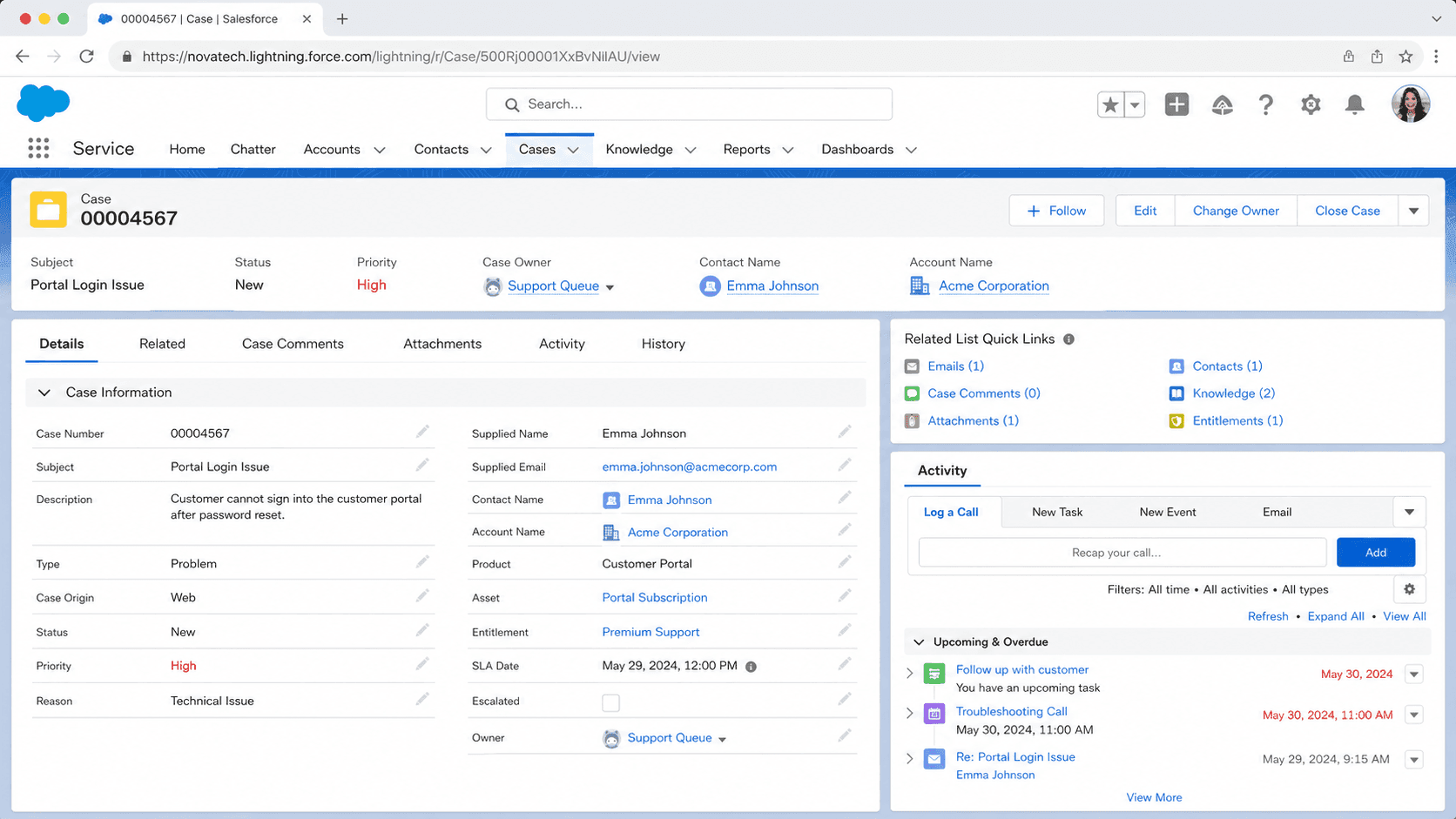
Definition
A Case is a customer support ticket in Salesforce, the record that captures something a customer needs from you and tracks the work done to resolve it. Cases tie to a Contact (the person who raised the issue) and usually to an Account (the company they belong to). They carry Subject, Description, Status, Priority, Origin, Type, and Reason, plus whatever custom fields your service organization uses to route, triage, and report on incoming work.
The Case object is the heart of Salesforce Service Cloud. Most of what makes Service Cloud distinct from Sales Cloud sits on top of Case: the OmniChannel routing engine, the Service Console, Entitlements and Milestones for SLA tracking, Knowledge article suggestions, and the Email-to-Case and Web-to-Case capture endpoints. If your org runs a support team out of Salesforce, almost every operational question that matters (how long are we taking to respond, where are we missing SLAs, which Account has the most escalations) traces back to a query against Case.
How Cases route, escalate, and close in a Salesforce service org
Case capture paths
Case capture happens in five common shapes, and each one has its own failure mode. Web-to-Case drops Cases from a public form and shares the authentication problem Web-to-Lead has; a default endpoint with no reCAPTCHA is one bot run away from a hundred thousand junk Cases. Email-to-Case spins Cases up from email sent to a routing address; without sender validation, it accepts a marketing-list-reply chain as legitimate support requests. Live agent chat, Messaging for In-App and Web, and Service Cloud Voice all route Cases through OmniChannel based on routing configurations that decide who picks up next. Manual creation through the Cases tab covers the last mile when a rep takes a Case over the phone or in person. The healthiest service orgs document which capture paths are active, route each path to a queue with a clear owner, and audit the volumes monthly to spot drift.
Status and SLA
Case Status drives every report and every SLA clock. The default values (New, Working, Escalated, Closed) survive most implementations until somebody asks for "Cases waiting on customer." Then the status set expands. Each Status maps to a Case Status Category that decides whether the Case counts as open or closed for reporting, and to the boolean IsClosed system field that drives ClosedDate auto-population. The trap most orgs fall into is using Status to mean two things at once: the current state of the ticket and the queue it sits in. Keep Status as the lifecycle state, route by Queue or assignment field, and resist the urge to invent statuses every time a manager asks for a new report bucket.
Entitlements and Milestones
Entitlements and Milestones are how Salesforce enforces SLAs on Cases. An Entitlement defines what support a particular Account or Asset is entitled to (response time, resolution time, hours of coverage). An Entitlement Process is the sequence of Milestones a Case must hit while that Entitlement applies: First Response within four hours, Resolution within forty-eight, Escalation if not picked up within two. Milestones inherit their start time from the Entitlement Process, which means turning on Milestones before configuring Entitlements does nothing; the clock never starts. Most teams set this up out of order, look at the empty SLA dashboard, and assume the feature is broken. Configure Entitlements first, attach them to Accounts (or Assets, or Contracts depending on your tier model), then turn on Milestones with start times that reference the Entitlement.
Case Comments vs Case Feed
Case Comments and the Case Feed are the two communication paths into a Case, and reps confuse them constantly. Case Comments has an isPublished flag that decides whether the customer can see the comment in the Customer Portal or Experience Cloud. Case Feed is the Chatter-style timeline on the Case record, which is internal by default but can expose specific posts through Email Publisher or Customer Communities. Reps who paste internal investigation notes into a Customer Portal-visible Case Comment send the unredacted detail straight to the customer. Lock down which comment fields are accessible from which page layout, and train every new rep on the difference before the first month of tenure ends.
Closing and reopening Cases
Closing a Case is not just flipping the Status to Closed. The ClosedDate field auto-populates the moment IsClosed becomes true, and most reporting on resolution time relies on that field rather than the LastModifiedDate. Reopening a Case (set Status back to Working) clears ClosedDate but does not clear the IsClosed history, which is why some legacy resolution-time reports double-count reopens. If your service org has a meaningful reopen rate, build a Closed-Twice metric explicitly rather than trusting the default ClosedDate-minus-CreatedDate math. The same advice applies to the IsEscalated flag, which once set never clears automatically.
Knowledge integration
Knowledge integration on Case is one of the higher-return investments a service org can make. Salesforce Knowledge surfaces suggested articles based on the Case Subject and Description, lets reps attach articles to Case Comments, and lets customers search the same Knowledge base through Experience Cloud. The articles need to exist and be tagged correctly first; turning on the suggestion panel without authoring Knowledge content shows an empty panel and trains reps to ignore it. Build the top twenty Knowledge articles before you turn on suggestions, then expand based on which Cases consume the most rep time.
How to create a Case
Creating a Case is most often done by an automated capture path. The manual create flow still matters for rep-driven captures (phone-in support, in-person escalations) and for testing the routing configuration after every change to assignment rules.
- Open the Cases tab
From the App Launcher, search Cases and open the list view. Service reps usually default to a specific queue view rather than the All Open Cases list.
- Click New
The New button sits at the top of the list view. If your profile lacks Create on Case, the button is hidden. Some service orgs hide manual create entirely to force reps to use capture paths that pre-populate Case Origin correctly.
- Pick a record type if prompted
Many orgs use record types to separate Customer Support, Internal IT, Billing, Returns, and other case categories, each with its own page layout and required fields. Pick the one that matches the work.
- Fill Subject and Description
Subject becomes the report headline; Description becomes the body Knowledge searches against. Write Subject like a summary, not like an email greeting. Avoid pasting entire conversation chains into Description; keep it to the actionable summary.
- Set Contact and Account
Contact is the person reporting the issue. Account is the company they belong to. Both fields drive entitlement checks, sharing, and SLA calculations. If the customer is not yet a Contact, create the Contact first and then the Case; do not file Contactless Cases as a workaround.
- Set Priority, Origin, and Type
Origin captures how the Case came in (Phone, Email, Web, Chat); Priority captures urgency; Type captures the work category. All three drive routing and reporting. Default values are fine for testing but should be overridden for real Cases.
- Save and let assignment rules fire
Click Save. Active assignment rules route the Case to the right queue or owner based on criteria. Confirm the assignment landed where you expected before stepping away.
Required. The summary line that shows up in every Case list view and report.
Required by most orgs (not platform-required). The detail Knowledge searches against and reps read first when picking up a Case.
- Email-to-Case has no sender authentication on the default routing address. Add SPF and DKIM verification at the email gateway, layer a duplicate-prevention rule, and route the email-to-case mailbox through Salesforce Email Service or your existing email security stack before pointing it at a public address.
- Milestones do not start their clocks unless an Entitlement Process applies to the Case. Configure Entitlements and attach them to Accounts (or Assets, Contracts) first, then turn on Milestones.
- ClosedDate is the field reporting reads, not LastModifiedDate. If you allow Cases to reopen, build a Closed-Twice metric to catch the double-resolution pattern; default reports treat the second close as the resolution time.
- Case Comments with isPublished=true are visible to the customer. Reps who paste investigation notes into a published comment send them to the customer. Lock the public-comment field down by layout and train new reps before they touch a real Case.
Prefer this walkthrough as its own page? How to Case in Salesforce, step by step
Trust & references
Cross-checked against the following references.
- Cases (opens in new tab)Salesforce Help
- Entitlement Management (opens in new tab)Salesforce Help
- Email-to-Case (opens in new tab)Salesforce Help
Straight from the source - Salesforce's reference material on Case.
- Cases (opens in new tab)Salesforce Help
- Case (Object Reference) (opens in new tab)Salesforce Developers
About the Author
Dipojjal Chakrabarti is a B2C Solution Architect with 29 Salesforce certifications and over 13 years in the Salesforce ecosystem. He writes and edits salesforcedictionary.com, published by KineticBit Inc., to help admins, developers, architects, and cert/interview candidates sharpen their fundamentals. More about Dipojjal.
Test your knowledge
+5 pts / dayQ1. Which Salesforce cloud is built around the Case object?
Q2. Why must Entitlements be configured before turning on Milestones for SLA tracking on Cases?
Q3. On a Case, what determines whether a Case Comment is visible to the customer in the portal?
Discussion
Loading discussion…