
Work Order
A Work Order is a standard Salesforce object that represents a job or piece of service work to be performed for a customer, usually at a specific location such as a home, office, or job site.
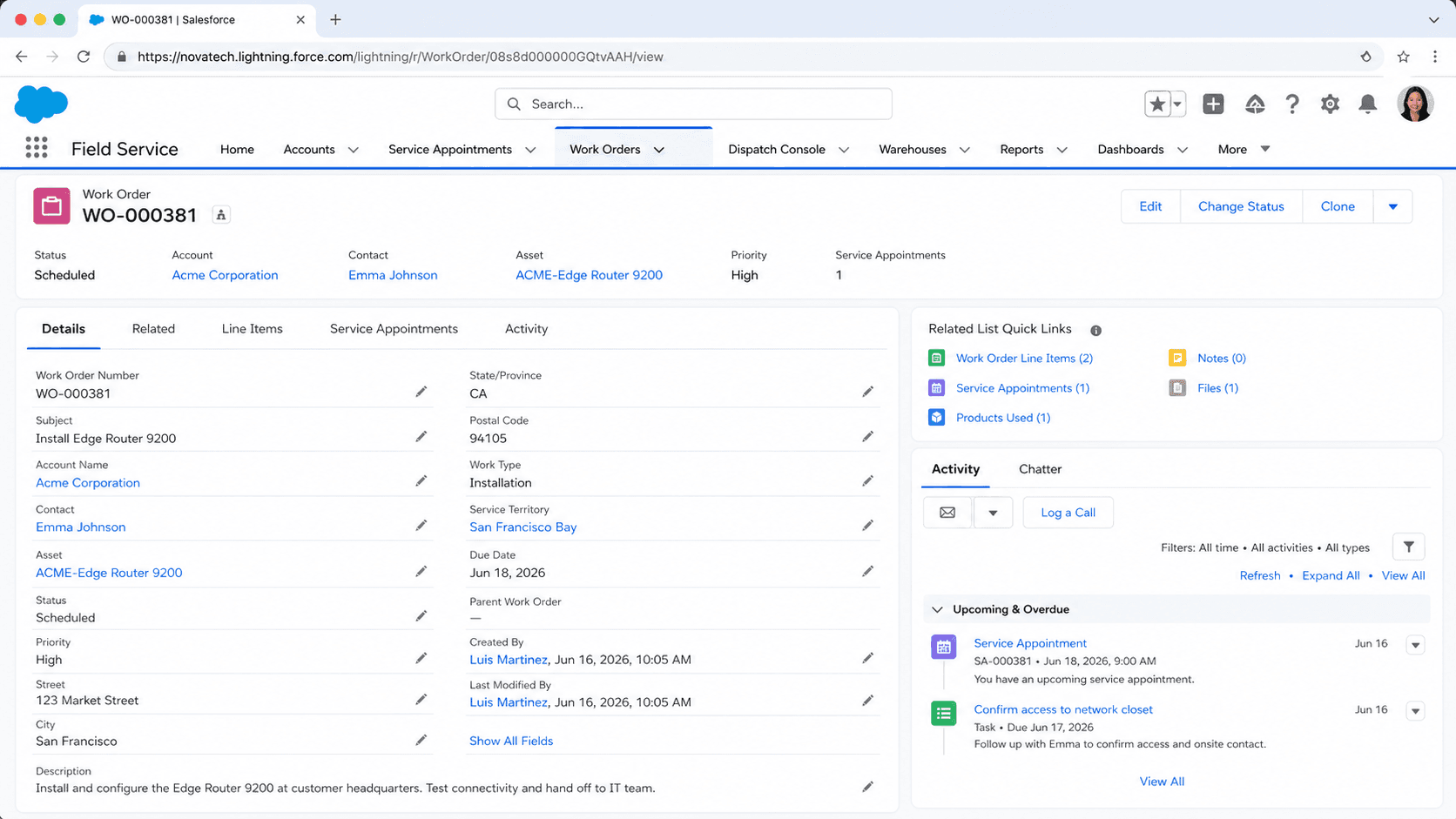
Definition
A Work Order is a standard Salesforce object that represents a job or piece of service work to be performed for a customer, usually at a specific location such as a home, office, or job site. It is the central record in Field Service, holding the what, where, and how of a task: the work type, priority, service territory, linked account or contact, the asset being serviced, and the related case or contract that triggered the work.
Work orders became available in API version 36.0 and act as the parent for two important child records. Work order line items break a job into smaller billable or trackable pieces, and service appointments carry the schedulable time slot that gets assigned to a mobile worker. A work order on its own describes the work; the service appointment under it is what actually lands on someone's calendar.
How a work order anchors the Field Service lifecycle
What the object actually stores
A work order is a record on the WorkOrder object, and most of its value sits in the fields that connect it to the rest of your data. Standard lookups tie a work order to an Account, a Contact, an Asset (the equipment being serviced), a Case, an Entitlement, and a Service Contract. Those links mean a technician arriving on site can see who they are visiting, what they are fixing, and which support agreement covers the visit. Address fields capture where the work happens, which feeds scheduling and routing. Beyond relationships, the object tracks operational details. The Work Type field applies a reusable template that can default the duration, required skills, and line items. Priority and Status describe urgency and progress. Duration and Duration Type estimate how long the job should take. A Price Book lookup lets line items pull product and pricing data. When you create a work order from a work type, Salesforce can copy that template's settings so agents do not rebuild a common job by hand every time.
Status, status category, and progress tracking
Every work order has a Status picklist that you control, and each status value maps to a fixed Status Category behind the scenes. Salesforce ships six categories: New, In Progress, On Hold, Completed, Cannot Complete, and Closed. You can add your own status labels, such as "Awaiting Parts" or "Tech En Route," but each one must point at one of those six categories. This split matters because reports, automation, and the field service managed package read the category, not your custom label. That design keeps reporting consistent even when two teams name their stages differently. A dashboard can count everything in the Completed category without caring whether one region calls it "Done" and another calls it "Wrapped Up." It also lets Flow and Apex make decisions on a stable value. When you design a status model, map each custom status to the closest category first, then pick a friendly label. Skipping that step is a common reason status based automation behaves in ways admins do not expect.
Line items and the rollup of totals
A work order rarely captures everything in its top level fields. Work order line items, stored on the WorkOrderLineItem object, break a job into discrete tasks or billable components. One line item might cover labor, another a replacement part, another a diagnostic fee. Each line item can carry its own status, duration, and price, and each can even have its own service appointment when different pieces of the job get scheduled separately. Financial fields on the parent work order roll up from these line items. Subtotal sums the line item prices before adjustments, Discount and Tax apply at the order level, and Grand Total reflects the final figure. Because the math flows upward, editing a line item price changes the parent totals without manual recalculation. This structure mirrors how Opportunity and Quote use their line items, so the pattern feels familiar. For service work that bills materials and time, line items are where the real detail lives, and the work order header becomes a summary view.
Service appointments do the scheduling
A work order describes work, but it does not appear on a dispatcher's schedule by itself. That job belongs to the service appointment, a child record that carries the arrival window, the assigned service resource, and the scheduled start and end times. You can create service appointments directly on a work order or on individual line items, which lets a single job span several visits when needed. This separation is deliberate. One work order to replace an HVAC system might need a survey visit, an installation visit, and a follow up inspection, each its own service appointment with its own technician and date. The scheduling optimizer and the Dispatcher Console operate on service appointments, matching required skills, parts, and territory to available resources. So when people say a work order was "scheduled," what really happened is that a service appointment under it was assigned a resource and a time. Keeping that distinction clear saves a lot of confusion when you build automation or train new dispatchers.
Hierarchies with parent and root work orders
Work orders support a hierarchy. The Parent Work Order field links a child work order to its immediate parent, and the Root Work Order field always points to the top of the tree, however deep the structure goes. This lets you model large jobs as a set of related work orders rather than one giant record. A facility upgrade across several buildings could have a root work order with a child per building, and line items under each. The hierarchy is useful for both reporting and rollups. You can summarize cost or status across an entire job by reading from the root, and you can hand individual branches to different teams. Salesforce maintains the Root Work Order link automatically as you reparent records, so the top reference stays accurate. When you design complex service jobs, decide early whether a piece of work is a separate child work order or just a line item on an existing one. Child work orders make sense when the pieces need independent ownership, scheduling, or customer visibility; line items fit when they are facets of the same visit.
Where work orders come from
Work orders rarely start life as blank manual records. The most common source is a Case: a support agent diagnoses an issue that needs an on site fix and spins up a work order straight from the case, carrying the account and contact across. Maintenance plans generate work orders on a schedule for preventive service, so recurring inspections appear automatically without anyone remembering to create them. Entitlements and service contracts can drive work orders that honor a customer's agreed service levels. Because of these origins, a work order usually arrives pre populated with context. The connected case explains the problem, the asset identifies the equipment, and the work type sets sensible defaults. Agents then confirm priority, territory, and timing before scheduling. Understanding these entry points helps you place automation in the right spot. If most of your work originates from cases, a Flow on the Case object that builds the work order and its first service appointment removes a lot of repetitive clicking and keeps data consistent from the first record onward.
Create a Field Service work order
Most teams create work orders from a case or a work type so defaults flow in automatically, but you can also build one by hand. Field Service must be enabled and the WorkOrder object available before these records appear. Here is the manual path.
- Open the Work Orders tab
From the App Launcher, find Work Orders and click New. If you are working from a case, use the related list or action on the case so the account and contact carry over automatically.
- Set the work context
Choose a Work Type to apply a template, then confirm the Account, Contact, and Asset. The work type can default the duration, required skills, and starting line items so you do not fill them in by hand.
- Define priority, territory, and timing
Set Priority, pick the Service Territory that covers the location, and review Duration and Duration Type. These values feed scheduling and help the optimizer place the eventual service appointment.
- Add line items and a service appointment
Use the related lists to add work order line items for labor, parts, or fees, then create a service appointment so the job becomes schedulable and can be assigned to a resource.
The current stage of the work order; each value maps to one of the six status categories that automation and reports rely on.
A short description of the job, or a work type template that names the work and supplies sensible defaults for duration and skills.
Who the work is for; usually inherited from the originating case so the technician knows whom they are visiting.
The geographic area the work falls in, which scheduling uses to match nearby, qualified resources.
- Scheduling happens on the service appointment, not the work order; a work order with no service appointment will never land on a dispatcher's board.
- Custom status labels must each map to one of the six status categories, or category based automation and dashboards will misbehave.
- Grand Total, Subtotal, and Tax roll up from line items, so edit the line items rather than trying to overwrite the parent totals directly.
Prefer this walkthrough as its own page? How to Work Order in Salesforce, step by step
Trust & references
Cross-checked against the following references.
Straight from the source - Salesforce's reference material on Work Order.
Hands-on resources to go deeper on Work Order.
About the Author
Dipojjal Chakrabarti is a B2C Solution Architect with 29 Salesforce certifications and over 13 years in the Salesforce ecosystem. He writes and edits salesforcedictionary.com, published by KineticBit Inc., to help admins, developers, architects, and cert/interview candidates sharpen their fundamentals. More about Dipojjal.
Test your knowledge
+5 pts / dayQ1. What does a Work Order represent in Salesforce Field Service?
Q2. Which step typically follows Work Order creation in the Field Service lifecycle?
Q3. From which records can a Work Order commonly be generated?


Discussion
Loading discussion…