
Service Territory
A Service Territory is a Salesforce Field Service object that represents an area where field work is performed, such as a city, region, or functional zone.
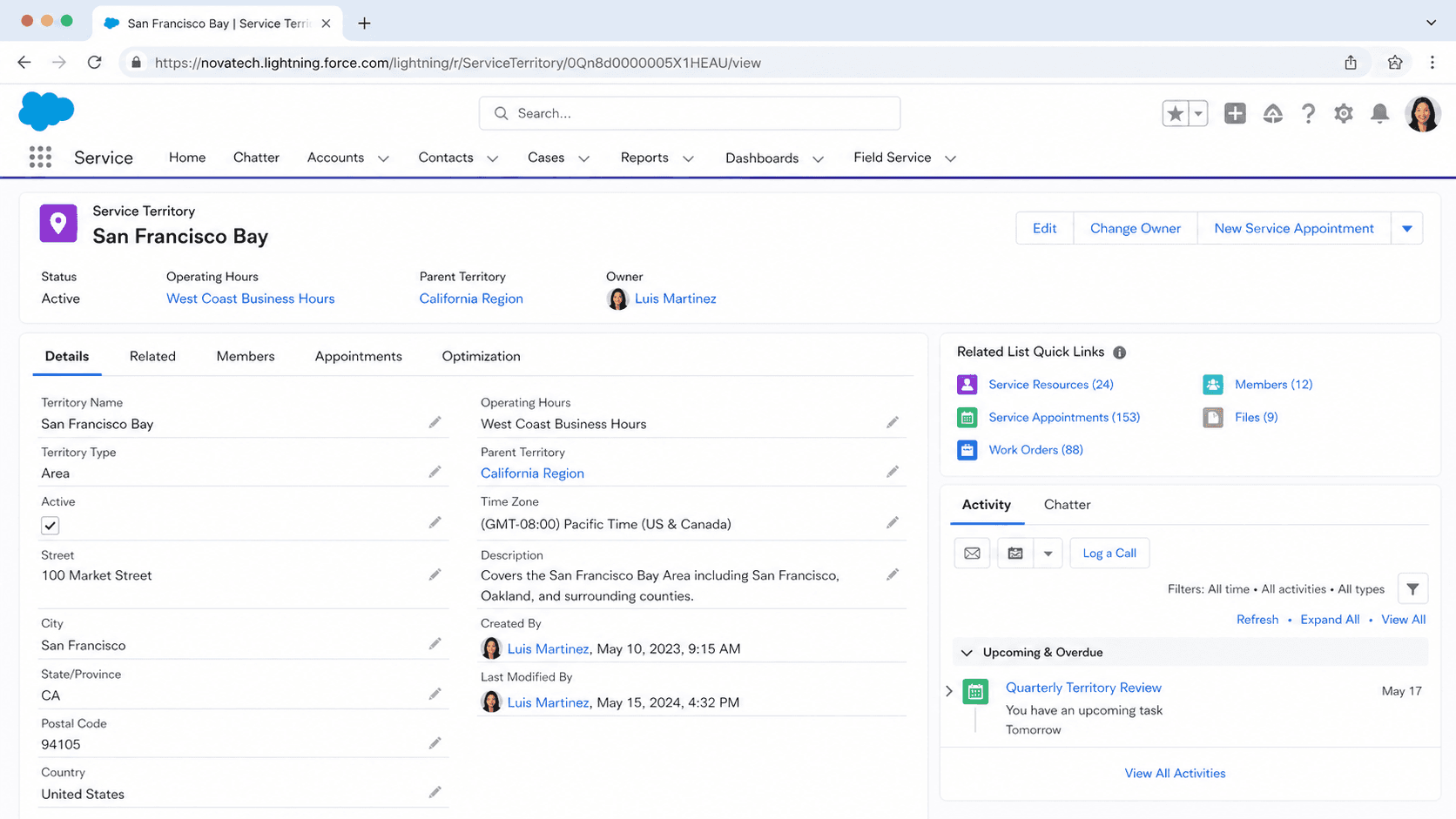
Definition
A Service Territory is a Salesforce Field Service object that represents an area where field work is performed, such as a city, region, or functional zone. It groups the mobile workers who cover that area, the operating hours they keep, and the addresses the scheduler uses to plan routes.
Territories anchor scheduling and dispatch. When a work order or service appointment falls inside a territory, Salesforce matches it to resources assigned to that territory and respects the hours and rules defined there. Territories can be geographic, functional, or virtual.
How Service Territories shape field scheduling
What a territory actually represents
A territory is the unit of geography or responsibility that Field Service plans around. Most teams map territories to physical areas like a city, a county, or a cluster of neighborhoods. The documentation also supports functional territories, where you split by the kind of work rather than location. Field sales and field service might each get their own territory even when they cover the same map. A third option is virtual or mobile territories for work done remotely or from a moving base, the classic example being a van such as "Jane's van" that travels with a technician. A territory holds an Active flag that must be on before you can add members or tie work orders to it. It also carries an address and time zone, which the scheduling engine reads to understand where appointments sit and how local hours line up. Because every downstream record points back to a territory, the choices you make about boundaries ripple into routing, travel time, and how evenly work spreads across your crews. Thoughtful territory shapes keep drive time low and coverage steady.
Service territory members and home base
A territory on its own schedules nothing. It needs members. A service territory member links a service resource to the territory and tells the engine that this worker can take appointments there. Each member record can hold its own operating hours and dates, so a technician borrowed for a busy season can be added for a fixed window and removed later. The member also depends on a geocoded home base location. The scheduling engine treats that point as where the resource starts and ends the day, which lets it calculate travel toward and away from appointments. Without a geocoded home base, the optimizer cannot reason about routes for that person. A single resource can belong to several territories at once, which is common for staff who float between neighboring areas. The member record is also where you set the member Type, the field that decides how strongly a resource is tied to a territory during scheduling. That type drives the primary, secondary, and relocation behavior described next.
Primary, secondary, and relocation members
The Type field on a service territory member can be primary, secondary, or relocation, and the choice changes how the scheduler treats that resource. A primary territory is where the worker operates most of the time, usually near home, and a resource can have only one primary at a time. This matters because scheduling and optimization run only for territories that have at least one primary member, so an empty primary list leaves a territory unschedulable. A secondary territory is one the resource can be pulled into when needed. If the active scheduling policy includes the Working Territories work rule, the engine is allowed to place that worker on secondary appointments too. A relocation territory covers a temporary move. During its active dates it behaves as the resource's primary territory for scheduling, which is useful for a technician on loan to another region for a few weeks. If the Match Territory work rule is in the policy, the resource can only be booked in their primary or relocation territories, tightening assignments to where they truly belong.
Operating hours and time zones
Operating hours describe when work can happen in a territory. They define the working windows the scheduler honors when it places appointments, so a territory open eight to five will not have jobs booked at nine at night. You attach operating hours to the territory using a lookup, picking an existing set or creating a new one. Hours carry a time zone, which is why the territory address matters so much. A region set to Eastern Time will book and display appointment times against that zone, keeping local crews and customers aligned. Territory hours act as the default for everyone assigned there. When a particular worker keeps different hours, you override them on that person's service territory member record instead of changing the whole territory. This two layer model lets you set a sensible baseline once and handle exceptions per resource. Getting hours right prevents two common headaches: appointments offered outside the times anyone actually works, and confusion when a territory spans more than one zone. Reviewing hours after schedule changes keeps the plan honest.
Territory hierarchy and parent territories
Territories can roll up into a hierarchy. A top level territory sits at the head of a branch, and child territories below it can represent finer divisions such as the boroughs inside a metro area. The parent relationship lets you mirror how the business is organized, with a regional area on top and local zones underneath. Hierarchy is a reporting and structural convenience as much as a scheduling one. It helps dispatchers and managers see the field operation grouped the way they think about it, then drill into the specific area that owns a given appointment. When you create a territory you can leave it as its own top level or point it at an existing parent. Many deployments start flat with a handful of standalone territories, then introduce a hierarchy as the operation grows and the number of zones climbs. Because the structure influences how lists, filters, and the dispatcher console group records, it pays to plan the levels before you create dozens of territories. A clear tree keeps large field organizations readable instead of a long flat list.
Where territories fit in the data model
Service Territory connects to nearly every part of Field Service. Service appointments and work orders carry a Service Territory field that places them on the map and tells the engine which resources are eligible. Service resources reach territories through service territory member records, and operating hours hang off the territory by lookup. The dispatcher console leans on territories heavily, letting dispatchers filter the schedule and the map down to one area so they only see relevant work and people. Work rules in a scheduling policy, including Match Territory and Working Territories, read the member type to decide who can be assigned where. Because the object is shared, the same Service Territory concept also appears in Salesforce Scheduler, formerly Lightning Scheduler, where it organizes appointment booking rather than mobile dispatch. The practical takeaway is that a territory is not a standalone setting you configure once and forget. It is the hub that routing, optimization, console filtering, and reporting all depend on, so changes to boundaries or membership tend to show up across the whole field service experience.
How to create a Service Territory in Field Service
Service Territories are created from the Service Territories tab in a Field Service enabled org. You need the Field Service permissions and at least one Operating Hours record to attach. Create the territory first, mark it active, then add members so the scheduler has resources to work with.
- Open the Service Territories tab
From the App Launcher or the Field Service app, go to the Service Territories tab and click New to start a record.
- Name and describe the territory
Give it a clear name that matches how your team refers to the area, such as New York Area, and add a short description if helpful.
- Attach operating hours and address
Use the Operating Hours lookup to pick the working windows for this area, and enter the address so the scheduler has a location and time zone.
- Set hierarchy and activate
Leave the territory as a top level or select a parent territory, then turn on the Active checkbox so you can add members and link work.
- Add service territory members
On the saved record, add service resources as members, set each member Type to primary, secondary, or relocation, and confirm each home base is geocoded.
A readable label for the area or function the territory covers; appears across scheduling and the dispatcher console.
A lookup to the working hours and time zone the scheduler honors when offering appointments in this territory.
The checkbox that must be on before you can add members or associate work orders and appointments.
The territory location the engine uses to anchor appointments and to read the local time zone for hours.
- Scheduling runs only for territories that have at least one primary member, so a territory with only secondary members stays unschedulable.
- Every member needs a geocoded home base, or the optimizer cannot calculate that resource's travel and may skip them.
- A resource can have just one primary territory; assigning a second primary is not allowed and forces a secondary or relocation type.
- Match Territory and Working Territories work rules only take effect if they are part of the scheduling policy actually applied to the run.
Prefer this walkthrough as its own page? How to Service Territory in Salesforce, step by step
Trust & references
Cross-checked against the following references.
Straight from the source - Salesforce's reference material on Service Territory.
Hands-on resources to go deeper on Service Territory.
About the Author
Dipojjal Chakrabarti is a B2C Solution Architect with 29 Salesforce certifications and over 13 years in the Salesforce ecosystem. He writes and edits salesforcedictionary.com, published by KineticBit Inc., to help admins, developers, architects, and cert/interview candidates sharpen their fundamentals. More about Dipojjal.
Test your knowledge
+5 pts / dayQ1. What does a Service Territory define in Salesforce Field Service?
Q2. Which configuration items typically live inside a single Service Territory record?
Q3. How should a Service Territory map be designed for balanced field operations?
Discussion
Loading discussion…