
Service Resource
A Service Resource is a Salesforce record that represents an individual worker or a service crew that can be assigned to service appointments.
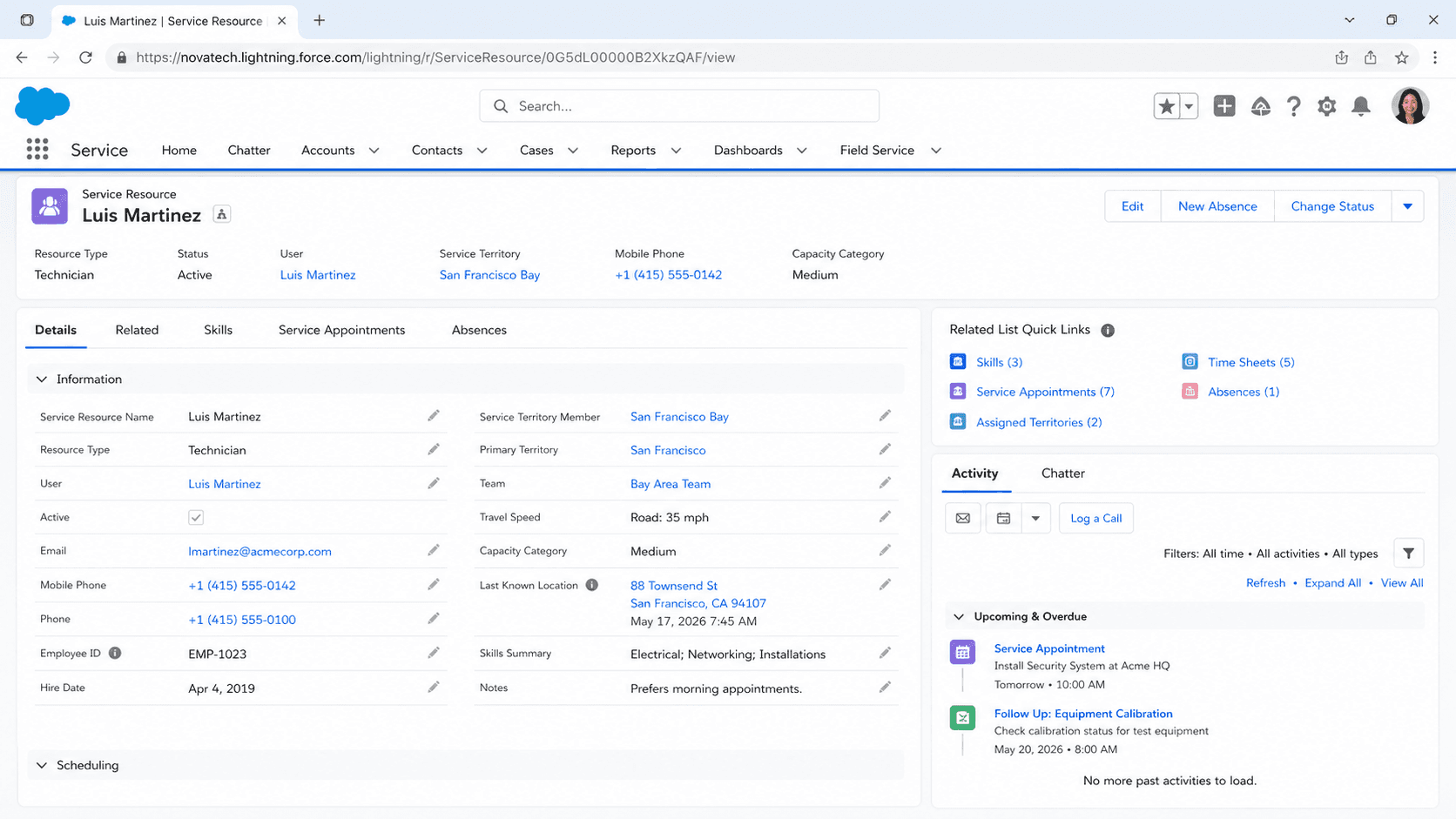
Definition
A Service Resource is a Salesforce record that represents an individual worker or a service crew that can be assigned to service appointments. It lives in the ServiceResource object and is shared by Field Service, Salesforce Scheduler, and Workforce Engagement.
Each Service Resource links a Salesforce user (or a crew) to the scheduling engine and carries the attributes that scheduling depends on: resource type, skills, service territory membership, operating hours, and capacity. When you assign work to a person in Field Service, you are really assigning it to their Service Resource record.
How a Service Resource feeds the scheduling engine
What the record actually is
The ServiceResource object became available in API version 38.0 and represents a service technician, a service crew, or an agent. One record stands for one assignable unit of work capacity. If the resource is an individual, you set the User field to the matching Salesforce user. If the resource is a crew, you leave User blank and point the Service Crew field at the crew instead. The record is more than a name. It is the join point between a human and the scheduling engine. The User lookup ties the resource to a real login, which is what lets the mobile worker open the Field Service mobile app and see their assigned appointments. The Active checkbox controls whether the scheduler will consider the resource at all. An inactive resource keeps its history but drops out of new assignments. Because the same object backs Field Service, Salesforce Scheduler, and Workforce Engagement, the exact fields you see depend on which product is enabled. The shared idea stays constant though. A Service Resource is the thing that work gets booked against, and its data quality decides whether the right person shows up at the right place at the right time.
Resource type decides the behavior
The Resource Type field is the most consequential choice on the record. It tells Salesforce what kind of worker this is, and that setting changes what the resource can and cannot do. Technician marks a mobile worker who travels to appointments. Dispatcher marks someone who manages and assigns work rather than performing it. Crew marks a record that represents a group of workers acting as one unit. These types are not cosmetic. A resource set to Dispatcher cannot be capacity-based, cannot be included in schedule optimization, and cannot be added to a service crew. That restriction exists because dispatchers coordinate the schedule from the office, so the optimizer should never try to route appointments to them. Pick the type before you wire up anything else. Skills, territory membership, and capacity all interpret differently depending on the type. Changing the type after a resource already has appointments and related records can create confusing scheduling behavior, so it pays to get this right when you first create the record rather than correcting it later.
Skills, territories, and operating hours
A bare Service Resource is not very useful. Three related configurations turn it into something the optimizer can schedule well. Skills are assigned through Service Resource Skill records and can go on resources of any type, Technician or Crew. They are matched during scheduling when the Match Skills work rule is part of the active scheduling policy. If a work order requires a skill the resource lacks, the optimizer will not book that resource for it. Service territory membership comes from Service Territory Member records. You add a resource to a territory so the engine knows where that person normally works. Associating members with a territory keeps appointments close to a worker home base instead of sending them across the region. A resource can belong to more than one territory, with one marked as primary. Operating hours define when the resource is available. They feed the gantt and the optimizer so appointments land inside real working windows. Layer absences on top for vacation, training, or sick time. Skills say what a resource can do, territories say where, and operating hours say when.
Capacity-based resources and contractors
Not every worker is scheduled the same way. Most technicians are booked by time, where the optimizer fits appointments into open slots on their calendar. A capacity-based resource is different. Instead of fixed hours, you define how much work the resource can take over a period, which suits contractors or partners who commit a block of availability rather than a strict shift. Capacity-based scheduling is the natural fit for an outside crew you do not manage hour by hour. You agree they can absorb a certain volume, and Field Service tracks consumption against that ceiling. Salesforce Scheduler added support for capacity-based scheduling in Winter 25, extending the pattern beyond Field Service into appointment booking. Contractor resources often combine several of these settings. They might be capacity-based, carry a narrower skill set, and belong to specific territories only. The point is that the Service Resource record is flexible enough to model an employee on a fixed shift and a third-party partner on a volume agreement using the same object, just with different field values.
Why resource data is foundational
Scheduling quality in Field Service is downstream of resource data quality. The optimizer is only as good as the records it reads. If skills are wrong, the wrong person gets dispatched and the job may fail on site. If operating hours are wrong, appointments get booked when nobody is actually working. If territory membership is wrong, technicians get sent to areas they do not cover, and travel time balloons. This is why mature deployments treat Service Resource records as infrastructure, not as a one-time setup task. Skills change as people earn certifications. Territories shift when someone relocates or the business reorganizes coverage. Availability changes with shift patterns. Each of those real-world changes needs to be reflected on the record, or the schedule slowly drifts away from reality. A practical habit is to review resource data on a cadence, not only when something breaks. Pair that with clear ownership so dispatchers or admins know who keeps skills and territories current. The payoff is a scheduler that produces routes people can actually run, which is the whole reason to invest in Field Service in the first place.
Where the record sits in the data model
A Service Resource never works alone. It sits at the center of a small web of related objects. Service Appointment records are the units of work assigned to it, usually through an Assigned Resource record that links the appointment and the resource together. Work Orders and Work Order Line Items describe the job to be done, and appointments hang off them. Service Resource Skill records attach competencies. Service Territory Member records attach geography. Resource Absence records carve out unavailable time. Resource Preference records let you mark a resource as required, preferred, or excluded for a specific account or work order, which nudges the optimizer toward continuity of service. Understanding this web matters when you build reports, automation, or integrations. A question like which technicians are overbooked next week is really a join across Service Resource, its operating hours, its appointments, and its absences. Because everything routes through the Service Resource record, it is the natural anchor for Field Service analytics and the first object to check when an assignment looks wrong.
Create a Service Resource in Field Service
Create a Service Resource so Field Service can assign service appointments to a worker. You need the Field Service managed package and permissions enabled first, and a Salesforce user (or a service crew) ready to link.
- Open the Service Resources tab
From the App Launcher, open Field Service, then go to the Service Resources tab and click New. This creates a single resource record that represents one assignable worker or crew.
- Name the resource and link a user or crew
Enter a resource name, typically the worker name. For an individual, set the User field to their Salesforce user. For a crew, leave User blank and select the crew in the Service Crew field.
- Set the resource type and active status
Choose Resource Type (Technician for a mobile worker, Dispatcher for someone who assigns work, or Crew). Select Active so the resource can be assigned to appointments. Remember that dispatchers cannot be capacity-based or optimized.
- Add skills, territories, and operating hours
After saving, use the related lists to add Service Resource Skills, add the resource as a Service Territory Member, and assign operating hours. These three pieces are what let the scheduling optimizer book the resource correctly.
A label for the resource, usually the worker full name, shown on the gantt and in scheduling.
Technician, Dispatcher, or Crew. Drives what the resource can do and how the optimizer treats it.
Set User for an individual to tie the record to a login, or Service Crew for a crew. One is required depending on the resource.
Must be selected for the resource to be eligible for service appointment assignment.
- A resource set to Dispatcher cannot be capacity-based, included in schedule optimization, or added to a service crew.
- Skills, service territory membership, and operating hours are separate related records. A resource with none of them will rarely be scheduled.
- Leaving Active unchecked silently removes the resource from new optimization runs while keeping its history intact.
- For a crew, the User field stays blank. Filling both User and Service Crew is a common setup mistake.
Prefer this walkthrough as its own page? How to Service Resource in Salesforce, step by step
Trust & references
Cross-checked against the following references.
Straight from the source - Salesforce's reference material on Service Resource.
Hands-on resources to go deeper on Service Resource.
About the Author
Dipojjal Chakrabarti is a B2C Solution Architect with 29 Salesforce certifications and over 13 years in the Salesforce ecosystem. He writes and edits salesforcedictionary.com, published by KineticBit Inc., to help admins, developers, architects, and cert/interview candidates sharpen their fundamentals. More about Dipojjal.
Test your knowledge
+5 pts / dayQ1. What does a Service Resource represent in Salesforce Field Service?
Q2. Which Service Resource attributes matter most for accurate scheduling?
Q3. Why does Service Resource data quality directly affect scheduling outcomes?
Discussion
Loading discussion…