
Service Appointment
A Service Appointment is a Salesforce object that records when and where work gets done for a customer, including the scheduled time, the assigned worker, and the location.
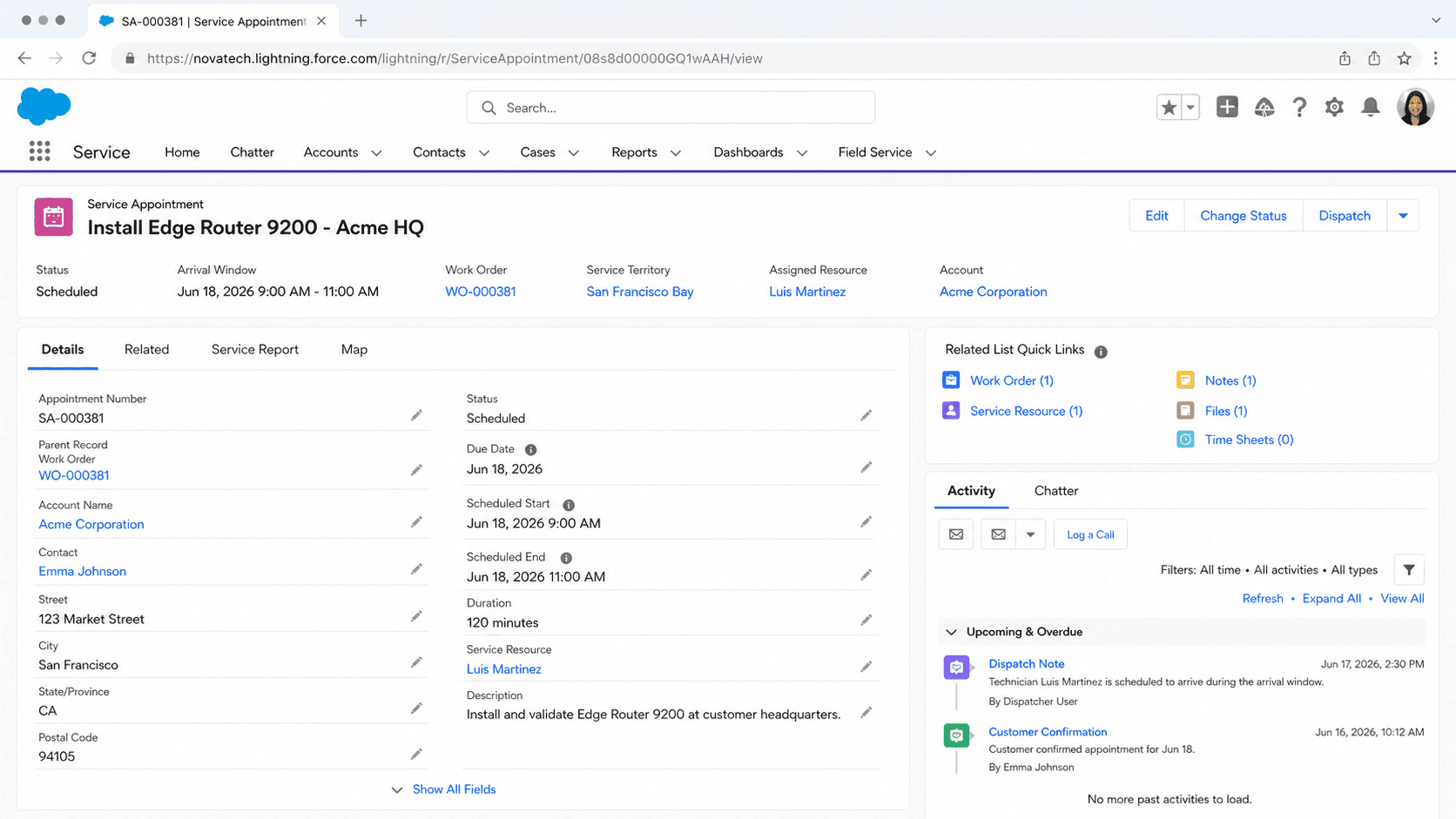
Definition
A Service Appointment is a Salesforce object that records when and where work gets done for a customer, including the scheduled time, the assigned worker, and the location. It is the unit the scheduler and dispatcher work with every day, and it sits at the center of Field Service alongside related products like Salesforce Scheduler, Intelligent Appointment Management, and Virtual Care.
Each appointment usually hangs off a parent record, most often a work order or work order line item, but the parent can also be an account, asset, opportunity, lead, or another object. The appointment carries its own time window, status, duration, and territory, so the work to be done (on the parent) stays separate from the commitment of when a resource shows up to do it.
How a Service Appointment drives the schedule
What the object represents
The ServiceAppointment object has been part of the platform since API version 38.0, and it is shared across several Salesforce products. In Field Service it is the appointment a mobile worker travels to. In Salesforce Scheduler it is the meeting a customer books with a banker or advisor. The same object also backs Intelligent Appointment Management and Virtual Care. Think of it as the scheduling layer. A work order describes the job that needs doing, such as repairing a meter or installing equipment. The service appointment answers a different question: when will someone be there, for how long, and who is it. That split matters because one work order can spawn several appointments. A multi-day install might need three visits, each its own appointment with its own time and resource, all pointing back to the same work order. Keeping the commitment separate from the work keeps reporting clean and lets the scheduler treat each visit on its own.
The parent record and the polymorphic link
Every service appointment points to a parent through the Parent Record field. In Field Service that parent is usually a work order or a work order line item, because those describe the job. The relationship is polymorphic, so the parent can instead be an account, asset, opportunity, lead, or other supported object depending on how you use appointments. This flexibility is why the same object serves field repairs and branch meetings. A retail bank using Salesforce Scheduler might parent an appointment to an account or a lead, with no work order in sight. A utility doing field work parents it to a work order line item so each line of the job gets its own visit. The parent also feeds defaults onto the appointment when you create it from a record, such as the address and the contact, which saves dispatchers from retyping details that already live upstream. Get the parent right and the rest of the record tends to fall into place.
Scheduling fields and the appointment window
A service appointment carries several time fields, and the scheduler reads them as constraints. Earliest Start Permitted and Due Date set the outer boundary: the visit must land somewhere between those two points. Duration tells the optimizer how long the work takes, which it needs to fit the job into a worker's day. Scheduled Start and Scheduled End hold the actual slot once the appointment is booked. Two more fields, Arrival Window Start and Arrival Window End, define the promise you give the customer, such as a four hour window when the technician will arrive. The booked Scheduled Start sits inside that window. Actual Start and Actual End get stamped as the worker begins and finishes, so you can compare what was promised against what happened. When the scheduling engine runs, it treats these fields as hard or soft rules and tries to place every appointment without breaking a constraint. Setting them carelessly, like a due date that is too tight, is a common reason an appointment cannot be scheduled at all.
Status, the workflow, and status categories
The Status field tracks where an appointment sits in its life cycle. Out of the box the values are None, Scheduled, Dispatched, In Progress, Cannot Complete, Completed, and Canceled. Scheduled means a resource and time are locked in. Dispatched means the work has been released to the mobile worker. In Progress means the visit is underway, and Completed closes it out. You are not stuck with those labels. Field Service lets admins add custom statuses to match how a business actually talks, then map each one to a status category. The category is the engine-facing meaning, so a custom status like On Site can map to the In Progress category and behave the same way in reporting and automation. The workflow settings also control which transitions are allowed, so you can stop someone jumping straight from Scheduled to Completed without going through the steps in between. Status changes are what light up dashboards and trigger customer notifications, which is why teams guard them closely.
Resources, territories, and the dispatcher console
An appointment does not schedule itself. It needs a service resource, which is the worker or crew that will do the job, and it belongs to a service territory, the geographic or business grouping that decides who can be assigned. The territory shapes how the appointment shows up in scheduling, dispatching, and optimization, so getting territory boundaries right is foundational work. Dispatchers live in the Dispatch Console, a Gantt-style view that lists appointments and resources side by side with a map. From there they assign visits, drag them to new slots, and handle the exceptions the automated scheduler could not solve. The console is where a late job, a sick worker, or a same-day emergency gets sorted out by hand. Service appointments are the cards on that board. Their status, time window, and assigned resource are exactly the fields a dispatcher watches all day, which is why a tidy appointment record makes the difference between a smooth shift and a scramble.
Optimization and getting the most out of the day
Manually placing every visit does not scale once you have hundreds of appointments a day. Field Service includes optimization that assigns appointments to resources while respecting their working hours, skills, travel time, and the appointment constraints described above. The goal is a schedule with less idle time and less driving. Optimization runs in a few shapes. Global optimization looks across resources and time slots to build a strong schedule from scratch. In-Day optimization reworks the plan for one or more territories on the day of service, absorbing the churn that mornings bring. Resource Schedule Optimization tightens a single worker's day. All three operate on the same service appointment fields, so the duration you set, the window you promise, and the territory you assign directly shape what the optimizer can achieve. Feed it clean appointments with realistic durations and it returns routes that hold up. Feed it loose data and even a good engine produces a schedule that falls apart by noon.
How to create a Service Appointment
Most service appointments are created from a parent work order or work order line item, which copies key details down automatically. You can also create one directly when you need a standalone visit. Here is the typical path from a work order.
- Open the parent record
Go to the work order or work order line item the visit is for. Creating the appointment from here copies the address and contact so you do not retype them.
- Add a new service appointment
Use the Service Appointments related list to create a new record. The parent link is set for you, which keeps the visit tied to the job.
- Set the scheduling window
Fill in Earliest Start Permitted, Due Date, and Duration so the scheduler knows the boundaries and how long the work takes. Add an arrival window if you promise customers one.
- Assign or schedule
Let the scheduler or optimizer pick a slot and resource, or assign manually in the Dispatch Console. Then move the status forward as the visit progresses.
The record the visit is for, usually a work order or work order line item, but it can be an account, asset, lead, or opportunity.
The earliest the visit may begin. With Due Date it forms the window the scheduler must work within.
The latest the visit should be completed. A due date that is too tight is a common reason an appointment cannot be scheduled.
How long the work takes. The optimizer needs this to fit the appointment into a resource's day.
- An appointment with no resource and no scheduled time sits in None until the scheduler or a dispatcher acts on it.
- A window that is too narrow, or a duration longer than any free slot, can leave the appointment unschedulable with no obvious error.
- Custom statuses only behave correctly when each one is mapped to a standard status category in Field Service Settings.
Prefer this walkthrough as its own page? How to Service Appointment in Salesforce, step by step
Trust & references
Cross-checked against the following references.
Straight from the source - Salesforce's reference material on Service Appointment.
Hands-on resources to go deeper on Service Appointment.
About the Author
Dipojjal Chakrabarti is a B2C Solution Architect with 29 Salesforce certifications and over 13 years in the Salesforce ecosystem. He writes and edits salesforcedictionary.com, published by KineticBit Inc., to help admins, developers, architects, and cert/interview candidates sharpen their fundamentals. More about Dipojjal.
Test your knowledge
+5 pts / dayQ1. What does a Service Appointment represent in Salesforce Field Service?
Q2. Which records does a Service Appointment connect to for dispatch and tracking?
Q3. Why does tracking each Service Appointment's status matter to operations and customers?


Discussion
Loading discussion…