
Work Order Line Item
A Work Order Line Item is a child record of a Salesforce Work Order that represents one subtask within a larger field service job.
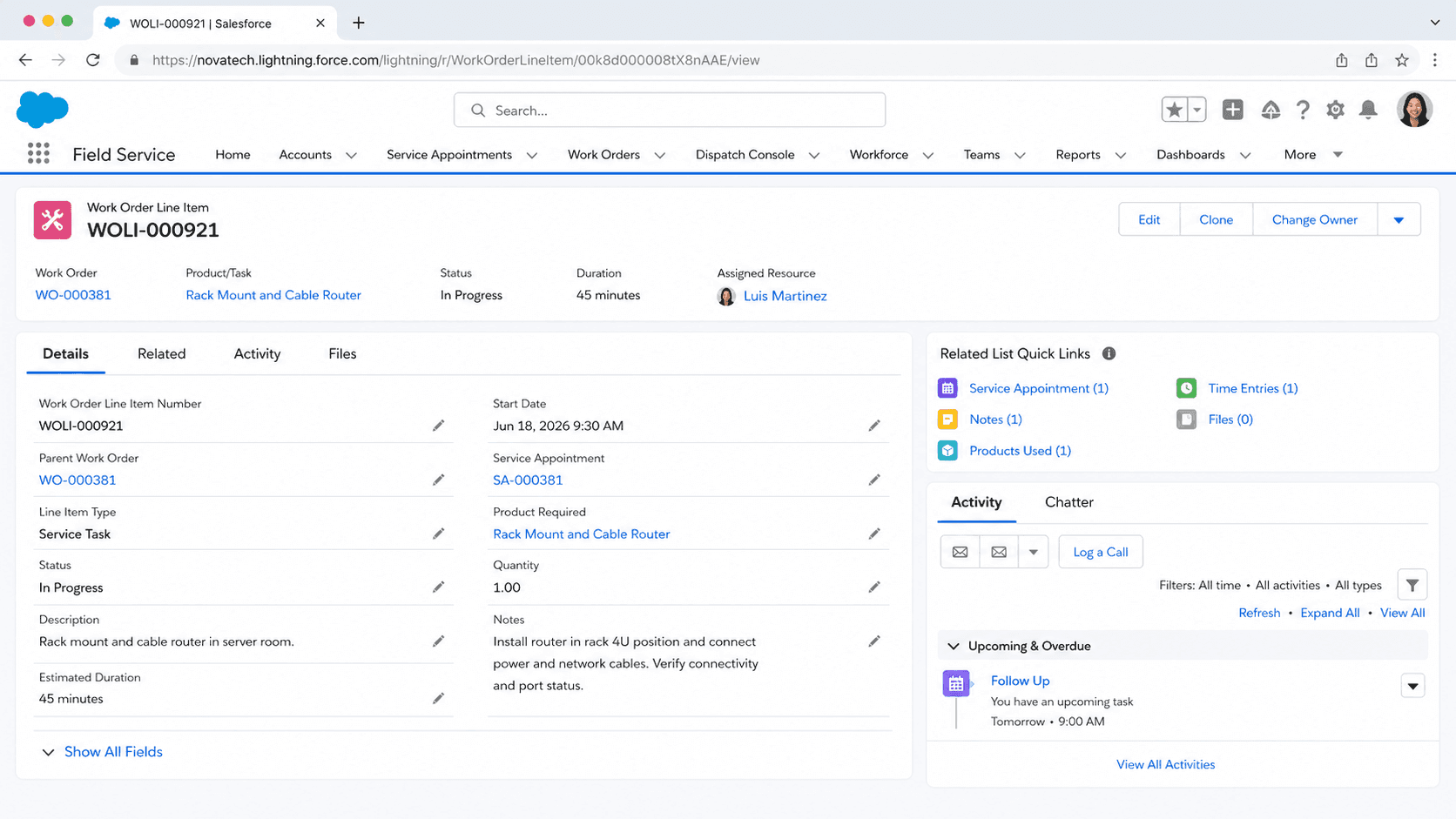
Definition
A Work Order Line Item is a child record of a Salesforce Work Order that represents one subtask within a larger field service job. It lets you break a single work order into smaller pieces, each with its own status, schedule, pricing, and assigned resource.
The object became available in API version 36.0 as part of Salesforce Field Service. A line item can stand on its own or sit inside a hierarchy, so a roof repair work order might split into separate line items for inspection, tile replacement, and cleanup. Each one tracks independently, yet all roll up to the same parent work order.
How Work Order Line Items break a job into trackable pieces
Where the object sits in Field Service
The WorkOrderLineItem object is the granular layer of the Field Service data model. A Work Order captures the overall customer request, such as servicing an HVAC unit. The line items below it capture the discrete tasks that make up that request. Because each line item is its own record, a dispatcher can schedule, price, and close it without touching its siblings. This split matters once jobs get complicated. A short job with one task rarely needs line items, and you can run a work order with none. Longer jobs with mixed skills benefit from the breakdown. One line item might need an electrician while another needs a plumber, and the records keep those needs separate. Line items also let you report on completion at the task level rather than guessing from a single parent status. When a customer asks which parts of a job are done, the line item statuses answer it directly instead of forcing you to read notes on the work order.
The line item hierarchy
Work Order Line Items support a parent-child tree through two fields. ParentWorkOrderLineItemId points a line item at another line item directly above it. RootWorkOrderLineItemId points at the topmost line item in that branch. Together they let you nest tasks several levels deep when a subtask itself has subtasks. Picture a commercial install work order. A top level line item called Network Setup could contain child line items for cabling, switch configuration, and testing. Each child belongs to the same root, so you can query a whole branch in one go. The hierarchy is optional, and flat lists of line items are common and perfectly valid. Salesforce caps the depth of the tree, so very deep nesting is not the goal. Most teams use one or two levels to mirror how a foreman would describe the job on site. Keep the structure shallow enough that a technician can read it on a mobile screen without scrolling through dozens of nested rows.
Status, status category, and progress
Every line item carries a Status field that draws from the WorkOrderLineItemStatus object. Out of the box you get values like New, In Progress, Completed, Cannot Complete, Closed, and Canceled. Admins can add custom statuses to match a company process, since the picklist is configurable rather than fixed. Behind each status sits a Status Category. Categories are a fixed set that Salesforce uses internally to understand where a line item stands regardless of its display label. If you rename Completed to Done, the underlying category still reads as completed, so automation and reports stay reliable. This separation is the same pattern Work Orders use, which keeps the two objects consistent. Line item status does not automatically change the parent Work Order status. You decide how the two relate, often with a flow or rollup that closes the work order once all line items reach a closed category. Plan that logic early, because teams often assume the parent closes itself and then wonder why work orders stay open.
Pricing and products on a line item
Work Order Line Items can carry pricing, which makes them useful for quoting and billing a job. A line item can reference a PricebookEntry, so it inherits a product and a list price from a price book. From there you set Quantity, Unit Price, and an optional Discount. Salesforce then calculates Subtotal and Total Price for the line. This mirrors how Opportunity Line Items and Quote Line Items work, so the pattern feels familiar to anyone who has priced a deal. The difference is context. Here the amounts describe the cost of performing a task in the field, not selling a product up front. A line item for a replacement compressor can hold the part, its quantity, and its price, while a labor line item holds the hours. Totals roll up so the work order reflects the full job cost. Many field service teams skip pricing on line items and handle billing elsewhere, so treat these fields as available rather than required.
Scheduling, duration, and service appointments
A line item describes work that someone has to perform, so it connects to scheduling. The Duration and Duration Type fields estimate how long the task takes, in minutes or hours. That estimate feeds the scheduler when it places the work on a calendar. A line item can also reference a Work Type, which acts as a template that pre fills duration, required skills, and other defaults. Service Appointments are how the work actually gets booked. You can create a Service Appointment against a Work Order Line Item, which ties a specific technician, time slot, and territory to that one subtask. This is the real payoff of the granular model. Two line items on the same work order can have separate appointments, separate resources, and separate arrival windows. A customer might see the inspector arrive Monday and the repair crew arrive Wednesday, both tracked under one work order. Without line items, you would be forced to fit every task into a single appointment, which rarely matches how field work happens.
Assets, entitlements, and service contracts
Line items often point at the equipment being serviced. The Asset field links a line item to a specific Asset record, such as a serial numbered pump or a customer printer. That link gives technicians the maintenance history for the exact unit, and it lets you report on which assets generate the most work. When one work order covers several machines, each line item can target a different asset. Entitlements and Service Contracts also connect here. A line item can reference an Entitlement, which defines the service level a customer is owed, and a Service Contract, which holds the broader agreement. These links let support verify coverage before dispatching anyone. If a contract entitles the customer to four maintenance visits a year, the line item ties this task back to that promise. Address fields on the line item describe where the work happens, which can differ from the account address when a customer has many sites. Together these relationships turn a line item from a simple checklist row into a record that knows what, where, and under what agreement the work is done.
How to create a Work Order Line Item
Work Order Line Items are created under an existing Work Order, usually once you know a job has more than one task. You can add them by hand from the related list, or generate them with automation and the API. Field Service must be enabled in the org first.
- Open the parent work order
Find the Work Order record that needs subtasks. The line item always belongs to a work order, so you start from that parent rather than from a standalone tab.
- Add a line item from the related list
On the work order page, locate the Work Order Line Items related list and click New. This pre fills the Work Order lookup so the new record attaches to the right parent.
- Describe the task
Enter a Description for the subtask, then set Status and, if you use templates, choose a Work Type to pull in default duration and skills.
- Add scheduling and pricing if needed
Set Duration and Duration Type so the scheduler can place the work. If you bill at the line level, add a Pricebook Entry, Quantity, and any Discount.
- Save and book the appointment
Save the line item, then create a Service Appointment against it so a resource can be scheduled to the specific subtask.
The parent work order this line item belongs to. Required, and it sets the record into the right job hierarchy.
The current state of the subtask, drawn from the configurable WorkOrderLineItemStatus values such as New or Completed.
A short note describing what the subtask involves, so technicians and dispatchers know the work at a glance.
- Closing every line item does not close the parent work order on its own. Build a flow or rollup if you want that behavior.
- Pricing fields are optional. Many teams handle billing on the work order or elsewhere and leave line item totals blank.
- Hierarchy depth is limited. Keep the parent and root structure shallow, usually one or two levels, so it stays readable.
Prefer this walkthrough as its own page? How to Work Order Line Item in Salesforce, step by step
Trust & references
Cross-checked against the following references.
Straight from the source - Salesforce's reference material on Work Order Line Item.
Hands-on resources to go deeper on Work Order Line Item.
About the Author
Dipojjal Chakrabarti is a B2C Solution Architect with 29 Salesforce certifications and over 13 years in the Salesforce ecosystem. He writes and edits salesforcedictionary.com, published by KineticBit Inc., to help admins, developers, architects, and cert/interview candidates sharpen their fundamentals. More about Dipojjal.
Test your knowledge
+5 pts / dayQ1. What does a Work Order Line Item represent relative to its parent Work Order?
Q2. Why would a Field Service team break a Work Order into multiple Line Items?
Q3. What can each Work Order Line Item carry that supports granular field-service tracking?
Discussion
Loading discussion…