Skip to content
Salesforce Dictionary - Free Salesforce GlossarySalesforce Dictionary
DictionarySSocial Key
ServiceBeginner

Social Key

A Social Key was a Salesforce feature that automatically found a person's social media handles and attached them to their Contact or Lead record.

§ 01

Definition

A Social Key was a Salesforce feature that automatically found a person's social media handles and attached them to their Contact or Lead record. It ran as part of Data.com Clean, so an account or contact could be matched to its Twitter, Facebook, and LinkedIn profiles without anyone searching by hand. The matched handle was then surfaced through the Social Accounts, Contacts, and Leads feature.

Social Key is retired. It depended on the Data.com data service, which Salesforce wound down, and on the wider Social Accounts, Contacts, and Leads feature, which Salesforce announced for retirement in Summer 2023 and switched off in the Spring 2024 release. If you still need social handles on records today, the official guidance is to look for an AppExchange app, because no native replacement ships with the platform.

§ 02

How Social Key worked and why it went away

What problem Social Key was built to solve

Before Social Key existed, linking a Salesforce record to a social profile was manual. A rep opened a Contact, clicked into the social viewer, searched for the right Twitter or LinkedIn account, and confirmed the match one record at a time. That worked for a handful of VIPs, but it did not scale to thousands of leads. Social Key was Salesforce's answer to that gap. Released as a Data.com Clean capability, Social Key ran in the background and tried to discover the social handles for each person automatically. It used the name and company already on the record, compared that against public social data, and wrote back any handles it found with reasonable confidence. The idea was that a sales or service team would open a record and already see the linked profiles, with no manual hunting. Because it piggybacked on Data.com Clean jobs, Social Key was an admin-configured, batch-style enrichment rather than something a single user triggered. That design is the main reason it shared the fate of Data.com: when the data engine retired, the matching logic behind Social Key had nothing left to run against.

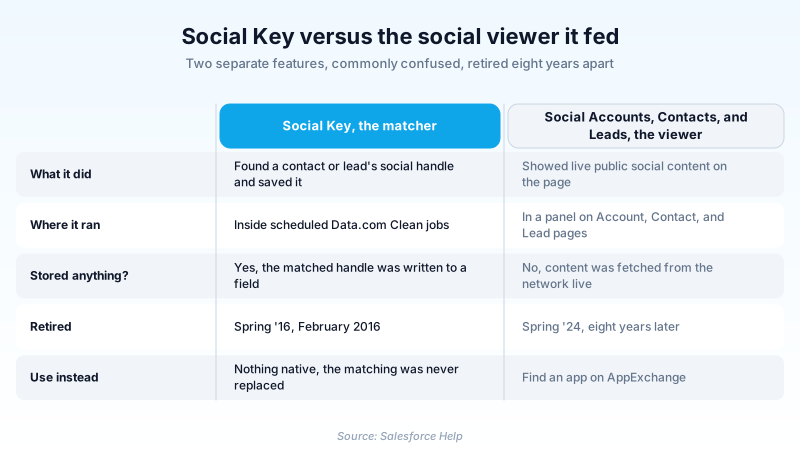
Social Key versus Social Accounts, Contacts, and Leads

These two features are easy to confuse, and the distinction matters when you read old documentation. Social Accounts, Contacts, and Leads was the viewer. It added a panel to Account, Contact, and Lead pages where a user could see and follow public social information pulled live from networks like Twitter, Facebook, and LinkedIn. Salesforce never stored that social content. The panel fetched it on demand so it stayed current, and it was read-only by design. Social Key was the matcher that fed the first half of that experience. Its job was to figure out which profile belonged to which record, then save the handle so the viewer knew where to look. You can think of the viewer as the window and Social Key as the part that decided what the window pointed at. That dependency cut both ways. A team could enable the viewer and link profiles manually without ever using Social Key. But Social Key on its own had little value unless the viewer was there to display what it matched. When both pieces were live, the combination removed nearly all of the manual social lookup work.

Where Social Key fit inside Data.com

Data.com was Salesforce's contact and company data service, sold mainly as Data.com Prospector for finding new records and Data.com Clean for keeping existing ones accurate. Clean compared your Account, Contact, and Lead fields against the Data.com database and updated stale values such as title, phone, or address. Social Key was bundled into that Clean experience as a way to enrich one more category of information, the person's public social handles. Because it lived inside Clean, Social Key inherited Clean's plumbing. Admins controlled it through Clean settings and Clean jobs, the same scheduled processes that refreshed other fields. Match results were governed by the same confidence and matching rules. For an admin, that meant Social Key was not a separate product to learn so much as an extra option to switch on inside a feature they already ran. The tight coupling explains the retirement timeline. Salesforce began retiring Data.com Prospector and Data.com Clean around 2020. Once the underlying data service was gone, the automated handle matching that Social Key performed could no longer function, regardless of whether the social viewer was still enabled in the org.

Why the feature was retired

Two forces ended Social Key. The first was the retirement of Data.com itself. Salesforce moved customers off Data.com Prospector and Clean, and that decision pulled the rug out from under any feature that relied on the Data.com database, Social Key included. The second force hit the viewer side. Social Accounts, Contacts, and Leads depended on live public access to social networks, and that access became unreliable. When Twitter, later rebranded X, revoked access to several public APIs in 2023, the panel could no longer pull Twitter data the way it always had. Salesforce announced that Social Accounts, Contacts, and Leads was being retired in the Summer 2023 release notes, then confirmed it was retired in the Spring 2024 release. With the viewer gone and the data engine already gone, there was nothing left for Social Key to support. The retirement was less a single dramatic shutdown and more the quiet end of a feature whose foundations had both been removed. Anyone reading legacy field references or old setup screens that mention Social Key is looking at a capability that no longer does anything in a current org.

What replaced it, and what to use now

Salesforce did not ship a like-for-like successor that automatically matches social handles to records. The official direction for orgs that still want social profile data is to browse AppExchange for a partner app that connects records to social networks under those networks' current API terms. That puts the responsibility for social access on a vendor who maintains the integration, rather than on a built-in feature. Many teams have also shifted the goal itself. Instead of attaching a personal social handle to every contact, they focus on social listening and engagement through dedicated channels. Service teams handle inbound social messages through case-creation tools, and marketing teams manage social publishing and monitoring in their own platforms. The single-record social viewer that Social Key fed was a 2012-era idea, and the market moved toward channel-level engagement. If you inherit an org with leftover Social Key configuration, treat it as dead weight. The Clean settings that mention it have no effect, and any custom code or reports that assume those handles populate themselves will quietly return nothing. Plan to source social data through a supported AppExchange package or stop relying on it.

What to do if you find Social Key in a legacy org

Older Salesforce orgs sometimes carry traces of Social Key, and knowing how to read them saves confusion. You might see references in old Data.com Clean setup notes, in documentation links that no longer resolve, or in field-mapping spreadsheets handed down between admins. None of these mean the feature is still doing work. Start by checking whether anything depends on those social handle fields. Search reports, list views, and automation for any logic that assumes a social handle will be present. Because Social Key no longer populates anything, that logic now operates on empty values, which can skew filters or leave list views looking broken without an obvious cause. Next, decide on a real source if the business still wants social data. Document that decision so the next admin does not waste time trying to revive a retired feature. If social data is no longer needed, remove the dead references during your next cleanup so the org's configuration matches reality. Treating retired features as documentation debt, not live functionality, keeps your environment honest and stops people from building on foundations that Salesforce has already taken away.

§

Trust & references

Official documentation

Straight from the source - Salesforce's reference material on Social Key.

Keep learning

Hands-on resources to go deeper on Social Key.

Was this entry helpful?
Help us write better definitions. Quick reactions or detailed edit suggestions.

About the Author

Dipojjal Chakrabarti is a B2C Solution Architect with 29 Salesforce certifications and over 13 years in the Salesforce ecosystem. He runs salesforcedictionary.com to help admins, developers, architects, and cert/interview candidates sharpen their fundamentals. More about Dipojjal.

§

Test your knowledge

Q1. What is a Social Key in the Salesforce Social Accounts and Contacts feature?

Q2. When does the Social Key become especially relevant for Salesforce admins or developers?

Q3. What does a healthy Social Key linkage enable for ongoing social data enrichment over time?

§

Discussion

Loading…

Loading discussion…