
Social Handle
A social handle is the @username that identifies a person on a social network, and in Salesforce it was the value that tied that public profile to a Contact, Lead, or Account record.
Definition
A social handle is the @username that identifies a person on a social network, and in Salesforce it was the value that tied that public profile to a Contact, Lead, or Account record.
No current Salesforce feature populates one. Social Accounts, Contacts, and Leads was retired in Spring '24, and Social Customer Service along with its Starter Pack was retired on November 18, 2024.
The storage outlasted the shutdown. SocialPersona and SocialPost are still documented objects, so old handles stay queryable, but nothing refreshes them and Salesforce now points you to AppExchange.
In plain English
“A handle is the short name someone picks for themselves on a social site, the bit after the @ sign. Salesforce used to copy that name onto the customer's record so staff could see who they were online. It stopped doing that, and the old names just sit there.”
Worked example
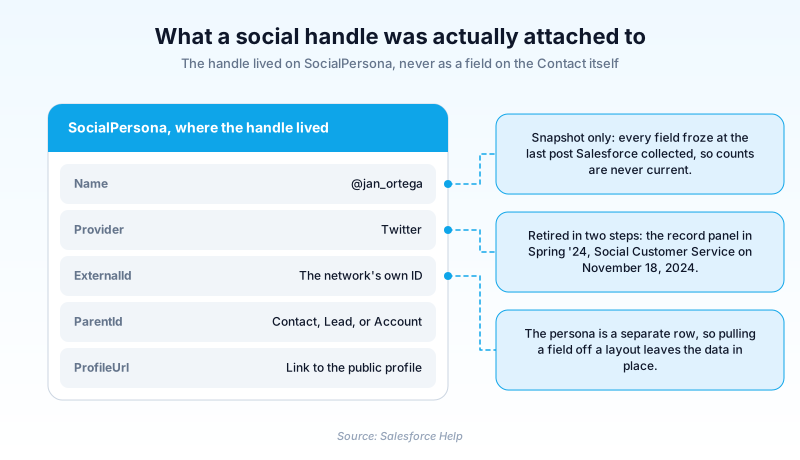
Picture a support team running Social Customer Service in early 2023. A complaint arrives from @jan_ortega on Twitter. Salesforce writes a SocialPersona row with Name set to @jan_ortega, Provider set to Twitter, ExternalId holding the numeric account ID the network returned, and ParentId pointing at the Contact for Jan Ortega. A SocialPost row stores the message, and a Case opens for an agent. Then Spring '24 arrives and the ingestion stops. Nothing errors. The Contact still shows its linked persona, but the record stops gaining posts, and any follower count on it is frozen at the last collection.
Where the handle actually lived, and what outlived it
The handle sat on SocialPersona, not on the Contact
People assume the handle was a field on Contact. It was not. Salesforce stored it on a separate SocialPersona row, where Name held the handle, Provider named the network, and ExternalId held the ID the network used internally. ParentId is polymorphic, pointing at an Account, Contact, Lead, or SocialPost. That indirection is why pulling a Twitter field off a layout never deleted anything.
Two features, two separate retirement dates
The muddle around this term comes from two products dying at different times. Social Accounts, Contacts, and Leads went first, retired in Spring '24 with a release note that tells you to find apps on AppExchange. Social Customer Service and its Starter Pack ran until November 18, 2024. The access underneath had already been cut: Twitter/X in API version 59.0, YouTube in version 60.0.
The objects outlived the features that filled them
SocialPersona and SocialPost are still published in the current object reference, still supporting query and update. Salesforce is blunt about what they hold: not real-time data, only a snapshot from the last collected post. Some columns died even earlier. InfluencerScore and ListedCount are documented as no longer used, and R6SourceId references a Social Studio that shut down in the same month.
What a leftover handle is worth now
Treat old persona rows as history rather than contact detail. A handle captured in 2022 might belong to a deleted account or a different person now, and nothing in the org flags which. Strip the retired panels from layouts, check any report filtering on persona fields, and send anyone wanting live social profiles to AppExchange.
Trust & references
Cross-checked against the following references.
Straight from the source - Salesforce's reference material on Social Handle.
Hands-on resources to go deeper on Social Handle.
About the Author
Dipojjal Chakrabarti is a B2C Solution Architect with 29 Salesforce certifications and over 13 years in the Salesforce ecosystem. He writes and edits salesforcedictionary.com, published by KineticBit Inc., to help admins, developers, architects, and cert/interview candidates sharpen their fundamentals. More about Dipojjal.
Test your knowledge
+5 pts / dayQ1. Where did Salesforce actually store a contact's social handle?
Q2. When was Social Customer Service retired?
Q3. An org still holds SocialPersona rows. What does a follower count on one represent?
Discussion
Loading discussion…