
Social Accounts and Contacts
Social Accounts and Contacts was a Salesforce feature that linked Account, Contact, and Lead records to public social media profiles.
Definition
Social Accounts and Contacts was a Salesforce feature that linked Account, Contact, and Lead records to public social media profiles. A rep opening the record saw a photo, a short bio, and recent posts next to the CRM data. Salesforce documented it under the longer name Social Accounts, Contacts, and Leads.
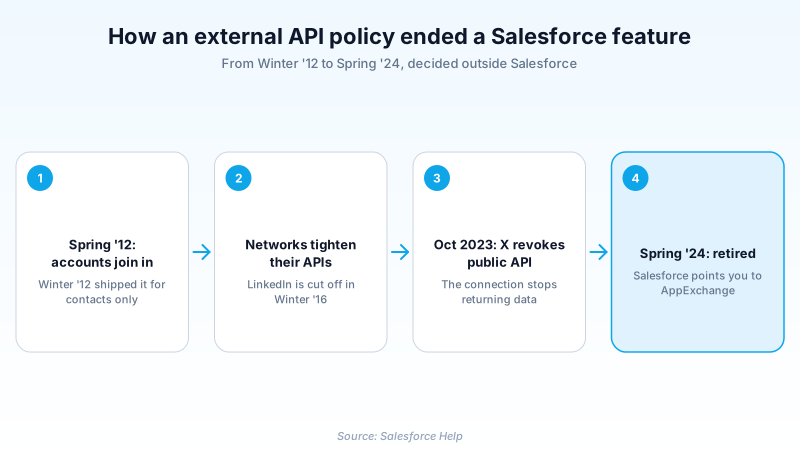
It is retired. Salesforce switched it off as of Spring '24, after the social networks it read from closed their public APIs.
Salesforce did not build a replacement. Its guidance is to find an app on AppExchange.
In plain English
“Salesforce used to show you a customer's public social media page right next to their details, so you knew a bit about them before calling. That information came from the social networks themselves. When the biggest one started charging for it, the window went blank. Salesforce took it away in early 2024.”
Worked example
An admin at a regional logistics firm opens a Contact record for Marcus Villalobos, Title of Director of Fleet Operations, Account of Cascade Freight Lines. Under the old setup a social profile viewer sat at the top of the detail page, beside his name and photo. Network icons on it let a rep pull his handle and recent public posts. Each rep had signed in to Twitter once to see any of it. In February 2024 the viewer comes up blank. No permission was edited in the org and no Setup toggle moved. X had cut off the public API in late 2023, and Spring '24 removed the feature outright. This org still renders that page from a Visualforce override, so the admin deletes the social:profileViewer component from it and moves on.
What it showed, and why an outside API ended it
A window, not a copy
The feature stored almost nothing. It kept a link between a Salesforce record and a matched social handle, then fetched the public details live whenever someone opened the page. Each rep authenticated to the network with their own credentials, so two reps could see different amounts. That design is why retirement caused no migration and no export.
The networks left one by one
Spring '12 shipped with five networks behind it: Facebook, Klout, LinkedIn, Twitter, and YouTube. They did not fade out together. LinkedIn went in a single release. Winter '16 stopped users signing in, and Salesforce deleted the LinkedIn profiles and images it was holding. Twitter access was removed in API version 59.0, YouTube in 60.0. That second one is the release that retired the whole feature, so YouTube was still connected the day it died.
Where the retirement is actually written down
Salesforce announced it in the Winter '24 release notes as scheduled for Spring '24, then confirmed the past tense in the Spring '24 notes. It is not listed on the Past Product and Feature Retirements page, which still omits it as of its most recent update. Searching that list and finding nothing does not disprove the retirement.
Three social features, three different deaths
Keep them apart. Social Key matched handles inside Data.com Clean, writing values onto records rather than showing a panel. Salesforce's Winter '16 notes put its end at Spring '16. The Spring '16 and Summer '16 notes both say Summer '16, so take the later date. Social Studio published and listened, and ended in November 2024. This one only displayed profiles on a record. So a screenshot of a social panel narrows the candidates to two, not three.
Trust & references
Cross-checked against the following references.
Straight from the source - Salesforce's reference material on Social Accounts and Contacts.
Hands-on resources to go deeper on Social Accounts and Contacts.
About the Author
Dipojjal Chakrabarti is a B2C Solution Architect with 29 Salesforce certifications and over 13 years in the Salesforce ecosystem. He writes and edits salesforcedictionary.com, published by KineticBit Inc., to help admins, developers, architects, and cert/interview candidates sharpen their fundamentals. More about Dipojjal.
Test your knowledge
+5 pts / dayQ1. In which release did Salesforce retire Social Accounts, Contacts, and Leads?
Q2. What triggered the retirement?
Q3. An admin inherits an org where the social profile viewer on Contact records renders empty. What is the correct cleanup?
Discussion
Loading discussion…