
Social Profile or Social Network Profile
A Social Profile, also called a Social Network Profile, was the link between a Salesforce Contact, Lead, or Account and that person's identity on a network such as Twitter, Facebook, or LinkedIn.
Definition
A Social Profile, also called a Social Network Profile, was the link between a Salesforce Contact, Lead, or Account and that person's identity on a network such as Twitter, Facebook, or LinkedIn. It was the visible half of the Social Accounts, Contacts, and Leads feature, and it wrote its data to the SocialPersona object.
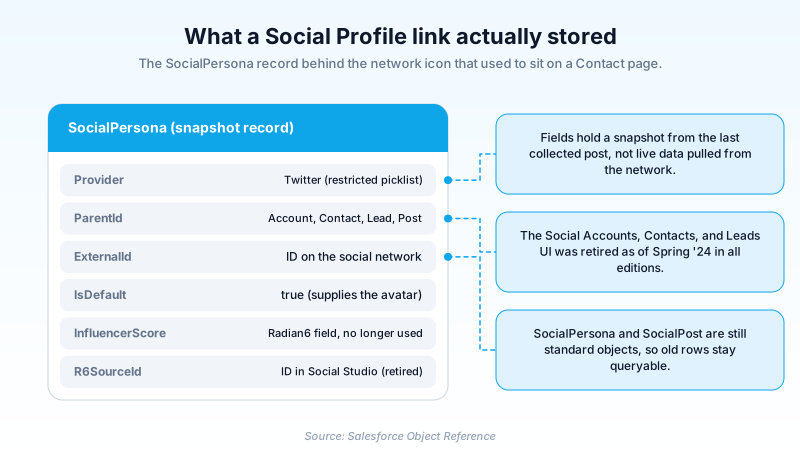
Salesforce retired that feature. The Winter '24 release notes flagged it as scheduled for retirement as of Spring '24, and the Spring '24 notes confirmed it was gone, across Lightning Experience and Salesforce Classic in every edition. For social profiles today, Salesforce points customers to AppExchange apps.
SocialPersona and SocialPost still ship in the current object reference, so leftover rows survive long after the icons disappeared from record pages.
In plain English
“Think of it as a name tag connecting a customer's record in Salesforce to their public account on a social site. Staff could open the record and see who that person was online. Salesforce switched this off in 2024, so the name tag is gone.”
Worked example
A regional insurance brokerage still runs a report called Contacts With Social Handles. Opened in 2026 it returns 4,812 SocialPersona rows nobody can refresh. One row has Provider set to Twitter, RealName set to Dana Whitfield, ExternalId holding the numeric handle ID, and IsDefault set to true, which is why that contact still shows a years-old profile picture as its avatar. ParentId points at a Contact record. No network icon appears on the page any more, and nothing recollects the data, so the Followers value of 1,204 is frozen at whatever it was when the last post came in.
How the social profile link worked, and how it ended
The object behind the icon
Every link wrote a SocialPersona row, an object available since API version 22.0. Provider was a restricted picklist naming the network. ParentId was a polymorphic lookup pointing at an Account, Contact, Lead, or SocialPost, so one person could carry a separate persona per network. IsDefault marked the persona supplying the avatar on the record.
A snapshot, not a live feed
This is the part most write-ups get wrong. The object reference says plainly that SocialPersona fields do not provide real time data, only a snapshot from the last time Salesforce collected a post. Radian6 leftovers linger in the field list: InfluencerScore and ListedCount are marked as no longer used, and R6SourceId holds an ID in Social Studio.
The UI said Profile, the API said Persona
This mismatch costs admins an afternoon. The record page labelled the related list Social Profiles, so that is the name people type into Object Manager. Nothing comes back. No object is spelled SocialProfile. Every row sat under SocialPersona, and the label above it was only ever a UI string.
Who owns the leftovers
Nobody, and that is the problem. These rows carry a real name, a handle and a follower count from an outside network, captured years ago and reviewed by no one since. No retention rule covers them, because the product that would have set one is retired. Clearing them now takes a data loader pass.
Trust & references
Cross-checked against the following references.
- Social Accounts, Contacts, and Leads Is Being Retired (Winter '24 Release Notes) (opens in new tab)Salesforce
- Social Accounts, Contacts, and Leads Was Retired (Spring '24 Release Notes) (opens in new tab)Salesforce
- SocialPersona | Object Reference for the Salesforce Platform (opens in new tab)Salesforce
Straight from the source - Salesforce's reference material on Social Profile or Social Network Profile.
Hands-on resources to go deeper on Social Profile or Social Network Profile.
About the Author
Dipojjal Chakrabarti is a B2C Solution Architect with 29 Salesforce certifications and over 13 years in the Salesforce ecosystem. He writes and edits salesforcedictionary.com, published by KineticBit Inc., to help admins, developers, architects, and cert/interview candidates sharpen their fundamentals. More about Dipojjal.
Test your knowledge
+5 pts / dayQ1. In which release was Social Accounts, Contacts, and Leads actually retired?
Q2. What does the object reference say about the data in SocialPersona fields?
Q3. Which records can SocialPersona.ParentId reference?
Discussion
Loading discussion…