
Social Studio
Social Studio was Salesforce Marketing Cloud's social media management application, retired on November 18, 2024.
Definition
Social Studio was Salesforce Marketing Cloud's social media management application, retired on November 18, 2024. Teams used it to publish posts, listen for brand mentions, reply to comments, and report on results across Facebook, Instagram, LinkedIn and X.
The retirement covered the whole family: Social Studio, Command Center, the mobile app, Social Studio Automate, and Social Customer Service including its free Starter Pack. Salesforce deleted customer data 90 days after access ended.
No Salesforce replacement shipped. Official guidance sent customers to their Account Executive to discuss third-party alternatives.
In plain English
“Picture one control room where a company wrote its social posts, watched what people said about the brand, and answered the replies. Salesforce ran that room for years, then closed it in late 2024. It never opened a new one, so customers had to move to another company's tool.”
Worked example
A regional insurance carrier held a Social Studio Enterprise subscription with an Order End Date of March 31, 2025. Because that fell after the cutoff, access ended on November 18, 2024 instead. The team began exports in August 2024, roughly 90 days ahead as Salesforce advised, pulling engagement history, approval logs, and post-level metrics to CSV. The X archive was the one they could not defer, since that content went away at retirement. After the cutoff they moved publishing and listening to a third-party platform and used its Salesforce connector to keep opening Service Cloud cases from public complaints.
What the shutdown removed and what it left behind
The four jobs it packaged
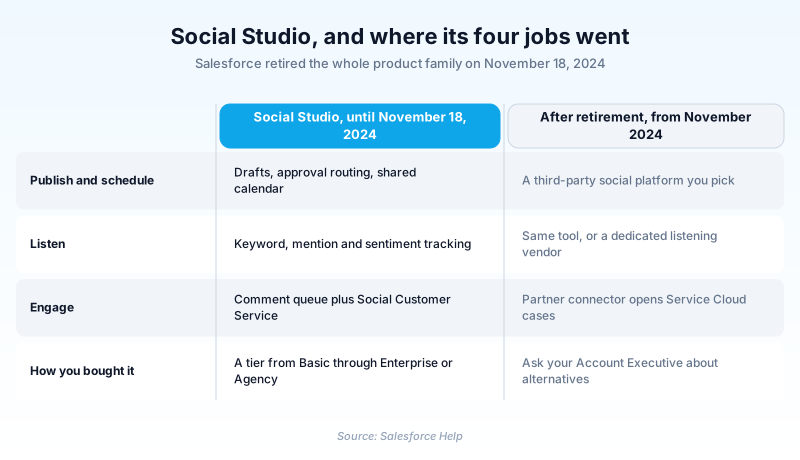
Social Studio bundled four jobs into one app. Publishing gave you drafts, approval routing, and a shared calendar across connected accounts. Listening tracked keywords, mentions, and sentiment. Engagement turned inbound comments into a workable queue. Analytics reported reach and campaign results. It sold in tiers from Basic to Enterprise and Agency, with add-ons like Command Center display walls.
The cutoff, and the data
Access ended on November 18, 2024, or at contract end if that came sooner. Salesforce told customers to pull their data 90 days before that cutoff, then deleted it 90 days after. That deletion follows the Marketing Cloud Security, Privacy, and Architecture (SPARC) documentation. X content was the exception, gone from the retirement date itself, not 90 days later.
The half that touched Service Cloud
Social Customer Service was the bridge into Service Cloud. It turned public posts into Cases and matched the author to a Contact. It came as a free Starter Pack or the paid Customer Service Pro edition. Both ended on the same date as the marketing side. Any case routing rule built on that inbound stream now has nothing feeding it.
When you still see it referenced
Social Studio survives in stale wikis, old certification prep, and job postings. None of that makes it available, since a current org cannot provision it and no trial exists. Read a live-Social-Studio assumption as a date stamp. Map the requirement forward: a partner platform for publish and listen, its Salesforce connector for CRM sync, Marketing Cloud Engagement for the rest.
Trust & references
Cross-checked against the following references.
Straight from the source - Salesforce's reference material on Social Studio.
Hands-on resources to go deeper on Social Studio.
About the Author
Dipojjal Chakrabarti is a B2C Solution Architect with 29 Salesforce certifications and over 13 years in the Salesforce ecosystem. He writes and edits salesforcedictionary.com, published by KineticBit Inc., to help admins, developers, architects, and cert/interview candidates sharpen their fundamentals. More about Dipojjal.
Test your knowledge
+5 pts / dayQ1. On what date did Salesforce retire Marketing Cloud Social Studio?
Q2. Which Salesforce product absorbed Social Studio's workload after retirement?
Q3. An old runbook routes X mentions into Service Cloud cases through Social Customer Service. What is true today?


Discussion
Loading discussion…