
Tableau Next Explained: Salesforce's Agentic Analytics Platform Built on Data 360
Salesforce rebuilt Tableau on Data 360 and wired Agentforce into it. Here is what Tableau Next actually is, the three analytics skills, and how it differs from CRM Analytics.

Your finance lead pings you on Slack at 8:40 in the morning: the Q3 pipeline dashboard is three days stale, and nobody can explain the drop in the West region without pulling four people into a call. You built that dashboard in CRM Analytics two years ago. Now your Salesforce account exec has sent over a deck about Tableau Next and wants to know when you are moving.
So you open the deck and hit the wall every Salesforce analytics conversation hits in 2026. There are three products with "Tableau" or "Analytics" in the name, they overlap, and the marketing says all of them are the future. This post cuts through that. Here is what Tableau Next actually is, how the pieces fit, what the three analytics skills do, and how to decide whether the dashboard that woke you up belongs on it.
What Tableau Next actually is
Tableau Next is Salesforce's rebuild of Tableau for the era where you ask an agent to act on data instead of just looking at it. Salesforce calls it an agentic analytics platform, and for once the label is doing real work rather than decoration.
The old Tableau you know, the one Salesforce bought in 2019, ran as its own platform with its own architecture. It connected to a data source, pulled an extract, and rendered a viz. Tableau Next moves that whole model onto Salesforce infrastructure. It runs on Hyperforce, and it uses Data 360 as its data layer instead of standalone extracts. That single architectural change is the reason everything else in the release exists.
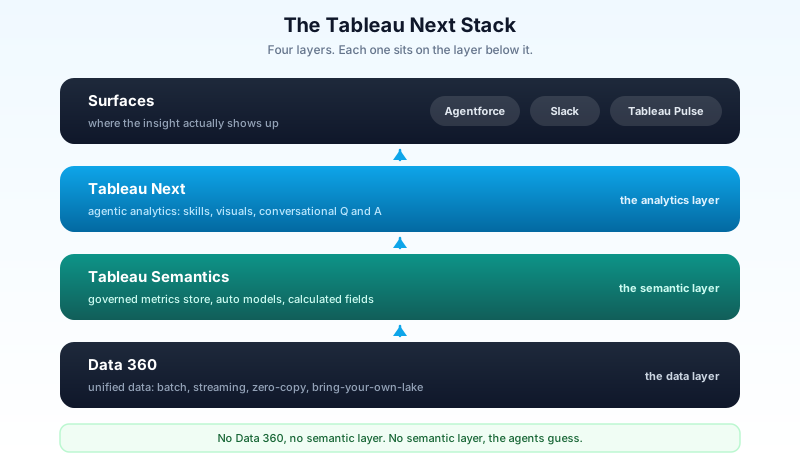
Think of it as four layers stacked on each other. Data 360 holds the unified data at the bottom. A semantic layer called Tableau Semantics sits on top of that and turns raw tables into governed metrics. Tableau Next sits on the semantic layer and does the analytics. And the answers surface wherever people already work: inside Agentforce, in a Slack channel, in a Tableau Pulse briefing. Pull the bottom layer out and nothing above it stands up.
The semantic layer is the part that matters
Most people skim past "semantic layer" as jargon. Do not. It is the piece that decides whether the agents give you trustworthy answers or confident nonsense.
Tableau Semantics is an AI-assisted semantic layer built into Data 360. Its job is to sit between messy source tables and every chart, question, and agent that reads them, and to define the shared meaning of your business. What counts as "revenue." How "active customer" is calculated. Which date field is the one that matters for pipeline. You define that once, in a governed metrics store, and everything downstream inherits it.
Why this beats the old way is concrete. In classic dashboard tools, the definition of a metric lived inside each workbook. Two analysts building two dashboards would each write their own version of "net new ARR," and the numbers would quietly disagree in the next board meeting. A shared semantic layer kills that class of bug. There is one definition, it is governed, and the agent answering a Slack question reads the exact same metric as the dashboard on the wall.
Tableau Semantics also tries to do the boring setup for you. It suggests relationships between tables, auto-generates calculated fields, and can draft the semantic data model rather than making you hand-build every join. You still review what it proposes, because a suggested join is a suggestion, not a fact. But the first draft arrives in minutes instead of an afternoon.
The three analytics skills
Here is where "agentic" stops being a slogan. Tableau Next ships with three prebuilt analytics skills, and each is a native Agentforce skill rather than a separate chatbot bolted onto a BI tool. That distinction matters, because it means these skills can be called by any agent you build, with the same governance and the same trust controls as the rest of your Agentforce estate.
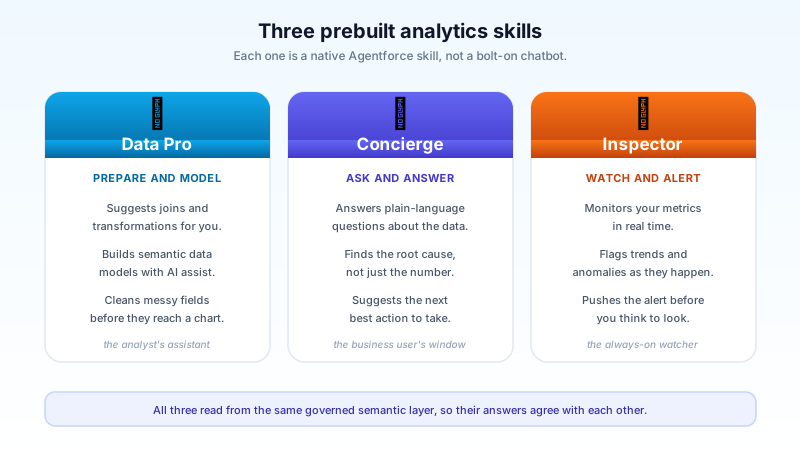
Data Pro is the data-preparation and modeling assistant. It suggests joins and transformations, cleans fields, and helps build the semantic models that feed everything else. This is the skill your analysts touch. It handles the part of the job that used to eat the first two days of any new dashboard, the wrangling nobody enjoys.
Concierge is the one your business users will actually notice. Ask a plain-language question, get an analytical answer back with the right visualization, the root cause behind the number, and a suggested next action. Not "West region is down 12 percent" and a shrug, but the drivers behind the 12 percent and what to do about it. This is the skill that answers the 8:40 Slack message without a four-person call.
Inspector never sleeps. It monitors your metrics in real time, watches for trends and anomalies, and pushes an alert the moment something moves. Instead of finding out on Thursday that the West region dropped on Monday, Inspector flags it Monday. It is the difference between analytics you have to go check and analytics that comes to you.
All three read from the same Tableau Semantics layer, which is why their answers line up with each other and with your dashboards. A monitoring alert, a conversational answer, and a governed report cannot disagree when they are all reading one definition of the metric.
How the agent actually helps
Underneath the three skills sits Tableau Agent, the conversational engine that does the work. It covers three kinds of task, and it is worth seeing them as a loop rather than a feature list.
First, preparation and modeling. You connect data and build semantic models by describing what you want in natural language, and the agent drafts the model. Second, conversational analytics. You ask about trends, root causes, and comparisons, and it queries the semantic layer and answers. Third, proactive insight. It watches metrics and alerts you to anomalies before you ask.
The loop is the point. The agent preps the data, answers questions against it, and then keeps watching it. You are not clicking through the same three menus every morning. You describe the outcome and review the work, the same shift you already feel if you have moved Apex or LWC work into an AI-assisted editor.
Because Data 360 is the foundation, Tableau Next inherits everything Data 360 already does with your data. Batch and streaming ingestion. Zero-copy access to Snowflake, BigQuery, Redshift, and Databricks. Bring-your-own-lake. The analytics layer does not have to copy your warehouse to see it, which is the whole argument for building on Data 360 in the first place. If your data already lives in Data 360, Tableau Next is reading it in place. That connection is worth understanding on its own, and the Data 360 rename and what changed is the place to start if the Data Cloud-to-Data 360 shift is still fuzzy.
Tableau Next vs CRM Analytics vs classic Tableau
This is the question that actually keeps admins up. You may be running CRM Analytics, or classic Tableau Cloud and Server, or both. Does Tableau Next replace them?
The short answer: not yet, and not by force. All three are live products with active roadmaps. Salesforce has been explicit that CRM Analytics customers keep their investment and their support. Tableau Next is positioned as the next generation, the agentic path for teams ready to build on Data 360, while CRM Analytics stays the native option for dashboards that live inside Salesforce records.
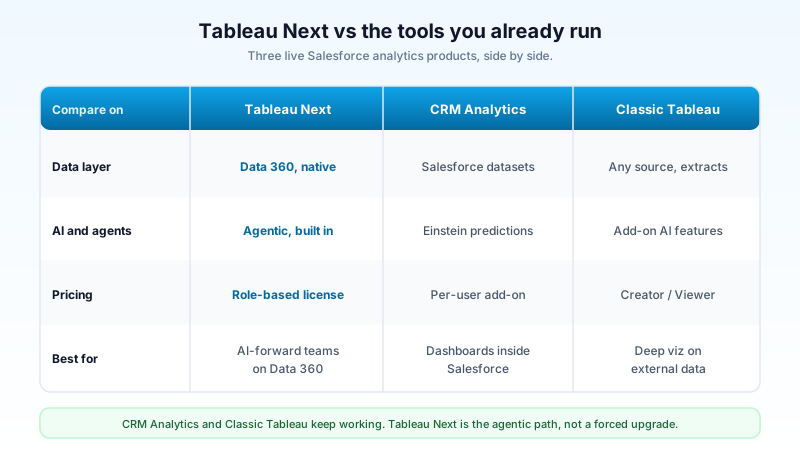
The practical split looks like this. CRM Analytics is best when your dashboards sit inside Salesforce, reading Salesforce data, embedded on a record page. Classic Tableau is best when you have deep visualization work on external data and a big existing library of workbooks. Tableau Next is best when you want agentic analytics on data that already lives in, or is federated through, Data 360, and you want those insights called from Agentforce and Slack.
If you already run CRM Analytics, there is a bridge rather than a cliff. Salesforce lets you move assets from CRM Analytics into Data Cloud to put them under the agentic analytics engine, so the migration is a path you take deliberately, not a switch someone flips for you. Before you plan any of that, get honest about which of your dashboards actually need an agent versus which just need to keep working. Most orgs have far more of the second kind. If you want the full native-reporting picture first, the CRM Analytics 2026 guide lays out what that tool still does well.
Pricing and where you get it
Two changes here are worth knowing before you take this to a budget conversation.
Tableau Next moved to role-based licensing and dropped the consumption-based pricing that made classic Tableau spend hard to forecast. You license users by role rather than metering usage, which makes the bill predictable. You can buy Tableau Next standalone, or get it inside the Tableau+ bundle, the Agentforce 1 editions, or Marketing Intelligence. If your org is already committed to Agentforce 1, check what analytics entitlement you already hold before you buy anything new.
One line item to watch: data storage in Data 360 can carry its own cost. Because Tableau Next runs on Data 360, the data behind your analytics lives there, and Data 360 storage and processing are billed separately from the analytics seats. This is the number that surprises people who budgeted for licenses and forgot the platform underneath them. Model it before you scale, not after.
The honest concerns
This is a real release with real gaps, and pretending otherwise helps nobody.
The semantic layer is not fully open yet. Salesforce has said it is working toward opening Tableau Semantics completely and toward translating semantic models from competing tools, but that portability is not shipped. If you have a mature semantic layer in another platform today, you cannot lift it over cleanly right now. Plan around the version that exists, not the roadmap.
Connector coverage has edges. The zero-copy story is strong for the big cloud warehouses, but some sources lag. SQL Server cloud connectivity has been on the "planned" list, and spreadsheet ingestion is limited to authoring workflows rather than being a first-class pipeline. Check your specific sources against the current connector list before you commit a migration date.
And the CRM Analytics coexistence question is genuinely unresolved. Salesforce says both products have active roadmaps, which is the correct thing to say and also the thing companies say right before a long consolidation. As Salesforce Ben noted in their Tableau Next breakdown, the honest posture is to watch whether this is durable dual investment or a slow migration with a friendly name. Build on Tableau Next because it fits your data and your agents, not because you assume CRM Analytics is going away, and not because you assume it is staying.
What to do next
Pick one dashboard. Not your whole analytics estate, one. Ideally the exact report someone pings you about most often, the one that is always three days stale when it matters. Map its underlying data to Data 360, define its core metric once in Tableau Semantics, and point Concierge at it. Then ask Concierge the question you usually get asked in a meeting and see whether the answer, the root cause, and the suggested action hold up against what you already know is true.
That one experiment tells you more than any deck. If Concierge answers the West-region question correctly, with a cause you trust, you have your migration case. If it does not, you have found exactly which part of your semantic layer needs work before any of this is real. Either way you learn something the marketing cannot tell you. When you are ready to go wider, the Data 360 implementation guide covers the foundation the whole stack depends on.
About the Author
Dipojjal Chakrabarti is a B2C Solution Architect with 29 Salesforce certifications and over 13 years in the Salesforce ecosystem. He writes and edits salesforcedictionary.com, published by KineticBit Inc., to help admins, developers, architects, and cert/interview candidates sharpen their fundamentals. More about Dipojjal.
Share this article
Sources
Related dictionary terms
Practise it
Five questions on Data Cloud Consultant
Exam-style questions with an explanation after each one. No account needed, and your answers build a weak-topic map once you have one.
Keep reading

Salesforce Data 360: The Complete 2026 Implementation Guide
Data 360 is Salesforce's unified data platform for the agent era. This 2026 implementation guide walks data streams, identity resolution, segmentation, activations, and zero-copy federation.

Tableau CRM Is Now CRM Analytics: The Rename History and 2026 Guide
Tableau CRM is now CRM Analytics. This 2026 guide walks the four-rename history (Wave to Einstein to Tableau CRM to CRM Analytics), what survived, and where to find current Salesforce docs.
Salesforce CRM Analytics: The Complete 2026 Guide
CRM Analytics is Salesforce's native embedded analytics. This 2026 guide covers datasets, recipes, dashboards, Einstein Discovery models, and how to pick it over Tableau or standard Reports.

Data Cloud Is Now Data 360: What Actually Changed (and Why It Matters)
Data Cloud became Data 360 in October 2025. Beyond the rename: Zero-Copy Federation, Tableau Semantics, the Lakehouse, and a new credit model. Here's the full picture.

Salesforce Reports & Dashboards: The Complete 2026 Guide
The complete 2026 guide to Salesforce reports and dashboards - report types, filters, summaries, bucketing, joined reports, dashboards, subscriptions, snapshots, and Tableau / CRM Analytics integration.
Comments
No comments yet. Start the conversation.
Sign in to join the discussion. Your account works across every page.