
Salesforce CRM Analytics: The Complete 2026 Guide
What CRM Analytics actually is in 2026 (formerly Tableau CRM, formerly Wave), the recipes, datasets, Einstein Discovery models, and how to pick it over Tableau or standard Reports.
You build a standard Salesforce report on Opportunities by Stage with a couple of summary filters and the report does what reports do. Then a VP asks: "Show me the same view, but only for accounts where the Industry is healthcare, the average deal size has grown more than 15 percent quarter-over-quarter, and there's a recent activity from the named account exec in the last seven days." You spend ninety minutes building a 12-cell [custom report type](/terms/custom-report-type), give up, and write an Apex batch instead. The report-builder hit its ceiling three filters ago.
That ceiling is the reason CRM Analytics exists. It is Salesforce's native, embedded-in-CRM analytics product, designed for the queries that standard reports cannot answer. In 2026 it has been through three renames (Wave Analytics → Einstein Analytics → Tableau CRM → CRM Analytics), absorbed Einstein Discovery as its predictive engine, and gained Data Cloud integration that makes it usable against 10 billion rows of data instead of just the records in your Salesforce org.
This post walks through what CRM Analytics is in 2026, how datasets and recipes work, where Einstein Discovery fits, the 2026 platform improvements (incremental upserts, dataset write-back to Data 360 lakes, semi-join queries), and the decision framework for picking it over Tableau or standard Reports.
What CRM Analytics actually is
CRM Analytics is the Salesforce-native business intelligence layer that lives inside your org. Same login, same security model, same record-level CRM context. Built from the Wave Analytics platform Salesforce launched in 2014, renamed to Einstein Analytics in 2017, then to Tableau CRM in 2020 after the Tableau acquisition, then to CRM Analytics in 2022. The product survived all four names.
The four building blocks:
- Datasets. The query target. A dataset is a denormalized, columnar copy of data sourced from Salesforce objects, external systems, or Data Cloud objects. Optimized for fast aggregation, not transactional read-write. Datasets get refreshed on a schedule (hourly, daily) or in near real-time via Salesforce streaming.
- Recipes (Data Prep). The transformation layer. A recipe is a visual data pipeline that takes inputs (datasets, raw Salesforce data, external CSVs, Data 360 lake objects), applies transforms (join, filter, compute, smart transform), and writes output to a dataset, a Salesforce object, or an external destination.
- Dashboards. The visualization surface. A dashboard is a configurable canvas of widgets (charts, tables, KPI tiles, repeaters, filters) bound to dataset queries. Dashboards can be embedded on Salesforce record pages, home pages, or surfaced as standalone Analytics Studio canvases.
- Einstein Discovery. The predictive engine. Einstein Discovery models take a target outcome (will this opp close, what is the predicted churn risk, what is the expected close date), train against historical data, and produce explainable predictions you can embed in records, dashboards, and Flow actions.
The whole stack runs inside Analytics Studio, the configuration surface where admins build datasets, recipes, dashboards, and Discovery models.
Datasets and recipes: how data actually gets in
The two-step pattern is the same every time. Recipe builds the dataset. Dataset feeds the dashboard.
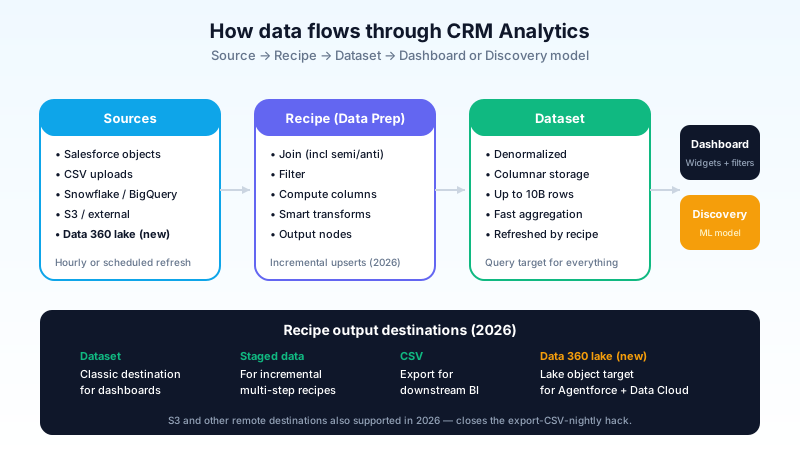
Source data. The inputs to a recipe. Salesforce objects (Account, Opportunity, Contact, custom objects), data uploaded as CSV, connected data from external systems (Snowflake, S3, Google BigQuery, SAP, ServiceNow), and increasingly in 2026, Data 360 data lake objects.
Recipe transformations. Visual nodes that compose into a pipeline:
- Join nodes. Inner, left, outer, and as of 2026, semi-join and anti-join for "rows in A that match B" and "rows in A that do not match B". The semi/anti-join addition closes a real gap that previously required Apex or external SQL to express.
- Filter nodes. Predicate filters on column values.
- Transform nodes. Compute columns, format dates, parse strings, aggregate to a summary level, pivot rows to columns.
- Output nodes. Write the recipe result to a target. In 2026, targets include datasets (the classic), staged data (for incremental refreshes), CSV, Data 360 data lake objects, and remote locations like Amazon S3.
Datasets. The recipe writes here. Columnar, compressed, optimized for aggregate queries. Datasets can hold up to 10 billion rows, though most production datasets are in the millions, not billions.
Schedule. Recipes can be scheduled hourly, daily, or kicked off manually. Critical recipes run as part of an Apex callout from a record save trigger or as part of a Flow automation.
The Spring '26 release added incremental upserts: recipe runs now operate on subsets of changed rows instead of reprocessing every row in the snapshot. For a 200-million-row dataset that refreshes hourly, the difference is the recipe completing in 8 minutes instead of 90, which is the difference between near-real-time analytics and yesterday's data.
Dashboards and Analytics Studio
The dashboard is what end users actually see. Reps in Sales Cloud see embedded dashboards on their Opportunity records. Managers see pipeline dashboards on their home pages. Executives see board-level summary dashboards in Analytics Studio.
The widget set in 2026:
- Charts. Bar, line, stacked, scatter, donut, pie, waterfall, funnel. The standard set.
- Tables. Tabular with conditional formatting, drilldown links, and column-level aggregation.
- KPI tiles. Big number with delta vs prior period, sparkline, threshold colors.
- Repeaters. Repeat a widget pattern across rows of a dataset. New in 2026: custom headers on repeaters, and sortable repeater headers.
- Filters. Bind to a dataset field, drive other widgets via interaction.
- Embedded Discovery predictions. A widget that displays an Einstein Discovery prediction inline.
Dashboards can be deeply interactive. Click a bar, the table filters. Pick a date range, the KPI tiles recompute. Click into a record, drill from the dashboard to the actual Salesforce record. This is the part standard Reports cannot do.
The embed pattern matters: dashboards live on Lightning record pages via the Dashboard Builder component. A rep working an Opportunity sees the deal-specific dashboard inline, with widgets that filter by Opportunity.Id automatically. The analytics live where the work happens. That is the single biggest reason CRM Analytics wins over standalone BI tools for in-flow-of-work analytics.
Einstein Discovery: the predictive layer
Einstein Discovery is the part of CRM Analytics that does predictions, not just descriptions.
A Discovery model takes:
- A target variable. What you want to predict. "Will this opportunity close" (binary), "What will the close amount be" (numeric), "What is the expected close date" (date).
- Training data. Historical records with the target variable filled in. Usually a CRM Analytics dataset built from past opps, cases, leads, etc.
- Optional grouping variables. Splits to train multiple models (one per region, one per product line).
The model trains automatically using AutoML. The output is a model with explainable predictions: when a new opportunity is scored, Discovery returns the prediction plus the top contributing variables ("this opp is likely to lose because the discount is 22 percent, the sales cycle is already 60 days longer than median, and there is no activity in the past 14 days"). The explainability is the differentiator. Black-box predictions do not move sales reps to action. Explained predictions, with specific factors, do.
The 2026 update worth flagging: Discovery models are accessible from Agentforce actions. An agent can call a Discovery model as part of an action, ground the response in the prediction, and explain to the user why the agent recommended what it recommended. The integration closes a loop the Einstein-era platform never quite closed.
The pitfall: Discovery is only as good as the historical data. An org with three years of clean opportunity-stage history gets good win-prediction models. An org with stage data that has been overwritten and re-mapped twice in the last two years gets confidently wrong predictions. Audit your historical data before trusting Discovery output for material decisions.
CRM Analytics vs Tableau vs standard Reports
This is the decision that confuses every Salesforce architect at least once.

Standard Reports & Dashboards. Free with every Salesforce edition. Built directly against Salesforce records via report types. Great for operational reporting (today's pipeline, this week's case backlog, last quarter's revenue by product). Hits a ceiling at: cross-object reports with more than 4 objects, queries with more than ~2,000 grouping rows, anything requiring rolling calculations or window functions. If you find yourself opening the report builder and writing a Custom Report Type, you might be ready for CRM Analytics.
CRM Analytics. Paid add-on. Best fit: analytics embedded in Salesforce pages, in the flow of CRM work. Reps, managers, and ops teams who live inside Salesforce. Data that is primarily Salesforce-native or close to it (Salesforce + a couple of connected external sources). The strength is in-Salesforce context and security: dashboards inherit your CRM record visibility, which is non-trivial to replicate in a generic BI tool.
Tableau. Paid product (separate licensing from CRM Analytics, despite both being Salesforce-owned). Best fit: enterprise BI across many systems, advanced visualization workflows, BI teams building dashboards for non-Salesforce users. The strength is the visualization library and the breadth of supported data sources. The weakness, for in-Salesforce work, is that Tableau lives outside the CRM and does not inherit CRM security or record context as cleanly as CRM Analytics does.
The decision rule:
- User lives in Salesforce, needs analytics at the record level. CRM Analytics.
- User is a BI analyst, builds enterprise dashboards across many systems. Tableau.
- Use case is operational reporting on Salesforce records, no cross-system needs. Standard Reports & Dashboards.
- You have all three and dashboards exist that nobody uses. The problem is adoption, not the tool. Prioritize embedded analytics in CRM Analytics, kill the unused Tableau dashboards.
Some shops use Tableau for executive BI and CRM Analytics for embedded record-level analytics. Both products coexist fine. Standard reports stay for one-off ops queries.
The 2026 platform improvements that matter
The Spring '26 release was substantive for CRM Analytics admins.
Incremental upserts and deletes. Recipes now run on changed rows only, not the full snapshot. Recipe completion times dropped by 5 to 10x on large datasets. Net effect: hourly refreshes that previously timed out now succeed, and near-real-time analytics is finally achievable for large orgs.
Semi-join and anti-join in recipes. "Show me Accounts with no opportunities" or "Show me Opportunities matching a known target list" no longer needs Apex or external SQL. The join node now supports these predicate joins natively.
Recipe output to Data 360 data lake objects. A recipe can now write its result to a Data Cloud data lake object. This is the unification path: CRM Analytics is no longer a closed-loop product. Recipes can produce data that Data Cloud uses to power Agentforce or external systems.
Recipe output to S3 and remote destinations. Closes the loop on data exfiltration for downstream BI or data warehouse use cases. Many orgs were exporting CSVs nightly through scheduled jobs; the native S3 output kills that hack.
Custom and sortable repeater headers. Smaller widget improvement, but the repeater was the most-used and least-flexible widget in the CRM Analytics dashboard set. The 2026 update makes it usable for executive-style dashboards.
Discovery models callable from Agentforce. Already mentioned. Worth restating because it closes the integration gap between the predictive layer and the agent layer.
The 2026 improvements are the kind that make a stuck platform usable, rather than headline-grabbing. The team has been quietly closing real gaps that admins have asked for since 2020.
A real-world implementation pattern: pipeline health for Sales
The canonical first build on CRM Analytics is a pipeline-health dashboard for a Sales team. Walking through this pattern grounds everything above.
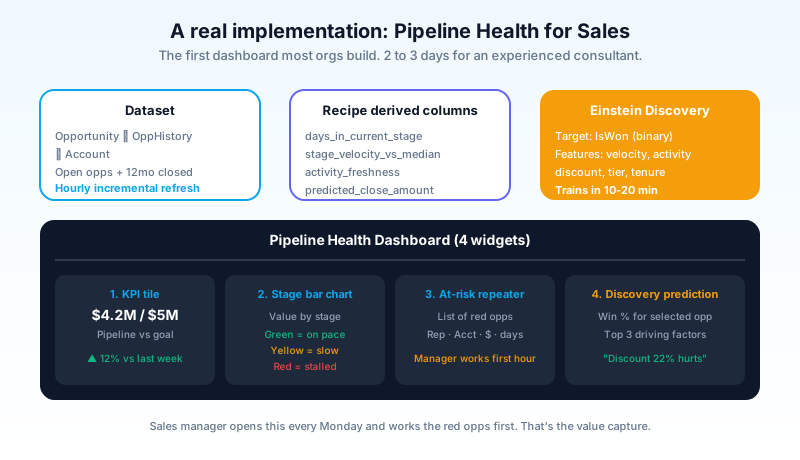
Dataset. Source: Opportunity object plus OpportunityHistory (for stage-change tracking) plus Account (for industry and account-tier context). Joined on Opportunity.AccountId and OpportunityId. Filtered to open opportunities in the current quarter plus a rolling 12-month window of closed opps for trend comparison. Refreshed hourly via the incremental upsert path.
Recipe. Joins the three sources. Adds derived columns: days_in_current_stage (date diff from latest history), stage_velocity_vs_median (current days vs the 12-month median for that stage), activity_freshness (days since last logged activity), and predicted_close_amount (placeholder for the Discovery model output).
Dashboard. Four widgets. (1) KPI tile: total open pipeline value vs goal. (2) Bar chart: pipeline value by stage, color-coded by velocity_vs_median (green for on-pace, yellow for slow, red for stalled). (3) Repeater of at-risk opportunities (the ones flagged red), each row showing rep, account, amount, days stalled. (4) Embedded Einstein Discovery prediction with the top three factors driving win probability for the selected opp.
Discovery model. Trained on the 12-month closed-opps dataset. Target variable: IsWon. Features: stage_velocity, activity_freshness, discount_percent, account_tier, rep tenure. Trains in 10 to 20 minutes against a typical mid-market org dataset. Surfaces the prediction plus the explainer back into the dashboard widget.
The whole stack takes a CRM Analytics consultant about 2 to 3 days to build, and another week to tune. Once live, the sales manager opens it every Monday and works the red-flagged opps for the first hour of the week. That is the pattern that justifies the licensing cost.
The pieces of CRM Analytics that are bad
Calling out what is worse, with specifics:
The dashboard authoring experience lags Tableau. Building a polished, layout-precise CRM Analytics dashboard takes longer than building the equivalent in Tableau. The layout grid is rigid, the conditional formatting is limited, and the typography options are basic. CRM Analytics is faster to embed and harder to make beautiful. Tableau is the opposite.
The renaming history has confused buyers for a decade. Wave Analytics, Einstein Analytics, Tableau CRM, CRM Analytics. Same product, four names. Old Trailhead modules still reference Tableau CRM. Stack Exchange answers reference Einstein Analytics. Help articles inconsistently reference all four. Plan for the documentation drift.
Pricing is opaque. CRM Analytics is sold as add-on licenses per user. The pricing page does not lead with this; the Salesforce sales motion is to bundle it with other Agentforce SKUs. Standalone pricing is negotiable. Push for clarity in the contract before signing.
Data Cloud integration is real but new. Recipe output to Data 360 lake objects works. Data Cloud objects as input to recipes works. The full bidirectional flow is shipping in 2026 and still maturing. Expect rough edges if you are connecting Data Cloud and CRM Analytics for the first time.
Real issues. The platform is the right tool for in-Salesforce embedded analytics. The rough edges are what to plan around.
Certification and skill path
For admins or analysts who want to become CRM Analytics specialists, Salesforce maintains a dedicated credential: the CRM Analytics and Einstein Discovery Consultant. The exam covers dataset design, recipe authoring, dashboard building, Discovery model training, and the integration patterns with Salesforce records and Data Cloud.
The 2026 maintenance module on Trailhead covers the new features: incremental upserts, semi-joins, recipe output to Data 360 lakes, and the Agentforce integration with Discovery. Existing certified consultants must complete the maintenance to keep their credential current.
The job market in 2026 for CRM Analytics specialists is healthy. Salesforce orgs that bought CRM Analytics licenses in 2022 and never built much beyond the templated apps are now under board pressure to extract value from those licenses, which is driving consulting demand for "actually build something useful with our CRM Analytics". The skill gap is real, and the path from Salesforce admin to CRM Analytics consultant is one of the shorter cert-driven career moves in the ecosystem.
What to do next
Open Salesforce, go to Setup, search "Analytics Studio". If you have CRM Analytics provisioned, you will see the link. Open it, look at the templated apps (Sales Analytics, Service Analytics, Pipeline Health). The templated apps come with prebuilt datasets, recipes, and dashboards that work against your Salesforce data out of the box. Install one. That is the fastest way to see what the product actually does.
If you do not have CRM Analytics licenses, the next move is the gap analysis. Open your three most-built-out reports in standard Reports. Look at them. Ask: are these still answering the questions the business asks? If yes, CRM Analytics is a future investment, not an urgent one. If no, the gap is the business case.
Open one Lightning record page (an Opportunity, an Account, a Case). Imagine the most useful embedded analytics widget for the user looking at that record. A pipeline-velocity tile. A churn-risk prediction. A peer-account comparison. That widget is the strongest CRM Analytics use case for your org. Build it as the first dashboard.
About the Author
Dipojjal Chakrabarti is a B2C Solution Architect with 29 Salesforce certifications and over 13 years in the Salesforce ecosystem. He writes and edits salesforcedictionary.com, published by KineticBit Inc., to help admins, developers, architects, and cert/interview candidates sharpen their fundamentals. More about Dipojjal.
Share this article
Sources
Related dictionary terms
Practise it
Five questions on Agentforce Specialist
Exam-style questions with an explanation after each one. No account needed, and your answers build a weak-topic map once you have one.
Keep reading

Data Cloud Is Now Data 360: What Actually Changed (and Why It Matters)
Data Cloud became Data 360 in October 2025. Beyond the rename: Zero-Copy Federation, Tableau Semantics, the Lakehouse, and a new credit model. Here's the full picture.
Salesforce Reports & Dashboards: The Complete 2026 Guide
The complete 2026 guide to Salesforce reports and dashboards - report types, filters, summaries, bucketing, joined reports, dashboards, subscriptions, snapshots, and Tableau / CRM Analytics integration.
What Is Agentforce 360? The Complete 2026 Guide for Salesforce Admins, Developers & Architects
Agentforce 360 is Salesforce's 2025 rebrand of its agentic-AI platform - built on the Atlas Reasoning Engine, Einstein Trust Layer, and Data 360. Here's the complete admin + dev + architect guide.
Comments
No comments yet. Start the conversation.
Sign in to join the discussion. Your account works across every page.