
Salesforce Data 360: The Complete 2026 Implementation Guide
Hands-on Data 360: data streams, lake objects, data model objects, identity resolution, calculated insights, segmentation, zero-copy federation, and the rollout sequence that ships.

You open Setup, navigate to Data 360, and the left rail has twelve menu items: Data Streams, Data Lake Objects, Data Model Objects, Identity Resolution, Calculated Insights, Segments, Activation Targets, Data Spaces, Data Shares, Connectors, Insights, and Settings. Your boss asked for "a 360-degree view of the customer". You stare at the screen. The product doesn't tell you which of those twelve doors to open first, and the help docs assume you already know.
That is the Data 360 problem in 2026. The platform is genuinely powerful: ingest anything, harmonize it, resolve identities across systems, compute derived metrics, segment, activate. The platform also has a steep on-ramp, twelve concept-objects deep, and an implementation sequence that the marketing site does not lead with. This post walks through the actual order of operations.
Data 360 is the renamed Data Cloud (the rename happened October 2025; the full naming history is in Data Cloud is now Data 360). This is the implementation guide for the renamed product in 2026: what each component is, how the pieces connect, the rollout sequence that ships, and the rough edges to plan around.
What Data 360 actually is in the architecture
Data 360 sits between your operational systems and the experiences you want to power: agent conversations, marketing campaigns, embedded analytics, partner integrations. It is the "single source of customer truth" layer, except that single source is composed from many systems and made coherent through identity resolution and harmonization.
The high-level architecture:
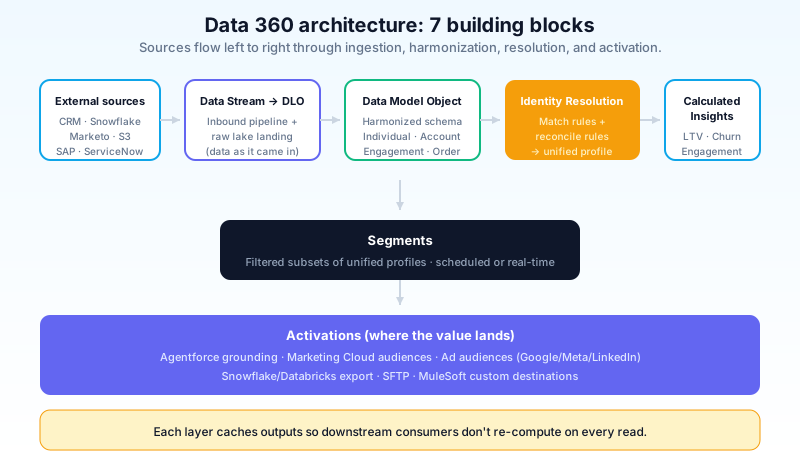
Inputs. Salesforce objects (Account, Opportunity, Case), external systems (Snowflake, Databricks, S3, Adobe Experience Cloud, SAP, ServiceNow), real-time signals (web events, mobile events, IoT), and batch loads (CSV, scheduled ETL).
Connectors. The handshake between your external system and Data 360. Each connector is configured once and reused across data streams. The native connector list is broad in 2026 (Snowflake, Databricks, S3, Azure ADLS, Google BigQuery, Adobe, Marketo, Mailchimp, Stripe, Zendesk, ServiceNow, and dozens more), and the MuleSoft generic connector covers anything not natively supported.
Data Streams. The configured pull-or-push pipelines that bring data into Data 360. A stream defines the connector, the source object or schema, the refresh cadence (real-time, hourly, daily, batch), the field mappings, and any inline transforms.
Data Lake Objects (DLO). The first landing zone. Raw inbound data lands here in the shape it came in. DLOs are the inbox; the data is yours, queryable, but not yet harmonized.
Data Model Objects (DMO). The standardized shape. DMOs are the harmonized layer where data from multiple DLOs and multiple sources gets mapped to a consistent schema (Individual, Account, Engagement, Order, etc.). This is where humans and agents query.
Identity Resolution. Matches and reconciles records that represent the same entity across sources. Your CRM has Bob Smith bob@email.com. Your marketing system has Robert Smith rs@email.com. Your support system has Bob Smith with a different email. Identity Resolution combines them into one Individual profile with a single unified ID, and reconciles the conflicting fields based on source-priority and recency rules.
Calculated Insights. Derived metrics, computed across the unified data. Customer Lifetime Value, churn-risk score, days-since-last-purchase, top product category by spend. Calculated Insights run on a schedule against the DMOs and write results back as fields on the unified Individual profile.
Segments. Filtered subsets of the unified Individual profiles, refreshed on a schedule or in real-time. The segment "lapsed paid customers with declining engagement and a recent support case" is a segment definition that updates as the underlying data updates.
Activations. Push the segments to downstream systems: Marketing Cloud for campaign sends, Ad Audience destinations for paid media, Snowflake for further analytics, Agentforce for in-conversation grounding.
That is the whole stack. Twelve concept-objects, but only seven of them are first-class entities you build. The other five are infrastructure (Data Spaces, Data Shares, Connectors, Insights, Settings).
The implementation sequence that ships
The orgs that successfully roll out Data 360 follow a specific order. Going out of order is the most common cause of stalled implementations.
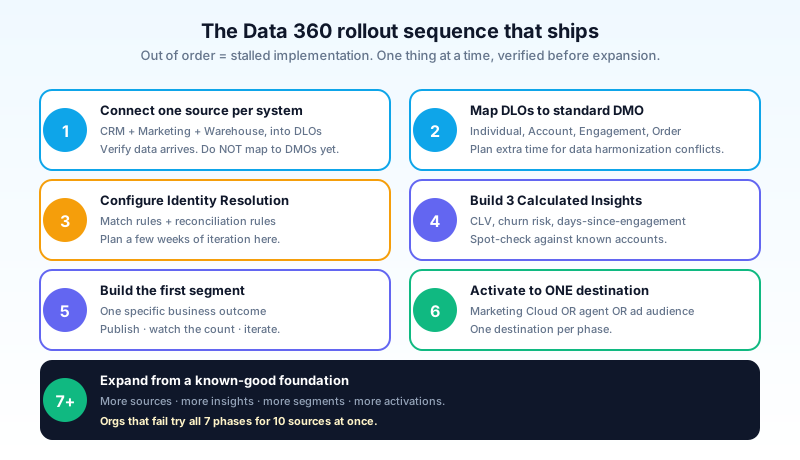
Phase 1: connect one source per system of record. Salesforce as Source A. Marketing Cloud as Source B. Snowflake (or your data warehouse) as Source C. Stream all three into Data 360 as DLOs. Verify the data arrives and matches what you expected. Do not start mapping to DMOs yet. The point is to confirm connectors work end to end.
Phase 2: map to the standard data model. Open the standard Data 360 data model. Map your DLO fields onto Individual, Account, Engagement, Order. The standard schema covers most use cases; extend with custom DMOs only when your data does not fit. Plan extra time here: harmonizing fields across three sources reveals data quality problems your team has been ignoring for years.
Phase 3: configure identity resolution. Define match rules (exact email, fuzzy name + city, normalized phone). Define reconciliation rules (Source A wins for first name, most-recent wins for current address, Source B wins for marketing-opt-in status). Run identity resolution against your DMO data and inspect the unified profiles. Tune the rules until the match-rate-by-source looks right.
Phase 4: build the first three calculated insights. Pick three metrics the business asks for: customer lifetime value, churn risk score, days since last engagement. Build them as Calculated Insights. Run them. Spot-check the results against known accounts. Tune the formulas.
Phase 5: build the first segment. Pick one specific business outcome: re-engage lapsed high-value customers, target net-new prospects in a region, notify churn-risk accounts to the CS team. Build the segment definition against your DMOs and Calculated Insights. Publish it. Watch the count.
Phase 6: activate to one destination. Send the segment to one downstream system. Marketing Cloud, an ad audience, Slack, an Agentforce agent. One destination per phase. Confirm the activation runs, the destination receives the segment, the downstream system uses it.
Phase 7+: expand. Add more sources. Add more DMO custom extensions. Add more calculated insights. Add more segments. Add more activations. Each subsequent phase should follow the same pattern: one thing at a time, verified before expansion.
The orgs that stall try to do all seven phases in parallel for ten data sources and twenty segments at once. The orgs that ship do one source, one identity resolution pass, one segment, one activation, and then expand from a known-good foundation.
Identity Resolution: the part that breaks most rollouts
Identity Resolution is genuinely the hardest part. Connecting data sources is engineering work. Resolving identities across sources is data hygiene work, which is harder.
Match rules. You define what counts as "same person". Exact match on hashed email is the cleanest signal. Fuzzy match on first name + last name + city handles common typos. Normalized match on phone number handles formatting differences. Compound rules combine these. Be careful with fuzzy matching: too loose merges different people into one profile, too strict leaves duplicates.
Reconciliation rules. When two matched records disagree, you decide which wins. Recency-based ("most recent update wins"), source-priority ("Salesforce wins over Marketing Cloud"), completeness-based ("the record with more fields populated wins"). Most production implementations use a mix.
Match-rate visibility. Data 360 surfaces match rates and ambiguity scores. Use them. A match rate of 90 percent across three sources is suspicious (probably too loose). A match rate of 20 percent is suspicious (probably missing obvious matches). Aim for the rate the data actually supports, not the rate that looks good in a presentation.
Re-running identity resolution. When you add a new data source, identity resolution should re-run across all sources to incorporate the new signals. The recomputation is incremental in 2026, so the cost is bounded, but it is not free. Plan for the recompute window when adding sources to a mature deployment.
The pitfall: most enterprises have data quality issues their identity resolution rules will surface. Bad data in source systems was tolerable when each system stood alone. When Identity Resolution merges them, the bad data creates wrong unified profiles. Plan for a data-cleanup cycle in source systems before tightening Identity Resolution rules.
Zero-Copy Federation: the 2026 differentiator
The biggest architectural shift in Data 360 versus the older Data Cloud is Zero-Copy Federation.
Old model: copy your customer data from Snowflake into Data Cloud, run analytics against the copy, accept storage costs and sync lag.
New model: leave the data in Snowflake (or Databricks, or BigQuery, or S3). Configure a Zero-Copy connector. Data 360 queries the remote data at read time. Identity resolution, calculated insights, and activations work against the federated data without ever copying it into the Data 360 lake.
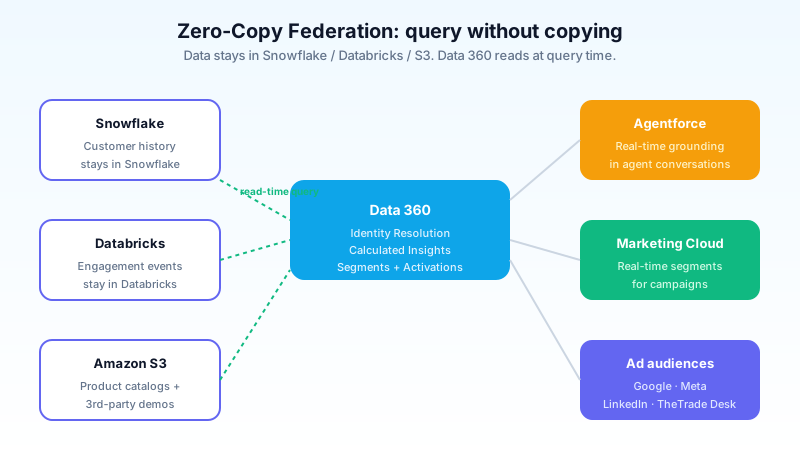
The implications:
- No ETL pipelines for federated sources. The data engineering team does not maintain a Snowflake-to-Data-360 sync. Data 360 reads on demand.
- No storage cost for the federated data. You pay for Snowflake storage. You pay Data 360 only for what it computes against, not for the underlying lake.
- Real-time read consistency. When your Snowflake table updates, Data 360 sees the update on the next query. No nightly batch lag.
- Trade-off: query latency. A federated query through a remote lake is slower than a query against locally-replicated data. For activations that run hourly, the latency is invisible. For real-time agent grounding, the latency might matter.
The pattern that works: use Zero-Copy Federation for cold or rarely-updated data (historical orders, product catalogs, third-party demographic data). Ingest hot data (recent CRM updates, real-time web events, current campaign engagement) directly into Data 360 lake objects for faster query latency.
The pattern that fails: trying to federate everything because the marketing material says you can. Federated queries that run constantly on hot paths slow agent responses, which is the use case Data 360 is supposed to power.
Calculated Insights and Segments in practice
Calculated Insights are SQL-like derived metrics. Segments are filtered subsets of the unified profile.
A typical Calculated Insight: customer_lifetime_value = SUM(order_amount) over Orders where customer_id = Individual.id, filtered to orders within the last 24 months. Computed daily, written back to the Individual DMO as a field.
A typical segment: high_value_lapsed = Individual.customer_lifetime_value > 5000 AND Individual.days_since_last_purchase > 90 AND Individual.churn_risk_score < 0.5. Refreshes hourly. Activates to Marketing Cloud for re-engagement.
The composition pattern:
- Build Calculated Insights for the metrics your segments will use.
- Build segments that filter on those Calculated Insights plus raw DMO fields.
- Activate segments to the downstream systems that use them.
The performance pattern: Calculated Insights run in the background on a schedule. Segments run on demand or schedule. Activations push results to destinations. Each layer caches its outputs so the downstream consumer does not re-compute on every read.
The pitfall: building a Calculated Insight that does work that should have been done upstream in your data warehouse. If your warehouse already has customer_lifetime_value as a computed column, federate the data and reference the existing column. Do not re-implement the calculation in Data 360 just because you can.
Activations: where the data lands
The output of Data 360 is segments activated to other systems. The supported destinations in 2026 are:
- Marketing Cloud (Engagement and Next). Audiences for campaigns, journeys, send sources.
- Agentforce. Real-time grounding for agent conversations. The agent retrieves the active segments a customer is in and uses them in prompts.
- Ad audiences. Google Ads, Meta, LinkedIn, The Trade Desk, and other DSPs receive segment audiences for paid media activation.
- Data warehouses. Snowflake, Databricks, BigQuery receive segment-membership tables for further analysis.
- SFTP. For legacy systems that consume audience exports as files.
- Custom destinations via MuleSoft. Anything not natively supported.
The activation cadence varies by destination. Marketing Cloud and Agentforce can receive near-real-time updates. Ad audiences refresh hourly or daily. SFTP exports run on a schedule.
The 2026 improvement worth flagging: Agentforce activations now include explanatory context, so the agent receiving the segment knows why a customer is in the segment, not just that they are. This closes a loop the older Data Cloud could not.
The pieces of Data 360 that are bad
Calling out what is worse, with specifics:
The terminology is dense. Twelve top-level concept objects is a lot. The documentation assumes you know which order to learn them in. New admins typically spend the first month asking what a Data Lake Object is versus a Data Model Object, why both exist, and which one they should be working with. The answer is "both, sequentially", but the docs do not lead with that.
Pricing is consumption-based and opaque. Data 360 is priced on credits consumed for ingestion, identity resolution, calculated insights, segments, and activations. Each operation has a credit cost. The pricing page does not lead with a clear per-action cost table. Customers regularly under-budget for the first year and renegotiate. Bring a financial model to the sale conversation, not trust the default sizing.
Identity Resolution rules are hard to test. You configure match rules, run identity resolution, and look at the result. If the match rate is wrong, you tune the rules and re-run. The feedback loop is slow (minutes to hours per run on production-scale data) and there is no test-mode that simulates rules against a sample before committing. Plan for a few weeks of iteration here.
Zero-Copy Federation is great when it works. When it does not (network issues, source system performance, malformed schemas), the failure modes are subtle. A federated query that returns wrong results because of a schema drift in Snowflake is harder to debug than an ETL pipeline that broke and you can see in your logs. Instrument federation thoroughly.
These are the rough edges. The platform is the right answer for orgs that need a unified customer data foundation. The rough edges are what to plan around.
Data Spaces: multi-tenancy inside one org
A feature worth calling out separately because it gets missed in most overviews. Data Spaces partition your Data 360 instance into logically-isolated namespaces, each with its own set of DLOs, DMOs, identity resolution rules, calculated insights, segments, and activations.
The use cases:
- Regional data sovereignty. EU customer data in one Data Space subject to GDPR rules, US data in another. Identity resolution does not cross spaces. Activations honor space boundaries.
- Brand or business unit isolation. A parent company with three customer-facing brands keeps each brand's customer data in a separate Data Space so internal teams do not accidentally cross-target.
- Sandbox-like development environments. Dev Data Space, UAT Data Space, Production Data Space. Test rule changes in dev before promoting to production.
Data Spaces are not free; each space adds setup complexity and consumes some credits independently. They are right for orgs with clear isolation requirements and wrong for orgs that just want development environments. For the latter, regular sandboxes are still the right answer.
The activation pattern: a segment built in one Data Space activates only to destinations configured in that space. Cross-space activations require explicit configuration and most orgs do not allow them by policy.
What to do next
Open Setup, search "Data 360" (or "Data Cloud" if your org has not picked up the rename yet). If it is provisioned, you will see the app. Open it. Look at the Data Streams tab. If there are no streams, the first move is connecting one source: pick Salesforce CRM, configure the standard data stream, watch the data arrive in a Data Lake Object. That is one afternoon of work, no risk, and it makes the rest of the platform make sense.
If you have Data 360 provisioned but no streams configured, the next move is the audit. Pull the credit usage report. Look at where your credits are being consumed. If they are being consumed without a corresponding business outcome (no activated segments, no agent grounding, no marketing audiences), the platform is costing money without producing value, and the rollout needs to restart with phase 1.
If you have an active Data 360 implementation, the next move is the data quality conversation. Identity Resolution surfaces the data quality issues in your source systems. Pull the match rates by source. Look at the ambiguity scores. Schedule a quarterly data quality cycle with the data owners of each source system. The unified customer profile is only as good as the data you feed it.
About the Author
Dipojjal Chakrabarti is a B2C Solution Architect with 29 Salesforce certifications and over 13 years in the Salesforce ecosystem. He writes and edits salesforcedictionary.com, published by KineticBit Inc., to help admins, developers, architects, and cert/interview candidates sharpen their fundamentals. More about Dipojjal.
Share this article
Sources
Related dictionary terms
Practise it
Five questions on Data Cloud Consultant
Exam-style questions with an explanation after each one. No account needed, and your answers build a weak-topic map once you have one.
Keep reading

Data Cloud Is Now Data 360: What Actually Changed (and Why It Matters)
Data Cloud became Data 360 in October 2025. Beyond the rename: Zero-Copy Federation, Tableau Semantics, the Lakehouse, and a new credit model. Here's the full picture.
Salesforce CRM Analytics: The Complete 2026 Guide
CRM Analytics is Salesforce's native embedded analytics. This 2026 guide covers datasets, recipes, dashboards, Einstein Discovery models, and how to pick it over Tableau or standard Reports.

What Is Agentforce 360? The Complete 2026 Guide for Salesforce Admins, Developers & Architects
Agentforce 360 is Salesforce's 2025 rebrand of its agentic-AI platform - built on the Atlas Reasoning Engine, Einstein Trust Layer, and Data 360. Here's the complete admin + dev + architect guide.
Comments
No comments yet. Start the conversation.
Sign in to join the discussion. Your account works across every page.