
Salesforce Slack AI: The Complete 2026 Guide
Channel recaps, thread summaries, AI search, and Agentforce inside Slack: what works, what to configure, and where it falls down.
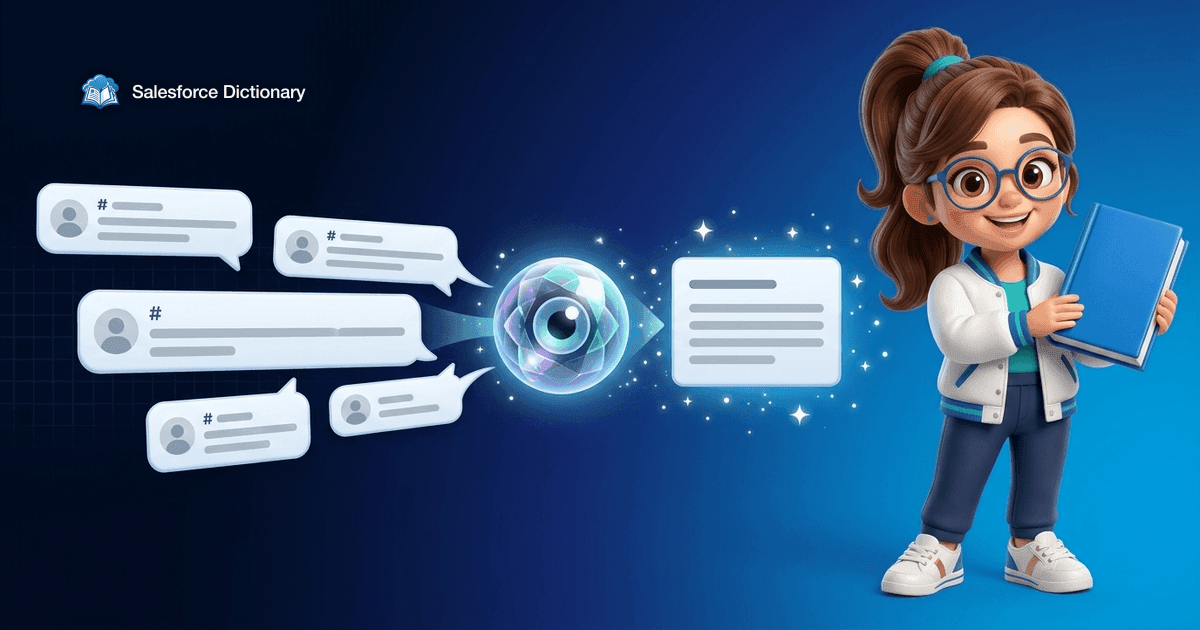
You return from a week off, your Slack has 4,300 unread messages across 27 channels, and a customer call starts in 30 minutes. You used to skim, panic, and bluff. Now you click "Catch up" on three channels, read the bulleted recaps, and walk into the call knowing the deal slipped, the renewal got pulled forward, and the engineering team is mid-incident on the integration the customer cares about. That is what Slack AI is for. The rest of this guide is what you actually need to know to run it well.
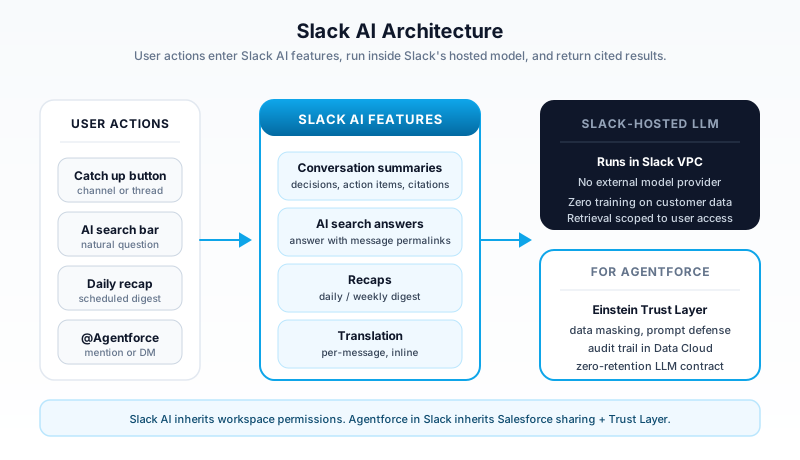
Slack AI is the native generative AI surface inside Slack: channel recaps, thread summaries, AI-powered search answers, and translated messages. Agentforce in Slack is the layer above that, where Salesforce's agents work alongside humans inside channels, DMs, and workflows. The two are different products, sold differently, governed differently, and they overlap in ways that confuse customers. This guide untangles them.
What Slack AI actually is
Slack AI is a paid add-on for Slack workspaces on Pro, Business+, and Enterprise Grid. It runs as a native feature inside the Slack client, not as a bot or a third-party app. The pricing sits on top of the base Slack subscription, billed per active user per month, and a workspace owner turns it on for the whole org or for selected user groups.
Three capabilities ship in the core product today:
- Conversation summaries for channels and threads. You click "Summarize" on any channel or thread, and Slack returns a structured recap: key decisions, action items, open questions, and links back to the source messages.
- AI search answers in the global search bar. Instead of returning a list of messages, search now answers the question directly with cited sources. Ask "what did we decide about the renewal pricing for ACME?" and you get an answer with three message links underneath.
- Recaps on a daily and weekly cadence. For channels you mark as important, Slack delivers a digest at a schedule you set. The recap surfaces the decisions and discussions you would have missed, without you scrolling.
A fourth capability, message translation, runs in the same surface for global teams. Translation is free at the per-message level and predates Slack AI as a paid feature, but it lives in the same UX now.
The model behind Slack AI is hosted inside Slack's infrastructure. Slack runs the LLM in its own VPC. Your messages are not sent to a third-party model provider's servers, are not retained by the model after the call, and are not used to train Slack's models or anyone else's. Slack publishes this contract in writing because their enterprise customers refused to turn the feature on without it.
How summaries and search actually work
The mental model is retrieval-augmented generation, scoped to what you can see.
When you ask for a channel recap, the AI does not read every message in the channel. It pulls the messages from the time window you asked for, filtered to what your user account is allowed to see. Then it feeds those messages into the LLM with a fixed system prompt that says "produce a structured recap with decisions, action items, and open questions, cite each point with the message permalink." The LLM returns the recap, the Slack client renders it, and the citations are clickable.
Search answers work the same way, with a different retrieval step. The user query gets vectorized, the index returns the top-K relevant messages from channels the user belongs to, those messages get fed into the LLM, and the LLM returns a cited answer.
Two consequences fall out of this design.
First: the AI never sees a message you cannot see. Private channels you are not in, DMs you are not part of, files you do not have access to: none of it reaches the model when you run a recap or a search. Slack inherits the workspace permission model into the AI surface, the same way good Salesforce features inherit sharing rules.
Second: the AI is only as good as the conversation. If your team has three threads, twenty emoji reactions, and one decision buried in a screenshot, the recap will miss it. The model reads text. It does not parse images, it does not ingest video, and it does not infer decisions from a thumbs-up reaction. You will see this in practice within your first week.
Agentforce in Slack: the layer above
Agentforce in Slack is a separate, larger story. Slack AI summarizes messages. Agentforce takes actions.
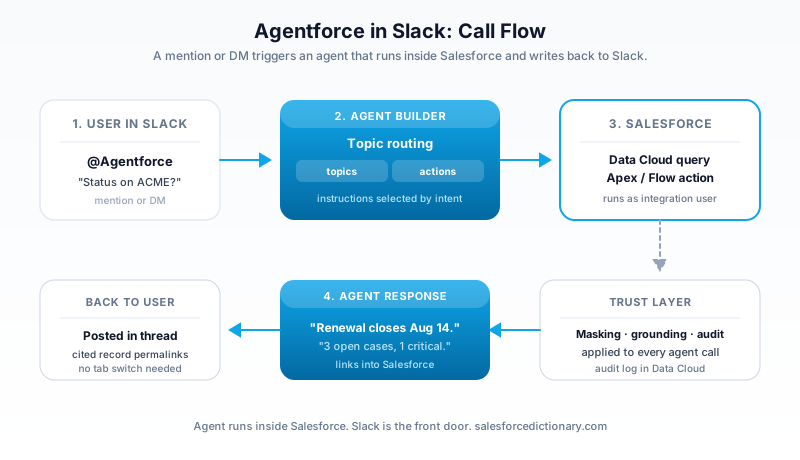
An Agentforce agent in Slack is a Salesforce-hosted agent surfaced as a Slack user. You @mention it, you DM it, or you trigger it from a workflow step. The agent's instructions, topics, and actions live in Agent Builder inside Salesforce. The Slack interface is just the front door. Behind the @mention, the agent is calling Apex, querying Data Cloud, running Flows, and writing back to Salesforce records, all governed by the Einstein Trust Layer.
Three usage patterns dominate in customer deployments today:
- Sales rep asking for account context. Rep DMs the Agentforce SDR agent: "what's the latest on ACME's renewal?" The agent pulls open opportunities, recent case activity, last call notes from Data Cloud, and returns a summary in the DM with links into Salesforce.
- Service team handling a triage thread. Support engineer types
@Service Agentin a customer-impacting incident channel: "create a sev-2 case for this thread and page the on-call". The agent reads the thread, creates the Case in Service Cloud, attaches the Slack permalink, and posts back the case number. - Recruiter screening candidates. Recruiter shares a job description in a channel and asks the Agentforce HR agent to find matching internal applicants. The agent queries the ATS, returns five candidates with strengths and gaps, and offers to send introduction DMs.
The pattern that does not work yet, despite the marketing: fully autonomous agents that act on their own initiative in your channels without a human prompt. Today's Agentforce-in-Slack agents are reactive. Someone has to mention them or trigger them from a workflow. That is the right design for 2026, even if the demos sometimes imply otherwise.
How to configure Slack AI
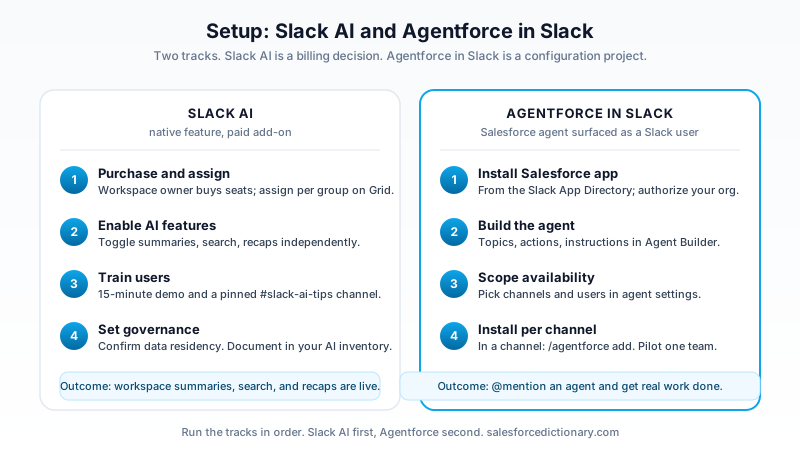
Turning Slack AI on is mostly a billing decision. The configuration work that matters happens after.
Step 1: Purchase and assign. A workspace owner or org admin on Enterprise Grid buys Slack AI seats. On Enterprise Grid you can assign seats by user group: pilot it with the leadership team, then expand. On smaller plans it is workspace-wide.
Step 2: Enable the AI features. In Settings & administration, the org admin toggles Slack AI on. Channel recaps, AI search, and daily recaps each have an independent toggle. Most customers turn on summaries first, search next, and recaps last.
Step 3: Train your users. This is the step every rollout under-invests in. Slack AI's value is invisible until someone shows you the "Catch up" button and the search-answer bar. Run a 15-minute internal demo. Make a screen recording. Pin it in a channel called #slack-ai-tips. Your adoption curve depends on this more than on any config setting.
Step 4: Decide your data governance posture. Slack AI inherits workspace data residency. If your workspace is hosted in the EU, prompts and completions stay in the EU. Confirm this with your legal team and document it in your AI inventory. If your industry requires data classification on conversations, layer on Slack's enterprise key management and information barriers before turning AI features on.
For Agentforce in Slack, configuration is heavier:
- Install the Salesforce app in Slack from the Slack App Directory and authorize it for your Salesforce org.
- In Agent Builder, build or activate the agent you want to expose in Slack. Configure topics, actions, and instructions.
- In the Agent's channel-targeting settings, decide which Slack channels and users the agent is available in.
- Add a channel installation: in a target Slack channel, type
/agentforce addand select your agent. The agent appears as a member of the channel. - Test with a low-risk user before expanding. Agentforce agents have access to Salesforce data, and a misconfigured action can write to production records.
The Agentforce setup is more involved because the agent is doing real work on real records. Slack AI summarizes conversations; Agentforce changes data.
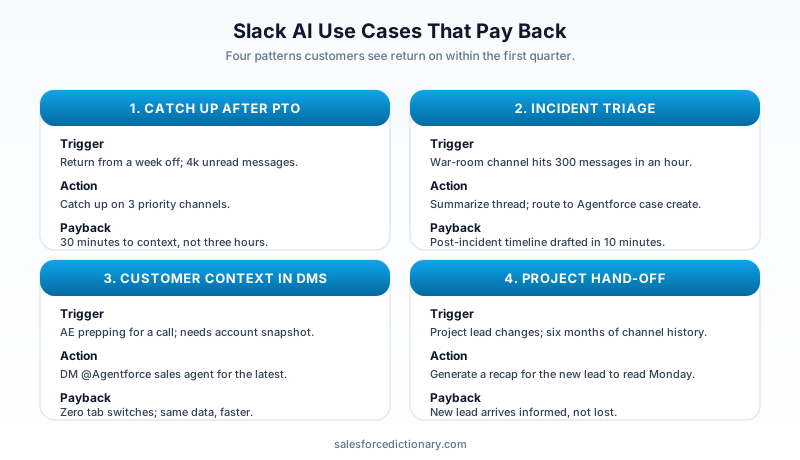
Real-world use cases that pay back
After two years of deployments, three patterns return measurable value with little ceremony.
Incident response. Major incidents on engineering teams generate hundreds of messages in 30 minutes. The post-incident review used to take an engineer two hours to write. With Slack AI, a senior engineer runs a thread summary on the war-room channel, edits it for 10 minutes, and ships the timeline to the customer the same day. The recap is not the report, but it gets you 70% of the way there.
Customer 360 in DMs. Sales and Customer Success teams used to switch tabs to Salesforce thirty times a day. With an Agentforce sales agent installed, they ask for account context in a DM and get it without leaving Slack. The win is not the answer; it is the elimination of the context switch.
Project hand-offs. Friday afternoon, the project lead types "summarize this channel for next week's lead" into the channel they are leaving. The new lead reads the recap on Monday, scans the action items, and walks into standup informed. This use case sells itself once one person tries it.
The pattern that has not yet paid back consistently: AI search as a knowledge base replacement. Slack AI search is good at finding decisions that were made in conversation. It is bad at being a single source of truth for documented knowledge. If your team uses Notion or Confluence, search Notion or Confluence first; use Slack AI search for "what did we say about this last week" questions.
Limitations and gotchas
Six things will bite you in the first three months.
1. Files are not summarized. A PDF dropped in a channel is invisible to the recap. The recap will mention "Alex shared a file" and stop. If your team works in attachments, the AI's view of the channel is incomplete by design. Either move file commentary into the message body or accept the gap.
2. The summary quality drops on noisy channels. A channel with 400 messages a day across 30 threads produces a recap that reads as generic. The model has too much to compress. Recaps are best on channels with 20 to 100 messages per day and clear topical focus.
3. Citations are message-level, not claim-level. When the recap says "the team decided to move the launch to Q2", the cited message is the one where the decision was stated, not every message that contributed. If you need provenance for compliance, you will need to click through.
4. Search answers can be confidently wrong. If three people discussed a topic and one of them stated something incorrectly without correction, the AI may surface the incorrect statement as the answer. Slack AI is a layer over your conversations; it does not fact-check them. Train your team to read citations before quoting an answer.
5. Cross-workspace search is limited. On Enterprise Grid, AI search by default scopes to the workspace the user is in. Org-wide search exists but requires configuration. Plan this with your IT team before you promise leadership a "search the whole company" experience.
6. Agentforce agents in Slack inherit Salesforce permission errors. If your agent action runs as the Salesforce integration user, and the integration user lacks field-level security on the field the user asked about, the agent will return "I cannot find that information" rather than a permission error. This looks like a model hallucination but is actually a configuration problem. Audit your Agentforce agent's running user before you blame the AI.
What Slack AI does not replace
Slack AI does not replace a written knowledge base. It does not replace a CRM. It does not replace standup, retrospective, or status updates. It compresses the cost of catching up on conversation, which is a real and large cost. It is best understood as a productivity layer on top of the work your team already does in Slack, not a substitute for any structured tool.
The same goes for Agentforce in Slack. The agent is not a manager, an analyst, or a decision-maker. It is a fast, polite interface to your Salesforce data and your business processes, accessible from where your team already works. That framing keeps expectations honest and the rollout on track.
Your next step
If you are evaluating Slack AI for the first time, do this in order. Turn on summaries for a single team for two weeks. Measure how often people click "Catch up". Survey the team for the two questions: "did the recap save you time?" and "did the recap miss anything important?" The first question gives you the case for expansion; the second tells you where to invest in conversation hygiene. Then layer in AI search, then layer in Agentforce. Do not do all three at once: each one needs its own adoption push, and combining them turns the rollout into a vague AI initiative that nobody owns.
About the Author
Dipojjal Chakrabarti is a B2C Solution Architect with 29 Salesforce certifications and over 13 years in the Salesforce ecosystem. He writes and edits salesforcedictionary.com, published by KineticBit Inc., to help admins, developers, architects, and cert/interview candidates sharpen their fundamentals. More about Dipojjal.
Share this article
Sources
Related dictionary terms
Practise it
Five questions on Agentforce Specialist
Exam-style questions with an explanation after each one. No account needed, and your answers build a weak-topic map once you have one.
Keep reading
Salesforce Einstein Trust Layer: The Complete 2026 Guide to Secure AI
Your security team asks where the customer data goes when Agentforce processes it. Here is the full answer: how the Einstein Trust Layer's prompt journey, data masking, zero-data retention, and toxicity detection actually work.
Salesforce Multi-Agent Orchestration: The Complete 2026 Guide
In 2026, orgs run an average of 12 AI agents - half in isolated silos. Learn the primary-and-specialist architecture, Agent Fabric, and the A2A protocol that turn agent sprawl into coordinated enterprise AI.
Salesforce Prompt Builder: The Complete 2026 Guide for Admins & Developers
Prompt Builder is the no-code studio that connects your Salesforce data to any LLM — and in 2026, it's the foundation of every Agentforce Agent Action. Here's the complete guide for admins and developers.
What Is Agentforce 360? The Complete 2026 Guide for Salesforce Admins, Developers & Architects
Agentforce 360 is Salesforce's 2025 rebrand of its agentic-AI platform - built on the Atlas Reasoning Engine, Einstein Trust Layer, and Data 360. Here's the complete admin + dev + architect guide.
Comments
No comments yet. Start the conversation.
Sign in to join the discussion. Your account works across every page.