
Salesforce Connected App OAuth Security: Find and Kill the Dormant Grants Before Someone Else Uses Them
Most orgs are sitting on forgotten OAuth grants from vendors nobody uses anymore. Here is how that handshake works, why it outlives the relationship, and how to audit and harden it.
You open Setup, type "[Connected Apps OAuth Usage](/terms/connected-apps-oauth-usage)," and start scrolling. Most rows make sense. Your data loader. Your BI tool. The marketing platform. Then you hit one named after a vendor you piloted two years ago, a contract that lapsed, a Slack channel that went quiet. The grant is still here. It still has a refresh token. Its last-used date is blank or stale, but blank does not mean dead. It means nobody has looked.
That row is a live key to your org's data, held by a company you no longer have a relationship with, monitored by no one. Multiply it across every trial, every "let's just connect it and see," every integration whose owner left the company, and you have the quietest high-value attack surface on the platform. This guide explains what that grant actually is, why it survives long after you stop caring about the vendor, and exactly how to find, kill, and keep killing the dormant ones.
What a Connected App and an OAuth grant actually are
A Connected App is the record in your org that lets an external application talk to Salesforce through the API instead of through a browser login. When a third party wants to read or write your data programmatically, it registers as a Connected App, declares which OAuth scopes it needs, and asks a user to approve.
OAuth is the protocol that does the approving. A user signs in once, consents to the scopes the app requested, and Salesforce hands the app two things: a short-lived access token and a long-lived refresh token. The access token expires in hours. The refresh token is the dangerous one. As long as it stays valid, the app can mint fresh access tokens on its own, forever, without the user ever logging in again. Salesforce's Authorize Apps with OAuth documentation lays out the full set of flows behind this handshake.
This is the part that catches admins off guard: that refresh token is what creates the grant in the first place. The grant is not the app. It is the standing permission, tied to a user and a set of scopes, sitting in your org waiting to be redeemed. It is also why multi-factor authentication on the user's account does not cover this. MFA protects the interactive login. The grant was already established before any attacker showed up. Token redemption is not an interactive login, so it never triggers an MFA prompt. You can have phishing-resistant MFA on every human in the org and still leak every account record through a refresh token nobody remembers issuing.
Worth contrasting this with the opposite direction of travel. When Salesforce calls out to an external API, you store the secret in a Named Credential, covered in the Named Credentials and External Credentials guide. That is outbound auth, where you hold the key. Connected App OAuth grants are inbound: someone else holds the key to your data. The governance instincts are mirror images, and most teams have only built the outbound half.
Why this is not theoretical
In August 2025, attackers tracked by Google's Threat Intelligence Group as UNC6395 did exactly what the previous section describes, at scale. They got hold of OAuth tokens tied to Drift, a Salesloft-owned AI chat product that thousands of companies had connected to Salesforce. With those tokens, they did not need to break into Salesforce. They were already trusted.
Per Google's technical writeup, "beginning as early as Aug. 8, 2025 through at least Aug. 18, 2025, the actor targeted Salesforce customer instances through compromised OAuth tokens associated with the Salesloft Drift third-party application." Over roughly ten days they systematically queried and exported records from more than 700 organizations, including Cloudflare, Google, PagerDuty, Palo Alto Networks, Proofpoint, and Zscaler.
The data taken was the ordinary stuff that lives in a CRM: support case text, contacts, account information, opportunities. The Salesforce platform itself was not breached. The grants were the breach. And the attackers knew what they were after. Google assessed that "the primary intent of the threat actor is to harvest credentials," combing the exported records for plaintext AWS keys, Snowflake tokens, and VPN logins to fuel follow-on attacks. For organizations that had wired Drift broadly, the stolen tokens reportedly stretched past Salesforce into Slack, Google Workspace, and other connected platforms. FINRA's supply chain alert put it plainly: "threat actors stole OAuth authentication tokens that allowed them to impersonate the trusted Drift application and gain unauthorized access to customer environments." Salesloft and Salesforce revoked all active Drift tokens on August 20, 2025.
If you want a more recent reminder that this keeps happening, this site covered another OAuth-driven CRM breach on its own newsbeat in June 2026, the Klue incident. The pattern does not change. A trusted integration's tokens become an attacker's master key.
The OAuth flows you control, and their risk profile
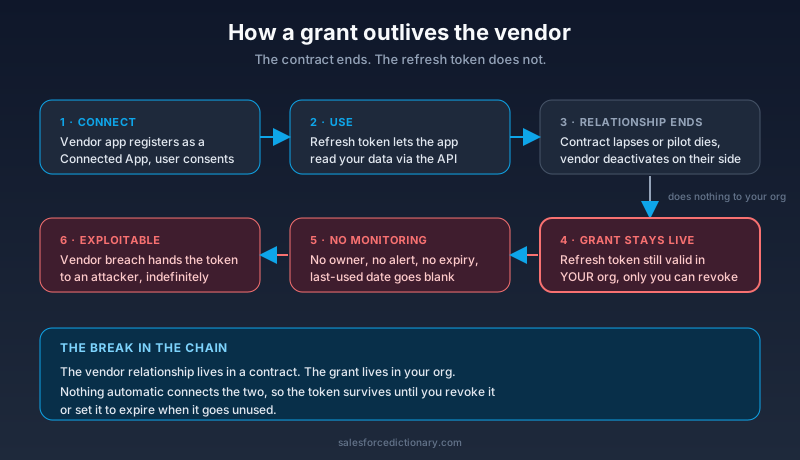
Not every grant is equally dangerous, because not every Connected App uses the same flow to get its tokens. Four flows cover almost everything you will see, and your job is to decide which to allow and which to block.
Web Server Flow with PKCE is the modern default for any app where a human signs in through a browser. PKCE (Proof Key for Code Exchange) binds the authorization code to the client that requested it, which kills the most common code-interception attack. If a vendor offers PKCE, require it. This is the flow you want most third-party SaaS using.
JWT Bearer Flow is server-to-server with no human present. The app holds a certificate, Salesforce trusts that certificate's public key, and every token request is a signed JWT. There is no refresh token to steal because there is no interactive consent. For scheduled syncs and backend integrations, this is the cleanest option, because the trust is anchored to a key you can rotate rather than a token sitting in a vendor's database.
Client Credentials Flow is also server-to-server, but it authenticates with a static client ID and secret instead of a signed assertion. It is simpler and fine for lower-value internal work. The tradeoff is that the secret travels and can be copied, so treat it like a password and rotate it on a schedule.
Username-Password Flow is the one to disable. It hands the integration a real user's username and password, which means those credentials live in the vendor's config, bypass MFA entirely, and break every modern identity control you have. Salesforce itself frames this flow as for special legacy scenarios only. In 2026 there is almost no integration that needs it and cannot use something safer. Block it at the org level and make exceptions only with a written reason.
Why the dormant grant survives the vendor relationship
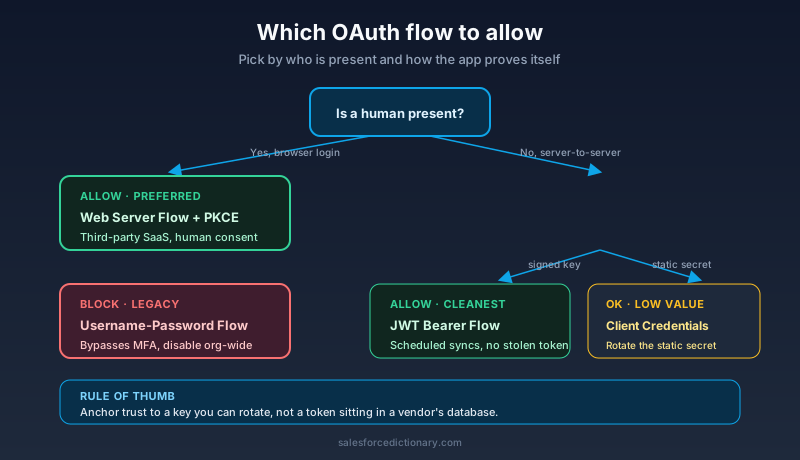
Here is the structural trap. The grant lives in your org. The vendor relationship lives in a contract. Those two things are not connected by anything automatic.
When you stop paying a vendor, when your champion leaves, when the pilot quietly dies, none of that touches the refresh token in your org. The vendor can deactivate the integration on their side. They can shut down the customer account. They can delete your config from their dashboard. Your grant does not notice. It is a record in your org, and only your org can revoke it. "Uninstalling" on the vendor's side does precisely nothing to the standing permission they were granted to read your data.
So the default trajectory of every integration you ever try is: connect, use, forget, and then the grant just sits there. No expiration unless you set one. No alert when it gets used after a year of silence. No owner once the person who set it up moves on. If the vendor later gets breached, and the Salesloft case shows that vendors do get breached, your forgotten grant is now an attacker's grant, and you will not find out from your own monitoring because you were not monitoring it.
This is why the problem is structural rather than a matter of any single careless admin. The platform will happily keep a grant alive forever. The discipline to expire and revoke has to come from you.
The OAuth policies you can actually set on a Connected App
Salesforce gives you real controls here, on each Connected App's OAuth policy page. Most orgs leave them at the permissive defaults. The Manage OAuth Access Policies documentation walks through each one. The settings worth tightening:
Permitted Users. The default, "All users may self-authorize," lets any user in the org consent to the app and create a grant. Change it to "Admin approved users are pre-authorized." Now only users in a Permission Set or Profile you assign can connect the app at all. This single change turns OAuth grant creation from a free-for-all into something you gate.
Expire refresh token if not used for N days. This is the most important setting for the dormant grant problem, and it is off by default. Set it to something like 30, 60, or 90 days. Any grant that goes unused for that window dies on its own. The two-year-old trial grant cannot rot in your org for two years if the refresh token expires after a quarter of silence.
IP Relaxation. Set this to "Enforce IP restrictions" where the integration runs from known, stable addresses. A server-to-server sync that always calls from the vendor's fixed egress IPs should be locked to those ranges. A stolen token used from somewhere else then fails on the network boundary before it touches a record.
High Assurance and session policies. For apps touching sensitive data, require a high-assurance session so the grant is bound to a stronger authentication context, not just any session.
Scope minimization. When the app was approved, it asked for scopes. Check what it actually got. An integration that only reads cases does not need full or api plus refresh_token plus web. Pare the scopes to the minimum the integration genuinely uses. A narrower grant is a smaller blast radius if the token leaks.
The audit playbook
Concrete steps. Do these in order.
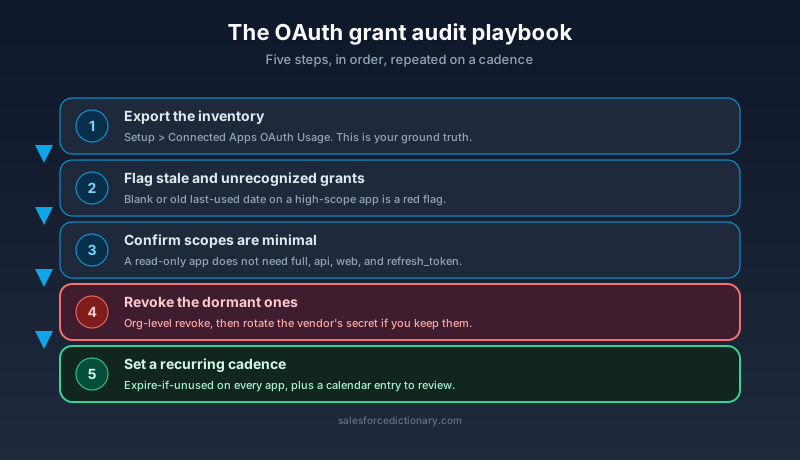
1. Pull the full inventory. In Setup, open Connected Apps OAuth Usage. This page lists every Connected App with an active OAuth grant against your org, how many users authorized it, and usage signals. Export it. This is your ground truth, and most admins have never opened it.
2. Flag the stale and the unrecognized. Read the user counts and last-activity signals. Two categories matter: grants you do not recognize at all, and grants for vendors you recognize but no longer actively use. Both are candidates for revocation. A blank or old last-used date on a high-scope app is a red flag, not a reassurance.
3. Check that scopes are minimal. For every grant you intend to keep, open it and confirm the OAuth scopes match what the integration actually does. Anything broader than necessary gets trimmed or, if the vendor cannot operate without excessive scope, reconsidered.
4. Revoke the dormant ones. From the OAuth Usage page you can revoke an app's access for the org in one action. Users can also revoke individual grants from their own personal settings per Salesforce's revocation guidance, but the org-level revoke is what you want for cleanup. After you revoke, also rotate any secret or certificate on the vendor's side if you are keeping the relationship, because revocation kills the token but not the underlying credential the vendor holds.
5. Set the recurring cadence. Revoking once is a fire drill. The point is to make the dormant pile stop refilling. Set refresh-token expiration on every app so dormancy becomes self-cleaning, and put a calendar entry on the OAuth Usage review.
If you have Salesforce Shield, you can go further than a periodic manual sweep. Event Monitoring captures API and login event logs, including which Connected App made which queries, so you can build a baseline of normal behavior and alert when a grant suddenly exports thousands of records it has never touched before. Transaction Security policies can block or notify on that pattern in near real time. The Salesloft attackers ran bulk queries for ten days. A rule that flags a connected app pulling abnormal record volumes would have lit up on day one. The full picture of Shield's monitoring layer is in the Shield complete guide.
Making it a practice, not a one-time cleanup
The cleanup is the easy part. Keeping the pile empty is the work.
Build an ownership registry. Every Connected App with a grant gets a named human owner and a one-line purpose. No owner, no grant. When that owner leaves the company, their offboarding includes reassigning or revoking the apps they stood up, the same way you reassign their records.
Tie grant revocation to vendor offboarding. When a contract ends or a pilot is killed, "revoke the Salesforce OAuth grant" goes on the offboarding checklist alongside cutting off SSO and reclaiming licenses. The grant is part of the vendor relationship, so it should die with the relationship, not outlive it by two years.
Run the OAuth Usage review on a cadence. Quarterly is reasonable for most orgs, monthly if you onboard integrations constantly. Pair it with the same review for phishing-resistant MFA coverage on your humans, covered in the MFA guide, so the inbound and the interactive attack surfaces both get looked at on schedule.
What to do next
Open Setup right now and go to Connected Apps OAuth Usage. Export the list. For every row, ask one question: do I know who owns this and why it exists? Revoke anything that fails that test today, because a dormant grant you cannot explain is a dormant grant you cannot trust. Then set "Expire refresh token if not used for 90 days" on every app you keep, so the next forgotten integration cleans itself up instead of waiting two years for an attacker to find it first.
About the Author
Dipojjal Chakrabarti is a B2C Solution Architect with 29 Salesforce certifications and over 13 years in the Salesforce ecosystem. He writes and edits salesforcedictionary.com, published by KineticBit Inc., to help admins, developers, architects, and cert/interview candidates sharpen their fundamentals. More about Dipojjal.
Share this article
Sources
- Google Cloud / GTIG: Widespread Data Theft Targets Salesforce Instances via Salesloft Drift
- FINRA: Cybersecurity Alert - Salesloft Drift AI Supply Chain Attack
- Salesforce Help: Manage OAuth Access Policies for a Connected App
- Salesforce Help: Authorize Apps with OAuth
- Salesforce Help: Manage OAuth-Enabled Connected Apps Access to Your Data
Related dictionary terms
Practise it
Five questions on Administrator
Exam-style questions with an explanation after each one. No account needed, and your answers build a weak-topic map once you have one.
Keep reading

Salesforce Named Credentials and External Credentials: The Complete 2026 Guide
Legacy Named Credentials are retiring. The new split between Named Credentials and External Credentials is how Salesforce expects every integration to authenticate in 2026. Here is what changed and how to migrate.
Salesforce Phishing-Resistant MFA: The Complete Setup Guide for 2026
Production enforcement of phishing-resistant MFA for Salesforce privileged users lands July 1, 2026. Here is what qualifies, who needs it, how to audit your org, and how to provision hardware keys and passkeys before the deadline.
Salesforce Shield: The Complete 2026 Guide
Salesforce Shield bundles Platform Encryption, Event Monitoring, and Field Audit Trail. Here is what each pillar does, what it breaks, what it costs, and when paying the 30 percent uplift is the right call.
Comments
No comments yet. Start the conversation.
Sign in to join the discussion. Your account works across every page.