
Salesforce Named Credentials and External Credentials: The Complete 2026 Guide
The modern way to store integration secrets, configure OAuth, and call external APIs from Apex, Flow, and Agentforce without leaking tokens

Your Apex class has been calling an external billing API for three years. The integration user's password lives in Custom Settings as plain text. Last night a security audit flagged it. This morning your CTO wants to know how every callout in the org authenticates, who can see the secrets, and whether any of this survives the next release.
You open Setup, type "Named Credentials," and find two tabs you do not remember being there. One says Named Credentials, the other says External Credentials. The thing you set up in 2021 is now labeled "Legacy." That label is doing real work, because legacy Named Credentials are scheduled for retirement.
Here is what changed, why Salesforce split one config into two, and exactly how to wire up the new model for Apex, Flow, External Services, and Agentforce in 2026.
The split: one record became two
Before Spring '23, a Named Credential was a single record that mixed three concerns: the endpoint URL, the auth protocol (Password, OAuth, JWT), and the per-user or org-wide credentials themselves. It worked, but it made permissioning awkward and migration between sandboxes a nightmare. Sharing the endpoint with five teams meant sharing the secret too.
The new model splits that single record into two pieces.
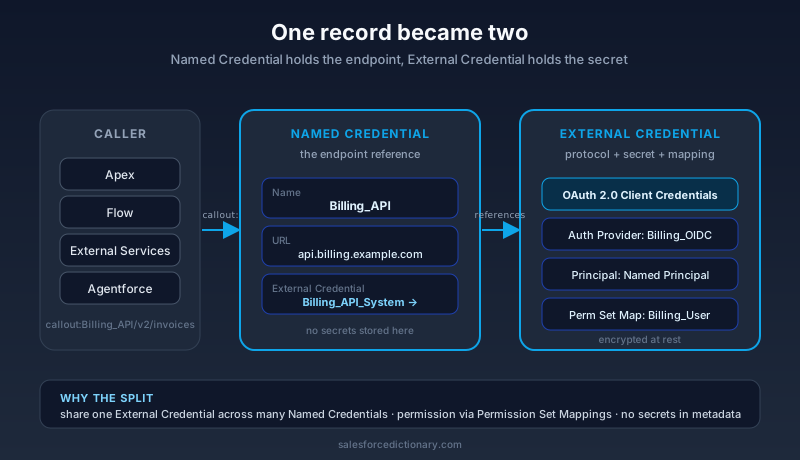
A Named Credential holds the endpoint URL and points at one External Credential. It is the thing your code references by name.
An External Credential holds the authentication protocol, the credentials themselves, and the [Permission Set](/terms/permission-set) Mappings that decide which users can use them. Multiple Named Credentials can share one External Credential. One External Credential can serve many endpoints.
The benefit is concrete. Your dev sandbox can have a Named Credential called Billing_API that points to https://sandbox.billing.example.com and uses a sandbox External Credential. Production has the same Billing_API name pointing at https://api.billing.example.com with a production External Credential. Your Apex says callout:Billing_API/v2/invoices in both orgs. No code change. No environment-specific branching. The official Salesforce Help on Named Credentials walks through this design rationale in more depth.
Why legacy Named Credentials are retiring
Legacy Named Credentials still work in 2026, but they are on a published retirement path. Salesforce's retirement notice lays out the reasons:
- They mix permissions and secrets in one record, which means anyone with Modify All Data on the Named Credential could read or change the credential.
- They cannot be controlled by Permission Sets, so per-team access requires Profile-level configuration.
- They predate Per-User External Credentials, so you cannot give every user their own OAuth token without ugly workarounds.
- Their migration story between orgs is bad. Connected App definitions, certificates, and the credential payload all have to be re-stitched by hand.
The new External Credential model fixes each of these. You will see warnings in Setup when you open a legacy record, and the Migrate button is one click. If you have a checklist for next quarter, putting "audit and migrate all legacy Named Credentials" on it is a reasonable item.
The five authentication protocols you will actually use
External Credentials support several protocols. Five cover the vast majority of real integrations.
OAuth 2.0 is the default for any modern SaaS API. Salesforce stores no password. The user (or a Per-User flow) signs into the external provider once, and Salesforce keeps the refresh token. The External Credential references an Auth Provider record that owns the client ID, client secret, and endpoints.
JWT Bearer Flow is for server-to-server callouts where no human is in the loop. You upload a certificate to the External Credential, the external provider trusts that certificate's public key, and every callout signs a JWT that the provider verifies. This is the protocol of choice for ETL, scheduled syncs, and most platform-event-driven integrations.
Client Credentials Flow is similar to JWT but uses a static client ID and client secret instead of a signed JWT. It is simpler to set up and adequate for low-value internal APIs. For higher-value integrations, prefer JWT because secrets do not have to travel.
Custom (Basic, Header, Mutual TLS) covers the long tail. Legacy SOAP endpoints that want HTTP Basic. Internal services that want a static API key in a header. Mutual-TLS endpoints that authenticate by certificate alone. The External Credential's Custom Auth headers feature lets you template these without writing Apex.
AWS Signature Version 4 is the protocol AWS APIs use. Salesforce ships native support, so you can call S3, SQS, Lambda, or Bedrock from Apex or Flow without writing the signing code yourself. This single feature is the reason a lot of Data Cloud and Agentforce deployments do not need MuleSoft for AWS integrations.
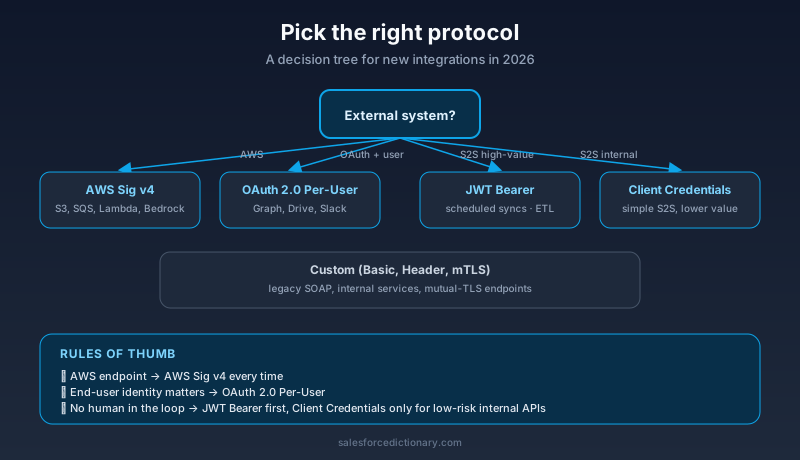
The decision tree is simple. If the external system speaks AWS, pick AWS Sig v4. If it speaks OAuth and a human will authenticate, pick OAuth 2.0 with Per-User. If it speaks OAuth and no human is in the loop, pick JWT Bearer. If it only supports Basic or a header, use Custom. Everything else is a special case.
Per-User versus Named Principal
Every External Credential picks one of two principal models.
Named Principal means there is exactly one credential stored on the org, and every user who calls through this External Credential uses that same credential. The external API sees one identity regardless of who triggered the callout. This is right for system-to-system flows where the external provider does not care about Salesforce user identity.
Per-User means each Salesforce user authenticates separately to the external provider. The External Credential stores a separate token per user. The external API sees the real user's identity. This is right for any flow where the user's permissions on the external system matter, such as a Microsoft Graph integration that should respect each user's mailbox access.
Permission Set Mappings glue users to principals. You create a Permission Set, map it to one or more External Credentials, and assign the Permission Set to the users who need access. A user without the mapping cannot use the Named Credential at all. The callout fails before it ever leaves the org.
This is the part most teams under-use. You can run the same OAuth integration with both modes side by side. A Named-Principal credential for system jobs, a Per-User credential for interactive Flow screens, both wrapped behind one Named Credential URL prefix.
Wiring it up: a real example
Walk through a billing API integration. The vendor speaks OAuth 2.0 Client Credentials. You need both system-scheduled syncs and user-triggered Flow actions.
Step 1: Create the Auth Provider. Setup, search "Auth Providers", click New, pick OpenID Connect. Paste the vendor's authorization, token, and userinfo URLs. Paste the client ID and client secret. Save.
Step 2: Create the External Credential. Setup, search "Named Credentials", open the External Credentials tab, click New. Name it Billing_API_System. Pick OAuth 2.0 as the protocol. Pick Client Credentials with Token Endpoint as the OAuth flow. Reference the Auth Provider you just made.
Step 3: Add a Permission Set Mapping. On the External Credential page, scroll to Permission Set Mappings, click New. Pick a Permission Set called Billing_Integration_User. Pick Named Principal as the identity type. Save. Assign that Permission Set to your integration user and to any admin who needs to test.
Step 4: Create the Named Credential. Same Setup page, click the Named Credentials tab, click New. Name it Billing_API. URL is the API root. Pick Billing_API_System as the External Credential. Tick "Generate Authorization Header" so Salesforce adds the bearer token automatically. Save.
Step 5: Call it. Anywhere in Apex:
HttpRequest req = new HttpRequest();
req.setEndpoint('callout:Billing_API/v2/invoices?status=open');
req.setMethod('GET');
HttpResponse res = new Http().send(req);
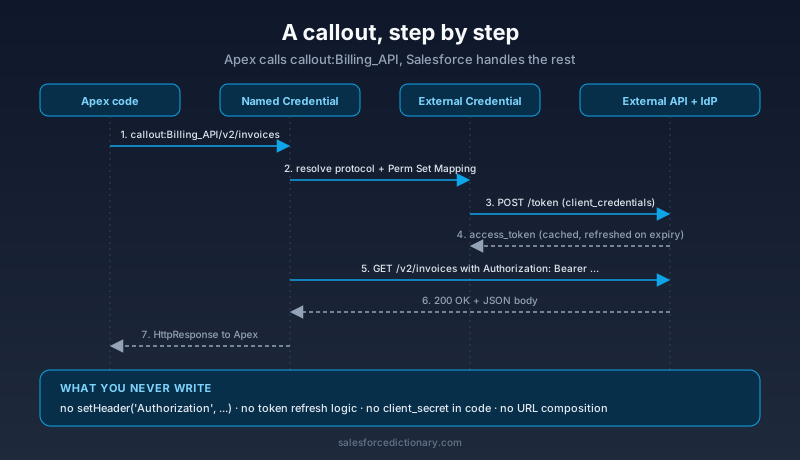
There is no token handling. No setHeader('Authorization', ...). Salesforce intercepts callout:Billing_API, looks up the External Credential, fetches or refreshes a token, attaches it, and sends the request. The Apex Developer Guide section on HTTP callouts with Named Credentials covers the full callout surface.
Using Named Credentials from Flow and External Services
Apex is the obvious case, but the new model shines in low-code paths too.
External Services is the no-code way to call REST APIs from Flow. You register an OpenAPI 3.0 schema, point it at a Named Credential, and Salesforce generates invocable actions for each endpoint. Your Flow drops in an HTTP Callout element, picks the registered service, picks the operation, and binds inputs and outputs. No Apex. The Named Credential handles auth, retry, and URL composition. If you have not touched External Services since the 2022 launch, the 2026 version is materially better, with named connections, dynamic header injection, and richer error handling.
HTTP Callout in Flow (the standalone element, separate from External Services) accepts a Named Credential directly. You can build a quick prototype in three clicks: pick the Named Credential, pick GET, paste a path. The element returns a structured response you can pattern-match without writing a single Apex line.
Agentforce actions that need to call an external API run through the same machinery. When you build a custom action that posts to a partner system, you reference the Named Credential. The Agent's runtime, Apex action, Flow action, or HTTP callout action, picks up the External Credential and the Permission Set Mapping. Agents that run as a user inherit Per-User credentials cleanly. The Einstein Trust Layer logs every credential resolution alongside every prompt.
This unification matters because it means your governance story is the same whether the callout originated from a developer, an admin, or an agent. One Named Credential, one External Credential, one mapping, one audit trail.
Common mistakes to avoid
You will see these in real orgs. Avoid them.
Storing the client secret in Custom Settings or a Custom Metadata Type. This was a real pattern in 2018. It is not acceptable in 2026. The External Credential payload is encrypted at rest, the Custom Settings field is not. If your org still has a Client_Secret__c field anywhere, plan to drain it.
Sharing one External Credential across unrelated systems. External Credentials are cheap. Make one per logical integration. Sharing them defeats the Permission Set Mapping model and makes audits painful.
Forgetting the Permission Set Mapping. A user who does not have the mapping gets a callout failure that says "User is not authorized to use Named Credential." This trips up admins who think Modify All Data should cover everything. It does not. Permission Set Mappings are required, by design.
Hardcoding a URL inside Apex when a Named Credential exists. Every Http.send with a literal URL bypasses the credential layer. The audit team will find it eventually. Use callout: references everywhere, including for tests, where you can stub the response with Test.setMock.
Skipping Per-User when the external API cares about identity. If you integrate with Google Drive or Microsoft 365 and use a Named Principal, every Salesforce user touches files as the same service account. That breaks sharing controls on the external system. Pick Per-User any time the external system's identity matters.
Migration playbook for legacy Named Credentials
If your org still has legacy Named Credentials, here is a practical sequence.
- Inventory. Run
SELECT DeveloperName, Endpoint FROM NamedCredentialin the Developer Console. Cross-reference each one against Apex classes, Flows, and External Services definitions. Know what calls what. - Pick a low-risk target first. A read-only integration with a single consumer is the right place to learn the mechanics.
- Create the new External Credential and Permission Set Mapping before touching the existing Named Credential. The new credential can coexist with the legacy one under different names.
- Repoint the Named Credential to the new External Credential. Salesforce gives you an in-place migrate button on the legacy record, which converts in a single transaction.
- Test with the actual integration user in a sandbox before touching production. Token refresh is the most common failure mode and only shows up on the second callout after the first token expires.
- Decommission the legacy record once the new one has run cleanly in production for a release cycle.
Trailhead's Named Credentials module walks through the migration UI step by step if you want a guided lab.
What to do next
If you have not opened the Named Credentials page in Setup since 2024, open it now. Sort by "Legacy" and count what you find. That number is your migration backlog.
For new integrations, default to External Credential + Named Credential from day one. Build one Permission Set per integration. Map it to a Named Principal for system flows and a Per-User principal for interactive flows. Reference everything by callout:Name in Apex, Flow, and Agentforce actions. Keep secrets out of every other config surface in the org.
The model is more moving parts than the legacy version, and that is the point. Permissions, secrets, endpoints, and protocols each live in the record that should own them. The result is an integration layer you can hand to a security auditor without flinching.
About the Author
Dipojjal Chakrabarti is a B2C Solution Architect with 29 Salesforce certifications and over 13 years in the Salesforce ecosystem. He writes and edits salesforcedictionary.com, published by KineticBit Inc., to help admins, developers, architects, and cert/interview candidates sharpen their fundamentals. More about Dipojjal.
Share this article
Sources
Related dictionary terms
Practise it
Five questions on Platform Developer I
Exam-style questions with an explanation after each one. No account needed, and your answers build a weak-topic map once you have one.
Keep reading

Salesforce Integration Patterns: REST vs SOAP vs Bulk vs Composite vs GraphQL (2026 Reference)
The complete 2026 reference for Salesforce APIs - REST, SOAP, Bulk 2.0, Composite, GraphQL, Pub/Sub, Streaming, Metadata, Tooling. When to use each, rate limits, OAuth flows, and patterns.

Salesforce MCP: The Complete 2026 Guide
MCP is the open standard that lets Agentforce agents, Claude Desktop, and Cursor read records, run SOQL, and invoke Flows directly in your org. Here's what every Salesforce developer needs to know in 2026.

What Is Agentforce 360? The Complete 2026 Guide for Salesforce Admins, Developers & Architects
Agentforce 360 is Salesforce's 2025 rebrand of its agentic-AI platform - built on the Atlas Reasoning Engine, Einstein Trust Layer, and Data 360. Here's the complete admin + dev + architect guide.
Comments
No comments yet. Start the conversation.
Sign in to join the discussion. Your account works across every page.