
Salesforce Report Export Step-Up Authentication: What Changed on July 1 and How to Prepare Your Org
The July 2026 report-export step-up rule, the 120-minute window you can shorten, the exemptions that save your scheduled jobs, and the fix Salesforce shipped after it broke dashboards.

You are three exports into a Monday morning board pack. The fourth time you click Export on a pipeline report, Salesforce stops you and asks for a verification code. You logged in with MFA ninety minutes ago. Nothing is wrong with your account. You just crossed the step-up window, and as of July 2026 that window is enforced in every production org whether you configured it or not.
This is not a bug and it is not going away. It is a secure-by-default control that Salesforce began enforcing in production on July 1, 2026, after a rocky sandbox rollout that started June 17. If you export reports, schedule them, or embed dashboards on Home pages, this rule touches part of your day. Here is exactly what it does, who it skips, the breakage that made Salesforce walk half of it back, and the settings you should change this week.
What the step-up rule actually does
Step-up authentication asks a user to prove their identity a second time, on top of the login they already passed, before a specific sensitive action runs. Salesforce scoped this particular control to one action: exporting a report. Viewing a report is untouched. Building one is untouched. The challenge fires only when a user clicks Export or Data Export on report output.
The trigger is a timer, not a risk score. Every user carries a step-up window. The default is 120 minutes. Once more than that window has passed since the user's last verification, the next export prompts a fresh challenge. Complete it, and the clock resets for another window. This runs on the standard MFA verification methods, so a user with an authenticator app taps approve and moves on. The friction is small per event. The problem is that it fires for everyone, on a schedule, forever.
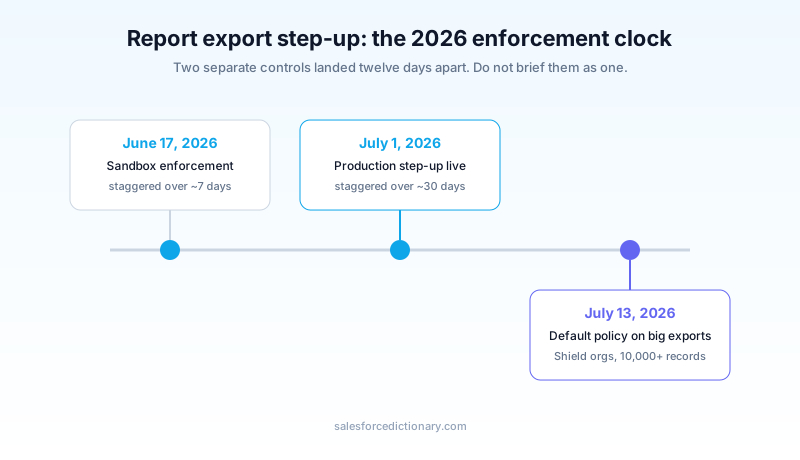
The rollout ran on two clocks. Sandboxes started getting enforcement on June 17, 2026, staggered across roughly a week so instances flipped on different days. Production started July 1, staggered across about thirty days. If your production org felt fine on July 2 and then started challenging exports on July 20, that is the stagger catching up to your instance, not a change you made. There is no opt-out toggle that turns the feature off. The only lever you control is the length of the window.
Why your MFA login is not enough
The obvious question from users is reasonable: I already did MFA at login, why again? Because Salesforce is treating a bulk export of records as a distinct high-value action that deserves its own recent proof, separate from the session that let you in. A stolen or hijacked session that survives past login now hits a wall the moment it tries to pull data out in volume. That is the security case, and it is a defensible one.
The catch is who this lands on. It lands on everyone with export rights, not on flagged or anomalous users. An analyst who lives in reports all day will see the challenge several times per shift at the default window. A user coming in through single sign-on gets no relief here. An SSO login does not start a step-up session, so an SSO user can get challenged seconds after signing in, and if they never registered a Salesforce verification method they fall back to a one-time passcode by email or SMS. If none of those work, the export is blocked. That last part matters: this is a hard control. When verification cannot complete, the data does not leave.
Put a number on it. An analyst who exports six reports across a shift at the default 120-minute window meets the challenge two or three times, once per window they cross. That is not a crisis. It becomes one only when the fallback path is the one that fires, because a user with no registered authenticator waits on an email or SMS code every single time, and codes that arrive late or not at all turn a two-second tap into a stalled export and a support ticket. The security control is the same for both users. The experience is not. The gap between them is entirely a provisioning problem you can close before the window ever matters.
For a deeper look at the identity methods this leans on, and the separate phishing-resistant MFA mandate that hit privileged users on the same July 1 date, see the complete phishing-resistant MFA setup guide. The two rules are cousins, not twins, and it is easy to confuse the enforcement dates.
The exemptions that decide whether you feel this
The exemption list is the single most useful thing to memorize, because it is the difference between a minor annoyance and a broken integration. Salesforce exempts a specific set of paths from the export challenge.
Scheduled and subscribed reports are exempt. A report that runs on a schedule and emails results does not have a human present to answer a prompt, so those background runs are skipped. Embedded reports on Lightning pages are exempt. The Salesforce Mobile App is exempt. External Experience Cloud users are exempt. API-based report access is exempt, which means a Data Loader or bulk export pull through the API does not trip the interactive challenge. Developer Console SOQL queries are exempt. And the Login As administrator session is exempt, so an admin troubleshooting as another user is not stopped mid-investigation.
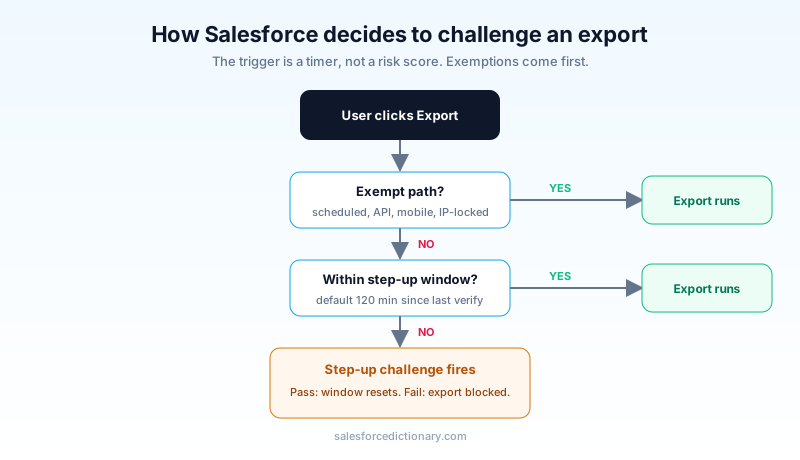
There is one more exemption that most teams miss, and it doubles as your escape hatch. Sessions locked to a consistent IP address are exempt. If a profile has Login IP Ranges configured, or the org locks sessions to the originating IP through Session Settings, users on those sessions skip the challenge. For a call center or a back-office team that always works from a known network, IP-based session controls turn the export challenge off for that group without weakening the control for roaming users. It is a real lever, and it predates this rule, so you may already have it in place for part of your org.
The three ways this broke real orgs, and what Salesforce fixed
The sandbox phase was not clean. When enforcement first turned on, it was scoped too broadly. It fired on viewing reports and dashboards, not just exporting them, and three things broke in ways that showed up in support queues fast.
First, dashboards embedded on Home pages threw a "This page has an error" message. A user opening their own home screen would see a broken component, because the embedded dashboard tried to render and got caught by the step-up gate with no way to answer it inline. Second, the admin Login As function broke. An admin logging in as a user to reproduce a problem would trip the challenge, and the prompt went to the impersonated user's devices, not the admin's, which made the exact troubleshooting the feature should allow impossible. Third, scheduled report jobs got caught, because a background job has no interactive session to complete a challenge.
Salesforce responded by narrowing the control. The current behavior triggers on report export only, not on viewing. Embedded dashboards render again. Login As is exempt. Scheduled jobs are exempt. Salesforce shipped these corrections without requiring any admin action, so if you saw the broken behavior in a sandbox in June and it looks fine now, that is the fix landing, not something you need to chase. The lesson for your own testing is to validate against current behavior, not against whatever a June sandbox showed you, because the two are meaningfully different.
If reports and dashboards are core to how your org runs, the complete reports and dashboards guide covers the surrounding surface area, from folder sharing to dashboard subscriptions, that interacts with this control.
The separate rule: a default policy on large exports
Here is where teams get tripped up, because a second, related enforcement landed twelve days later and people blur the two together. On July 13, 2026, Salesforce began enforcing a default Transaction Security Policy on the report export event for orgs that have Event Monitoring or Salesforce Shield and had not defined their own policy.
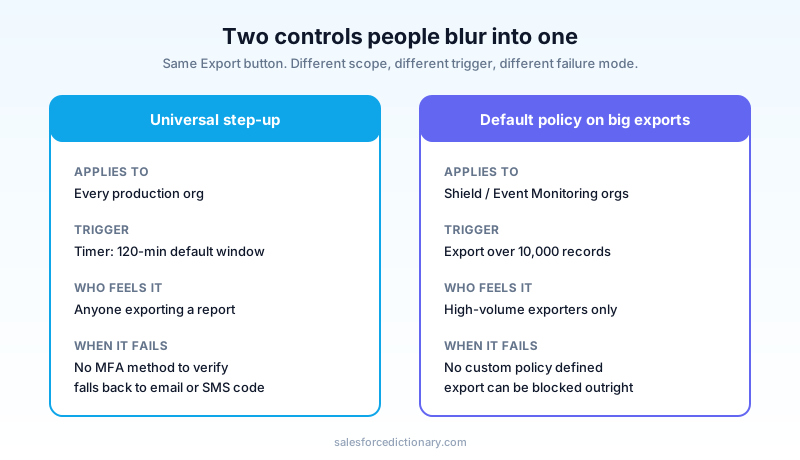
This is a different mechanism from the universal step-up. The step-up window applies to every org and challenges on a timer. The default Transaction Security Policy applies only to Shield and Event Monitoring orgs, and it targets exports above 10,000 records. When a user tries to export more than that threshold and no custom policy exists, the default policy can challenge for step-up verification or block the export entirely if the pattern looks anomalous. If you own Shield, the practical move is to define your own Transaction Security Policy rather than inherit the default, so a legitimate high-volume export from your data team gets a challenge instead of a hard block. The Salesforce Shield guide walks through building these policies if you have not touched Event Monitoring before.
A concrete example makes the split obvious. A sales manager exporting a 400-row pipeline report at 9am meets the universal step-up, taps approve, and gets on with the day. A data engineer in the same Shield org exporting a 40,000-row extract meets the default Transaction Security Policy, which can block that pull outright if no custom policy has been written to allow it. Same button, same org, two entirely different controls, and the engineer's export is the one that fails silently if nobody defined a policy. That is why a Shield org should never leave the default in place: you want the large export challenged and logged, not stopped with a message the exporter cannot resolve on their own.
Keep the two rules straight when you brief your users. Most people meet the 120-minute step-up. Only high-volume exporters in Shield orgs meet the 10,000-record policy. Explaining both as one thing generates support tickets that do not need to exist.
How to configure the window and get ahead of it
You cannot disable the step-up, but you can tune it, and you can prepare your users so the challenge is a two-second tap instead of a blocker.
The window itself lives on the Identity Verification setup page, in a field called Step-Up Authentication Period (Minutes). It accepts a value from 1 to 120. The default is 120. Shortening it makes the org more secure and more annoying at the same time, because a shorter window means more frequent challenges. Lengthening it past 120 is not an option, since 120 is the ceiling. For most orgs the default is the right call, and the better investment is not the number but the readiness of the people who will hit it.
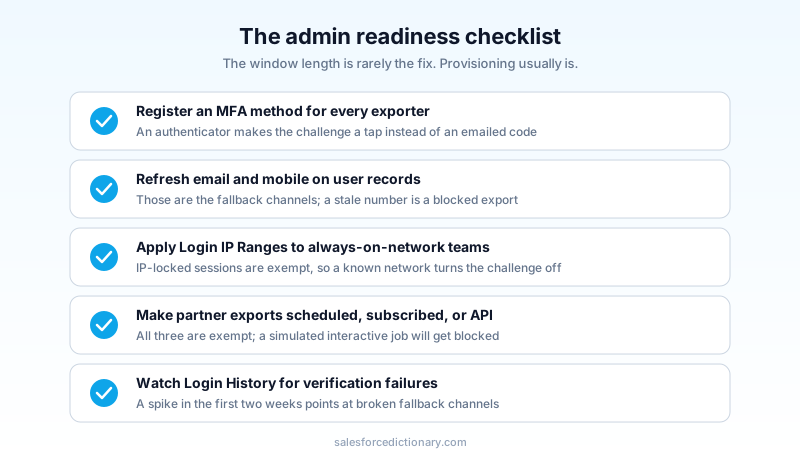
Readiness comes down to a short list. Confirm every internal user who exports reports has at least one registered MFA method, because a registered authenticator turns the challenge into a tap while an unregistered user falls back to email or SMS codes. Confirm the email addresses and mobile numbers on your user records are current, since those are the fallback channels and a stale number means a blocked export. Map your always-on-network teams and apply Login IP Ranges on their profile or lock their sessions to the originating IP, which exempts them cleanly. Audit any process that exports reports on a schedule for external partners and confirm it runs as a scheduled or subscribed report or through the API, both of which are exempt, rather than as a simulated interactive session that will get blocked. Finally, watch Login History for verification failures in the first two weeks, because a spike there points straight at users whose fallback channels are broken.
If your board pack export is the thing that keeps getting interrupted, the fix is rarely the window length. It is usually one of two things: the exporter has no registered MFA method, or the job should be a subscription and someone is running it by hand. Both are quick to correct once you know to look.
What to do this week
Open Setup, find the Identity Verification page, and confirm the Step-Up Authentication Period is set where you want it, then pull a list of users with export access and check that each has a registered MFA method and a current mobile number and email. Those two checks catch the large majority of the pain before a user ever files a ticket. If you own Shield, define a Transaction Security Policy on report export so your high-volume exporters get a challenge and not a wall.
About the Author
Dipojjal Chakrabarti is a B2C Solution Architect with 29 Salesforce certifications and over 13 years in the Salesforce ecosystem. He writes and edits salesforcedictionary.com, published by KineticBit Inc., to help admins, developers, architects, and cert/interview candidates sharpen their fundamentals. More about Dipojjal.
Share this article
Sources
- Salesforce Help: Prepare for the Step-Up Authentication for Report Export
- Salesforce Blog: Balancing Security and Agility, Updates to Step-Up Authentication for Reports and Dashboards
- Salesforce Ben: June 2026 Security Requirements, What to Expect and How to Prepare
- Salesforce News: Summer 2026 Product Release Announcement
Related dictionary terms
Practise it
Five questions on Administrator
Exam-style questions with an explanation after each one. No account needed, and your answers build a weak-topic map once you have one.
Keep reading

Salesforce Shield: The Complete 2026 Guide
Salesforce Shield bundles Platform Encryption, Event Monitoring, and Field Audit Trail. Here is what each pillar does, what it breaks, what it costs, and when paying the 30 percent uplift is the right call.

Salesforce Phishing-Resistant MFA: The Complete Setup Guide for 2026
Production enforcement of phishing-resistant MFA for Salesforce privileged users lands July 1, 2026. Here is what qualifies, who needs it, how to audit your org, and how to provision hardware keys and passkeys before the deadline.

Salesforce Reports & Dashboards: The Complete 2026 Guide
The complete 2026 guide to Salesforce reports and dashboards - report types, filters, summaries, bucketing, joined reports, dashboards, subscriptions, snapshots, and Tableau / CRM Analytics integration.
Comments
No comments yet. Start the conversation.
Sign in to join the discussion. Your account works across every page.