
Salesforce LWC State Managers: The Complete 2026 Guide
How the @lwc/state library replaces prop drilling and event chains with a shared, testable data layer for Lightning Web Components

You add a line item to an opportunity, and the summary card three components over still shows the old total. So you wire up a custom event, dispatch it from the line-item editor, catch it on the parent, and pass the new number back down through two more components as public properties. Then a fourth component needs the same total, and you repeat the entire chain. That tax has been part of Lightning Web Components since day one, and the Summer '26 release finally ships an answer inside the framework itself.
State Managers reached general availability in Summer '26 after a stretch in developer preview and beta. Salesforce Ben called it the most significant change to LWC data architecture in years, and that framing holds up once you see what it removes. This guide covers what a state manager is, the exact API you write, how components find shared state, and the cases where you should reach for it instead of the tools you already know.
The problem it solves
Two components on the same page need the same data. In classic LWC, you have three ways to make that happen, and each one costs you something.
The first is public properties. A parent owns the data and passes it down to each child through @api fields. When the children sit two or three levels deep, you thread that same property through every component in between, even the ones that never read it. This is prop drilling, and it turns a small refactor into a hunt across five files.
The second is custom events. A child that changes the data fires an event, the parent listens, updates its copy, and pushes the new value back down. Two components that both read and write the same value produce a loop of events going up and properties coming down. The wiring works until you add a third component, and then the event chain becomes the most fragile part of your page.
The third is Lightning Message Service. LMS broadcasts a message on a channel that any subscriber can hear, which is genuinely useful when components sit in different parts of the DOM or in different regions of a Lightning page. But LMS gives you a message, not a managed value. You still own the state on both ends, you still handle the update logic twice, and there is no single record of what the current value actually is.
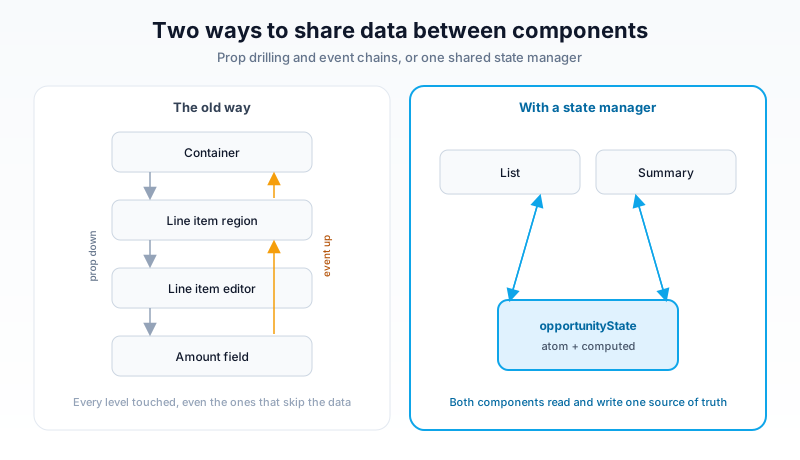
A state manager collapses all three patterns into one idea. You put the data and the functions that change it in a module of their own. Components read from that module and call its functions. Nobody passes props through a component that does not care about them, and nobody wires an event just to keep two copies of the same number in sync.
What a state manager actually is
A state manager is a plain JavaScript module that holds a related set of data and the functions that change it. The official Lightning Web Components guide describes three parts: a definition function you pass to defineState, a set of named properties that hold the state, and a set of named actions that modify it.
You import defineState from the @lwc/state library and call it with a callback. That callback receives a few primitives and returns the shape of your state.
import { defineState } from '@lwc/state';

export default defineState(({ atom, computed, update }) => (initialItems) => {
  const items = atom(initialItems ?? []);

  const total = computed({ items }, ({ items }) =>
    items.value.reduce((sum, i) => sum + i.amount, 0)
  );

  const addItem = update({ items }, ({ items }, newItem) => {
    items.value = [...items.value, newItem];
  });

  return {
    items,
    total,
    addItem,
  };
});
Three primitives carry the weight here. An atom wraps a single reactive piece of data and acts as the source of truth for that value. A computed value derives from one or more atoms and recalculates only when those atoms change, so a running total never drifts out of step with the list it sums. An action (built with update in the example above) is the only sanctioned way to change an atom. Components do not reach in and mutate state directly. They call an action, the action changes the atom, and every reader updates.
That last rule is the quiet win. Because actions are the single write path, you always know where a value can change. When the total looks wrong, you have one function to inspect, not a scatter of event handlers across four components. The object you return at the end is the public API. Anything you leave out stays private, which gives you real control over what each consuming component can see or do.
How components find the shared state
Defining a state manager is half the job. The other half is getting the same instance into every component that needs it, and this is where the design earns its keep.
One component acts as the provider. It instantiates the state manager in its class, and that instance becomes available to the entire component tree beneath it.
import { LightningElement } from 'lwc';
import opportunityState from 'c/opportunityState';

export default class OpportunityContainer extends LightningElement {
  state = opportunityState([]);
}
Any descendant reads the same instance with fromContext, imported from @lwc/state.
import { LightningElement } from 'lwc';
import { fromContext } from '@lwc/state';
import opportunityState from 'c/opportunityState';

export default class OpportunitySummary extends LightningElement {
  state = fromContext(opportunityState);

  get total() {
    return this.state.value.total;
  }
}
fromContext searches upward through the component hierarchy, starting with the component itself and moving toward the root, until it finds the nearest instance of that state manager. The Salesforce Ben deep dive describes this as proximity-based resolution: a consumer sees the instance from its closest ancestor and no other. That detail matters more than it first looks.
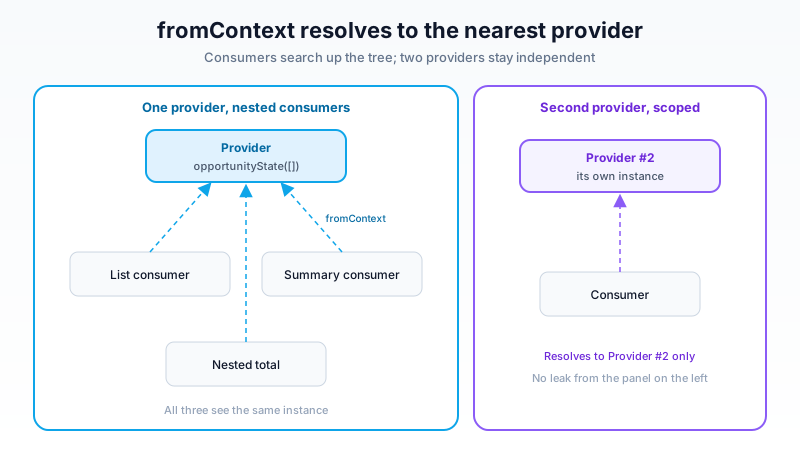
Proximity-based resolution means you can put two independent instances on the same page. Imagine a page that shows two opportunities side by side. Wrap each one in its own provider, and the summary inside the left opportunity resolves to the left state, while the summary inside the right resolves to the right. Neither one leaks into the other. You get scoped state without inventing a naming scheme or a channel per instance, which is exactly the kind of thing LMS forces you to do by hand.
A concrete example
The lwc-recipes repository ships a working version of the opportunity scenario. It has an opportunitiesStateManager module plus two components, opportunitiesList and opportunitiesSummary, that read from it. The forcedotcom/state-management repository holds a couple more.
Picture the two-component version on a record page. The list component renders each line item and has an Add button. The summary component shows the count and the running total. In the old model, the Add button fired an event, the container caught it, refetched or recalculated, and pushed a fresh total into the summary through a property.
With a state manager, the list component calls addItem on the shared instance. The atom changes. The total computed recalculates because its dependency changed. The summary reads state.value.total in a getter, and the framework re-renders it. No event left the list component. No property passed through the container. The two components never referenced each other at all. They only referenced the state.
This is also where a second benefit shows up. Fewer round trips. When the source of truth lives in one place and every reader subscribes to it, you stop refetching the same records to keep separate copies aligned. One update, many readers, no server call to reconcile them.
Reactivity, without the ceremony
The update model is worth being precise about, because it is what makes the getters above work. When an atom's value changes, every component and every computed value that observes it updates automatically, and the framework re-renders the affected components. You do not subscribe by hand, and you do not call a refresh method. You read the state in a getter or a template expression, and the reactivity system tracks the dependency for you.
Computed values only recalculate when their own dependencies change. If the summary reads total and you change an unrelated atom in the same manager, total does not recompute and the summary does not re-render for no reason. That is a meaningful difference from a naive shared object where any change forces everyone to re-evaluate everything.
The write side stays disciplined on purpose. Reads happen anywhere through the returned properties. Writes happen only through actions. Keeping those two paths separate is what lets you reason about a page with a dozen components without tracing a dozen event listeners.
When to use it, and when not to
A new tool invites overuse, so be deliberate. State Managers solve a specific class of problem: shared, mutable state inside a connected component tree on one page. Reach for them when several components on the same page read and write the same data, when a component tree runs deep enough that prop drilling has become a chore, or when two sibling components have to stay in lockstep.
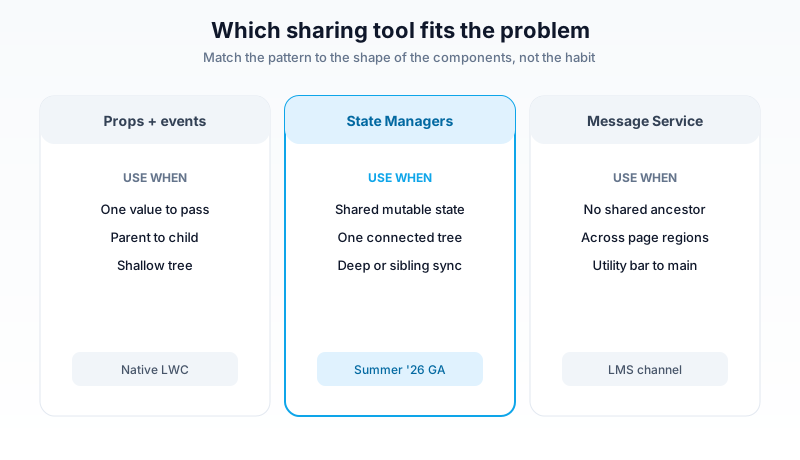
Do not reach for them when the case is simple. A parent handing one value to one child is a job for an @api property, and adding a state manager there buys you nothing but indirection. The Salesforce Ben guide is blunt about this: when complexity is low, the native mechanisms work fine.
State Managers also do not replace Lightning Message Service, and the two are built for different shapes of problem. LMS connects components that do not share a tree, such as a utility bar item talking to a component in the main region, or two components dropped into unrelated areas of a Lightning App page. State Managers work within one connected tree where a provider sits above its consumers. If your components are loosely connected across the page, LMS is still the right call. If they share an ancestor, a state manager is cleaner.
The other rule to hold onto: actions are the write path. If you find yourself wanting to mutate an atom directly from a component, stop and add an action. The moment you break that discipline, you lose the single-write-path property that made the whole thing easy to reason about.
The limitations you need to plan around
Two constraints stand out at GA, and both can change a design decision.
First, State Managers are not available in Experience Cloud as of Summer '26. The feature runs in Lightning Experience and the Salesforce mobile app only. If you build components that have to work on both an internal Lightning page and an Experience Cloud site, you cannot rely on a state manager as your shared layer across both surfaces. You either keep the Experience Cloud version on classic patterns or you split the component. Confirm the current support matrix in the release notes before you commit, because Salesforce tends to widen surface support release over release.
Second, this is a client-side state layer, not a persistence layer. An atom lives for the life of the page. Reload the page and the state is gone unless you rehydrate it from Apex, a wire adapter, or a record page context. Treat the state manager as the in-memory coordinator for a session, and keep your server-side source of truth exactly where it already is.
There is also a learning curve worth naming. The provider-and-consumer split, the atom-computed-action vocabulary, and proximity-based resolution are new mental models for a team that has only ever written props and events. Budget a little time for the first few components. The payoff comes on the fourth or fifth, when a change that used to touch five files touches one.
What this changes about testing
One underrated result of pulling state into its own module is that you can test it without rendering a single component. A state manager is plain JavaScript. You import it, create an instance, call its actions, and assert on the resulting values in a Jest test that never touches the DOM.
That inverts the usual LWC testing chore, where you mount a component, dispatch synthetic events, and read rendered output to prove that a piece of logic worked. With the logic in a state manager, the business rules get unit tests of their own, and the components shrink to thin views that read values and call actions. Thinner components mean fewer branches to cover in the harder-to-write rendering tests. Your coverage improves in the place it is cheapest to earn it.
How to adopt it without a big-bang rewrite
You do not need to convert a whole app. Pick one page where the event wiring already hurts. A record page with a couple of custom components that fight to stay in sync is the ideal first target.
Start here.
- Find the shared value. Identify the one piece of data that two or more components on the page both read and write. That value, and the functions that change it, become your first state manager.
- Write the manager first, in isolation. Build the module with
defineState, add the atoms and one or two actions, and cover it with a plain Jest test before you touch a component. Prove the logic works with no UI in the picture. - Make the top component the provider. Instantiate the manager in the highest component that all the readers share, so
fromContextcan resolve for every one of them. - Convert consumers one at a time. Replace each component's
@apiinputs and event handlers with afromContextread and action calls. Do one, verify the page, then do the next. Delete the events you retired as you go. - Confirm the surface. Check that the page is Lightning Experience or mobile, not Experience Cloud, before you rely on it in production.
Run the whole thing against a scratch org first, and clone one of the lwc-recipes state-management components as a reference while you learn the shape of the API. The Summer '26 developer release notes list State Managers alongside the other GA features and point at the sample repositories, so start there and copy a pattern that already works rather than inventing one from scratch.
About the Author
Dipojjal Chakrabarti is a B2C Solution Architect with 29 Salesforce certifications and over 13 years in the Salesforce ecosystem. He writes and edits salesforcedictionary.com, published by KineticBit Inc., to help admins, developers, architects, and cert/interview candidates sharpen their fundamentals. More about Dipojjal.
Share this article
Sources
- Manage State Across LWC Components | Lightning Web Components Developer Guide
- State Management Examples | Lightning Web Components Developer Guide
- The Salesforce Developer's Guide to the Summer '26 Release
- Ultimate Guide to State Management in Salesforce LWC (Salesforce Ben)
- Top 8 Salesforce Summer '26 Features for Developers (Salesforce Ben)
Related dictionary terms
Practise it
Five questions on Platform Developer I
Exam-style questions with an explanation after each one. No account needed, and your answers build a weak-topic map once you have one.
Keep reading

The Apex Trigger Framework: Best Practices for Bulk-Safe, Scalable Triggers (2026)
The complete 2026 trigger framework guide. Logic-less triggers, bulk safety, recursion control, framework comparison (Kevin O'Hara vs interface vs virtual), and CRUD/FLS enforcement.

Lightning Web Components (LWC) for Beginners: Build Your First Component in 30 Minutes
A complete LWC tutorial. What it is, why it replaced Aura, environment setup, Hello World, reactive properties, @wire to Apex, events, and the cache gotchas that trip up beginners.

Salesforce Flow vs Apex in 2026: A Decision Matrix for Admins, Developers & Consultants
Flow vs Apex is not a religious war anymore. Here is the 2026 decision matrix. Capability gaps, governor limits, the 70/30 rule, and 12 worked scenarios with the right answer for each.
Comments
No comments yet. Start the conversation.
Sign in to join the discussion. Your account works across every page.