
Lightning Web Components (LWC) for Beginners: Build Your First Component in 30 Minutes
What LWC is, why it replaced Aura, environment setup, Hello World, reactive properties, @wire and Apex, events, debugging cache issues, and quick-action LWCs.

You hit sf project deploy, the spinner runs for ten seconds, the App Builder reloads, and your component finally appears on the Lightning Record Page. Hello World is on screen. The next thirty minutes are about everything that has to happen between that first deploy and a component your team can actually use. By the time you reach the bottom of this guide, you will have a working component on a record page, an Apex method feeding it data, an event firing back to a parent, and a Quick Action your business users can click. We will skip nothing, including the cache problem that costs every LWC beginner an hour the first time it hits.
If you have read about LWC but never built one, this article is the runway. It is opinionated where the docs are neutral, because beginners need a path, not options. Once you have shipped the example below end to end, the Salesforce Developer Guide will read very differently.
What is LWC, and why did it replace Aura?
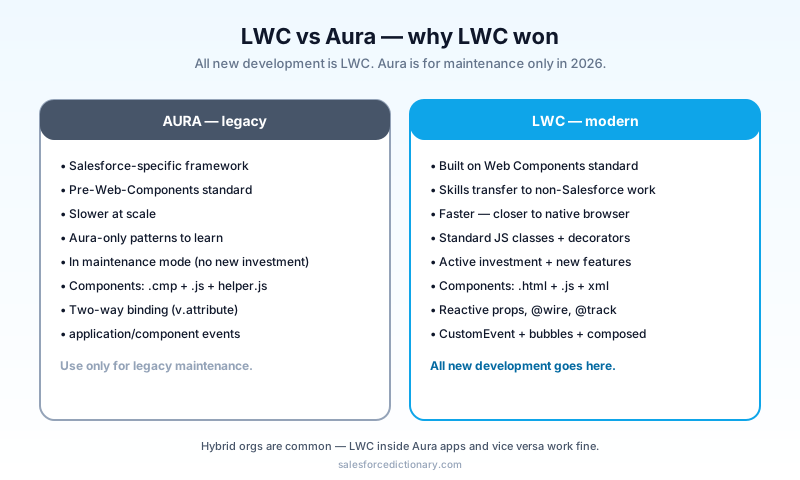
LWC is Salesforce's UI framework introduced in 2019, built on the Web Components standard. Standard means <my-component> is a real browser primitive, not a Salesforce-specific abstraction. The same skills (web components, modern JavaScript, Shadow DOM) work outside Salesforce too, which is why an LWC developer's resume looks more like a generic front-end developer's resume than an Aura developer's did.
Aura, by contrast, was Salesforce's first answer to "we need a modern UI framework." It was built before Web Components were standardized. It worked, but it was Salesforce-specific, slow at scale, and required learning Aura-only patterns that translated to nothing else in the industry. The performance gap was the bigger problem. Aura's rendering pipeline added meaningful overhead on every state change, and on big record pages with many components, it showed.
In 2026, the rule is: all new development is LWC. Aura is supported but will not get new investment. If you are maintaining an Aura org, plan a gradual migration as you touch components. Greenfield projects should not contain a single Aura component, with one exception: certain admin-facing tools in Setup are still Aura-only, and you sometimes have to wrap them.
Setting up your environment
Three tools, and you can have all of them running in under fifteen minutes if your machine is reasonably set up.
- Visual Studio Code, free editor, https://code.visualstudio.com/. Most LWC tutorials assume VS Code. Other editors work, but the official Salesforce extensions are best in VS Code.
- Salesforce Extensions Pack: search the VS Code marketplace for "Salesforce Extension Pack" by Salesforce. Install. This bundle gives you syntax highlighting, deploy/retrieve commands, and the Org Browser.
- Salesforce CLI (
sf), install via npm:npm install -g @salesforce/cli sf --version
Then authorize an org:
sf org login web -a mydevhub --set-default-dev-hub
sf org login web -a mysandbox --set-default
The first command authorizes a Dev Hub (your production or trial org with Dev Hub enabled). The second authorizes a target org for development, typically a sandbox or scratch org. Use a scratch org for the first walkthrough if you have Dev Hub available; you can throw it away after the tutorial without polluting a real sandbox.
Create a project:
sf project generate --name lwc-quickstart
cd lwc-quickstart
You are ready to build. If sf is not found after install, open a new terminal window so your PATH refreshes. If your sandbox is on the latest preview, point the CLI at the matching API version in sfdx-project.json to avoid version-skew warnings on deploy.
Hello World
Three files make a component, and they share a directory name. The naming convention matters; the platform looks for <component>.html, <component>.js, and <component>.js-meta.xml in a folder named after the component.
sf lightning generate component --type lwc -n helloWorld -d force-app/main/default/lwc
This generates:
force-app/main/default/lwc/helloWorld/
  ├── helloWorld.html         (template)
  ├── helloWorld.js           (controller)
  └── helloWorld.js-meta.xml  (metadata)
helloWorld.html
<template>
<h1>Hello, {greeting}!</h1>
<input value={greeting} oninput={handleChange} />
</template>
helloWorld.js
import { LightningElement } from 'lwc'

export default class HelloWorld extends LightningElement {
  greeting = 'World'

  handleChange(e) {
    this.greeting = e.target.value
  }
}
helloWorld.js-meta.xml
<?xml version="1.0" encoding="UTF-8"?>
<LightningComponentBundle xmlns="http://soap.sforce.com/2006/04/metadata">
  <apiVersion>62.0</apiVersion>
  <isExposed>true</isExposed>
  <targets>
    <target>lightning__AppPage</target>
    <target>lightning__RecordPage</target>
    <target>lightning__HomePage</target>
  </targets>
</LightningComponentBundle>
Deploy and test:
sf project deploy start --source-dir force-app/main/default/lwc/helloWorld
sf org open
Drop the component on a Lightning App page from Setup, App Builder, then Edit Page on whatever target you chose. Type into the input box; the heading updates. Reactive properties work because LWC re-renders the template when class properties change, and you did not write a single line of state-management code to make that happen.
Reactive properties: the model
Every property on the class is reactive by default in LWC. Change this.greeting, the template re-renders. No useState, no setState. The framework watches. That is the single most important mental shift coming from React or Vue: the property is the source of truth, and assignment is the trigger.
For deep reactivity (objects, arrays), you need @track:
import { LightningElement, track } from 'lwc'

export default class TodoList extends LightningElement {
  @track items = []  // changes inside the array trigger re-render

  addItem() {
    this.items.push({ id: Date.now(), text: 'New' })  // works because @track
  }
}
Without @track, replacing the whole array (this.items = [...]) still triggers re-render, but mutating it (this.items.push(...)) does not. The convention many teams adopt: always replace, never mutate. That gets you React-style immutability without @track, and it also makes time-travel debugging easier when something goes wrong.
Connecting to Apex with @wire
The pattern that makes LWC actually useful: pulling data from Salesforce. This is also the moment most beginners stop reading tutorials and start writing the thing they were hired to build, so spend extra time here.
First, an Apex class:
public with sharing class AccountController {
  @AuraEnabled(cacheable=true)
  public static List<Account> getTopAccounts(Integer howMany) {
    return [
      SELECT Id, Name, Industry, AnnualRevenue
      FROM Account
      ORDER BY AnnualRevenue DESC NULLS LAST
      LIMIT :howMany
    ];
  }
}
Two important keywords on the method signature:
@AuraEnabledexposes the method to the Lightning UI (LWC and Aura).cacheable=truecaches the result client-side. Required for@wire. Read-only methods only. The platform enforces this at runtime, so do not try to sneak a write past it.
Now the component:
import { LightningElement, wire } from 'lwc'
import getTopAccounts from '@salesforce/apex/AccountController.getTopAccounts'

export default class TopAccounts extends LightningElement {
  howMany = 5
  @wire(getTopAccounts, { howMany: '$howMany' }) accounts
}
<template>
  <template lwc:if={accounts.data}>
    <ul>
      <template for:each={accounts.data} for:item="a">
        <li key={a.Id}>{a.Name} - {a.Industry}</li>
      </template>
    </ul>
  </template>
  <template lwc:if={accounts.error}>
    <p>Error: {accounts.error.body.message}</p>
  </template>
</template>
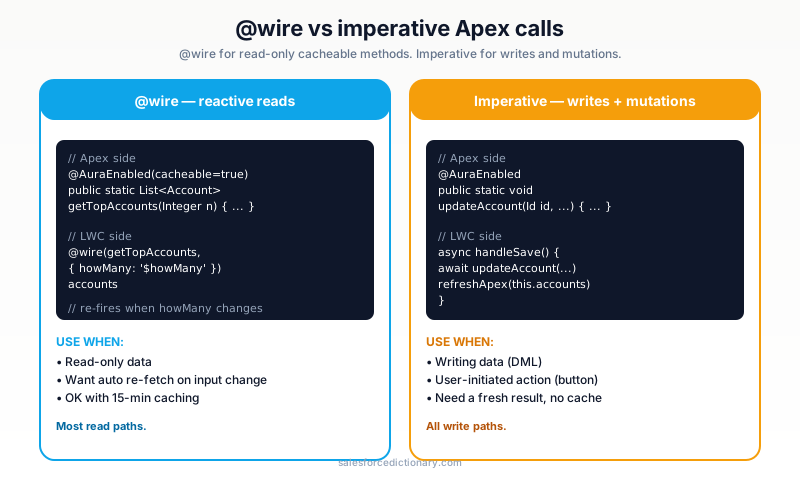
@wire is reactive. The '$howMany' syntax says "re-call this function when howMany changes." Set this.howMany = 10 and the wire fires again. That is the entire model. No subscriptions, no manual refresh calls in the happy path, and the framework caches identical calls for you so multiple components asking for the same data get one network round-trip.
Imperative Apex calls
@wire only works for read-only cacheable=true methods. For writes, call Apex imperatively:
import { LightningElement } from 'lwc'
import updateAccount from '@salesforce/apex/AccountController.updateAccount'

export default class AccountEditor extends LightningElement {
  async handleSave() {
    try {
      await updateAccount({ recordId: this.recordId, name: this.name })
      // success
    } catch (e) {
      console.error(e)
    }
  }
}
Imperative calls are fine for buttons and form submits. They are not cached automatically. If you need caching, do it yourself. The other reason to use imperative calls: when you want to control the timing of the request, for example only after the user clicks Save rather than every time recordId changes. Use imperative for verbs that change state, use @wire for nouns that describe state.
Events: passing data up
Children fire events; parents listen. LWC follows the DOM event model, which means events bubble up the component tree by default but stop at the Shadow DOM boundary unless you opt in.
Child component (childButton.js):
import { LightningElement } from 'lwc'

export default class ChildButton extends LightningElement {
  handleClick() {
    this.dispatchEvent(new CustomEvent('save', {
      detail: { id: 123 },
      bubbles: true,
      composed: true,
    }))
  }
}
Parent template:
<template>
  <c-child-button onsave={handleSave}></c-child-button>
</template>
Parent JS:
handleSave(e) {
  console.log('Got save event with id:', e.detail.id)
}
bubbles: true lets the event cross component boundaries. composed: true lets it cross the Shadow DOM boundary. Use both when you want the parent (or grandparent) to handle the event. Skip both when you want the event to stay scoped to a single parent. The four combinations of bubbles and composed give you precise control over which ancestors get a chance to listen, and you will use all of them eventually.
The cache problem (and how to fix it)
This is the LWC issue that costs beginners the most time. You deploy a change. Refresh the browser. Nothing changes. What?
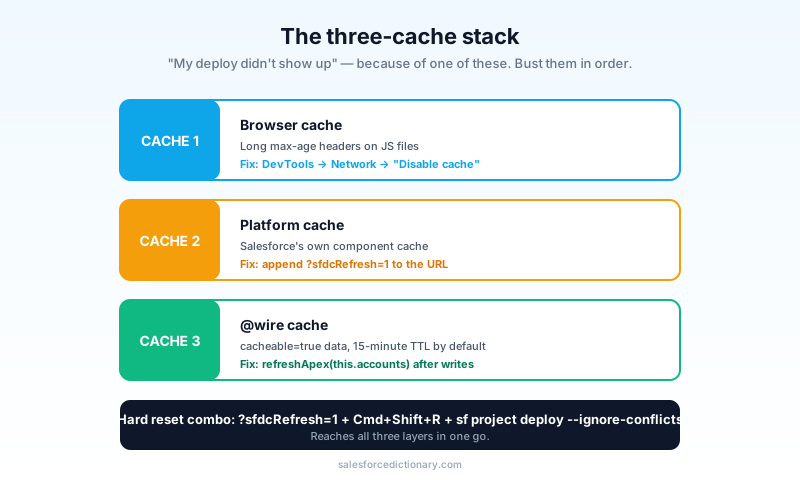
Three caches are stacked between your laptop and the rendered component:
- Browser cache: JavaScript files served with long max-age headers.
- Platform cache: Salesforce's own component cache.
- LWC
@wirecache:cacheable=truedata lives 15 minutes by default.
Fixes:
- For dev: open the org with
?sfdcRefresh=1appended to the URL. Forces a refresh of platform-cached components. Bookmark a Lightning page with this query string already on it and you will save yourself the next twenty rounds of "did my deploy work?" - Browser cache: disable cache in Chrome DevTools (Network tab, then "Disable cache" while DevTools is open).
@wirecache: callrefreshApex(this.accounts)fromlightning/uiRecordApito bust the wire's cached result. This is also what you call from a save handler when you want the list to reflect the new record without a full page reload.- Hard reset:
sf project deploy start --ignore-conflictsand a Cmd+Shift+R hard reload.
The two biggest pitfalls in production:
- "I deployed but my changes are not showing up." Clear the browser cache, then add
?sfdcRefresh=1. - "I changed an Apex method but the LWC still shows old data." Call
refreshApex()or invalidate the wire on save. The 15-minute window is real, and the framework will not break it for you.
Quick-action LWC: the most underused pattern
Adding lightning__RecordAction to your component's targets lets you launch it as a Quick Action from any record page. This is the cheapest way to surface a custom UI without redesigning a page layout.
helloWorld.js-meta.xml:
<targets>
  <target>lightning__RecordAction</target>
</targets>
<targetConfigs>
  <targetConfig targets="lightning__RecordAction">
    <actionType>ScreenAction</actionType>
  </targetConfig>
</targetConfigs>
Then in Setup, Object Manager, Account, Buttons, Links, and Actions, click New Action and point at the LWC. Drop the action on the page layout.
Now from any Account, the user clicks your Quick Action; your LWC opens in a modal. Use this for inline editing, custom data-entry forms, complex calculation widgets, anything that is awkward in standard Salesforce UI. The modal handles its own dismiss logic, so you only have to write the body, which is a major productivity win the first time you build one.
Working with the record context
Your LWC often runs in the context of a record. Two key inputs:
import { LightningElement, api } from 'lwc'

export default class MyComponent extends LightningElement {
  @api recordId   // automatically populated when on a record page
  @api objectApiName // automatically populated to "Account", "Contact", etc.
}
@api makes a property public. It is how parents pass data in. @api properties on the targets lightning__RecordPage and lightning__RecordAction get populated automatically by the Lightning framework, which means you do not have to wire them up from the page layout.
Combined with getRecord from lightning/uiRecordApi, you can fetch the current record without writing Apex:
import { LightningElement, wire, api } from 'lwc'
import { getRecord } from 'lightning/uiRecordApi'

const FIELDS = ['Account.Name', 'Account.Industry', 'Account.AnnualRevenue']

export default class AccountSummary extends LightningElement {
  @api recordId
  @wire(getRecord, { recordId: '$recordId', fields: FIELDS }) account
}
getRecord respects field-level security and sharing automatically. Use it instead of writing trivial Apex when possible. The performance benefit is real: the Lightning Data Service caches and deduplicates record fetches across every component on the page, so two components asking for the same field make one network call.
Testing LWC
Salesforce ships Jest tests for LWC. Run them locally without deploying, which is a big productivity win for component logic.
npm install --save-dev @salesforce/sfdx-lwc-jest
sf force lightning lwc test create -f force-app/main/default/lwc/helloWorld/helloWorld.js
sf force lightning lwc test run --component helloWorld
A simple test:
import { createElement } from 'lwc'
import HelloWorld from 'c/helloWorld'

describe('c-hello-world', () => {
  it('renders the greeting', () => {
    const el = createElement('c-hello-world', { is: HelloWorld })
    document.body.appendChild(el)
    const heading = el.shadowRoot.querySelector('h1')
    expect(heading.textContent).toBe('Hello, World!')
  })
})
LWC Jest tests are fast (no org connection) and great for component logic. Use them for pre-deploy validation; the full Salesforce test classes still cover Apex. The typical CI setup runs Jest on every push and reserves the slower Apex test run for the deploy step itself.
Connecting to Agentforce
In 2026, an LWC can be the surface where users interact with your agents. Two patterns:
- Embed the agent chat: drop the standard
lightning-conversation-toolkitcomponent to surface an Agentforce conversation in your LWC. - Call agent Actions imperatively: your LWC dispatches a request to a server-side Apex method that calls an agent Action via the Atlas Reasoning Engine.
For most cases, the embed pattern is right. The imperative pattern is for power users who need agent capabilities inside a custom UI flow. If you are building a customer-facing feature where the agent is the experience, embed. If you are building an internal tool where the agent is one helper among many, imperative.
Common beginner mistakes
- Forgetting
cacheable=trueon@wireApex. You will see a runtime error. Add it, and confirm the method is read-only. - Mutating an array without
@track. Re-render will not fire. Either add@trackor replace the array (this.items = [...this.items, newItem]). - Forgetting
keyonfor:eachitems. Lightning will warn. Always include a unique key. - Hardcoding org-specific data. Use Custom Metadata or Custom Settings instead of magic strings.
- Not handling the loading state.
accounts.dataisundefinedinitially. Handle it (<template lwc:if={accounts.data}>). - Skipping accessibility. ARIA labels, keyboard navigation, color contrast all matter. Salesforce's design system (SLDS) gives you most of this for free if you use SLDS classes.
- Cache confusion. When in doubt, append
?sfdcRefresh=1and disable browser cache. - Wiring the wrong thing as reactive. A
@wireonly refires when one of its'$prop'references changes. If your prop never changes (because it is a constant), the wire fires once on mount and never again.
Frequently asked questions
Should I learn Aura first? No. New development is all LWC. Aura is for maintenance.
Can LWC and Aura coexist? Yes. LWC components can sit inside Aura apps and vice versa. You will see hybrid orgs for years.
Do I need TypeScript? Salesforce announced TypeScript support for LWC in Spring '26 release. It is optional but recommended for larger projects. Plain JavaScript is still fully supported.
How does this connect to Flow?
LWC components can be exposed as Flow Screens. Flow renders the LWC; the component reads and writes Flow variables via @api properties.
What is the relationship to Quick Actions? LWC plus Quick Action is the modern pattern for custom actions on records. It replaces Aura quick actions and most legacy Visualforce action overrides.
Can LWC make external HTTP calls? Not directly. Go through an Apex method that uses Named Credentials. Direct fetch from LWC works in some cases but bypasses CSP, CSRF, and integration governance.
What is the difference between @api and a plain class property?
@api makes the property part of the public contract of the component. Parents can set it, the Lightning framework can populate it on record pages, and the property shows up in App Builder if isExposed is true. A plain property is internal state with no public hook.
What to read next
- LWC, Aura Component, Apex, Quick Action: the dictionary entries.
- Flow vs Apex 2026: when LWC is the right answer versus Flow.
- Governor Limits Cheat Sheet: the Apex you call from your LWC shares the same limits.
If you only do one thing tonight, build Hello World end to end. The mechanics click after one full deploy cycle in a way no amount of reading does, and once they have clicked, everything in this guide reads as a tactical refinement rather than a concept.
About the Author
Dipojjal Chakrabarti is a B2C Solution Architect with 29 Salesforce certifications and over 13 years in the Salesforce ecosystem. He writes and edits salesforcedictionary.com, published by KineticBit Inc., to help admins, developers, architects, and cert/interview candidates sharpen their fundamentals. More about Dipojjal.
Share this article
Related dictionary terms
 Our appAdWake up sharp. Not just awake.The alarm that rings through Silent and DND — free on iOS & Android.Get WakeSharp →
Keep reading

Salesforce Data Model Explained: Objects, Records, Fields & Relationships (Beginner's Guide)
The complete beginner's guide to the Salesforce data model - objects, fields, all six relationship types, junction objects, record types, and Schema Builder. Worked examples included.

Salesforce Flow vs Apex in 2026: A Decision Matrix for Admins, Developers & Consultants
Flow vs Apex is not a religious war anymore. Here is the 2026 decision matrix. Capability gaps, governor limits, the 70/30 rule, and 12 worked scenarios with the right answer for each.


Comments
No comments yet. Start the conversation.
Sign in to join the discussion. Your account works across every page.