
The Salesforce Guest User Audit: Finding What Your Experience Cloud Site Gives Away
Every public site has a user you never created, cannot delete, and probably never audited. Here is the exposure map, the fix order, and the detection that catches the next crawler.

Open your company's public help site in a private browser window. Do not log in. Now open the network tab and reload the page. Somewhere in that request list is a call your site makes on behalf of a user you never created, whose name nobody on your team knows, and whose permissions nobody has reviewed since the site went live.
That user answered the request. It returned data. Nothing about that is a bug.
Every Experience Cloud site runs unauthenticated traffic through a guest user, and the platform is doing exactly what it was configured to do when it hands that user's query results back to an anonymous visitor. Which is why the August 2026 disclosure of the City-Forum campaign, where security firm Reco traced 17 months of record collection against Salesforce and ServiceNow portals back to a single rented server, contains no CVE and no patch. The attacker did not break in. They read what was already readable, one page at a time, for a year and a half. One targeted org logged over 560,000 requests from that single IP address before anyone looked.
If your response to that is "we require login on our site," read the next section before you close the tab.
The user you cannot delete
A guest user is created automatically for every [Experience Cloud site](/terms/experience-cloud-site), and it exists whether or not anyone ever visits anonymously. Requiring login on the site does not remove it. The profile still exists, its object permissions still exist, its sharing rules still grant what they grant, and any Apex running in that context still runs. What login enforcement changes is the front door. The data layer behind it keeps answering.
That distinction is the whole problem. Most orgs audit the site, meaning the pages, the components, the navigation. The guest user is not a page. It is an identity with a profile, and its blast radius is defined in Setup, not in Experience Builder.
Three things make it unusual compared to every other user in your org:
It has no password and no session you can revoke. There is no login history to review in the ordinary sense, no MFA to enforce, no way to disable it while the site stays up.
It is shared by everyone. Ten thousand anonymous visitors and one automated crawler all present as the same user. Nothing in the record layer distinguishes them.
Its permissions are cumulative and quiet. A permission set assigned two years ago for a since-retired form still applies. Nobody gets a warning when a new custom object inherits access through a profile that was cloned from a permissive template.
What Salesforce already fixed, and what it left to you
Salesforce has been tightening guest access since the Spring '20 backlash, and the enforced baseline in 2026 is genuinely tight. Knowing exactly where that line sits saves you from auditing things the platform already guarantees.
Secure guest user record access was enforced in Winter '21 and cannot be disabled in any org with an Experience Cloud site. It forces external org-wide defaults to Private for guest users regardless of what your sharing settings page says, and it removes every access path except one. Guest users cannot receive records through manual sharing, cannot be added to queues or public groups, and cannot be granted access through Apex managed sharing.
The one remaining path is the guest user sharing rule, a criteria-based rule that grants Read Only and nothing more. It counts against the limit of 50 criteria-based sharing rules per object, which is a useful ceiling to remember when someone proposes solving a portal requirement with a twentieth rule.
The rest of the enforced timeline: Spring '21 removed View All, Modify All, edit and delete permissions from guest users on standard and custom objects. Winter '23 removed guest users from permission sets carrying those restricted permissions. Summer '23 blocked email sent from an unverified address on the guest user record. And the setting that assigns records created by guest users to a real default owner, enabled in Winter '21, became permanently non-disableable in Spring '25.
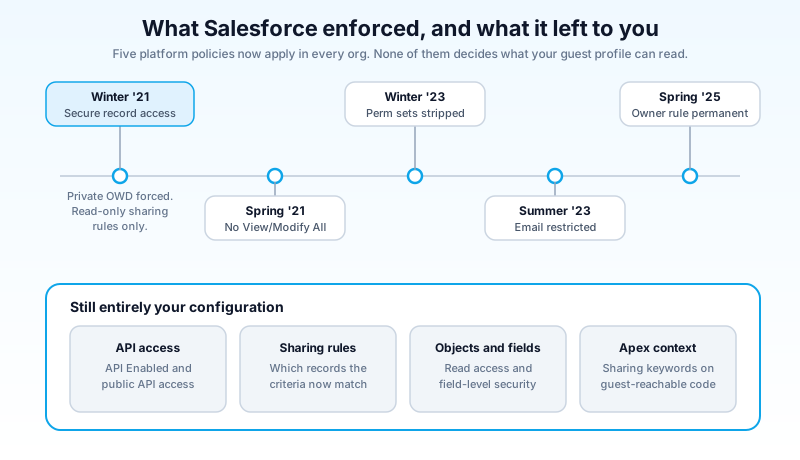
Read that list carefully and notice what is missing. Every enforcement above constrains how records can be granted and what can be done with them. None of them decides which objects and fields your guest profile can read, whether it can call APIs, or whether your sharing rules are scoped tightly. That set of decisions is entirely yours, and it is where every incident of the past two years has lived.
Three doors into the same data
The reason a misconfigured guest profile turns into a bulk extraction is that the same permissions answer through more than one interface, and the ones people forget are the ones that page cleanly.
The site itself. Components render what the guest user can read. This is the door teams do audit, because the exposure is visible: if a record appears on a page, someone eventually notices.
The Aura endpoint. Aura-based sites expose a controller endpoint that accepts descriptor calls. Reco observed the campaign using it first to enumerate which objects were reachable, then to page through records through a list data provider. This is where the bulk of that 560,000-request volume went. Nothing renders, so nothing looks wrong from the front end.
The LWR data layer. Lightning Web Runtime sites expose UI API and GraphQL under the site path. The City-Forum operator walked consecutive API versions from v56.0 through v66.0 against that path, queried the schema for object names, then pulled records with cursor pagination that also returned total record counts. Free reconnaissance: the count tells you how big the dataset is before you decide to take it.
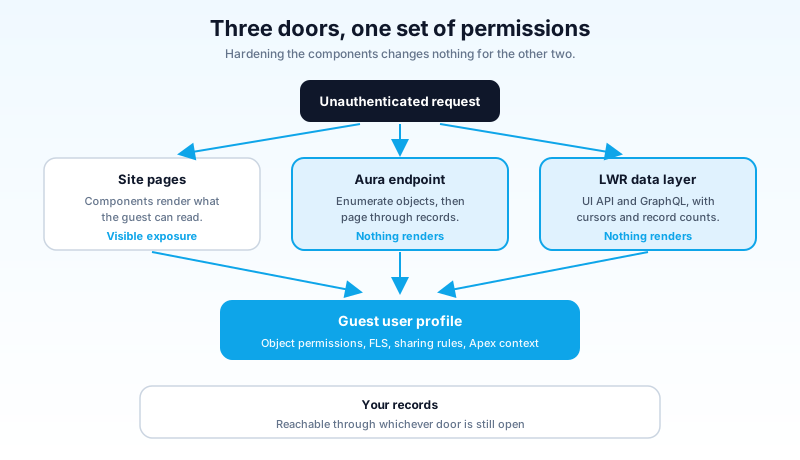
All three doors resolve to one permission set. Tightening the components does nothing for the other two. That is the single most useful sentence in this article, and it is the reason "we reviewed the site" is not an answer to "what can the guest user read?"
The audit, in order of how much data each step takes off the internet
Do these in this order. The ranking is deliberate: the first two steps close entire interfaces, and the rest narrow what remains reachable through them.
1. Turn off API Enabled on every guest user profile. This is the highest-value single change available to you. Without it, programmatic querying through the Aura and GraphQL paths does not work. Salesforce's own guidance and every vendor advisory published this year agree on this being first. If a site genuinely needs it, that is a decision someone should make explicitly and write down, not a default nobody chose.
2. On LWR sites, uncheck "Allow guest users to access public APIs." Experience Workspaces, Administration, Preferences. It closes the UI API and GraphQL surfaces together. Reco called it the strongest single lever LWR gives you, and Salesforce lists disabling public API access as its highest-impact single change. Winter '27 adds finer control here, a release update letting admins govern guest access to the GraphQL API specifically, which is worth testing in a preview sandbox rather than waiting to discover in production.
3. Inventory every guest user sharing rule. For each one, answer three questions: which records does the criteria actually match today, is the rule still tied to a live site requirement, and does anything in those records need protecting. Rules written for a public product catalog age badly when the object later picks up an internal notes field or starts holding partner pricing. The Guest User Sharing Rule Access Report exists for exactly this and gives you the per-object view faster than clicking through Sharing Settings.
Criteria are where the drift happens. A rule that says "share Product records where Active equals true" was correct when Active meant a published catalog item. Two years and one data migration later, Active is set on 40,000 rows including the ones sales uses for internal quoting, and the rule that reviewed clean at launch is now a bulk export waiting for someone to page through it. Write the record count next to each rule when you inventory it. A rule matching eleven records and a rule matching eleven thousand are different risks even when the criteria look identical on the page.
4. Strip object permissions to the minimum. Most objects should be no access. Where read is needed, read only, and never with View All. Check permission sets and permission set groups as well as the profile, because that is where surprise access hides.
5. Review field-level security object by object. This is the tedious step everyone skips and the one that decides how bad an exposure gets. Object access says a crawler can see records; FLS decides whether those records contain a phone number, an email, an internal case comment, or a contract value. Reachable is not the same as sensitive. The field-level security audit is the same work you would do for internal least privilege, done for a user who is on the public internet.
6. Close user visibility. Portal User Visibility and Site User Visibility in Sharing Settings should both be off. With them on, a guest can enumerate other users of the site. While you are there, turn on nicknames in Experience Workspaces so member display names are masked, and review Enhanced Personal Information Management, which protects sensitive fields on the User object.
7. Remove what nobody uses. Self-registration pages if self-registration is not a requirement. The default Visualforce pages you never customized. The Run Flows permission if guests do not run flows. Access Activities, which is on the removal list in both Salesforce's best-practice documentation and Reco's writeup.
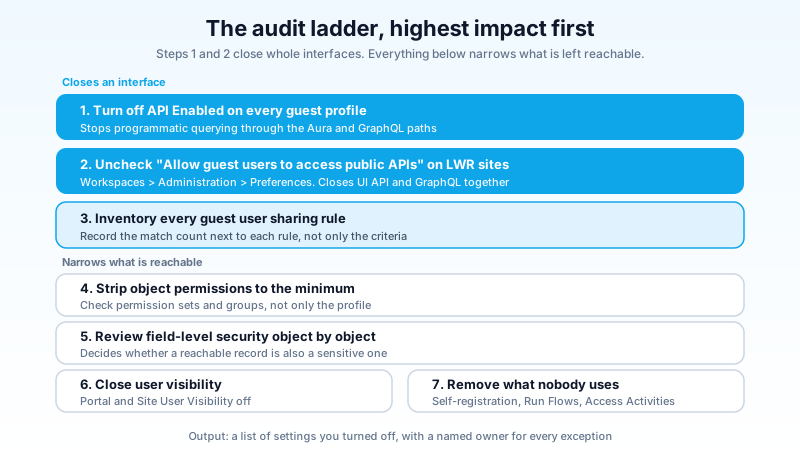
Everything above is configuration. You can complete the whole ladder in an afternoon for a single site, and the output is a list of things you turned off with a named owner for each exception.
The Apex that runs as nobody
Configuration is only half the surface. The other half is code, and it fails differently.
Any @AuraEnabled method reachable from a component on a public site executes in the guest user's context. If the class is declared without sharing, the record-level protections described above stop applying inside that method. Secure guest user record access forces Private org-wide defaults; a without sharing Apex class runs in system context and queries straight past them. Salesforce's guidance is unambiguous: use with sharing on classes backing @AuraEnabled methods that guests can reach.
Sharing keywords handle records. They do not handle fields. A with sharing class still returns every field the SOQL query selected, whether or not the guest profile has read access to it. Enforce field and object permissions explicitly with user mode operations or Security.stripInaccessible, and prefer selecting the fields the component actually needs over SELECT lists that grew by accretion.
Two more checks worth running against guest-reachable code. Restrict Apex classes so that only what the site needs is exposed, and treat any class whose name suggests a data provider or search handler as worth reading in full. Search endpoints are attractive because they accept a term and return matches across records, which is a page-through interface even when nobody designed it as one.
Detecting the crawler you already have
The uncomfortable part of the City-Forum disclosure is not that a configuration was wrong. It is that the collection ran for 17 months. Traffic that reads records at a steady rate from one address looks like traffic. So the detection question is not "was there an alert" but "would we have a record of it."
Watch for volume and shape rather than signatures. A single IP producing sustained unauthenticated requests, requests that step through consecutive API versions, query patterns with cursor pagination against the same object, and record counts requested without the records themselves are all cheap to spot in retrospect and nearly invisible in the moment. Event Monitoring is where that history lives, and if your org has Shield you can build the query once and schedule it.
If you have no event data at all for your public sites, that is the finding. Fix it before you go looking for the next control, because everything else in this article is prevention and this is the only part that tells you whether prevention arrived in time. Salesforce also recommends designating a Security Contact in your org so that when their Cyber Security Operations Center sees something targeting your instance, the notification reaches a person instead of an inbox nobody owns.
Make it a standing check, not a one-time cleanup
Guest exposure does not stay fixed, because orgs do not stay still. A new custom object gets created with a permissive profile clone. A partner integration adds a field to an object that a sharing rule already exposes. A site gets spun up for a campaign and never gets decommissioned.
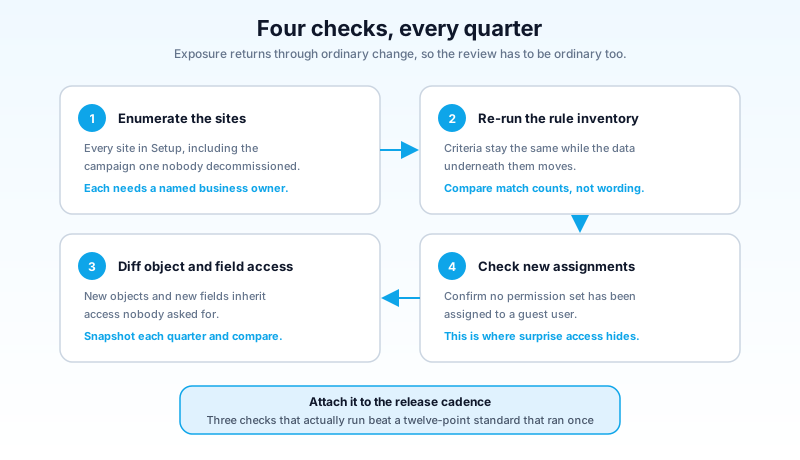
Put four things on a quarterly recurrence: enumerate every site in Setup and confirm each still has a business owner, re-run the sharing rule inventory, diff guest profile object and field permissions against your last snapshot, and confirm no new permission set has been assigned to a guest user. Attach it to the release cadence if that helps it survive. Three checks that actually run beat a twelve-point standard that ran once.
The broader pattern here matters beyond Experience Cloud. Anonymous access, dormant OAuth grants, and over-scoped integration users are the same failure wearing different hats: an identity nobody owns, holding permissions nobody reviews, on a surface that answers requests from the internet. If you have already worked through the Connected App and OAuth grant audit, this is the same exercise on the other side of the org, and if you are standing up a new portal, the Experience Cloud implementation guide covers where these settings sit in the build sequence.
What to do today
Open Setup, go to All Sites, and list every Experience Cloud site in your production org. For each one, open its guest user profile and check a single box: is API Enabled on? Turn it off wherever the answer is yes and no documented requirement says otherwise. That one pass, on its own, closes the interface that did the heavy lifting in a 17-month collection campaign, and it takes less time than the meeting you would schedule to discuss it.
About the Author
Dipojjal Chakrabarti is a B2C Solution Architect with 29 Salesforce certifications and over 13 years in the Salesforce ecosystem. He writes and edits salesforcedictionary.com, published by KineticBit Inc., to help admins, developers, architects, and cert/interview candidates sharpen their fundamentals. More about Dipojjal.
Share this article
Sources
- Best Practices and Considerations When Configuring the Guest User Profile (Salesforce Help)
- Secure Guest Users' Sharing Settings and Record Access (Salesforce Help)
- Guest User Security Policies and Timelines (Salesforce Help)
- Protecting Your Data: Essential Actions to Secure Experience Cloud Guest User Access (Salesforce)
- The City-Forum Campaign (Reco, August 12 2026)
Related dictionary terms
Practise it
Five questions on Administrator
Exam-style questions with an explanation after each one. No account needed, and your answers build a weak-topic map once you have one.
Keep reading

Salesforce Connected App OAuth Security: Find and Kill the Dormant Grants Before Someone Else Uses Them
Forgotten OAuth grants from Connected Apps you stopped using are one of the highest-value attack surfaces in Salesforce. Here is how to find them, revoke them, and stop them from coming back.

Salesforce Experience Cloud: The Complete 2026 Guide (Sites, Portals & Agentic Customer Experiences)
Experience Cloud is no longer Communities. In 2026, it's an LWR-powered site runtime, a Digital Experience identity layer, and an Agentforce-first portal surface. Here's the complete admin, developer, and architect guide.
Salesforce Field-Level Security in 2026: The Field Access Tab, the Layout Trap, and an Audit You Can Actually Finish
A user can see a field you never granted her. Summer '26 added a Field Access tab that names every profile, permission set, and group behind that access. Here is how to read it and audit the rest.
Comments
No comments yet. Start the conversation.
Sign in to join the discussion. Your account works across every page.