
Microsoft Is Retiring EWS: The Salesforce Email and Calendar Sync Migration You Have Weeks to Finish
Microsoft turns EWS off on October 1, 2026. Here is the August cutoff Salesforce set, the Graph upgrade for Einstein Activity Capture and Inbox, and the Lightning Sync exit.

A sales manager messages you on a Tuesday afternoon. None of her team's emails have shown up on Contact records since Friday. You open three Contacts and check the timeline. Blank since Friday, 4 p.m. You check the release notes, the deploy log, the recent [permission set](/terms/permission-set) changes. Nothing in Salesforce touched activity capture that week.
Nothing in Salesforce did. The break was upstream, in Microsoft, and the version of that break most orgs will hit lands on October 1, 2026.
What Microsoft is actually turning off
Exchange Web Services is the SOAP-era API that non-Microsoft applications have used to read mailboxes and calendars in Exchange Online since roughly 2007. It is old, it is wide open compared to modern scoped access, and Microsoft has been telling developers to move to Microsoft Graph for years. The soft deprecation is now a hard date.
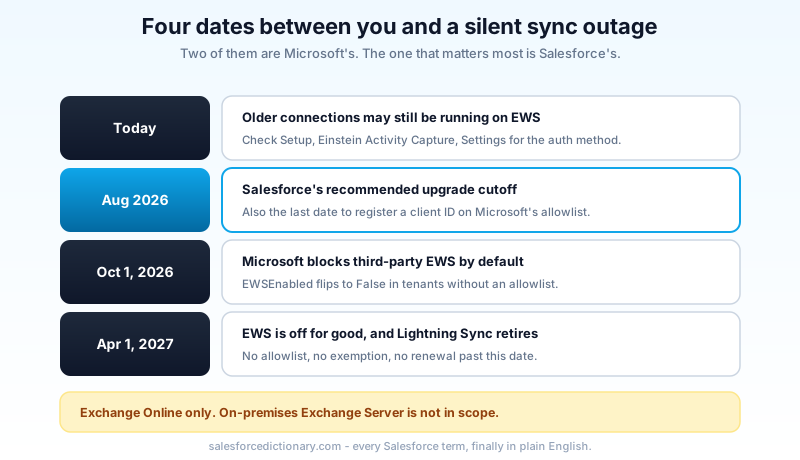
Two dates matter, and people keep collapsing them into one.
October 1, 2026. Microsoft starts blocking EWS requests from non-Microsoft applications. In practice it flips the EWSEnabled tenant property to False for any Exchange Online tenant that has not explicitly configured an application allowlist. If your tenant has not registered the client IDs it wants to keep alive, third-party EWS traffic stops that day.
April 1, 2027. EWS is permanently disabled. No allowlist, no exemption, no extension. The allowlist is a stay of execution and Microsoft has said plainly there is no renewal past this date.
There is a deadline hidden inside the first date that catches people. To get an application onto the allowlist, tenant admins have to register its client ID by the end of August 2026. Miss that and the exemption does not take effect, which means the October 1 block applies to you whether or not you intended to use the allowlist as a buffer.
One clarification before anyone panics unnecessarily: this is an Exchange Online change. On-premises Exchange Server is not in scope. Orgs running Google Workspace are not affected by this particular retirement, though everything below about Lightning Sync still applies to them.
The three Salesforce features sitting on top of EWS
Three things in your org can be authenticating to Microsoft 365 over EWS right now.
Einstein Activity Capture is the big one. It pulls email and calendar events out of connected mailboxes and renders them on the activity history and timeline of Contacts, Leads, Accounts, Opportunities, and Quotes.
Salesforce Inbox is the productivity layer your reps use inside Outlook: the side panel, the logging, the templates, the read receipts. It rides the same connection.
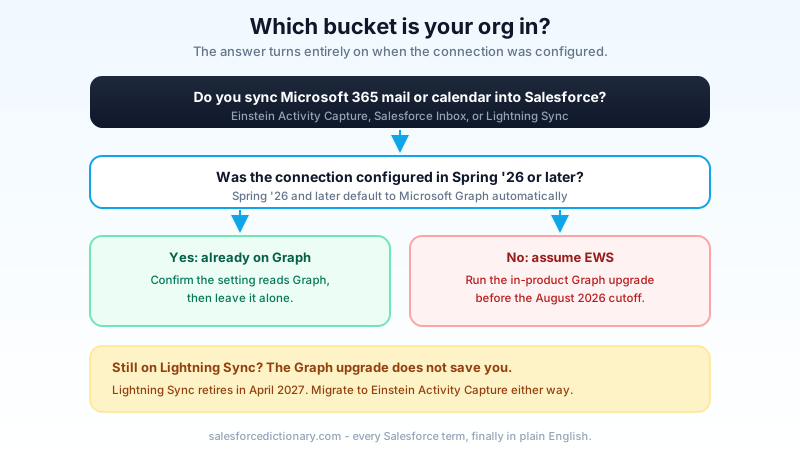
Lightning Sync is the older bidirectional sync for contacts and calendar events, and it is the piece with its own separate death sentence. Lightning Sync retires in April 2027 regardless of what happens to EWS. Salesforce has been pointing customers at Einstein Activity Capture as the replacement for years.
Whether you have work to do comes down to when the configuration was created. Starting in Spring '26, any Einstein Activity Capture configuration set up against Microsoft Office 365 authenticates with Microsoft Graph automatically. If your connection was built in Spring '26 or later, you are already on Graph and there is nothing to upgrade. If it was built before that, assume it is on EWS until you have looked at the setting and confirmed otherwise.
Salesforce's stated cutoff is August 2026, deliberately set ahead of Microsoft's October block so orgs have testing room. That is roughly five weeks from today.
Job one: the Graph authentication upgrade
The upgrade itself is not hard. The dependency around it is what eats your calendar.
In Setup, open Einstein Activity Capture, go to Settings, and look at the connection's authentication method. If it reads EWS, there is an in-product upgrade path that swaps the connection to Microsoft Graph. Salesforce built a tool for exactly this. The clicking takes minutes.
The part that takes weeks lives in a different building. Microsoft Graph access requires tenant-wide admin consent, granted by a Microsoft 365 global admin in Azure. That person does not report to you, may not have heard of Einstein Activity Capture, and almost certainly has a change-approval process in front of them. Send that request first. Everything else in this post is an afternoon of work; the consent ticket is the long pole.
While you are waiting, check licensing. Each feature needs the corresponding Outlook and Graph entitlement on the Microsoft side, and mismatches show up as users who connect fine but sync nothing. Confirm entitlement counts against your actual assigned-user counts, not against your headcount.
Two operational details that catch teams flat:
Inbox users have to reconnect. After the connection moves to Graph, Outlook integration and sync users are prompted to re-authorize their Microsoft account. If you do not warn them, your first sign that the migration completed will be a wave of tickets asking why the Salesforce panel is asking for a password. Write that email before you flip the switch, not after.
There is no rollback. Once a connection is upgraded to Graph, you do not move it back to EWS. That single fact is the argument for testing in a sandbox first, and it is why the "just do it in production on Friday" plan is a bad plan here. If you need a refresher on which sandbox type gives you what, the sandbox types breakdown covers the trade-offs.
If the OAuth consent and scoping side of this is unfamiliar territory, the same mechanics show up everywhere Salesforce talks to an external identity provider. The connected app OAuth security guide walks through how those grants behave and how to audit them, and the named credentials guide covers the pattern Salesforce uses for outbound authentication generally.
What to actually ask your Microsoft admin for
Vague requests bounce. Specific ones get approved. When you file the ticket, say that Salesforce needs tenant-wide admin consent for the Microsoft Graph application backing Einstein Activity Capture, that it replaces the existing Exchange Web Services access your org already grants, and that Microsoft is blocking EWS for third-party applications on October 1, 2026. Attach the Microsoft Exchange team's own retirement notice. Ask them to confirm two things in writing: that consent has been granted at the organization level rather than per user, and that no conditional access policy blocks the new application for the mailboxes you sync.
That second one is the quiet killer. Plenty of tenants have a conditional access rule scoped to legacy authentication or specific application IDs, written years ago by someone who has since left. Consent gets granted, everyone declares victory, and a third of your users still fail to sync because a policy nobody remembers is filtering them out. Ask the question before cutover, not during triage.
Job two: getting off Lightning Sync
The auth upgrade keeps your existing setup breathing. It does not solve Lightning Sync, which is retiring on its own schedule in April 2027.
Salesforce ships a Migration Assistant in Setup that reads your Lightning Sync configuration, tells you which settings carry over, flags what does not, and helps you stand up the equivalent Einstein Activity Capture configuration. For a small org the walkthrough genuinely does take half an hour.
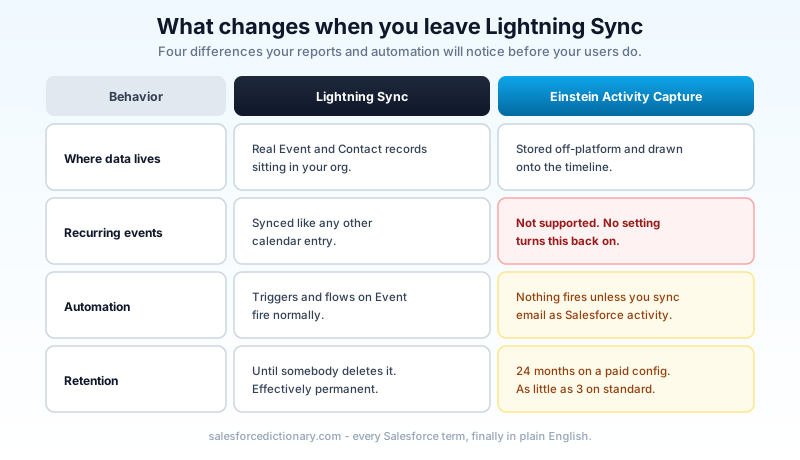
Then you discover the four behavior differences, and those are what actually make this a project.
Where the data lives changed. Lightning Sync wrote real records. A synced meeting became an Event record with an owner, a WhoId, a WhatId, and everything else a Salesforce record has. Einstein Activity Capture's capture path stores email and event data on separate cloud infrastructure and renders it onto the timeline. It looks the same to a rep looking at a Contact. It is completely different to a report. Any dashboard counting Events by owner, any "meetings booked this quarter" metric, any activity-based territory scoring goes quiet the day you cut over. The mitigation is the "Sync Email as Salesforce Activity" setting, which writes captured mail into real EmailMessage and Task records so reports and automation can see them. Turn it on deliberately and validate it, because the default behavior is the one that breaks your dashboards.
Recurring events do not sync. Lightning Sync handled them. Einstein Activity Capture does not support recurring event sync. If your sales ops team measures standing customer check-ins, or your capacity model counts weekly recurring meetings, that data stops arriving and no error appears anywhere. This is the single most common unpleasant surprise in these migrations, and there is no configuration that turns it back on.
Automation stops firing. A trigger or record-triggered flow listening on Event fires when Lightning Sync creates an Event. Captured-only activity data never creates that record, so nothing fires. Inventory every trigger, flow, validation rule, and assignment rule touching Event and Contact before you cut over, and decide for each one whether "Sync Email as Salesforce Activity" covers it or whether the logic needs rewriting.
Retention is now finite. Lightning Sync data lived in your org until someone deleted it. Einstein Activity Capture retention runs 24 months by default on a configuration with at least one paid user, extendable to five years through Support. On standard Einstein Activity Capture, retention can be as short as three to six months. Activity older than the window falls off the timeline. If anyone in your business has a compliance reason to keep customer correspondence for seven years, resolve that before you migrate, not after.
One more constraint that surprises people mid-pilot: a given user cannot run Lightning Sync and Einstein Activity Capture at the same time. There is no soft overlap period per user. You move a user, and that user is moved.
The sequence that actually survives contact with a real org
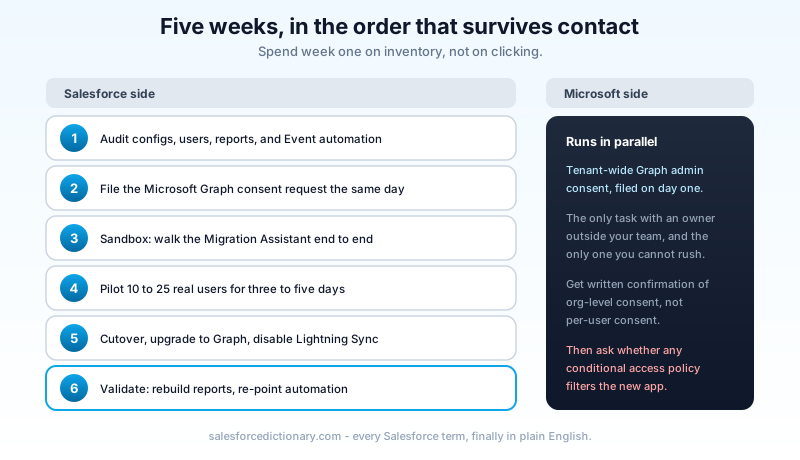
Five weeks is enough if you spend the first one on inventory instead of clicking.
Audit. List every Lightning Sync configuration and the users assigned to each. Pull every report and dashboard whose source is Events or Tasks. Query your metadata for triggers and flows on Event and Contact. Write down which of your sales metrics are computed from activity data. This list is the definition of "done" for the whole project, and if you skip it you will discover the list one angry stakeholder at a time.
Ask Microsoft. File the tenant-wide Graph consent request on day one of the audit, in parallel. It is the only item with an external dependency.
Sandbox. A Developer sandbox is enough to walk the Migration Assistant and confirm the configuration screens behave. It will not give you real mailbox traffic, so treat the sandbox pass as a rehearsal of the clicks, not a validation of the data.
Pilot. Move 10 to 25 real users in production. Pick people who will actually tell you when something looks wrong, and include at least one person whose workflow depends on recurring meetings. Watch for three to five business days.
Cutover. Move the remaining users, upgrade the connection to Graph, disable Lightning Sync.
Validate. Rebuild the reports the audit flagged, re-point the automation, confirm each pilot finding is closed.
How you will know it worked, and how you will know it didn't
The dangerous failure mode here is not a loud one. Sync does not usually break for everybody at once. It degrades for a subset of users whose mailbox permissions, license assignment, or account state differs slightly, and those users assume the quiet timeline is normal. Nobody files a ticket. You find out in a quarterly business review when a manager says her team's activity numbers look wrong.
So do not measure success by ticket volume. Measure it directly.
At 24 hours, confirm captured activity is arriving for a named sample of pilot users, one from each profile and region you migrated. At 72 hours, compare daily activity volume against the same weekday before cutover; a 10 percent wobble is noise, a 60 percent drop is a subset of users who never reconnected. At two weeks, re-run every report from your audit list and diff the numbers against the pre-migration baseline you captured.
Then check the connection status surface in Setup on a schedule for the first month. Einstein Activity Capture surfaces per-user sync errors there, and that screen tells you about the silent subset long before a human does.
The orgs that come out of this cleanly are not the ones with the best tooling. They are the ones that treated a five-week auth deadline as a reporting migration, because that is what it actually is.
Open Setup, search Einstein Activity Capture, and read the authentication method on your connection. If it says EWS, send one message to your Microsoft 365 admin today asking for tenant-wide Microsoft Graph admin consent. That request sitting in someone else's approval queue is the only part of this you cannot compress, and every day it waits is a day off the end of your testing window.
About the Author
Dipojjal Chakrabarti is a B2C Solution Architect with 29 Salesforce certifications and over 13 years in the Salesforce ecosystem. He writes and edits salesforcedictionary.com, published by KineticBit Inc., to help admins, developers, architects, and cert/interview candidates sharpen their fundamentals. More about Dipojjal.
Share this article
Sources
- Salesforce Help: Move from Lightning Sync to Einstein Activity Capture
- Salesforce Help: Upgrade Microsoft Office 365 Authentication Method to Microsoft Graph
- Salesforce Release Notes: Prepare Lightning Sync for Microsoft Exchange Web Services (EWS) Retirement
- Microsoft Exchange Team Blog: Retirement of Exchange Web Services in Exchange Online
- Salesforce Help: Lightning Sync
Related dictionary terms
Practise it
Five questions on Platform Developer I
Exam-style questions with an explanation after each one. No account needed, and your answers build a weak-topic map once you have one.
Keep reading

Salesforce Connected App OAuth Security: Find and Kill the Dormant Grants Before Someone Else Uses Them
Forgotten OAuth grants from Connected Apps you stopped using are one of the highest-value attack surfaces in Salesforce. Here is how to find them, revoke them, and stop them from coming back.

Salesforce Named Credentials and External Credentials: The Complete 2026 Guide
Legacy Named Credentials are retiring. The new split between Named Credentials and External Credentials is how Salesforce expects every integration to authenticate in 2026. Here is what changed and how to migrate.

Salesforce Sandbox Types Explained: Developer, Developer Pro, Partial Copy & Full
Four sandbox types, four use cases. Here is the 2026 reference: storage, refresh, cost, license. Plus the templates, masking, and refresh strategies that keep environments healthy.
Comments
No comments yet. Start the conversation.
Sign in to join the discussion. Your account works across every page.