
Recurring Event
A Recurring Event is a Salesforce calendar event that repeats on a defined schedule (daily, weekly, monthly, or yearly) rather than occurring once.
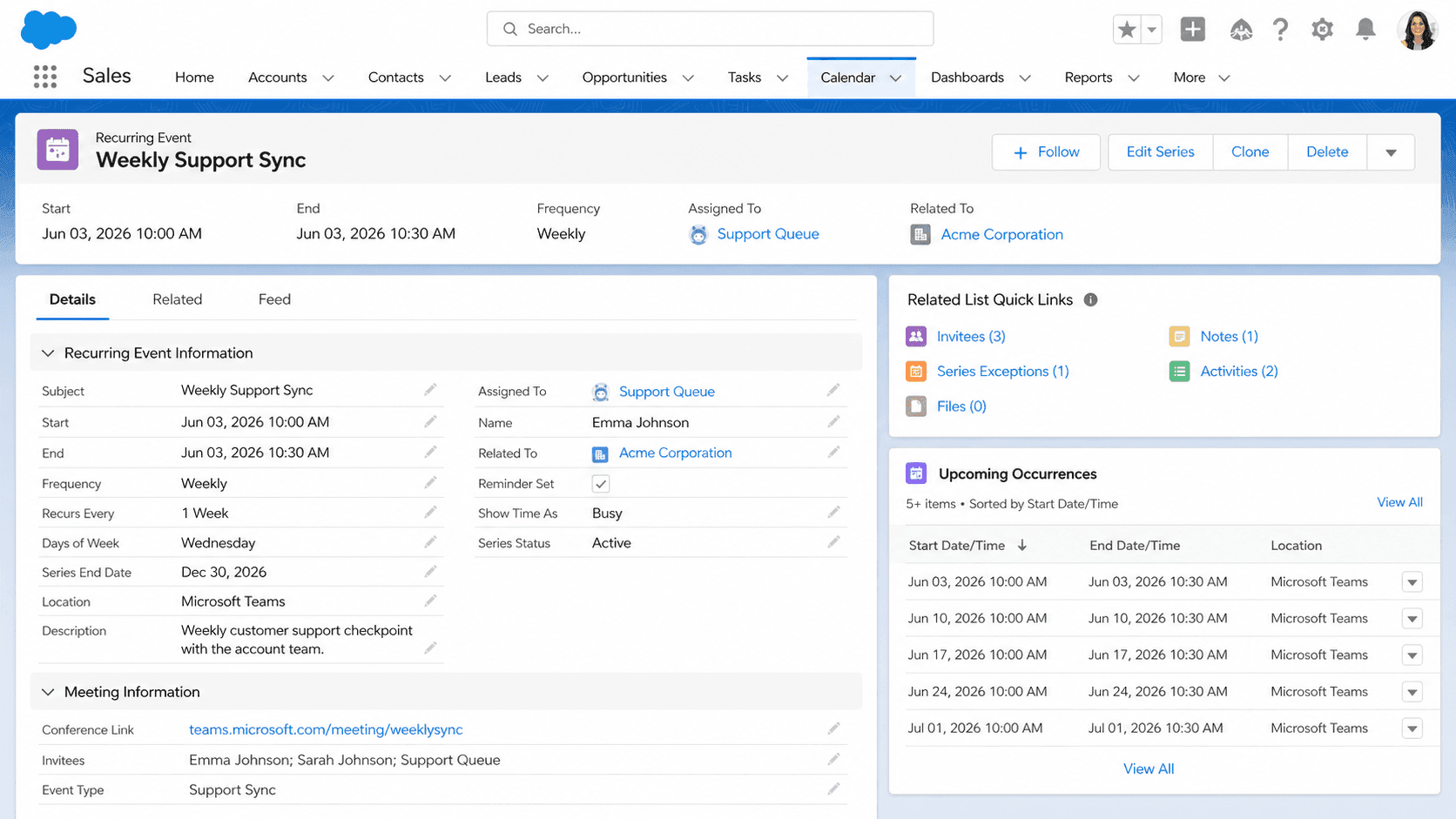
Definition
A Recurring Event is a Salesforce calendar event that repeats on a defined schedule (daily, weekly, monthly, or yearly) rather than occurring once. The series is stored as one master Event record with a recurrence pattern, and each occurrence in the series is rendered on the calendar from that pattern at display time. Users create a recurring event the same way as a single event, then set the recurrence options (every Tuesday, every other Friday, the third Thursday of the month) before saving.
Recurring events differ from single events in three places that matter to admins. They live as a single Event row in the database with an IsRecurrence flag set true; they generate occurrence records on demand for the calendar view but those occurrences are not separately editable until the user breaks them out; and they can be edited series-wide or single-instance, with the user choosing the scope at save time. The recurrence pattern is the same iCal-style RRULE you would see in Outlook or Google Calendar.
How a Recurring Event differs from 30 single Events and why that matters
One row, many occurrences
The Salesforce Event object stores a recurring event as one row with a recurrence pattern (RecurrenceType, RecurrenceInterval, RecurrenceDayOfWeekMask, RecurrenceEndDateOnly, etc.). The calendar renders the occurrences by expanding the pattern at view time, so a year-long weekly meeting shows 52 calendar cells from one database row. This keeps the data model small and the storage cheap, but it also means a SOQL query for events in a date range needs special handling to expand the recurrence.
Editing the series vs editing one occurrence
When a user opens a recurring event and changes a field, Salesforce prompts: edit this event only, or edit the entire series. Choosing this event only writes a new child Event row attached to the series, breaking that occurrence out from the pattern. Choosing the series updates the master row and re-expands all future occurrences. The behavior matches Outlook and Google Calendar exactly, which is intentional because Salesforce events sync to those tools through Einstein Activity Capture.
Recurrence pattern fields
The pattern is described by a handful of fields on Event. RecurrenceType holds the cadence (Daily, Weekly, Monthly, Yearly). RecurrenceInterval holds the multiplier (every 2 weeks). RecurrenceDayOfWeekMask is a bitmask of days within a week. RecurrenceEndDateOnly is the last date the series runs to. There is no infinite recurrence; the series must have an end date or an occurrence count cap. Salesforce enforces a maximum of 100 occurrences per series, which is why long-running standing meetings are usually split into yearly sub-series.
SOQL behavior
SOQL on the Event object normally returns only the master row for a recurring series. To get the expanded occurrences in a date range, the query must use the special syntax SELECT Id FROM Event WHERE ActivityDate = LAST_N_DAYS:30 INCLUDE_RECURRING. Without INCLUDE_RECURRING, a report or a custom Apex query showing the user's calendar in a custom UI returns only the parent rows and misses every occurrence after the first. This is a common source of bugs in custom calendar components.
Reminders and invitees
Each occurrence in a recurring event series fires its own reminder, has its own invitee response state, and tracks its own attendance. A single Event Relation record is created per invitee per occurrence (or per series, depending on how the user accepted), which means a 52-week meeting with 5 invitees can produce 260 Event Relation rows. This is the main storage impact of recurring events and is the reason Salesforce caps occurrences at 100 per series.
Sync to Outlook and Google
Einstein Activity Capture (and the older Lightning Sync) sync recurring events bidirectionally. The sync respects the master-occurrence model: a change to one occurrence in Outlook becomes a broken-out child Event in Salesforce, and a change to the series in Salesforce updates the master in Outlook. The sync uses the same RRULE format both systems share, which is why edits round-trip cleanly when they stay within the supported pattern shapes. Patterns Outlook supports but Salesforce does not (every workday of the month, certain Friday-the-13th rules) fall back to single events.
Reporting on recurring events
Standard event reports respect the master-occurrence model and group by series. A custom report type can flatten occurrences into individual rows by using the Activity Date field with a date range filter. Activity reporting for sales productivity (Einstein Activity Capture, Activity Metrics) counts each occurrence as a separate logged activity, so a rep who runs a weekly standing call shows 52 calls a year on their activity dashboard rather than one.
Create a Recurring Event from the activity composer
Schedule a meeting that repeats weekly, biweekly, or monthly by setting the recurrence pattern on the Event composer before saving.
- Open the activity composer
From any record's Activity tab, click New Event. The composer opens with the standard subject, start, end, and related-to fields.
- Fill the core fields
Enter the subject, start date, start time, duration, and any related records (account, opportunity, contact). These fields apply to every occurrence in the series unless you break out a specific occurrence later.
- Enable recurrence
Check the Recurring Event box. A panel appears with cadence options: Daily, Weekly, Monthly, Yearly.
- Configure the pattern
Pick the cadence. Set the interval (every 1, 2, or 3 weeks). Pick the day-of-week mask for weekly events. Set the end date or the occurrence count.
- Add invitees
Click Add Invitees, search for users, contacts, or leads. Each invitee receives a recurring meeting invite that respects the same pattern.
- Save and verify
Click Save. The calendar shows the series rendered across the configured date range. Click any single occurrence to verify the recurrence summary shows the expected pattern.
- The 100-occurrence cap can be hit on a standing weekly meeting in two years. Plan for it by creating yearly sub-series for any meeting that will run indefinitely.
- SOQL queries that omit INCLUDE_RECURRING miss every occurrence after the first. Custom calendar UIs and reports must include the keyword or they silently undercount.
- Editing the series re-expands all future occurrences from the new pattern. Any broken-out occurrence stays as-is, but a series-level subject change rewrites every occurrence the user thought was custom.
- Einstein Activity Capture sync can lose a recurring pattern when the user uses an Outlook-only feature (Friday-the-13th rules, every workday). The series falls back to single events on the Salesforce side.
Prefer this walkthrough as its own page? How to Recurring Event in Salesforce, step by step
Trust & references
Cross-checked against the following references.
- Set Up Recurring Events (opens in new tab)Salesforce Help
- Event Object Reference (opens in new tab)Salesforce Developer Docs
- Lightning Calendar Overview (opens in new tab)Salesforce Help
Straight from the source - Salesforce's reference material on Recurring Event.
- Recurring Events (opens in new tab)Salesforce Help
- SOQL INCLUDE_RECURRING (opens in new tab)Salesforce Developer Docs
- Einstein Activity Capture Overview (opens in new tab)Salesforce Help
Hands-on resources to go deeper on Recurring Event.
About the Author
Dipojjal Chakrabarti is a B2C Solution Architect with 29 Salesforce certifications and over 13 years in the Salesforce ecosystem. He writes and edits salesforcedictionary.com, published by KineticBit Inc., to help admins, developers, architects, and cert/interview candidates sharpen their fundamentals. More about Dipojjal.
Test your knowledge
+5 pts / dayQ1. How does Salesforce store a Recurring Event in the database?
Q2. What does Salesforce prompt when a user edits one occurrence of a Recurring Event?
Q3. What is the maximum number of occurrences Salesforce allows in a single Recurring Event series?
Discussion
Loading discussion…