
Salesforce Digital Experience: The Complete 2026 Platform Guide
What the Digital Experience platform actually is in 2026, LWR vs Aura, OmniStudio integration, GEO for AI search, and the architecture decisions that determine site performance.
You ship a partner portal in 2018 on Aura templates. Six years later, the page loads in three and a half seconds on a corporate network, the SEO ranks below your old marketing site, and the IT team has stopped touching the Lightning components because half of them break when you upgrade. The same portal rebuilt on Lightning Web Runtime today loads in under a second, ranks on real search terms, and survives the platform upgrade cycle. The platform got radically better between those two dates. Most existing customer sites have not yet caught up.
That is the Salesforce Digital Experience story in 2026. The platform branded under various names over the years (Communities, Community Cloud, Experience Cloud) is now positioned as Salesforce's Digital Experience platform, with Lightning Web Runtime as the modern foundation and Aura as the legacy runtime that still exists for backwards compatibility. The platform powers customer portals, partner sites, self-service help centers, branded web destinations, and AI-discoverable content surfaces.
This post is the platform-architecture and decision guide for the 2026 Digital Experience platform. For a feature-by-feature walkthrough of Experience Cloud (the product SKU), see Salesforce Experience Cloud Complete 2026 Guide. This post focuses on the architecture decisions: LWR vs Aura, OmniStudio integration, AI-search optimization, performance, and the strategic choices that determine whether your digital experience scales or stalls.
What the Digital Experience platform actually is in 2026
The Salesforce Digital Experience platform is the umbrella for the products and capabilities that build customer-facing digital surfaces on the Salesforce platform. The headline product is Experience Cloud (the SKU), but the platform layer includes the framework runtimes, the developer toolkits, the OmniStudio components, the AI-search optimization features, and the integration patterns with Agentforce.
The components:
- Experience Cloud SKU. The licensed product. Configurable templates (Customer Account Portal, Help Center, Partner Central, Build Your Own), branding tools, audience targeting, navigation builder, page builder.
- Lightning Web Runtime (LWR). The modern execution framework. Static-by-default architecture, CDN-served content, fast page loads.
- Aura runtime. The legacy execution framework. Used by older communities and templates. Still supported, not the recommended path for new development.
- Lightning Web Components (LWC). The component model both LWR and Lightning Experience use. Write once, render in either environment with some constraints.
- OmniStudio components. Omniscripts, Flexcards, DataRaptors. Now natively supported on LWR in the Spring '26 release.
- GEO (Generative Engine Optimization). The 2026 feature that makes Experience Cloud sites discoverable by AI assistants (ChatGPT, Claude, Perplexity), not just search engines.
- Headless options. The Salesforce Commerce APIs and the LWR-as-rendered-frontend pattern for B2B and D2C sites.
- Mobile Publisher. Build native iOS and Android apps that wrap Experience Cloud sites.
The platform supports five canonical use cases:
- Customer self-service portals. Knowledge access, case submission, account management.
- Partner portals. Deal registration, lead distribution, training, MDF management.
- Help centers. Public knowledge bases, community forums, AI-driven Q&A.
- Branded customer-facing sites. Marketing landing pages, branded community destinations.
- Internal employee portals. HR self-service, IT self-service, training delivery.
The decision tree for picking templates and runtimes is the part most architects get wrong on the first build, so it gets the most attention below.
The LWR vs Aura decision
This is the architecture decision that shapes everything else.
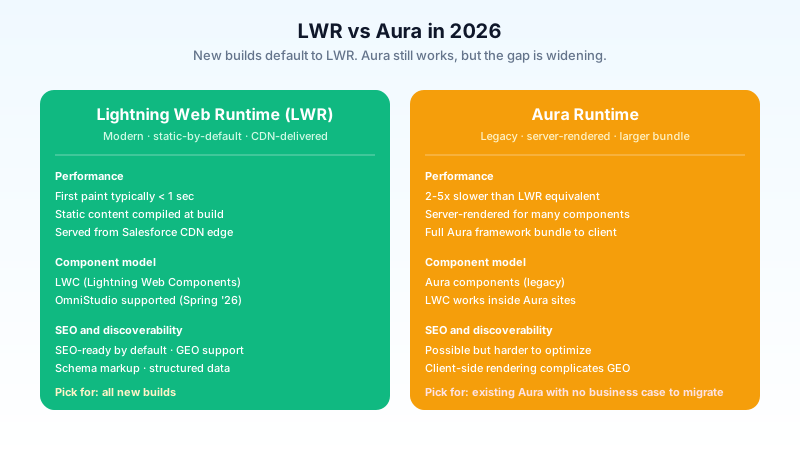
Lightning Web Runtime (LWR). The modern path. Static-by-default architecture: framework and UI compile at build time, ship to the Salesforce CDN, deliver to the user with a first paint typically under one second. Subscribes to a clean component model based on Lightning Web Components, supports OmniStudio components natively as of Spring '26, includes built-in SEO optimization, and produces the page-load performance customers expect from a modern web destination.
Aura runtime. The legacy path. Server-rendered for many components, larger client-side framework bundle, slower first-contentful-paint. Aura is still supported and still works; Salesforce has not announced a hard deprecation date in 2026. But the platform team has been explicit that LWR is the strategic direction. Aura sites typically run 2 to 5 times slower than equivalent LWR sites under the same content.
When to pick LWR:
- New Experience Cloud project. Default to LWR.
- Public-facing site where SEO matters. LWR is faster, ranks better.
- Site requiring a high-performance customer journey (checkout, application flow, time-sensitive content).
- Site with OmniStudio components (Flexcards, Omniscripts). LWR is now the recommended host.
When to stay on Aura:
- Existing Aura site with deep custom Aura component investment and no immediate business need to rebuild.
- Site that relies on specific legacy components without LWR equivalents (the list of these shrinks every release).
- Internal-only portal with low traffic and no SEO or performance requirements.
The migration path from Aura to LWR is real but non-trivial. Components need to be rebuilt in LWC. Navigation needs to be reconstructed. Branding needs to be reapplied. Most teams budget 2 to 4 months for a moderately complex site rebuild, plus ongoing migration of custom components.
OmniStudio on LWR: the 2026 unblock
OmniStudio (Flexcards, Omniscripts, DataRaptors) is the configurable-without-code application-building layer that came from the Vlocity acquisition. For years, it ran on Aura. Building a high-performance LWR site that needed OmniStudio components meant either rebuilding the Omniscripts as LWC or accepting Aura-rendered islands inside an LWR site.
The Spring '26 release shipped native LWR support for the core OmniStudio components. Flexcards now render directly on LWR pages. Omniscripts execute inside LWR templates. DataRaptors work as headless data shapers in either runtime.
The implication for architects: the previous architectural compromise (LWR for marketing pages, Aura for OmniStudio-heavy customer-facing apps) is no longer necessary. New builds can be entirely LWR even when they depend heavily on OmniStudio configuration.
The migration implication for existing sites: orgs that built Aura sites specifically because OmniStudio required it now have a path forward. The migration is still real engineering work, but the technical constraint that justified Aura is gone.
A side note for orgs running OmniStudio on Aura today: do not migrate immediately just because the LWR path opened. The migration cost is real, the existing sites work, and the LWR support is still maturing. Plan the migration for the next major site refresh, not as an urgent project.
GEO: optimizing for AI search
The Spring '26 release introduced Generative Engine Optimization as a first-class feature in Experience Cloud. The premise: customers no longer search exclusively through Google. They search through ChatGPT, Claude, Perplexity, and other AI assistants. Sites that are not optimized for AI-assistant discovery do not appear in the answers those assistants give.
GEO covers:
- Structured content tagging. Schema.org markup, JSON-LD structured data, content-type signals that help AI assistants parse the page.
- Crawlable content patterns. Server-rendered or pre-rendered content (LWR's static-by-default model handles this naturally), avoiding client-side rendering for content discovery.
- Citation-friendly content structure. Clear headings, paragraph-level answer structure, explicit Q&A patterns that AI assistants can quote.
- Knowledge article syndication. Knowledge articles published to your help center can be syndicated to AI assistants for direct answers.
The pattern that wins in 2026 customer support: a knowledge article that answers a specific question, hosted on an LWR-based help center, with GEO markup applied, is the article AI assistants surface when a customer asks the corresponding question. The customer either reads the article and self-serves, or clicks through to your branded experience for follow-up.
This is genuinely new content marketing for support and self-service. The early-adopter orgs are seeing measurable shifts in case deflection metrics: customers find answers via AI assistants before opening a case, which the case-deflection metric captures as cases-not-opened.
Performance architecture and the CDN
LWR's static-by-default architecture is the headline performance difference, and it deserves attention.
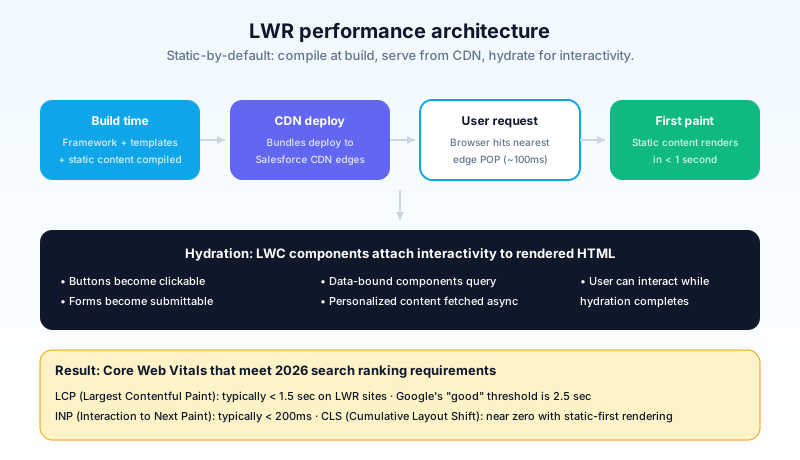
When you publish an LWR site, the build process compiles the framework, the templates, and the static content into bundled assets, deploys them to the Salesforce CDN (regionally distributed POPs), and serves them to users from the nearest geographic location.
The user's experience:
- Initial request. The browser requests the page from the closest CDN edge. The static HTML, CSS, and the JS bundle return in under 100 milliseconds typically.
- First paint. The browser renders the static content immediately. The user sees the page structure and most of the content before any JavaScript executes.
- Hydration. The LWC components attach interactivity to the rendered static markup. Buttons become clickable, forms become submittable, data-bound components start querying.
- Data fetch for personalized content. The components query Salesforce APIs for user-specific data (cart contents, account-specific records, personalized recommendations). This happens after the initial render so the user is not waiting on a blank page.
The contrast with Aura: Aura renders content server-side on every request, with the full Lightning framework bundle shipping to the client. The first paint waits for the server response and the framework download. The difference shows up as 2 to 5x faster page loads on LWR for typical Experience Cloud workloads.
For public-facing sites where Core Web Vitals (LCP, INP, CLS) matter for SEO and conversion, this is decisive. For internal portals where users are logged in over a fast corporate network, the difference is less noticeable but still real.
The headless option
For orgs that want full control over the frontend and want to use the Salesforce platform as the headless backend, the headless option exists.
In headless mode, the frontend is not an Experience Cloud LWR site. It is a React, Vue, Next.js, or similar custom-built frontend hosted on your own infrastructure. The frontend queries Salesforce via the Connect REST API and the Salesforce Commerce APIs for data, authenticates users via Salesforce-issued OAuth tokens, and renders the UI in whatever framework the engineering team chose.
When headless makes sense:
- Engineering team is genuinely capable of running a custom frontend at scale (CDN strategy, performance monitoring, security ownership, accessibility compliance).
- The customer experience needs a level of design control that LWR templates do not provide.
- The frontend is part of a broader site (a marketing site with a small embedded Salesforce-powered area) rather than a Salesforce-centric experience.
When headless does not make sense:
- The team's reason for going headless is "LWR templates feel limiting". In 2026, LWR templates have caught up substantially. The reason to go headless is engineering capability, not template limitations.
- The internal team does not have a strong frontend engineering practice. Headless shifts the responsibility from Salesforce to the org, and the responsibility is non-trivial.
The pattern that has emerged in 2026: most Salesforce-centric experiences (customer portals, partner portals, help centers) stay on LWR. The headless option is reserved for orgs running Commerce sites where the frontend is the brand and Salesforce is the backend.
The pieces of Digital Experience that are bad
Calling out what is worse, with specifics:
Aura-to-LWR migration is real engineering, not a click upgrade. Salesforce's marketing implies the migration is straightforward. It is not. Custom Aura components need to be rebuilt as LWC. Navigation needs reconstruction. Branding needs reapplication. Plan for 2 to 6 months depending on complexity.
Template depth varies by template. Customer Account Portal is mature on LWR. Partner Central is still catching up. Build Your Own is the most flexible but requires the most configuration. Pick the template that matches your use case; do not pick the template you think will be most flexible and try to bend it.
Documentation lags the product, again. This pattern repeats across Salesforce products. LWR has been GA since 2020 and the documentation still occasionally references Aura-only patterns. Cross-check help articles against the runtime they actually apply to.
Mobile Publisher is a separate license and a separate workflow. If you want native iOS and Android apps wrapping your Experience Cloud site, Mobile Publisher is the path, and it is licensed separately from Experience Cloud. The native app build process is consultant-heavy and slow.
These are real frustrations. The platform is the right answer for Salesforce-centric digital experiences. The rough edges are what to plan around.
Agentforce in Experience Cloud sites
The integration between Experience Cloud and Agentforce is the 2026 pattern that changes how self-service works.
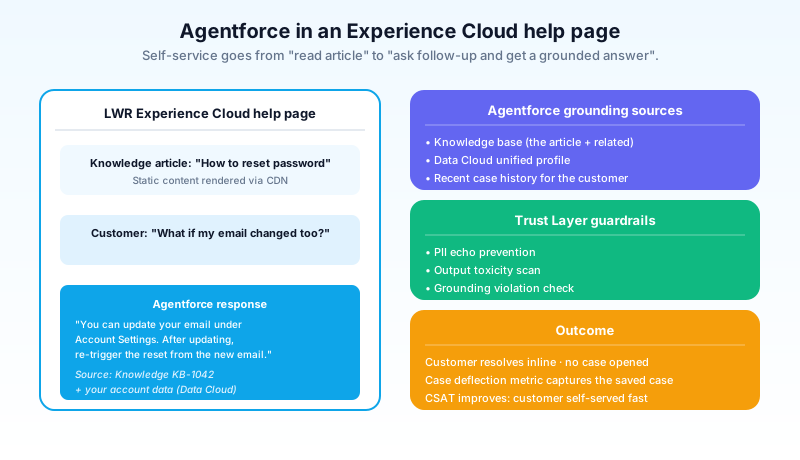
In 2024, a customer arrived at a help-center page, read the article, and either resolved their issue or opened a case. In 2026, the help-center page hosts an Agentforce conversational component. The customer can ask a follow-up question in plain language, the agent grounds in the same knowledge base plus the customer's account data (via Data Cloud), and responds inline without forcing a case.
The integration patterns:
- Embedded chat agent. A floating chat widget on every site page. Configurable for use case (sales pre-purchase, customer service post-purchase, partner enablement).
- In-page Q&A. Next to a knowledge article, an "ask a follow-up" prompt that the agent answers grounded in the article plus the customer's context.
- Authenticated agent context. Logged-in users get an agent that knows their account, recent cases, recent orders, and active subscriptions. Anonymous visitors get a more generic agent grounded in public knowledge.
The pitfall: the agent inherits the quality of the underlying knowledge base. A site with stale articles produces an agent that confidently cites stale information. The 2026 Experience Cloud pattern that works is the article audit cycle from the Service Cloud rollout: review knowledge before turning the agent on, not after.
Architecture decision framework
The decisions that determine whether your Digital Experience build scales:
- Runtime: LWR by default. Only stay on Aura if you have a specific blocker.
- Template: pick the closest match. Customer Account Portal for customer self-service, Partner Central for partner enablement, Help Center for public knowledge, Build Your Own for custom journeys.
- OmniStudio: use it where it fits. Flexcards for record-style displays. Omniscripts for guided multi-step processes. DataRaptors for headless data transformations.
- GEO: turn it on day one. No reason not to optimize for AI-assistant discoverability if the content is public.
- CDN: rely on Salesforce's. Do not custom-route through your own CDN unless you have a specific compliance reason.
- Auth: use the templated patterns. Customer self-registration, partner SSO, branded login. Salesforce ships these as configurable patterns.
- Headless: only if you have the engineering team. Otherwise stay on LWR templates.
Branding, theming, and the design-system question
Brand consistency across customer touchpoints is a recurring conversation in Experience Cloud projects. The platform supports it, but requires discipline.
LWR sites use a CSS-token-based theming system: colors, fonts, spacing, and component shapes are configured as design tokens that propagate across every page and component. Brand guidelines map directly to those tokens. Updates to the brand (new accent color, new typography) propagate without page-by-page editing.
The 2026 expansion: Experience Cloud branding now integrates with the Brand Settings concept that landed in Agentforce Marketing. The same tone-of-voice, visual identity, and mandatory disclosure definitions can flow from one configuration into both the Marketing Cloud asset generation and the Experience Cloud site theming. For orgs running both products, this is the first time the brand truly lives in one configuration surface instead of being maintained in two.
The pattern that fails: building an Experience Cloud site without a design system. The result is a portal that looks fine on day one and drifts visually as different admins add components. The pattern that works: define the brand tokens once, document the component patterns, and require new components to use tokens rather than inline styles.
What to do next
Open Setup, search "All Sites". List your existing Experience Cloud sites. For each one, check the runtime (Aura or LWR), the template, and the last-updated date. If you have Aura sites that have not been touched in two years and serve public traffic, those are the migration candidates. Pick the highest-traffic, highest-business-value site as the pilot LWR rebuild.
If you have no Experience Cloud sites and are evaluating the platform, the next move is the use case mapping. Pick the canonical use case (customer portal, partner portal, help center, branded site) and the template that matches. Start a sandbox build with the template. Configure the basics (branding, navigation, audience). Walk a representative end user through it. That feedback loop in two weeks is worth more than any vendor demo.
If you have an existing LWR site, the next move is the GEO audit. Pull your help-center articles. Check the structured-data markup. Verify your knowledge articles are syndicating to the AI assistants your customers use. The deflection-via-AI-assistant metric is genuinely shifting in 2026, and the orgs that captured the GEO opportunity early are seeing the case-volume drop.
About the Author
Dipojjal Chakrabarti is a B2C Solution Architect with 29 Salesforce certifications and over 13 years in the Salesforce ecosystem. He writes and edits salesforcedictionary.com, published by KineticBit Inc., to help admins, developers, architects, and cert/interview candidates sharpen their fundamentals. More about Dipojjal.
Share this article
Sources
Related dictionary terms
Practise it
Five questions on Platform Developer I
Exam-style questions with an explanation after each one. No account needed, and your answers build a weak-topic map once you have one.
Keep reading
Agentforce Service: The Complete 2026 Guide (Formerly Service Cloud)
Service Cloud is now Agentforce Service. This 2026 guide cuts through the rebrand: the Service Agent, IT Service, Agentic Milestones, knowledge grounding, and the real deflection numbers.
What Is Agentforce 360? The Complete 2026 Guide for Salesforce Admins, Developers & Architects
Agentforce 360 is Salesforce's 2025 rebrand of its agentic-AI platform - built on the Atlas Reasoning Engine, Einstein Trust Layer, and Data 360. Here's the complete admin + dev + architect guide.
Comments
No comments yet. Start the conversation.
Sign in to join the discussion. Your account works across every page.