
Digital Experience
A Digital Experience is an Experience Cloud site: a branded web property, hosted by Salesforce, that reads and writes data in your org.
Definition
A Digital Experience is an Experience Cloud site: a branded web property, hosted by Salesforce, that reads and writes data in your org. It is reachable by people who have no normal Salesforce login.
The phrase turns up in three places you actually touch. Setup has a node by that name, where the feature gets switched on and every site in the org is managed. So does the App Launcher, as an app with tabs for All Sites, CMS Workspaces, and CMS Channels. Then there is DigitalExperienceBundle, the metadata type that carries an enhanced LWR site's source when you deploy it.
Experience Cloud is the product brand, renamed from Community Cloud in Spring '21. Digital Experience is the older platform label that survived the rebrand.
In plain English
“Your Salesforce org is normally a private workspace that only your staff signs into. A digital experience is a public website attached to that same workspace, so customers and partners can see and change a small slice of the same records. You decide which slice, and who gets in.”
Worked example
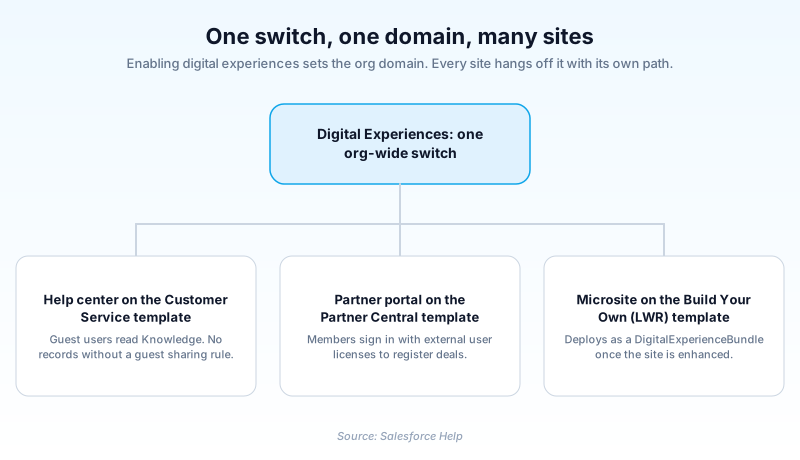
Northwind Pumps, a 400-person equipment maker, enables digital experiences once and enters the domain name northwindpumps. Salesforce turns that into northwindpumps.my.site.com. They then build two sites. The help center uses the Customer Service template with the URL path help, so customers land on northwindpumps.my.site.com/help to read Knowledge articles and log cases. The partner portal uses Partner Central with the path partners, for deal registration. On the help center the guest user profile gets read access to Knowledge and nothing else, and no guest user sharing rule is created. Anonymous visitors read every published article and cannot see a single Case or Account record.
The parts of a digital experience you actually configure
Why Setup says Digital Experiences and the website says Experience Cloud
Salesforce launched this as Community Cloud, rebranded it to Experience Cloud in Spring '21 at API version 51.0, and left the plumbing underneath alone. The API layer never got the memo. The Metadata API component representing a site is called Network, shipped in API version 28.0 and still retrieved into a networks folder with a .network suffix. Connect REST API reads a site at /connect/communities/{communityId}. Developer docs say Experience Builder sites, formerly Lightning communities. So when a colleague or a certification question says community, they mean a site. When a retrieve hands you a .network file, that is the site too.
The domain you pick once and live with
Enabling digital experiences is an org-wide switch, and the first thing it asks for is a domain name. Salesforce appends my.site.com, so entering acme gives you acme.my.site.com. The setup checklist is blunt: choose carefully, because you cannot change it after it is set. Every site then hangs off that domain with its own path, like acme.my.site.com/help. Public sites usually get a branded custom domain later, which needs DNS records and a certificate. My Domain is a different feature, covering the login URLs your internal users hit.
Three site types, and only one is getting investment
Salesforce Help sorts sites into LWR sites, Aura sites, and Visualforce sites, the last of which used to be labelled Salesforce Tabs + Visualforce. LWR runs on Lightning Web Runtime and is where new builds belong. Aura still runs and is still documented, but it is the older path. Templates decide how much you start with. Customer Service and Customer Account Portal ship a working help center or account portal. Partner Central covers deal registration, and Build Your Own (LWR) or Microsite (LWR) hand you close to an empty canvas.
Enhanced LWR sites and the metadata split
An LWR site is either enhanced or it is not, and the difference shows up in source control. A non-enhanced site deploys as ExperienceBundle. An enhanced site deploys as DigitalExperienceBundle with a DigitalExperienceConfig, types added in API version 56.0 for sites built in Winter '23 or later. Enhanced sites get partial deployment, enhanced CMS workspaces, expression-based visibility, a per-component Style tab, and a Data Cloud connection. Salesforce scheduled the Upgrade to Enhanced LWR Sites release update for Spring '26 enforcement, then dropped it. Back up and test in a sandbox anyway, because the metadata shape changes.
Guest users are where these sites get orgs into trouble
Any page you expose without a login runs as the site guest user, and that account is the one auditors ask about first. Salesforce ships Secure guest user record access on by default, which strips guests back to almost nothing. The only supported way to hand an unauthenticated visitor a record is a guest user sharing rule. It grants read only, and Salesforce itself describes it as immediate and unlimited access to everything matching the criteria. Read that twice before writing one. Audit the guest profile object by object and assume anything readable there is readable by the internet.
Changing a live site without breaking it
A site is org metadata, so it moves through sandboxes the way Apex does. Enhanced LWR sites also support partial deployment, so you can push one page instead of the whole bundle. What does not travel cleanly is anything tied to the domain, which is why sandbox site URLs never match production. Build in a sandbox, deploy the bundle, then re-point the custom domain. Re-check the guest profile on the way in, because one that looked harmless against an empty sandbox is a different proposition against real customer records.
How to enable digital experiences and stand up a site
Enablement is org-wide rather than per site, so one admin doing this changes the whole org. Run it in a sandbox first.
- Enable the feature
From Setup, enter Digital Experiences in the Quick Find box, select Settings, then select Enable Digital Experiences.
- Choose the org domain
Enter a domain name. Salesforce appends my.site.com to whatever you type. Check it against your brand and your published support URLs before you save.
- Create a site
Go to Digital Experiences, then All Sites, and click New. Pick a template, name the site, and enter the URL path that follows your domain.
- Build it and lock it down
Open Experience Builder for branding, pages, and navigation. Then open the site's guest user profile and remove every object the public does not need.
- Activate, then publish
Activate the site to make the URL live, and publish in Experience Builder to push your Builder changes. Those are two separate actions.
The org-wide switch under Setup, Digital Experiences, Settings. It creates the site domain and the Digital Experiences app.
The subdomain that becomes yourname.my.site.com. Entered during enablement, and shared by every site in the org.
Chosen per site. Customer Service, Customer Account Portal, Partner Central, Build Your Own (LWR), and Microsite (LWR) are the usual starting points.
The path appended to the org domain, such as help or partners. Enhanced LWR sites can drop the older /s segment.
- The domain is not editable after enablement. Orgs that typed a project codename are still living with it years later.
- Activating a site and publishing in Experience Builder are different actions, and a published but inactive site serves nothing at its URL.
- Guest access is configured per site, so a second site does not inherit the careful guest profile you built for the first.
Prefer this walkthrough as its own page? How to Digital Experience in Salesforce, step by step
How organizations use Digital Experience
Runs a distributor portal on Partner Central so resellers register deals and check order status without phoning inside sales.
Publishes a grant applicant help center on the Customer Service template, with Knowledge articles open to guests and case submission behind a login.
Trust & references
Cross-checked against the following references.
- Experience Cloud Glossary (opens in new tab)Salesforce
- Enable Digital Experiences (opens in new tab)Salesforce
- Create an Experience Cloud Site (opens in new tab)Salesforce
- Which Experience Cloud Template Should I Use? (opens in new tab)Salesforce
- Upgrade to Enhanced LWR Sites (Release Update), Winter '26 (opens in new tab)Salesforce
- Securely Share Your Experience Cloud Sites with Guest Users (opens in new tab)Salesforce
- Create Guest User Sharing Rules (opens in new tab)Salesforce
Straight from the source - Salesforce's reference material on Digital Experience.
Hands-on resources to go deeper on Digital Experience.
About the Author
Dipojjal Chakrabarti is a B2C Solution Architect with 29 Salesforce certifications and over 13 years in the Salesforce ecosystem. He writes and edits salesforcedictionary.com, published by KineticBit Inc., to help admins, developers, architects, and cert/interview candidates sharpen their fundamentals. More about Dipojjal.
Test your knowledge
+5 pts / dayQ1. Where in Setup do you turn on the feature that lets an org create Experience Cloud sites?
Q2. A public help center has to show anonymous visitors a small set of published Product records. What is the supported way to grant that access?
Q3. Which metadata type carries an enhanced LWR site when you deploy it?
Discussion
Loading discussion…