
Agentforce Service: The Complete 2026 Guide (Formerly Service Cloud)
What the Service Cloud rebrand actually changed, the Service Agent and IT Service agents, the new Agentic Milestones, knowledge grounding, and the deflection numbers that hold up.

You watch the case queue at 9:02 on a Monday and the number is already eighteen percent below what it was at the same time last quarter. Same SKUs. Same product issues. Same team. The only change is that the Service Agent your admin turned on six weeks ago is closing tier-one cases overnight while you were asleep, and now you and the rest of the team are working tier-two and tier-three exclusively. The bad news, if it is bad news, is that fewer cases hit a human than ever before. The good news is the ones that do are the interesting ones.
That is the Agentforce Service story in 2026. Service Cloud, as a SKU, is now Agentforce Service. Same data model, same case object, same [Omni-Channel routing](/terms/omni-channel-routing), same Knowledge articles. What changed is the agent layer wrapped around it, and the operational shape of the contact center as a result.
This post walks through the rebrand, the two flagship agents (Service Agent and IT Service), how Agentic Milestones replaces the manual SLA email work, what the deflection numbers actually look like in real customer orgs, and the rollout pattern that does not stall at pilot.
What the Service Cloud to Agentforce Service rebrand actually changed
The headline product on salesforce.com/service is now "Agentforce Service (formerly Service Cloud)". Sales Cloud, Service Cloud, Marketing Cloud, and Commerce Cloud all picked up the Agentforce branding in the 2025 rebrand. The internal SKU codes still reference Service Cloud. The license you bought as Service Cloud Enterprise Edition is now Agentforce Service Enterprise Edition. The objects underneath did not move.
What did not change:
- The case object. Status, Priority, Origin, Subject, Description, all the same fields you have been using for a decade.
- Omni-Channel routing. The skill-based routing rules, the queue declarations, the agent capacity model. Same screens, same setup tree.
- Knowledge articles. The data category structure, the article types, the publishing workflow. Same.
- Field Service. Service Appointments, Work Orders, Resource Absences. Same.
- Service Console layouts, the chat transcript object, the email-to-case settings, the case auto-response rules.
What did change:
- The Service Console got rebranded to Agentforce Service Console and picked up contextual side panels that surface transcripts, product details, and similar past cases without the rep clicking anywhere.
- Two flagship prebuilt agents shipped: Agentforce Service Agent (the customer-facing one) and Agentforce IT Service (an ITSM replacement). Both ride on Agent Builder.
- Agentic Milestones replaces the manual work of sending SLA update emails. The agent now drafts and sends the initial response and periodic status updates, grounded in real case progression.
- Knowledge handling in case email replies got smarter. Links can now open in your Experience Cloud site instead of the bare article page, with AI summaries and follow-up Q&A available next to the article body.
- The pricing model added Agentforce 1 above Unlimited, which bundles unmetered agent usage.
The rename is half-done in the same way the Sales Cloud rename is half-done. Help docs still say Service Cloud. Trailhead modules from 2024 still teach the old terminology. Setup menus in your org still have the Service Cloud labels. Plan for the inconsistency.
The two flagship agents: Service Agent and IT Service
These are the two agents customers ask about first when they evaluate Agentforce Service.
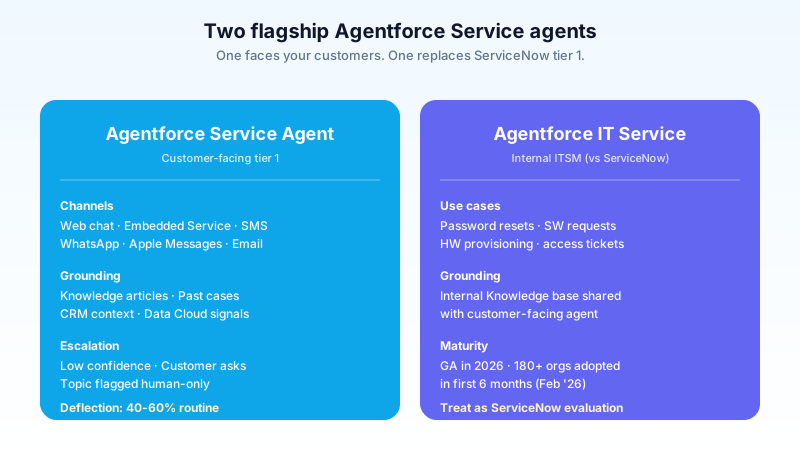
Agentforce Service Agent. Customer-facing. Runs on web chat, embedded service deployments, SMS, WhatsApp, Apple Messages for Business, and email. Replaces the rigid chatbot dialog tree with a generative agent that can hold conversation, query Knowledge, look up the customer's account and case history, and resolve or escalate. The escalation logic is rule-based plus confidence-based: the agent escalates when it cannot answer with sufficient confidence, when the customer asks for a human, or when the case hits a topic flagged for human-only handling (cancellation, refund, anything legal).
Real-world deflection numbers vary widely by use case. A well-configured Service Agent against a strong knowledge base in a B2C support context deflects 40 to 60 percent of routine inquiries. Some orgs report higher (60 to 90 percent) for narrow inquiry categories like password reset, order status, return policy. Orgs without a maintained knowledge base get the low end of that range, or worse.
The mechanism: the agent receives an inbound message, classifies the intent, retrieves relevant Knowledge articles and similar past cases from the Data Cloud knowledge graph, drafts a response, and either replies (if confidence is high) or escalates with the context attached. The Trust Layer catches PII echoes, prompt injection, and toxic output before the response goes out.
Agentforce IT Service. Internal-facing. Targets the ITSM market that ServiceNow has dominated for fifteen years. Handles password resets, software requests, hardware provisioning, account access, and the standard tier-one IT tickets that companies still resolve manually in 2026. Salesforce announced in February 2026 that 180 organizations had selected it as their primary ITSM tool. The pitch: ride on the same agent platform as customer-facing service, share the Knowledge base across customer and internal use cases, replace the legacy ITSM stack with the platform you already own.
The IT Service agent is genuinely new. Service Agent has been in production with customers for over a year. IT Service is shipping fast but the deep customer references for it are still smaller than for the customer-facing variant. Treat it as a credible alternative to ServiceNow that needs a careful pilot, not a like-for-like drop-in replacement.
Agentic Milestones: the work that goes away
The Summer '26 release introduced Agentic Milestones, which is the operational change that contact-center managers care about most.
Before: case milestones triggered automated emails based on time. The "first response in 4 hours" milestone fired a templated email that said "We have received your case and are working on it." Half the customer dissatisfaction in B2B support traces back to those templated emails. They are not informative. They are checkbox emails that satisfy the SLA without actually communicating anything.
After: the agent drafts and sends the initial response and periodic status updates, grounded in the actual case progression. If the case was assigned to engineering for a code fix, the customer hears that. If the case is waiting on a hardware swap, the customer hears that. If the case is escalated, the customer hears why. The update is contextual, not boilerplate.
This is small in scope and large in impact. Manager-level support metrics (CSAT on cases over 24 hours old, first-response NPS, escalation-rate-to-cancellation) all move when the periodic updates become specific instead of templated. The pattern works because the agent has access to the case feed, the activity history, the chatter posts, and the related records, and can summarize the current state in plain language without the support engineer writing it.
The setup is light: you turn on Agentic Milestones in setup, you map the milestone types to the update cadence, you configure the tone (formal, casual, technical), and you let the agent run. Review the first two weeks of outbound messages. Tune the tone and the cadence. Then it operates on autopilot.
The pitfall: the agent describes what is in the case feed. If your reps do not log work to the case (private notes only, Slack-only discussions, decisions made in standup that never make it into the system of record), the agent has nothing to summarize. The Agentic Milestones agent is a forcing function for better case logging hygiene. Some teams hate this. Other teams realize it was always supposed to be the rule.
Knowledge grounding in 2026
Knowledge is the foundation of every Agentforce Service deployment. The deflection rate of Service Agent is a direct function of Knowledge quality.
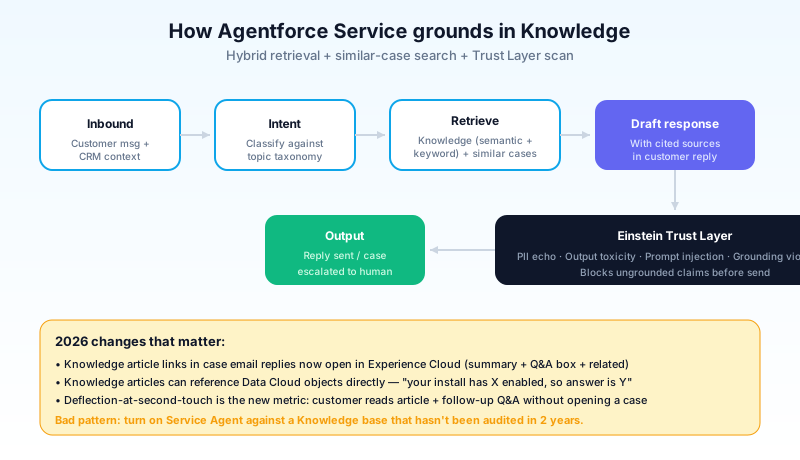
The retrieval pattern works like this:
- The agent receives the inbound message and the customer context.
- It classifies the intent against the topic taxonomy your admin configured.
- It runs a hybrid retrieval (keyword + semantic) against the published Knowledge articles in your data category structure.
- It runs a similarity search against past cases that resolved successfully on the same intent.
- It composes a draft response that cites the source article in the customer-facing reply.
- The Trust Layer scans the draft for PII echo, output toxicity, and grounding violations (where the draft asserts something not present in the cited sources).
- The reply goes out, the customer either accepts the answer or replies with more questions, and the cycle continues.
The 2026 change worth flagging: the Knowledge article links in case email replies can now open in your Experience Cloud site instead of the standalone article URL. The Experience Cloud landing page renders the article body, an AI summary at the top, a follow-up Q&A box, and a list of related articles. The customer reads the article, gets stuck, asks a follow-up in the Q&A box, and the agent handles the follow-up without a new case being opened. Deflection-at-second-touch is the new metric to watch.
The other 2026 change is that Knowledge articles can now reference Data Cloud objects directly. If your Data Cloud holds the customer's product configuration, the article can say "your specific install has feature X enabled, so the answer is Y" instead of generic walkthrough text. This is the single biggest jump in deflection quality for orgs that already have Data Cloud connected to their customer data.
The pattern that fails: turning on Service Agent against a Knowledge base that has not been audited in two years. The agent will cite stale articles, customers will get wrong answers, your CSAT will tank, and the rollback will be blamed on Agentforce. Audit Knowledge before you turn on the agent.
The deflection numbers that hold up
The deflection rate is the most-asked question and the most-misleading marketing claim. Let me be specific about what the numbers actually mean.
40 to 60 percent overall deflection. This is the number a well-configured Service Agent achieves against a maintained Knowledge base in a typical B2C support environment. Cases that would have been opened by a human are resolved by the agent without case creation.
60 to 90 percent on narrow intent categories. Password reset, order status, return-window check, store-hours lookup. These topics have unambiguous answers in Knowledge and high resolution rates without escalation.
10 to 25 percent on complex topics. Multi-product configurations, integration troubleshooting, anything that requires the customer to provide diagnostic data the agent cannot pull from the CRM. These categories deflect poorly, and that is fine, because the agent at least pre-collects context before escalating to a human, which compresses the human handle time.
Negative deflection on cases the agent should never have taken. A bad intent classifier sends complex cases to the agent, the agent spins for three turns, the customer gets frustrated, and the eventual human handle time is longer than if the case had routed straight to a human. Watch this metric. If your agent is handling cases that should have escalated, fix the routing.
The composite metric to track is total cost per case, not raw deflection. A 60 percent deflection rate with a 20 percent increase in average human handle time on escalated cases is worse economics than a 40 percent deflection rate with stable human handle time. Salesforce's pricing page does not lead with this nuance.
The rollout pattern that works
The orgs that succeed at Agentforce Service follow a discipline. The ones that stall enable everything on day one and never recover.
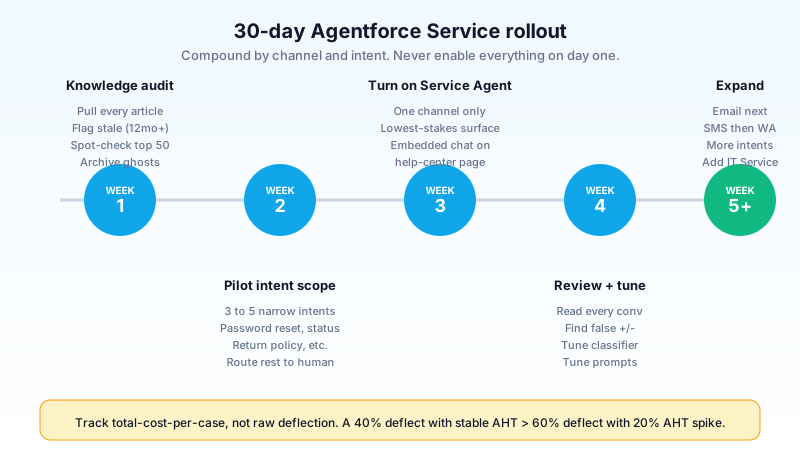
Week 1: Knowledge audit. Pull every published article. Check the last-updated date. Flag every article older than 12 months for review. Archive obviously stale articles (referenced features that no longer exist, screenshots from the prior UI, deprecated APIs). Spot-check the top 50 articles by view count for accuracy. This is where most rollouts actually fail.
Week 2: pilot intent scope. Pick three to five narrow intent categories the team agrees the agent can handle. Password reset, order status, return policy, shipping inquiry, general product info. Configure the agent to only handle these intents. Route everything else to a human.
Week 3: turn on Service Agent on one channel. Pick the lowest-stakes channel first. Embedded chat on a single help-center page. Not the production chat widget. Not the inbound email queue. One contained surface where you can monitor every conversation in real time.
Week 4: review every conversation. Have a service manager or senior agent read every Service Agent conversation for the first week. Note the false positives (cases the agent handled that needed a human) and the false negatives (cases the agent escalated that it could have handled). Tune the intent classifier and the response prompts.
Week 5+: expand channel by channel. Add email when chat is solid. Add SMS when email is solid. Add WhatsApp when SMS is solid. Add IT Service for internal use cases when customer-facing is solid. Do not turn on six channels at once.
The orgs that stall enable Service Agent on every channel and every intent simultaneously, get overwhelmed with quality issues across the board, and pull back. The orgs that succeed compound by channel.
The pieces of Agentforce Service that are bad
Calling out what is worse, with specifics:
The Trailhead modules lag the product. Many Service Cloud modules still teach the pre-Agentforce flow. The Agentforce-specific modules exist but the search experience still surfaces older content first. New admins coming through Trailhead will absorb the old mental model and have to unlearn the rebrand.
Knowledge migration from legacy systems is painful. If you are coming from Zendesk, Freshdesk, or ServiceNow with thousands of articles, the import tools are functional but not great. The data category mapping is manual. The article-type mapping is manual. Plan two to four weeks of cleanup work that the migration guides understate.
The IT Service agent is shipping early. ServiceNow has fifteen years of integration depth that Salesforce does not yet match. If your IT org runs custom workflows in ServiceNow with deep Discovery / CMDB integrations, Agentforce IT Service is a credible alternative to evaluate, not a one-quarter migration.
Consumption pricing is the same surprise as Sales. 20 credits per agent action means a 100k Flex Credits allowance disappears in days at production volume. Run the math before you commit. Agentforce 1 at $550 per user per month is the predictability tier. The mid-market complaint here is that the entry-tier pricing model rewards larger orgs that can negotiate Agentforce 1 enterprise contracts.
Real issues, not dealbreakers. The platform is still the best customer-service AI shipping in 2026 inside an enterprise CRM. The rough edges are what to plan around.
The Agentforce Service Console: what reps actually see
The Service Console has been the workhorse of contact-center work for over a decade. The 2026 redesign added an agent panel that sits next to the case and surfaces three things without the rep clicking anywhere: a contextual summary of the customer (current product mix, recent cases, related Data Cloud signals), a list of three to five most-similar past cases that resolved successfully, and an action panel with one-click options the agent suggests (send a Knowledge article, create a child case, escalate to engineering, schedule a follow-up).
The behavior change for reps is subtle but real. The console used to be a place to do work. The 2026 console is a place to confirm work the agent already drafted. Veteran reps initially resist this, then adjust within a few weeks once they see the time savings on routine cases. The training challenge is teaching reps to scan the agent's draft critically, edit when needed, and reject when the draft is wrong, rather than autoclick approve. Managers should review a sample of agent-assisted case responses weekly for the first quarter to catch the autoclick pattern early.
What to do next
Open Setup, search "Agentforce", and turn on Salesforce Foundations if your org is Enterprise Edition or above. That gives you Agent Builder and a starter credit balance. Pick the top three intent categories your support team handles most frequently. Run the Knowledge audit for those topics first. If the articles are current and accurate, you can pilot Service Agent on those intents inside two weeks.
If you are a service leader, the next concrete move is the Knowledge audit. Whether you turn on Agentforce next month or next year, the article hygiene work has to happen before the agent can produce work you would send. Start by pulling the top fifty articles by view count and confirming each one is still accurate.
Open one open case in your org. Look at the right rail. The Service Agent suggestion panel is probably gated until your admin enables it. Ask them to enable it for your team in a sandbox first. Run one inbound chat through it. That is one case, one conversation, fifteen minutes. The opening move is that small.
About the Author
Dipojjal Chakrabarti is a B2C Solution Architect with 29 Salesforce certifications and over 13 years in the Salesforce ecosystem. He writes and edits salesforcedictionary.com, published by KineticBit Inc., to help admins, developers, architects, and cert/interview candidates sharpen their fundamentals. More about Dipojjal.
Share this article
Sources
Related dictionary terms
Practise it
Five questions on Agentforce Specialist
Exam-style questions with an explanation after each one. No account needed, and your answers build a weak-topic map once you have one.
Keep reading

Agentforce Sales: The Complete 2026 Guide (Formerly Sales Cloud)
Sales Cloud got a new name and five new agents. This 2026 guide cuts through the marketing: what changed, the SDR and Sales Coach agents, the pricing tiers, and the 30-day rollout that actually works.
Salesforce Sales Cloud vs Service Cloud: Which Do You Need in 2026?
Sales Cloud and Service Cloud share a platform but solve different problems. Here is the 2026 comparison. Features, pricing, decision scenarios, and how Agentforce fits both.

What Is Agentforce 360? The Complete 2026 Guide for Salesforce Admins, Developers & Architects
Agentforce 360 is Salesforce's 2025 rebrand of its agentic-AI platform - built on the Atlas Reasoning Engine, Einstein Trust Layer, and Data 360. Here's the complete admin + dev + architect guide.
Comments
No comments yet. Start the conversation.
Sign in to join the discussion. Your account works across every page.