
OmniStudio Explained: FlexCards, OmniScripts, DataRaptors & Integration Procedures
The complete pillar guide - three layers, four primitives, where it fits vs Flow + LWC, and the pitfalls that cost teams quarters.

If you've worked in core Salesforce for years and stepped into an Industries Cloud project, you've found a parallel universe. Different vocabulary, different tools, different deployment story. OmniStudio is the reason. This guide is the canonical mental map: what each primitive does, how they fit together, and when to use OmniStudio vs core platform tools.
The three layers of OmniStudio
OmniStudio organizes its primitives into three layers - a useful mental model when navigating the labyrinth.
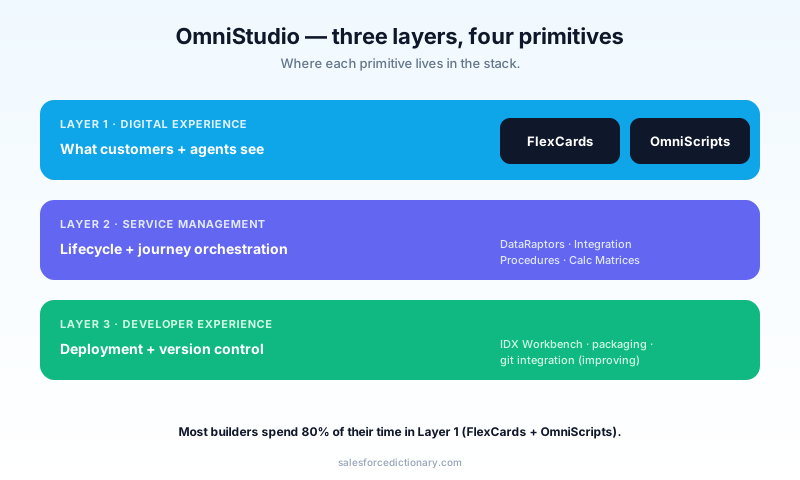
1. Digital Experience layer
What customers and agents see. Two primitives:
- FlexCards - display tiles built from data. The "card on the right" with customer summary, recent orders, recommended actions.
- OmniScripts - guided multi-step processes. "Reschedule appointment" wizard, "claim a benefit" workflow.
2. Service Management layer
The lifecycle and journey orchestration. Less hands-on for new admins; this is where Industries Cloud's pre-built solutions live (Care Plans in Health Cloud, Claims in FSC, etc.).
3. Developer Experience layer
Deployment, [version control](/terms/version-control), and metadata. OmniStudio uses IDX Workbench (its own metadata tool, not the standard Salesforce CLI). This is the layer that frustrates platform veterans the most.
The four primitives
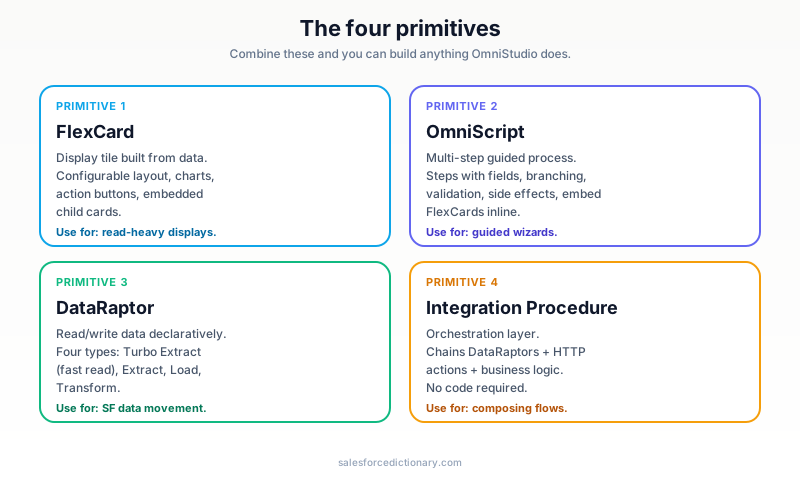
These are the building blocks. You'll combine them into anything OmniStudio does.
FlexCard - display data
A FlexCard is a configurable display tile. You drop fields, charts, action buttons, conditional sections, and embedded child cards into a layout. Output: a Lightning component you can drop on a record page or embed in an OmniScript.
Think of it as: "a customizable read-only view, but easier to build than a custom LWC."
FlexCard: AccountSummary
├─ Header: Account Name + Industry + AccountOwner
├─ Section 1: Annual Revenue + Employees
├─ Section 2: Recent Cases (embedded child FlexCard)
└─ Actions: [Edit] [Create Case] [Open Quote]
When to use: read-heavy, layout-rich displays where standard page layouts feel limiting. Common in Service Console workflows.
OmniScript - guided process
An OmniScript is a multi-step wizard. Each step has fields, conditional branching, validation, and side effects. Think "guided customer onboarding," "appointment scheduling," or "benefit claim filing."
Anatomy:
OmniScript: ScheduleAppointment
├─ Step 1: Identify customer (DataRaptor: AccountById)
├─ Step 2: Choose service type (Picklist + Conditional Branch)
├─ Step 3: Pick available time slot (DataRaptor: SlotsByService)
├─ Step 4: Confirm + Pay (Integration Procedure: ProcessAppointment)
└─ Step 5: Show confirmation (FlexCard: AppointmentConfirmed)
When to use: multi-step processes that don't fit a standard form. The ones that always become "but the customer is confused" if you build them as a Flow.
DataRaptor - read/write data
DataRaptors move data between Salesforce and your OmniScripts/FlexCards. Four types:
| Type | Direction | Purpose |
|---|---|---|
| Turbo Extract | Read | Fastest read; bypass much of the OS layer for performance |
| Extract | Read | Standard read with transformation |
| Load | Write | Insert/update records |
| Transform | None | In-memory data transformation |
Think of DataRaptors as "configurable Apex methods built declaratively." A DataRaptor Extract is a SOQL query plus a JSON output mapping. A DataRaptor Load is an upsert plus an input mapping.
DataRaptor Extract: AccountById
- Object: Account
- Filter: Id = {input.recordId}
- Output JSON: { id, name, industry, owner: {name, email} }
When to use: any time an OmniScript or FlexCard needs to read or write Salesforce data. Almost always.
Integration Procedure - orchestrate logic
An Integration Procedure (IP) is the orchestration layer. It chains together DataRaptors, calls external services, transforms data, and runs business logic - all without code.
IP: ProcessAppointment
├─ Action 1: DataRaptor Load (create Appointment record)
├─ Action 2: HTTP Action (notify external scheduling service)
├─ Action 3: DataRaptor Load (create Case if conflict)
└─ Action 4: Response (assemble final JSON)
When to use: anytime you need to compose multiple DataRaptors, call an external API, or apply business logic that doesn't fit one DataRaptor. Most production OmniScripts call at least one IP.
How the four primitives connect
In a typical workflow:
- The user opens an OmniScript on a record page.
- The OmniScript calls a DataRaptor Extract to fetch starting data.
- The user moves through steps; conditional branching shows different fields.
- On final submission, the OmniScript calls an Integration Procedure.
- The IP calls multiple DataRaptors (loads, extracts) and possibly external HTTP services.
- Results are returned to the OmniScript, which displays a confirmation FlexCard.
That's the whole pattern. Memorize it; everything else is variation.
When to use OmniStudio vs Flow + LWC
The most common architecture question on Industries Cloud projects.
| Scenario | OmniStudio | Flow + LWC |
|---|---|---|
| Multi-step customer-facing process | Yes | Possible but heavy |
| Industry-specific (insurance, healthcare, telco) | Yes | Reinventing the wheel |
| Standard CRUD form on a record | Possible | Yes - simpler |
| High-volume backend automation | No | Yes - Flow + Apex |
| Deeply branching workflow (10+ paths) | Yes | Possible but messy |
| Need to integrate with legacy SOAP service | Yes (via HTTP Action) | Possible (via Apex callout) |
| Tight CPU performance budget | No | Yes - Apex |
| Org doesn't have OmniStudio licensed | N/A | Yes |
Two practical rules:
- If your org has OmniStudio licensed and you're building customer-facing guided processes, use it. That's what it's for.
- If you're not on Industries Cloud, you don't need OmniStudio. Flow + LWC + Apex covers the rest.
Calculation Matrices and Calculation Procedures
Two more OmniStudio primitives, less commonly used but worth knowing.
- Calculation Matrix - declarative lookup tables. "Given customer tier and product type, what's the discount?" Avoids hardcoding pricing logic in DataRaptors or Apex.
- Calculation Procedure - composable calculation rules built on top of matrices. Chain multiple matrices and apply logic in sequence.
These are the unsung heroes of insurance and FSC implementations. When pricing rules are complex and changing monthly, these primitives let business analysts edit them without engineer involvement.
IDX Workbench - the deployment story
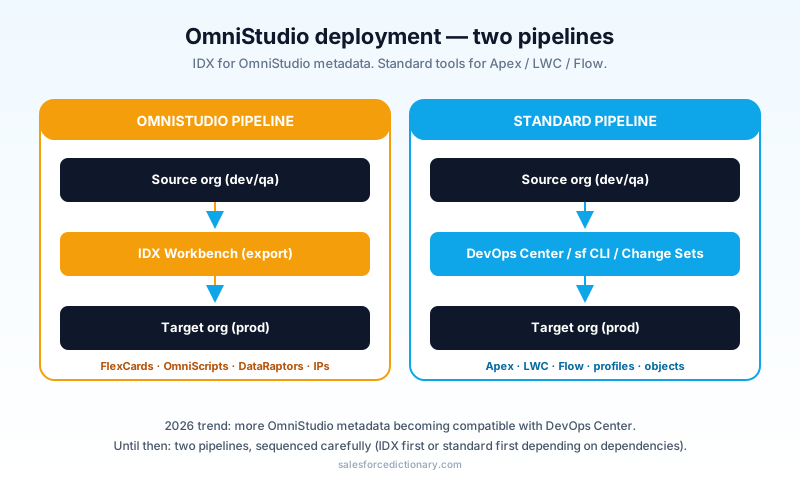
OmniStudio's deployment story is its own world. IDX Workbench is the metadata management tool - it exports OmniStudio components, maps dependencies, and deploys to other orgs.
You don't deploy OmniStudio components via Change Sets or DevOps Center reliably. The metadata representation is JSON-heavy, with cross-references that the standard tools don't track well. IDX is the right tool - but it's a separate UI to learn.
The 2026 trend: more OmniStudio metadata is becoming compatible with DevOps Center. Until that's complete, plan to use IDX for OmniStudio and DevOps Center for everything else.
Common pitfalls
The mistakes I see on every OmniStudio project.
Pitfall 1: Treating an OmniScript like a Flow
OmniScripts and Flows look similar. They're not. OmniScripts have richer UI controls, branching, and FlexCard embedding - but they don't have Flow's automation triggers (you can't have a "record-triggered OmniScript"). Use Flow for triggers; use OmniScript for guided processes.
Pitfall 2: Underusing Turbo Extract
Standard DataRaptor Extract goes through the OmniStudio engine. Turbo Extract bypasses much of it for raw speed - 5–10× faster on simple reads. If your OmniScript feels slow on Step 1, swap Extract for Turbo.
Pitfall 3: Building everything in one giant OmniScript
A 30-step OmniScript is unmaintainable. Break it into a parent OmniScript that calls sub-OmniScripts (yes, OmniScripts can call each other). Same readability gains as Subflows in Flow.
Pitfall 4: Skipping the test data step
OmniScripts have a "test mode" where you can paste mock JSON instead of calling real DataRaptors. Use it. Iterating on a complex OmniScript with real Salesforce queries on every preview wastes hours.
Pitfall 5: Not version-controlling
OmniStudio components are metadata. Treat them like code. Export via IDX, commit to git, review changes via PR. Without this, two admins editing the same OmniScript in parallel will overwrite each other's work.
Pitfall 6: Custom Apex that should be a DataRaptor
If a developer wrote an @AuraEnabled Apex method that's "just a SOQL query and a JSON map," it should be a DataRaptor. Easier to maintain, faster to deploy, doesn't require Apex test coverage.
How OmniStudio interacts with Agentforce
In 2026, OmniStudio components can be exposed as Agentforce Actions. The pattern:
- OmniScript as Action: an agent can launch an OmniScript on the user's behalf, prefilling steps based on the conversation context. Useful for "schedule my appointment" voice flows.
- Integration Procedure as Action: more common - agents call IPs as backend actions, the IP does the multi-step orchestration, and the agent reads back the result.
The same Trust Layer rules apply: the OmniScript runs as the calling user; FLS, sharing, and validation rules all enforce.
Frequently asked questions
Do I need a separate license for OmniStudio? Yes - it ships with Industries Cloud SKUs (Health Cloud, FSC, Communications Cloud, etc.) or can be purchased separately. It's not included in standard Sales/Service Cloud.
Can I use OmniStudio without Industries Cloud? Technically yes (it's licensable standalone), but rare. Almost all OmniStudio installations are on Industries orgs.
What was Vlocity? OmniStudio's previous name. Salesforce acquired Vlocity in 2020 and rebranded over 2021–2022. If you see "Vlocity" in old docs, it means OmniStudio.
Can DataRaptors call external services? Indirectly - DataRaptors handle Salesforce data. For external calls, use Integration Procedure HTTP Actions, which can call REST/SOAP services and pass results to DataRaptors.
Is OmniStudio replacing Flow? No - they target different use cases. Flow is automation; OmniStudio is guided experiences. Most orgs use both.
How do I learn OmniStudio? Start with the Trailhead OmniStudio module, then build a small workflow end-to-end in a sandbox. The mental model only clicks once you've shipped one real flow with all four primitives.
What to read next
- OmniStudio, FlexCard, OmniScript, DataRaptor, Integration Procedure - the dictionary entries.
- Flow vs Apex 2026 - the parallel decision on the platform side.
- LWC for Beginners - when LWC is the right alternative.
If you're new to OmniStudio: build the canonical "schedule appointment" OmniScript end-to-end this week. Step through DataRaptors and Integration Procedures. The vocabulary stops feeling foreign after one full cycle.
About the Author
Dipojjal Chakrabarti is a B2C Solution Architect with 29 Salesforce certifications and over 13 years in the Salesforce ecosystem. He writes and edits salesforcedictionary.com, published by KineticBit Inc., to help admins, developers, architects, and cert/interview candidates sharpen their fundamentals. More about Dipojjal.
Share this article
Sources
Related dictionary terms
 Our appAdWake up sharp. Not just awake.The alarm that rings through Silent and DND — free on iOS & Android.Get WakeSharp →
Keep reading

Lightning Web Components (LWC) for Beginners: Build Your First Component in 30 Minutes
A complete LWC tutorial. What it is, why it replaced Aura, environment setup, Hello World, reactive properties, @wire to Apex, events, and the cache gotchas that trip up beginners.

Salesforce Flow vs Apex in 2026: A Decision Matrix for Admins, Developers & Consultants
Flow vs Apex is not a religious war anymore. Here is the 2026 decision matrix. Capability gaps, governor limits, the 70/30 rule, and 12 worked scenarios with the right answer for each.


Comments
No comments yet. Start the conversation.
Sign in to join the discussion. Your account works across every page.