
Querying Data 360 from Apex: The Callout Hiding Inside Your SOQL
Every DMO query leaves the org. Here is where SOQL stops, when the sfsqlquery namespace is the right answer, and how to test a query whose records you cannot create.

The class works. You wrote it against a sandbox with a few hundred unified profiles, the reviewer approved it, and it shipped. Six weeks later a sales manager asks why the churn-risk panel on the account page always shows the same names, and you go looking, and the count comes back 201. Not 201 today and 340 tomorrow. Exactly 201, every time, since the day it deployed.
No exception. Nothing in the debug log. The class was created on [API version](/terms/api-version) 58.0, and until API version 61.0, a SOQL query against a Data 360 [Data Model Object](/terms/data-model-object) returned the first 201 records and stopped there. Silently. Your panel has been showing the first page of an alphabetical list for a month and a half and calling it a risk model.
That is the shape of most Data 360 bugs I see in Apex. Nothing crashes. The syntax you typed is SOQL you have written ten thousand times, so your brain files the query under "database read" and moves on, and every assumption that comes with that filing is wrong.
The syntax is familiar. The database is not.
When you query Account, the work happens inside your org's own transaction against your org's own storage. Sharing rules apply. Field-level security applies. The row you inserted two lines earlier is there.
A Data Model Object lives somewhere else. Data 360 is a separate lakehouse with its own compute, its own storage and its own identity resolution, joined to your org by an integration rather than a foreign key. Salesforce gave DMOs an SObject-shaped surface in Apex so you can write SELECT ... FROM UnifiedIndividual__dlm and get typed records back, and that surface is genuinely convenient. It is also a wrapper over a network call.
Salesforce says this plainly in the Apex Developer Guide: static SOQL queries against Data 360 from Apex function as callouts and carry the equivalent restrictions. Read that sentence twice, because two consequences fall out of it immediately.
The first is the uncommitted-work rule. A callout cannot run after DML in the same transaction. So this fails:
insert new Case(Subject = 'Churn review');
List<UnifiedIndividual__dlm> people = [
    SELECT ssot__Id__c FROM UnifiedIndividual__dlm LIMIT 100
];
You get "You have uncommitted work pending", the error every integration developer knows and nobody expects from a SELECT. Query Data 360 first, then do your DML, or push the query into an async context.
The second is latency. It is a network hop with a query engine on the far side. A DMO read is not a two-millisecond indexed lookup, and putting one inside a trigger on a high-volume object is how you turn a save into a timeout.
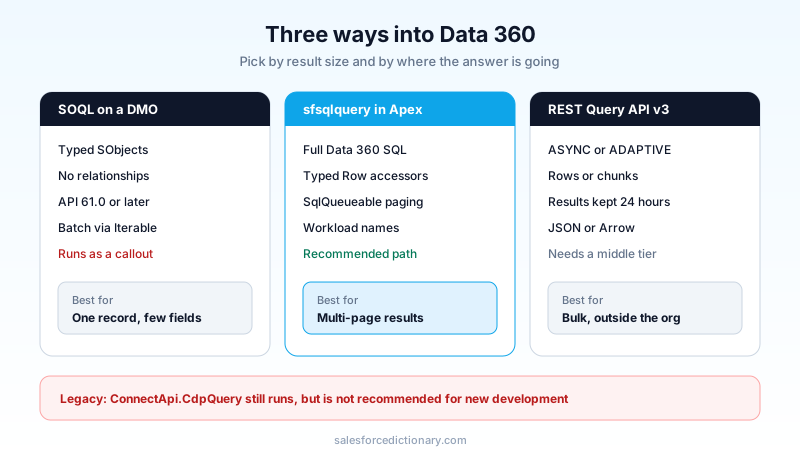
Route one: SOQL against a DMO
This is the path most teams take first, and for a narrow set of jobs it is the correct one. You want a handful of unified fields to render on a Lightning record page, you know the identifier, and the volume is small. SOQL gives you typed SObjects, bind variables, and code your teammates can read without a second reference guide open.
Then you find the walls.
No relationship traversal. In ordinary SOQL, parent and child relationships are what replace the JOIN you would write in SQL. The Data 360 Query Guide states those relationships are not supported in the current implementation of SOQL in Data 360. So no Account.Name style dot-walking across DMOs, and no subquery to pull related engagement rows. Every join you need has to happen in your Apex, in memory, across two separate reads.
No asterisk, and FIELDS(ALL) is not free. Data 360 SQL does not accept *, so the documented way to grab everything is the FIELDS(ALL) keyword. That keyword comes with its own cap: it requires a LIMIT of 200 or fewer. Convenient for a spot check in a scratch org, useless for anything that has to scale.
The 201-row cliff. This is the one from the opening. SOQL against DMOs using Database.QueryLocator or in a for loop is supported in API version 61.0 and later. In versions earlier than 61.0, only the first 201 records come back. There is no error and no warning. If you inherited a Data 360 integration written before 2024, open the class metadata and check the API version before you check anything else.
Batch Apex is half-blocked. Batch Apex against DMOs is blocked when you use a QueryLocator, and supported when you use Iterable. That is a real constraint on the pattern most developers reach for by reflex. If you want to process a large DMO result set in batch, you build the Iterable yourself, which means you are back to paging by hand.
The security model is not the one you are used to
This is the part that belongs in your design review, not in a footnote.
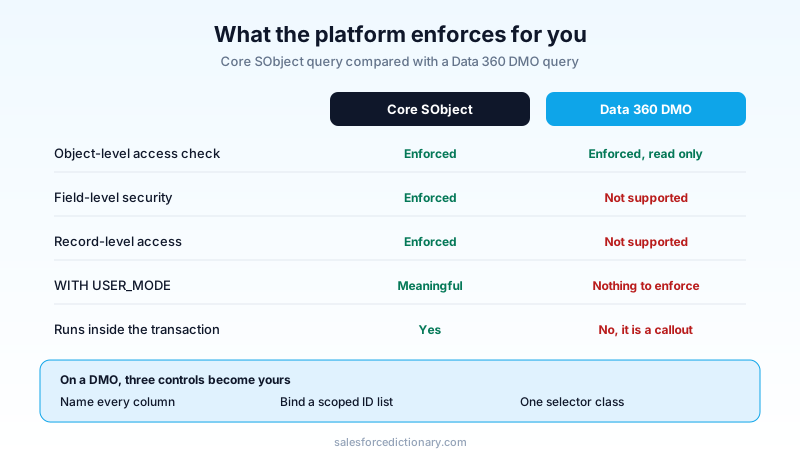
The Apex Developer Guide is explicit: DMOs support read-only object-level access checks, and there is currently no support for field-level security or for record-level access control.
Sit with that. Every instinct you have built on the core platform assumes three layers of enforcement under your query. On DMOs you get one. WITH USER_MODE and Security.stripInaccessible() have nothing to enforce, because there is no field-level security metadata on the far side to read. If a user can read the object, they can read every column your SOQL asks for, and every row your WHERE clause returns.
I have watched a team ship a "customer 360" Lightning component that surfaced unified profile fields on the contact page, tested by an admin, approved by an admin, and rolled out to a 400-seat service floor. Nobody caught that the component was returning household income and lifetime value to agents who could not see the equivalent fields on the Contact record two inches to the left. The permission model on Contact was airtight. The DMO query walked straight past it.
There are exactly three defenses, and you need all of them.
Project explicitly, never FIELDS(ALL). The field list in the query is now your only field-level control. Name the columns, and name only the ones the surface needs.
Filter for the user, in code. Record-level scoping is your job. Pass the identifiers the running user is allowed to see, derived from a core-object query that does have sharing applied, and bind them into the DMO query. Never let a client-side parameter decide which rows come back.
Put it behind one class. Every DMO read in the codebase goes through a single selector layer with the projection and the filter baked in. One class to review, one class to test, one place where the next developer cannot quietly add a column.
Route two: the sfsqlquery namespace
When SOQL runs out, the answer since Winter '27 is the sfsqlquery namespace: Apex classes for running Data 360 SQL directly, with iterators and typed row accessors. Salesforce names it as the recommended path for new development, which is also the polite way of saying the older ConnectApi.CdpQuery route is now maintenance-only. That class still works and still exists for backward compatibility. Do not start anything new on it.
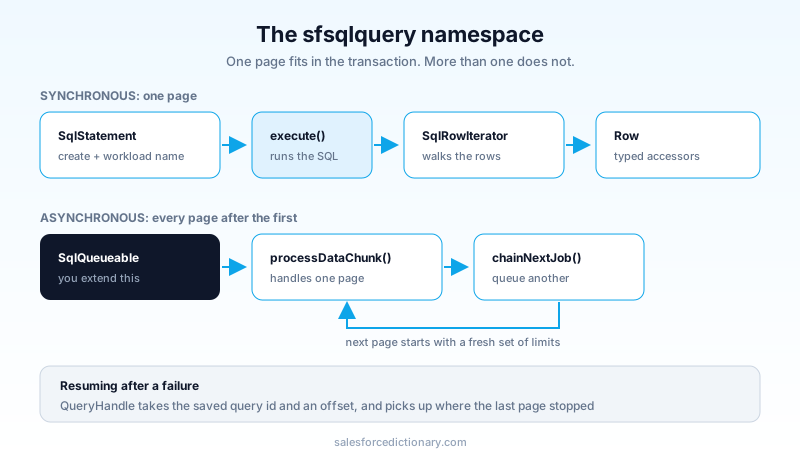
The synchronous shape is three objects. SqlStatement builds the query, execute() runs it and hands back a SqlRowIterator, and Row gives you typed accessors.
sfsqlquery.SqlRowIterator rows = sfsqlquery.SqlStatement
    .create('SELECT ssot__Id__c, ssot__FirstName__c ' +
            'FROM UnifiedIndividual__dlm ' +
            'WHERE ssot__Id__c IN (' + safeIdList + ') ' +
            'LIMIT 500')
    .withWorkloadName('ChurnRiskPanel')
    .execute();

while (rows.hasNext()) {
    sfsqlquery.Row row = rows.next();
    String firstName = row.getString('ssot__FirstName__c');
}
Two things in that snippet earn their place.
withWorkloadName() is the one people skip, and it is the one you will want at 2am. Data 360 bills by consumption and reports usage by workload. Tag every query with the feature that issued it and your consumption report reads like an itemized bill instead of a single line labelled "Apex". Ship it from day one, because retrofitting workload names across forty classes is a chore nobody funds.
safeIdList is doing quiet work too. You are building a SQL string, so you own the escaping. String.escapeSingleQuotes() is the floor, not the ceiling. Better is to never interpolate a value that came from a client at all: derive your identifier list from a sharing-aware SOQL query in the same method, and interpolate only values you produced.
For anything that returns more than a page, the namespace gives you SqlQueueable. You extend it and implement two methods: processDataChunk(), which receives each page of rows, and chainNextJob(), which decides whether to queue the next one.
public class ChurnRiskLoader extends sfsqlquery.SqlQueueable {
    // processDataChunk() handles one page of rows
    // chainNextJob() returns true to queue the next page
}
That pattern is why the namespace matters more than the syntax does. Paging a large Data 360 result set inside one synchronous transaction is a losing game against governor limits: heap on the rows you have accumulated, CPU on the parsing, and a callout budget you are spending one page at a time. Chaining hands each page a fresh set of limits. If the async model is not second nature yet, the async Apex guide covers the chaining rules that apply here.
The third piece is QueryHandle, which resumes a query you already ran using its saved query ID and an offset. Useful when a process dies mid-page, or when the results feed a UI that pages on demand rather than all at once.
Route three: do not do it in Apex at all
The best Data 360 query from Apex is frequently the one you deleted.
The REST Query API v3 accepts a SQL statement at POST /api/v3/query in ASYNC or ADAPTIVE mode, then lets you poll status, pull rows with offset pagination, or pull chunks, which Salesforce recommends for large result sets. Results stay available for 24 hours without incurring further consumption charges, and you can ask for Apache Arrow streaming instead of JSON by setting the Accept header. None of that is reachable in a useful way from inside a synchronous Apex transaction, and all of it is trivial from a middleware tier or a scheduled job that owns its own runtime.
So before writing the Apex, ask what the query is actually feeding.
A dashboard or a report? Query Editor, or an integrated analytics surface. A nightly enrichment of core records? A scheduled process against the REST API, writing back through the Bulk API. Grounding for an Agentforce action? Use a Data Graph or the retrievers already wired into the platform rather than hand-rolling SQL in an invocable method, because those paths are indexed for low-latency reads and yours is not. A Lightning component that needs eight fields for one customer? That is the case where Apex is correct.
The Data 360 implementation guide walks the modelling layer underneath all of this, and getting that layer right removes more Apex than any optimization will.
Testing a query whose records do not exist
Here is the wall every team hits on the day the pull request opens: you cannot insert a DMO record in a test. There is no insert new UnifiedIndividual__dlm(...). The data lives in another system, SeeAllData will not save you, and your beautifully layered selector class has zero coverage and no way to get any.
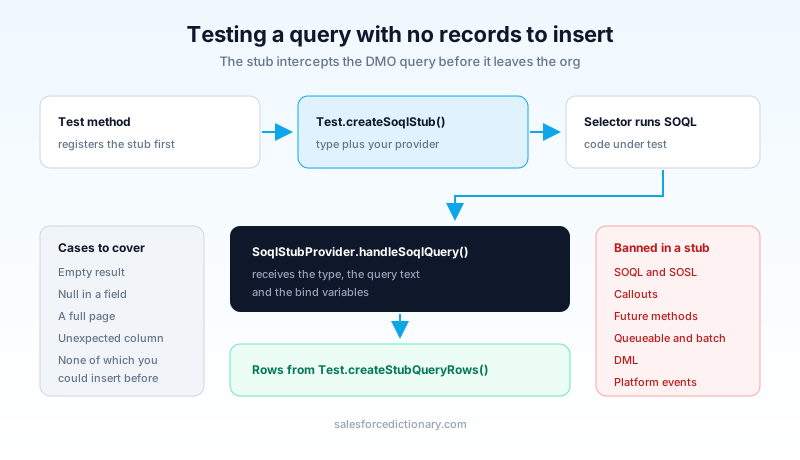
Salesforce shipped the answer as SOQL stubbing. You extend System.SoqlStubProvider, override handleSoqlQuery(), and register the stub with Test.createSoqlStub(). Every DMO query in that test then runs through your provider instead of over the wire.
@IsTest
private class ChurnRiskSelectorTest {
    private class FakeIndividuals extends System.SoqlStubProvider {
        public override List<SObject> handleSoqlQuery(
            Schema.SObjectType sot, String stubbedQuery, Map<String, Object> bindVars
        ) {
            return Test.createStubQueryRows(sot, new List<Map<String, Object>>{
                new Map<String, Object>{ 'ssot__FirstName__c' => 'Ada' },
                new Map<String, Object>{ 'ssot__FirstName__c' => 'Grace' }
            });
        }
    }

    @IsTest
    static void mapsRowsToPanelEntries() {
        Test.createSoqlStub(UnifiedIndividual__dlm.SObjectType, new FakeIndividuals());
        // exercise the selector, assert on what it built
    }
}
Test.createStubQueryRow() builds a single row from a field map; createStubQueryRows() takes a list of maps and builds several. Test.isSoqlStubDefined() tells you whether a stub is registered for a type, which is handy in a shared test factory.
Two restrictions will bite you. Inside a stub implementation you cannot use SOQL, SOSL, callouts, future methods, queueable jobs, batch jobs, DML or platform events, so your provider has to be pure construction and nothing else. And only queries that involve a DMO or an external object can be stubbed; point it at a standard object and you get an error.
The upside is bigger than the coverage number. Because you control the rows, you can finally write the tests that matter: the empty result, the row with a null in the field your formatter assumes is populated, the 5,000-row page. Those are the cases production will send you, and until stubbing existed there was no way to write any of them. The test class patterns guide covers the factory structure that keeps this readable once you have a dozen of them.
The pattern I would ship
One selector class per DMO. Explicit column projection, no FIELDS(ALL). Identifiers derived from a sharing-aware core query and bound in, never accepted from the client. A workload name on every statement. API version 61.0 or later on every class that touches a DMO, checked in the metadata and not assumed. Anything above one page goes through SqlQueueable, and anything above roughly ten thousand rows leaves Apex entirely for the REST API and a middleware tier that can wait.
Then one test class per selector with a stub provider that returns the empty case, the null-field case and the full-page case.
That is maybe two hundred lines of scaffolding for the first DMO and thirty for each one after. It is dramatically cheaper than the alternative, which is discovering the truncation, the leaked field or the CPU timeout from a user rather than a test.
Do this before your next Data 360 story
Run one query against your own org today. In Setup, open Apex Classes and sort by API version, then cross-reference anything under 61.0 against a search of your codebase for __dlm. Every hit on that intersection is a class silently capped at 201 rows right now. That is a fifteen-minute audit and it either comes back clean, which is a good morning, or it hands you the reason a report has been wrong for a quarter.
Then take your busiest DMO query and add withWorkloadName() to it. By the time the next consumption invoice arrives you will know what that feature actually costs, which is the argument you need before anyone asks you to build the second one.
About the Author
Dipojjal Chakrabarti is a B2C Solution Architect with 29 Salesforce certifications and over 13 years in the Salesforce ecosystem. He writes and edits salesforcedictionary.com, published by KineticBit Inc., to help admins, developers, architects, and cert/interview candidates sharpen their fundamentals. More about Dipojjal.
Share this article
Sources
Related dictionary terms
Practise it
Five questions on Platform Developer I
Exam-style questions with an explanation after each one. No account needed, and your answers build a weak-topic map once you have one.
Keep reading

Async Apex: The Complete 2026 Guide to Batch, Queueable, Schedulable & Future Methods
The complete 2026 guide to async Apex - Future, Queueable, Batch, and Schedulable. When to pick each, the Flex Queue, chaining, monitoring, and the production patterns that scale.

Salesforce Apex Test Classes: Best Practices, Test Factories, and Real-World Patterns (2026)
Write Apex tests that actually catch bugs. Test factories, bulk patterns with 200 records, callout mocks, negative testing, and why coverage percentage lies to you.

Salesforce Data 360: The Complete 2026 Implementation Guide
Data 360 is Salesforce's unified data platform for the agent era. This 2026 implementation guide walks data streams, identity resolution, segmentation, activations, and zero-copy federation.
Comments
No comments yet. Start the conversation.
Sign in to join the discussion. Your account works across every page.