
Salesforce Apex Test Classes: Best Practices, Test Factories, and Real-World Patterns (2026)
Test class anatomy, data factories, bulk testing, callout mocks, negative testing, and the coverage traps that pass green while hiding bugs.

You push your Apex class to production and the deployment fails: 73% [code coverage](/terms/code-coverage). The minimum is 75. You have a release window that closes in fifteen minutes, a Slack channel full of people waiting, and one option that feels easy. Write a test that calls every method, asserts nothing, and watch the number climb to 91%. It deploys. Everyone goes home.
Six weeks later that same class corrupts a few thousand records and nobody finds out until a customer does. The tests were green the whole time. They were never testing anything.
This is the central problem with Apex testing. The platform forces a coverage number on you, and the number is trivially gamed. A green suite means almost nothing on its own. A green suite full of real assertions means your code does what you think it does. This guide is about writing the second kind.
1. Why test classes exist (and what the 75% actually buys you)
Salesforce will not let you deploy Apex to production unless your org's overall coverage is at least 75%, and every trigger has at least some coverage. That rule exists because Apex runs on shared, multi-tenant infrastructure. Your unhandled exception is Salesforce's support ticket. They are protecting the platform, not your data quality.
So separate two ideas in your head right now:
- Coverage is the percentage of executable lines your tests run.
- Quality is whether those tests would fail when the code is wrong.
Coverage is a deployment gate. Quality is the actual point. You can hit 95% coverage with zero assertions, and you can write a brilliant test that exercises one critical method and covers 4%. The platform rewards the first and ignores the second. Don't confuse the org's incentive with yours.
2. The anatomy of a test class
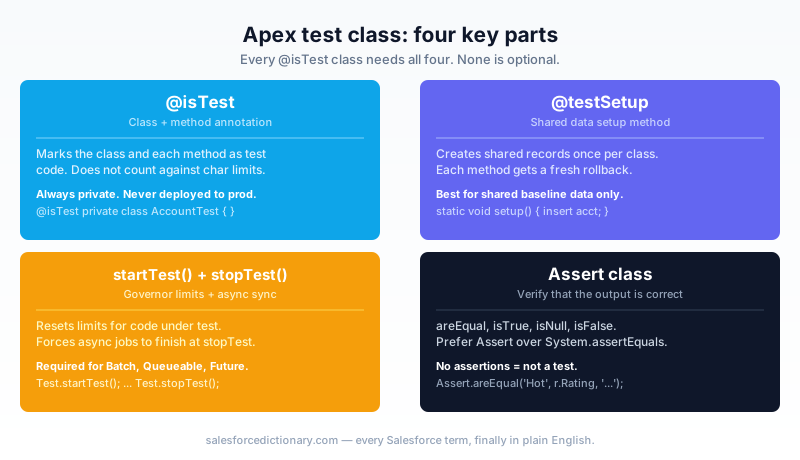
Every test class is built from the same parts. Learn them once and the rest is composition.
@isTest
private class AccountServiceTest {

    @testSetup
    static void setup() {
        // Runs once before every test method. Data is rolled back
        // and re-created fresh for each method.
        Account a = new Account(Name = 'Acme', AnnualRevenue = 1000000);
        insert a;
    }

    @isTest
    static void rating_isHot_whenRevenueAboveThreshold() {
        Account a = [SELECT Id, AnnualRevenue FROM Account LIMIT 1];

        Test.startTest();
        AccountService.applyRating(new List<Account>{ a });
        Test.stopTest();

        Account result = [SELECT Rating FROM Account WHERE Id = :a.Id];
        Assert.areEqual('Hot', result.Rating,
            'High-revenue account should be rated Hot');
    }
}
The pieces:
| Element | What it does |
|---|---|
@isTest | Marks the class or method as test code. Test code does not count against your org's Apex character limit. |
private | Test classes should be private. They are not part of your public API. |
@testSetup | Creates common records once per class. Each test method gets a fresh copy, rolled back automatically. |
Test.startTest() / Test.stopTest() | Resets governor limits for the code between them, and forces async work (future, queueable, batch) to run synchronously at stopTest(). |
Assert methods | Assert.areEqual, Assert.isTrue, Assert.isNull, and so on. This is where the test earns its existence. |
A note on Test.startTest(). It does two jobs. First, it gives the code under test a clean set of governor limits, separate from any setup queries you ran. Second, it is the synchronization point for async work. If you enqueue a Queueable inside startTest()/stopTest(), that job has finished by the time stopTest() returns, so you can query its results immediately after. If you test async Apex, this is not optional.
Use the modern Assert class, not the legacy System.assertEquals. Same behavior, clearer names, and it is what current Trailhead content teaches.
3. Test data factories: stop writing new Account() everywhere
Here is the pattern that separates maintainable test suites from the ones everyone is afraid to touch.
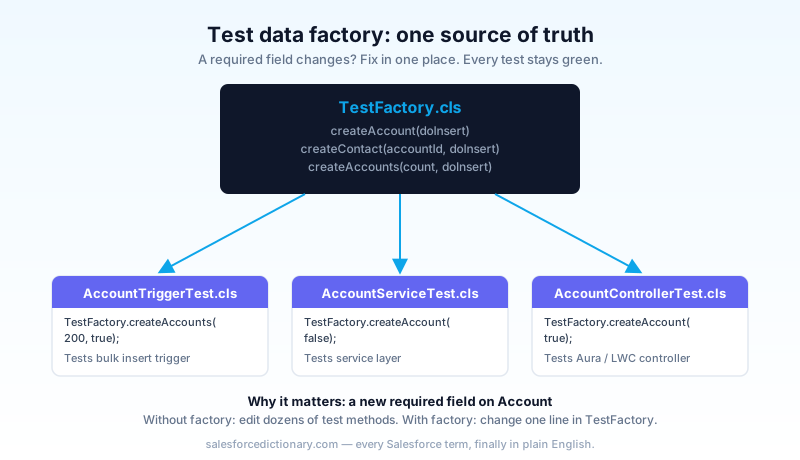
You will write new Account(Name = 'Test') in your first test. Then your second. By the time the Account object has a required custom field, three validation rules, and a mandatory parent relationship, you are editing forty test methods to add one field. That is not a hypothetical. That is Tuesday.
A test data factory is a single utility class whose only job is creating valid records. Centralize the shape of your data in one place, and a new required field becomes a one-line change.
@isTest
public class TestFactory {

    public static Account createAccount(Boolean doInsert) {
        Account a = new Account(
            Name = 'Test Account ' + uniqueSuffix(),
            AnnualRevenue = 500000,
            Industry = 'Technology'
        );
        if (doInsert) insert a;
        return a;
    }

    public static List<Account> createAccounts(Integer count, Boolean doInsert) {
        List<Account> accounts = new List<Account>();
        for (Integer i = 0; i < count; i++) {
            accounts.add(new Account(
                Name = 'Test Account ' + i + ' ' + uniqueSuffix(),
                AnnualRevenue = 500000,
                Industry = 'Technology'
            ));
        }
        if (doInsert) insert accounts;
        return accounts;
    }

    private static String uniqueSuffix() {
        return String.valueOf(Crypto.getRandomLong());
    }
}
Two design choices matter here.
The doInsert flag. Sometimes you want the record in the database. Sometimes you want it in memory so you can tweak a field before inserting, or pass it to a method that does its own DML. Give the caller the choice instead of inserting unconditionally.
The bulk method. createAccounts(200, true) is the single most useful line in your entire test suite, and we will get to why in a moment.
Factory methods vs @testSetup
People ask which to use. They solve different problems, so use both.
@testSetup | Factory class | |
|---|---|---|
| Scope | One class | Every test in the org |
| Best for | Shared baseline data, every method needs it | Per-method custom shapes, varying counts |
| Reuse | Copy-paste between classes | Call from anywhere |
| Complex scenarios | Gets unwieldy fast | Compose methods to build any graph |
@testSetup is fine for "every test in this class needs one Account." Once you have parent-child-grandchild relationships, opportunities with line items, contacts on accounts in territories, a factory wins decisively. You compose small methods into exactly the data graph a given test needs.
A factory also kills the worst test-data sin: hardcoded record shapes copied across files. When a validation rule changes, you fix one method, not forty.
4. Test with 200 records, not 1
Your trigger works on one record. You insert one Account, the trigger fires, the assertion passes, coverage goes green. Ship it.
Then someone runs a Bulk API load of 5,000 Accounts, the platform hands your trigger a batch of 200 at a time, and your code does a SOQL query inside a for loop. You hit the 100-query governor limit on the first chunk and the entire load fails.
The single-record test could never have caught this. It executed the loop once. The query-in-a-loop bug only appears at scale.
The rule: every test that touches a trigger, a batch, or any bulk-capable code path runs against 200 records. Not one. Two hundred is the platform's trigger batch size, so it is the number that exposes per-record DML and SOQL.
@isTest
static void rating_appliesToAllRecords_inBulk() {
    List<Account> accounts = TestFactory.createAccounts(200, false);

    Test.startTest();
    insert accounts; // trigger fires on all 200
    Test.stopTest();

    List<Account> rated = [SELECT Rating FROM Account WHERE Rating = 'Hot'];
    Assert.areEqual(200, rated.size(),
        'All 200 high-revenue accounts should be rated Hot');
}
Note the assertion checks all 200, not "at least one." A bulk test that only verifies the first record is a single-record test wearing a costume.
5. The mistakes that turn coverage into theater
These are the patterns that produce green suites and false confidence. I have seen every one of them in a production org.
Testing getters and setters. A test that calls controller.getAccountName() and asserts the value you just set proves nothing about your business logic. It inflates the coverage number. That is the only thing it does. If a method has no logic, a test for it has no value.
Asserting nothing. The deployment-saving test from the opening. It runs lines, it covers code, it can never fail. A test that cannot fail is not a test. It is a coverage donation.
Trusting the percentage. 90% coverage tells you 90% of lines executed during testing. It says nothing about whether the outputs were correct. Read your own assertions. If a method can return a wrong answer and every test still passes, the coverage number is lying to you.
Test.startTest() decoration. Wrapping setup queries inside startTest()/stopTest() and forgetting to put the actual code under test there. The block exists to isolate the system under test and run async work. Use it for that.
One giant test method. Twenty assertions in one method, and when assertion three fails, you never learn whether the other seventeen would have. One behavior, one method. When it fails, the method name tells you exactly what broke.
6. Mocking callouts: you cannot call the outside world from a test
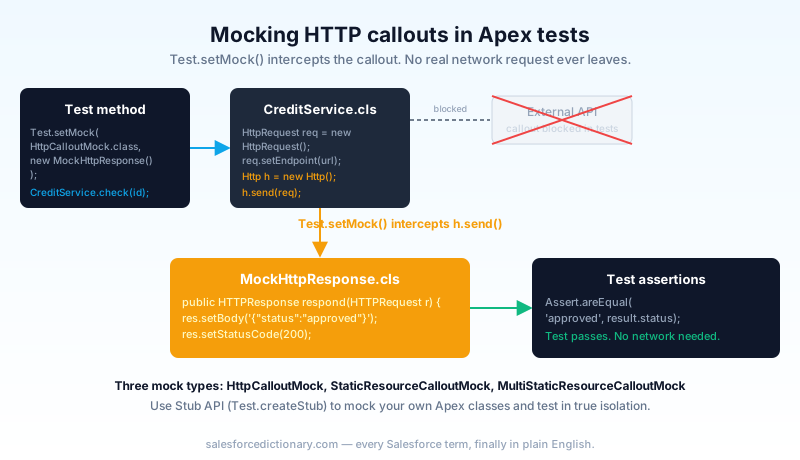
Apex tests are not allowed to make real HTTP callouts. The platform blocks them, because a test that depends on an external endpoint is flaky by construction. So you supply a fake response with Test.setMock().
@isTest
public class MockHttpResponse implements HttpCalloutMock {
    public HTTPResponse respond(HTTPRequest req) {
        HttpResponse res = new HttpResponse();
        res.setHeader('Content-Type', 'application/json');
        res.setBody('{"status":"approved","score":740}');
        res.setStatusCode(200);
        return res;
    }
}
@isTest
static void creditCheck_parsesApprovedResponse() {
    Test.setMock(HttpCalloutMock.class, new MockHttpResponse());

    Test.startTest();
    CreditResult result = CreditService.check('001xx000003DGb2');
    Test.stopTest();

    Assert.areEqual('approved', result.status, 'Should parse approved status');
    Assert.areEqual(740, result.score, 'Should parse the score field');
}
Your options for mocking:
| Tool | Use it for |
|---|---|
HttpCalloutMock | Custom HTTP responses, full control over body, headers, status code. |
StaticResourceCalloutMock | Storing a canned response body as a static resource and replaying it. Good for large JSON payloads. |
MultiStaticResourceCalloutMock | Different responses for different endpoints in one test. |
Stub API (Test.createStub) | Mocking your own Apex classes, not callouts. Inject a fake selector or service so a unit test runs without touching the database. |
The Stub API deserves a mention. It lets you replace a dependency with a controlled fake. If your service class takes a selector interface, you can stub the selector to return canned records and test the service in true isolation, no DML, no SOQL. That is how you write fast unit tests instead of slow integration tests. It pairs naturally with enterprise patterns.
7. Negative testing and governor limits
A test suite that only checks the happy path is half a suite. Real code fails, and you need to prove it fails the way you intended.
Test the exception. When input is bad, your code should throw a specific, handled exception. Prove it.
@isTest
static void check_throwsForBlankAccountId() {
    Boolean threw = false;
    try {
        Test.startTest();
        CreditService.check('');
        Test.stopTest();
    } catch (IllegalArgumentException e) {
        threw = true;
        Assert.areEqual('Account Id is required', e.getMessage(),
            'Should throw with a clear message');
    }
    Assert.isTrue(threw, 'Blank Id should raise IllegalArgumentException');
}
Test validation and permission failures. If a user without edit access tries the operation, your code should reject it cleanly. Use System.runAs() to run the logic as a low-privilege user and assert the failure. This is also how you verify CRUD and field-level security enforcement.
Think about limits as a behavior. You will not usually assert on a raw governor limit number, but you should design bulk tests (the 200-record ones) specifically to push the code toward limits. If the code is going to blow the SOQL or DML ceiling, a 200-record test is where it surfaces, on your laptop, not in production at 2 a.m.
8. Never use SeeAllData=true
By default, @isTest classes run with SeeAllData=false. Your tests cannot see the org's real data. They only see records they create themselves, plus a few setup objects like users and profiles.
This is correct, and you should keep it that way.
@isTest(SeeAllData=true) opens the door to every record in the org. It feels convenient. It is a trap. A test that queries "the first Account in the org" will pass in your sandbox and fail in production where the data is different, or pass today and fail next month when someone deletes that record. Tests must be self-contained and deterministic. They create their data, assert against their data, and never depend on what happens to be sitting in the org.
The only legitimate reason to reach for SeeAllData=true is testing against objects you genuinely cannot create in a test, like certain pricebook or org-wide setup records, and even most of those have workarounds (Test.getStandardPricebookId(), for one). If you find yourself typing SeeAllData=true, stop and ask what data the test actually needs, then create it.
9. Running tests: console, CLI, and CI
You write the tests. Now you run them, and where you run them matters as much as what they assert.
Developer Console. Fine for one-off runs while you write a method. Test, Run, watch the results. It is slow and manual and does not scale past a handful of classes.
Salesforce CLI. This is the working developer's tool. Run a single class, a list, or the whole suite, and get coverage back in the terminal.
# Run one test class with coverage
sf apex run test --class-names AccountServiceTest --code-coverage --result-format human

# Run the whole local suite, wait for results
sf apex run test --test-level RunLocalTests --code-coverage --wait 30
RunLocalTests runs everything except managed-package tests, which is what your deployment will run anyway. Catch the failure locally before the pipeline does.
CI/CD. Wire sf apex run test into your pipeline so every pull request runs the suite before merge. Fail the build on any test failure or on coverage below your team's bar (set it higher than 75% internally; the platform minimum is a floor, not a goal). Validation-only deployments (sf project deploy start --dry-run) let you confirm a deployment will pass before it touches the target org. The goal is simple: no untested code reaches an environment a human cares about.
Do this next
Open your org and run sf apex run test --test-level RunLocalTests --code-coverage. Sort the results by coverage, ascending. Pick the lowest-covered class that touches data, and find its test. Read the assertions. If there are none, or if they assert values you set yourself, you have found theater, not a test. Rewrite that one test today: create realistic data with a factory, run the real method, and assert the output you actually care about. Then do the next one tomorrow. A suite gets trustworthy one honest test at a time.
If you want the surrounding context, read the Apex trigger framework guide for where these bulk tests plug in, the async Apex guide for testing futures and queueables, and the governor limits cheat sheet for the numbers your bulk tests are pushing against.
About the Author
Dipojjal Chakrabarti is a B2C Solution Architect with 29 Salesforce certifications and over 13 years in the Salesforce ecosystem. He writes and edits salesforcedictionary.com, published by KineticBit Inc., to help admins, developers, architects, and cert/interview candidates sharpen their fundamentals. More about Dipojjal.
Share this article
Sources
Related dictionary terms
Practise it
Five questions on Platform Developer I
Exam-style questions with an explanation after each one. No account needed, and your answers build a weak-topic map once you have one.
Keep reading

The Apex Trigger Framework: Best Practices for Bulk-Safe, Scalable Triggers (2026)
The complete 2026 trigger framework guide. Logic-less triggers, bulk safety, recursion control, framework comparison (Kevin O'Hara vs interface vs virtual), and CRUD/FLS enforcement.

Async Apex: The Complete 2026 Guide to Batch, Queueable, Schedulable & Future Methods
The complete 2026 guide to async Apex - Future, Queueable, Batch, and Schedulable. When to pick each, the Flex Queue, chaining, monitoring, and the production patterns that scale.

Salesforce Governor Limits Explained: The 2026 Cheat Sheet (with Examples)
The canonical 2026 cheat sheet: SOQL/DML/CPU/heap limits, sync vs async, the most-hit limits in production, and 10 patterns to keep your org out of the red.
Comments
No comments yet. Start the conversation.
Sign in to join the discussion. Your account works across every page.