
Deploying Agentforce Agents From Sandbox to Production: The Metadata, the Order, and What API 68 Changes
The seven metadata types behind one agent, the deploy order that stops the empty-agent-list failure, and why API 68 splits your orgs into two release trains this autumn.

The deploy log says Succeeded. You open [Agentforce Agents](/terms/agentforce-agents) in production, and the list is empty.
Nothing failed. The components you selected went in cleanly. What you missed is that the thing you have been calling "the agent" was never one component, and the piece that makes it visible in Setup was not in your change set.
This is the most common Agentforce release failure, and it stops happening the moment you can name the parts. Here they are, in the order that matters, plus the change landing in production orgs right now that rewrites the whole procedure.
An agent is a graph, not a record
When you build in Agent Builder, you see one screen with a name, some topics, and some actions under them. The metadata underneath is a dependency graph with at least four nodes, and usually seven.
This is the gap that makes Agentforce releases feel harder than they are. The builder presents an agent as a single object. The Metadata API presents it as a set of components with references between them, and the API is the one your pipeline talks to.
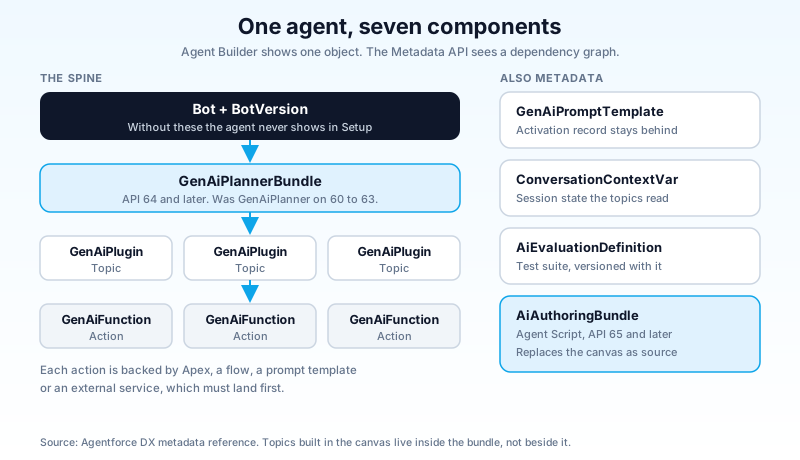
Bot and BotVersion. The container. Agentforce agents still sit on the Einstein Bots chassis, and the Bot record plus its version is what makes an agent appear in Setup at all. Skip these two and you get exactly the failure above: components deployed, agent invisible.
GenAiPlannerBundle. The reasoning configuration. It decides how a request gets broken into steps and which actions run. On API versions 60 through 63 this was GenAiPlanner. From API 64 it is GenAiPlannerBundle, and the older type is deprecated rather than dual-supported. If your pipeline still names GenAiPlanner in a manifest, it is running on a type Salesforce has already moved past.
GenAiPlugin. A topic. The grouping of instructions and actions for one job the agent does, such as order status or appointment booking.
GenAiFunction. An agent action. One operation, with an input and output schema, backed by Apex, a flow, a prompt template, or an external service. If you are writing these rather than picking standard ones, the custom actions guide covers the invocable patterns and where the governor limits bite.
GenAiPromptTemplate. The prompt scaffolding your actions and topics call. Note the separate activation record, GenAiPromptTemplateActv, which is not deployable through the Metadata API. Templates arrive, activation does not.
ConversationContextVariable. The session state your topics read and write. Easy to forget because nothing in the builder makes it look like a separate component.
AiEvaluationDefinition. The test suite. Also metadata, which is the part most teams miss, and the part that turns agent quality into something a pipeline can gate on.
If you build with Agent Script instead of the canvas, the picture changes shape: the authoring bundle (AiAuthoringBundle, API 65 and up) becomes the source of truth for that agent. The split between the open Agent Script toolchain and the closed runtime is worth reading before you standardise a team on it.
Winter '26 moved the furniture, quietly
If your release process was written before Winter '26, it is describing an org that no longer exists.
Through Summer '25, topics and actions were shared objects. Edit a topic, and every agent version pointing at it changed underneath you. That produced a genuinely bad failure mode: a fix in the version you were building leaked into the version answering live customers.
Winter '26 isolated agent versions from each other. Topics and actions can live as global assets in the Agent Asset Library, but when you add one to an agent, it is copied in as a local asset with a reference back to the original. Local edits stay local. Nothing cascades.
That fixed the leak and broke a habit. Topics and actions created inside Agent Builder are local by construction, which means they are embedded inside the planner bundle rather than existing as standalone GenAiPlugin and GenAiFunction components. They will not show up as separate items in a metadata comparison, in Workbench, or in a CLI retrieve. Teams hunting for a missing topic in a diff view usually find it already sitting inside the bundle XML.
Two practical consequences. First, if you want a topic to be reusable across agents and visible as its own component, create it in the Asset Library, not in the builder. Second, deletion order inverted: local topics and local actions have to be removed before the agent itself can be deleted, where the older model let dependencies go in one pass.
There is also a hard version wall. The v65 metadata format deploys to v65 orgs using v65 or v64 API. It does not deploy to a v64 org, and it does not deploy over a v64 API call. Mixed estates hit this every release window, which brings us to the more interesting problem.
The order that works
Until API 68 reaches both of your orgs, an agent deploy is a manual dependency sort. The rule underneath every step is the same: nothing may reference a component that is not already there or arriving in the same request.
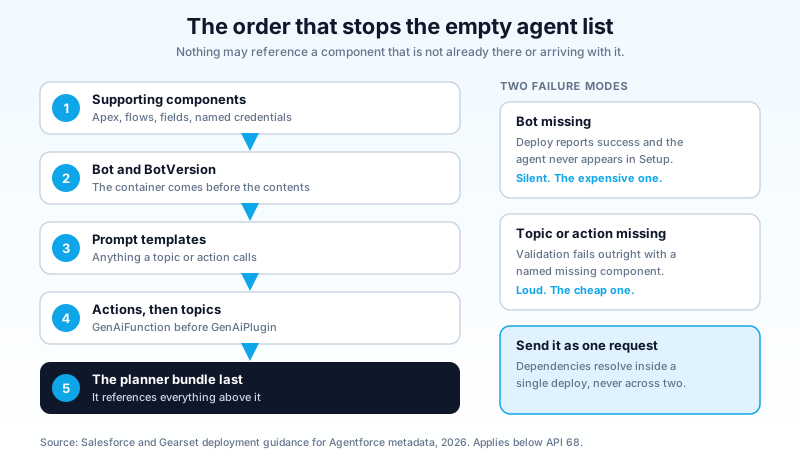
- Supporting components first. The Apex classes behind your invocable actions, the flows, the custom objects and fields those touch, the named credentials and external services. An action whose Apex class is missing is not a partially working action, it is a failed deploy.
- Bot and BotVersion. The container has to exist before the thing it contains.
- Prompt templates. Anything a topic or action calls.
- Actions, then topics.
GenAiFunctionbeforeGenAiPlugin, because topics reference actions. - The planner bundle last. It references everything above it.
You can send this as one deploy request, and for most teams that is the right answer, because the platform resolves dependencies inside a single request in a way it cannot resolve across two. The order still matters for how you build the manifest and for how you read the error when it fails.
Two error patterns cover most of what you will see. Validation failing on a missing GenAiPlugin or GenAiFunction means the target org does not have that component and you did not include it. The agent deploying but never appearing in Setup means the Bot or BotVersion did not travel. Neither is subtle once you know the graph, and both are almost impossible to diagnose without it.
One more thing that is easy to miss on a first production release: the SDR Agent and the Sales Coach Agent are not supported for deployment through the Metadata API. They are configured per environment by hand. Plan the runbook accordingly rather than discovering it during a release window.
Change sets are the wrong tool for this. They give you a flat component picker with no dependency resolution and no diff, which is tolerable for three fields and actively hostile for a graph where one missing node produces a silent, cosmetic-looking failure. Use the CLI or a DevOps tool that reads dependencies. This is not tooling snobbery, it is that the failure mode here is invisible rather than loud, and change sets give you nothing to check your work against.
API 68 makes this mostly go away
Starting in API version 68.0, Salesforce collapsed the whole arrangement into two metadata types: AiAgentDefinition and AiAgentDefinitionVersion. Retrieve one of those with the Salesforce CLI and the agent's dependencies come with it, rather than you assembling a package manifest by hand and hoping you named every Apex class, flow, and prompt template the agent quietly depends on.
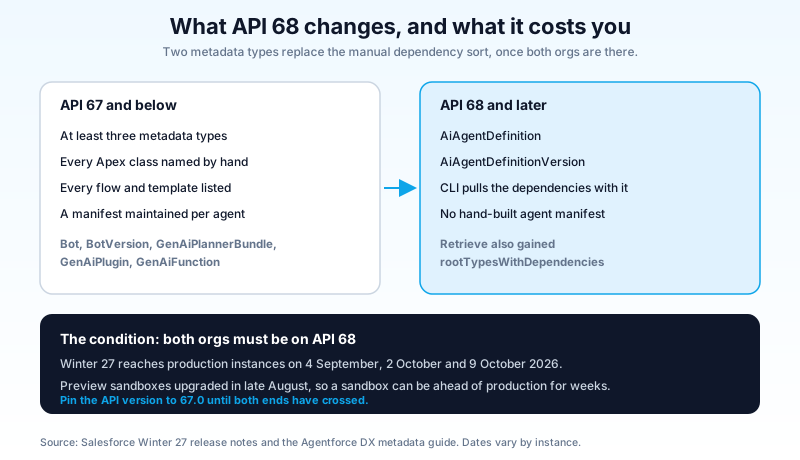
That is a real improvement, and it comes with a real condition attached. Both orgs must be on API 68.0 for the new types to work. During the mixed-version period, you stay on the previous types at API 67.0.
Look at the calendar and you will see why that sentence matters more than it reads. Winter '27 reaches production instances across three weekends: 4 September, 2 October and 9 October 2026. Which weekend you get depends on your instance, and it is published on the Salesforce Trust maintenance calendar. So for roughly five weeks, plenty of teams are running a sandbox on one release and a production org on the other.
The trap is obvious once stated and easy to walk into anyway. Your preview sandbox upgraded in late August. If production upgrades on 9 October, a CLI defaulting to the newest API version will happily retrieve AiAgentDefinition from the sandbox and hand you a source tree production cannot accept. Pin the API version in sfdx-project.json to 67.0 until both ends have crossed, then move deliberately.
Alongside this, the Metadata API added rootTypesWithDependencies on the retrieve request, which pulls a type together with what it depends on. Worth knowing even outside agent work, because the same problem exists for flows and prompt templates.
What never travels in the bundle
A clean deploy is not a working agent. The parts below are org-scoped or environment-scoped, and no metadata request brings them across.
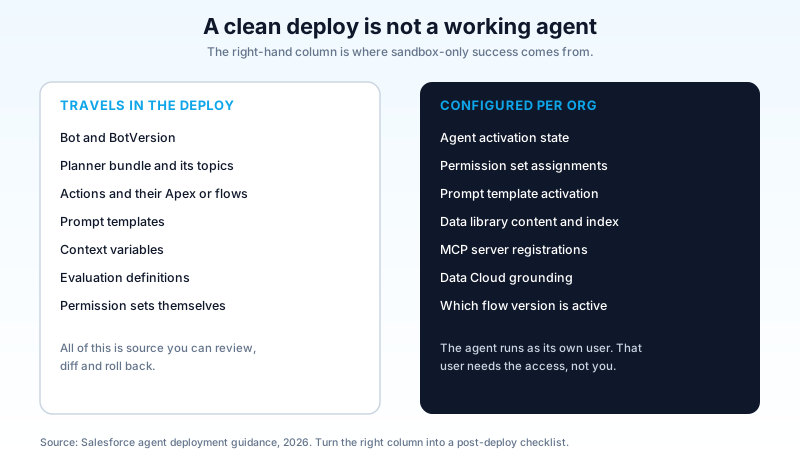
Activation. Verify the agent is active in the target org after the deploy rather than assuming it arrived that way. sf agent activate and sf agent deactivate exist precisely because this is a separate decision from the deploy, and treating it as one is what lets you ship an agent on Tuesday and switch it on for customers on Thursday.
The agent user and its permission sets. This is the one that produces silent, weird behaviour rather than an error. An agent runs as its own user. That user needs explicit access to every object, field, Apex class, and flow the agent touches, granted through permission sets assigned to it. Permission sets deploy. Assignments do not. An agent that works perfectly in your sandbox and returns "I could not find that information" in production is usually an unassigned permission set, not a broken topic.
Prompt template activation. The template deploys, the activation record does not. Check each one.
Data library content. The library and its indexed material are provisioned and built per org, through their own commands (sf agent adl create, sf agent adl upload, sf agent adl status). An index is not metadata, and it does not arrive with your agent.
MCP server registrations. If your agent reaches an external Model Context Protocol server, the registration and its asset allowlist are configured per org through sf agent mcp. Same story as data libraries.
Data Cloud grounding. Data streams, data model objects and identity resolution in the target org are their own project. An agent grounded on data that is not there in production still runs. It just answers worse.
Flow versions. Flows deploy as new versions and do not always land as the active one. Check the active version of every flow an action calls.
Write these seven as a post-deploy checklist and keep it in the repo next to the pipeline config. It takes ten minutes and removes the most common category of "it worked in the sandbox" incident.
A pipeline you can actually run
The tooling is now good enough that agents belong in your normal release management process, not in a separate manual ritual.
Source of truth is the repo. Retrieve with the CLI, commit the agent alongside its Apex and flows. Agent Builder is an editor for a sandbox, not a system of record. If two people edit the same agent in the same org, the last save wins and nothing tells you what changed.
Preview before you promote. sf agent preview reached general availability in Summer '26, and it scripts end to end: start, send, sessions, end, with trace files you can read afterwards through sf agent trace list and sf agent trace read. That gives you a repeatable conversation you can run against a freshly deployed agent in a staging org, in CI, without a human clicking through a chat window.
Gate on tests, not vibes. Author a test spec with sf agent generate test-spec, deploy it as an AiEvaluationDefinition with sf agent test create, and run it with sf agent test run. Because these are metadata, your test suite versions with the agent it tests. Do bear in mind that a test run executes the agent's real actions, including real Apex, so point it at an org where that is safe. The Testing Center guide goes deeper on what to assert and where the evaluations mislead you.
Validate-only against production first. Standard Salesforce DX practice, and it earns its keep here because agent dependency errors are exactly the kind that a validation run catches for free and a Friday deploy catches expensively.
Deploy, then activate, then assign. In that order, as three visible steps in the runbook. Most agent release incidents are one of those three steps happening implicitly and nobody noticing which.
One useful piece of timing
Agentforce is now enabled by default. In Winter '27 the platform is on for every org with Agentforce access, new orgs are enabled at creation, existing orgs are being auto-enabled on a rolling basis, and the setting is being removed from the Agentforce Agents page in Setup.
That removes an old excuse. "We have not turned it on yet" is no longer a release-management position, because the platform state is not yours to hold any more. What you still control completely is whether an agent exists, whether it is active, and what its running user can reach. Those three are your controls now, and all three live in the pipeline described above.
Do this before your next release
Retrieve one agent from your sandbox with the CLI and read what comes back. Count the components, find the Bot and BotVersion, and open the planner bundle to see which topics are living inside it rather than beside it. That single retrieve tells you more about your release risk than any diagram, including the ones above. Then check your production org's release weekend on the Trust maintenance calendar, and pin your API version to 67.0 until both ends are past it.
About the Author
Dipojjal Chakrabarti is a B2C Solution Architect with 29 Salesforce certifications and over 13 years in the Salesforce ecosystem. He writes and edits salesforcedictionary.com, published by KineticBit Inc., to help admins, developers, architects, and cert/interview candidates sharpen their fundamentals. More about Dipojjal.
Share this article
Sources
- Agent Metadata (Agentforce DX, Salesforce Developer Guide)
- Retrieve and Deploy Agent Metadata (Agentforce DX, Salesforce Developer Guide)
- agent Commands (Salesforce CLI Command Reference)
- Salesforce Winter '27 Release Notes (Salesforce Help)
- How to deploy Agentforce (GenAi & Ai) metadata types (Gearset)
Related dictionary terms
Practise it
Five questions on Platform Developer I
Exam-style questions with an explanation after each one. No account needed, and your answers build a weak-topic map once you have one.
Keep reading

Build Custom Agentforce Actions
Agentforce agents can call three types of custom actions: Apex invocable methods, autolaunched Flows, and External Service operations. Here is how to build each one correctly, what the Trust Layer enforces, and where governor limits bite.

Agentforce Testing Center: The Complete Guide to Testing Your AI Agents in 2026
Testing Center is the Agentforce tool for validating AI agents before they ship. Synthetic test users, conversation-level checks, custom evaluations, and DevOps quality gates. Here's how to use all of it.
Comments
No comments yet. Start the conversation.
Sign in to join the discussion. Your account works across every page.