
Agentforce Testing Center: The Complete Guide to Testing Your AI Agents in 2026
How to validate your Agentforce agents at scale with synthetic conversations, custom evaluations, and CI/CD quality gates before they ever talk to a real customer.
You shipped the agent on Tuesday morning. By Tuesday afternoon, your VP of support is forwarding a screenshot. A customer asked the new Agentforce service agent for a refund on order #18472, and the agent confidently quoted a refund policy that has not existed since 2023. The customer screenshot is already on LinkedIn. You open the agent in Agent Builder, run the same prompt, and it works perfectly. You cannot reproduce the failure. You have no idea how many other customers got a similar answer.
That is the moment every team meets the same hard truth: testing an AI agent the way you test a Lightning Web Component does not work. The agent is non-deterministic. Inputs vary in tone, length, language, and intent. Two runs of the same prompt can land in different places. The standard "click around in a sandbox and call it good" approach falls apart the moment your agent goes live.
Agentforce Testing Center exists for this exact problem. It is the place inside Agentforce Studio where you stress-test an agent against hundreds of synthetic conversations before it ever talks to a paying customer. This post walks through what it does, how it fits into your release process, and the parts most teams miss the first time through.
Why testing an AI agent is a different sport
Traditional Salesforce testing is a closed system. An Apex test runs a deterministic method against a known input and asserts an exact output. Validation rules either fire or they do not. Flows take the same path every time given the same record state. You can write 90 percent code coverage and trust that the next deploy will behave like the last one.
Agents do none of that.
An agent has to interpret a user's intent from free-form natural language. It picks a topic. It chooses an action. It composes a response. The same question, phrased two different ways, can take two different paths through the Atlas Reasoning Engine. A small change to one instruction can shift behavior in another topic entirely. There is no compiler error to catch the regression.
So the testing problem changes shape. You are no longer asserting "this function returns 42." You are asserting "across a hundred reasonable phrasings of this customer intent, the agent picks the right topic at least 95 percent of the time, never hallucinates a policy, and always hands off to a human when it detects frustration." That is the job Testing Center was built to do, as Salesforce frames in their own Guide to AI Agent Testing.
Where Testing Center lives
Open any agent in Agentforce Studio and you will see a row of tabs across the top. Agent Builder is where you design topics, instructions, and actions. Observability is where you watch what happens in production. Testing sits between them. That placement matters. Testing Center is the bridge from "I built it" to "I trust it in front of customers."
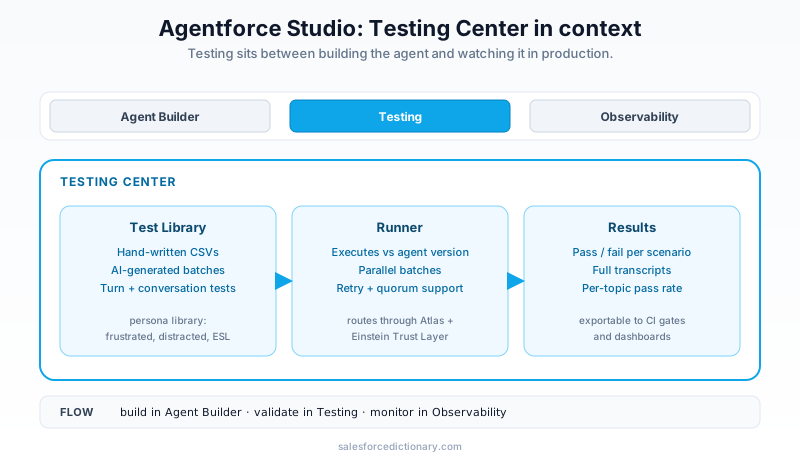
Inside the Testing tab you get three things: a test case library, a runner that executes those cases against the agent under test, and a results view that shows per-scenario scores. The Salesforce Help article on Testing Center is the authoritative reference for the UI. The shape of the tool is simple. The discipline of using it well is the harder part.
You can run tests against any agent version in any sandbox where Agentforce is enabled. Most teams settle on a workflow where developers iterate in a scratch org or a partial-copy sandbox, then promote to a full sandbox where Testing Center runs the full suite before changes hit production.
Turn-by-turn testing: the foundation
The simplest test in the tool is a single turn. You write one user utterance, you write the expected behavior, and the runner checks whether the agent gets it right.
A test case has four things:
- Utterance. What the user types or says, in their own words.
- Expected topic. Which topic should the agent route this to.
- Expected action. Which action, if any, should the agent invoke.
- Expected response. Either an exact string match, a contains check, or a custom rule.
You can build a CSV by hand. A row per scenario, with columns for utterance, expected topic, expected action, and the evaluation rule. Upload it. Click Run. The results table shows pass or fail per row and the actual agent response next to your expectation.
The Salesforce Admins blog walks through this end to end in Ensuring AI Accuracy: 5 Steps To Test Agentforce. The post is a good ground-floor starting point for any admin who has never built a test case before.
The pattern most teams settle into: every topic gets between five and twenty turn-by-turn tests. Five canonical phrasings of the happy path, plus five edge cases (misspellings, partial information, ambiguous intent), plus the negative cases that should route somewhere else entirely. That gives you a regression net you can re-run after every instruction change.
Conversation-level testing: the real upgrade
Turn-by-turn tests catch routing failures. They do not catch conversation failures. A real customer rarely asks one clean question and goes away. They ramble. They change their mind mid-thread. They give partial information, then fill in the rest two turns later when the agent asks. They forget what they already told you. The agent has to hold all of that in working memory and still land somewhere sensible.
Conversation-level testing simulates exactly that. You define a synthetic user with a goal ("I want a refund on order #18472 because it arrived damaged") and a persona ("frustrated, in a hurry, uses short sentences"). Testing Center spins up a simulated user agent against your real agent and lets them have a full multi-turn conversation. The runner records every turn, scores the agent against your evaluation criteria, and returns a transcript you can read like a chat log.
The personas are not cosmetic. Salesforce ships several out of the box: frustrated customer, non-native English speaker, distracted user, customer who wanders off-topic, customer who tries to game the system. Each one stresses the agent differently. The frustrated persona will repeat themselves and escalate tone. The distracted persona will mention three unrelated things in one turn. The non-native speaker will use simpler grammar and more direct phrasing.
This is where you find the bugs that demos never surface. The agent that handles "I need a refund" flawlessly might collapse when the user opens with "ok so basically the thing showed up and like, the box was crushed and I don't even know what was inside but anyway my husband ordered it last week, can you help."
The Salesforce blog announcement explicitly calls this out as the gap that Testing Center fills compared to manual sandbox testing. A human tester running through scenarios one at a time will catch a few. A synthetic user running fifty conversations in parallel will catch all of them.
AI-generated test cases: batch testing at scale
Writing test cases is grindwork. Most teams burn out at thirty. Testing Center addresses that by letting the platform generate test cases for you.
You give it your agent's topic catalog. It synthesizes a representative set of user utterances per topic, runs them through the agent, and reports which ones passed your evaluation criteria. You can ask for fifty cases per topic or five hundred. The tool spreads them across the persona library, varies phrasing, and includes intentionally tricky edge cases.
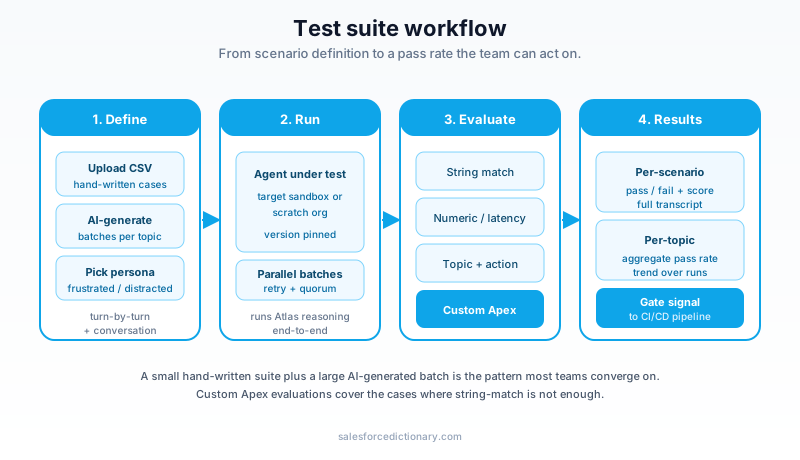
The workflow above is the one most teams converge on. A small set of hand-written canonical tests for the cases you care most about, a much larger AI-generated batch for breadth, and a results dashboard that gives you a single pass rate per topic. When the pass rate dips below a threshold you set, the build does not promote.
One nuance worth holding. AI-generated tests are excellent at finding routing weaknesses and tone drift. They are weaker at finding compliance failures, because they do not know your industry's regulatory language unless you give it to them. For HIPAA, PCI, KYC, or any policy-bound domain, the hand-written suite still matters. The AI batch gets you to "the agent does not faceplant." The hand-written suite gets you to "the agent does not get us sued."
Custom evaluations: defining what good looks like
Out of the box, Testing Center supports exact string matches and contains checks. That gets you started. It does not get you far.
Real evaluations need nuance. You want to assert "the response mentions the order number the user gave us." You want to assert "the response stays under 200 characters because this is a voice agent and long replies kill the experience." You want to assert "the response does not mention competitor product names." You want to assert "the action that fired actually returned a non-null record."
Testing Center supports all of that through custom evaluations, walked through in detail on the Salesforce Developers blog post Test Your Agentforce Agents with Custom Evaluation Criteria. The supported evaluation types include:
- String comparison. Exact, contains, does-not-contain, regex match.
- Numeric comparison. Latency under N seconds, response length under N characters, confidence score above a threshold.
- Topic and action assertions. The agent picked the topic you expected and invoked the action you expected.
- Custom code. For anything else, you write Apex or call out to your own evaluation service.
The custom-code path is the one mature teams gravitate to. You write an Apex class that implements an evaluation interface. The runner passes the test input, the agent response, and the conversation context to your class. You return pass, fail, or a numeric score with reasoning. That gives you the full Apex surface to assert anything you can compute, including hitting an external system or running a small LLM-as-judge call to score response quality on a rubric you define.
A pragmatic split: use built-in string and numeric checks for 70 percent of cases. Use custom Apex evaluations for the 30 percent that actually require judgment.
CI/CD integration and DevOps quality gates
Tests in the UI are useful. Tests that run automatically on every deploy are transformative.
Testing Center exposes a command-line interface through the Agentforce Developer eXperience (AgentDX) CLI. You point it at a test suite, you point it at a target org, and it runs the suite, prints a pass/fail summary, and exits with a non-zero code if any test fails. That makes it trivial to wire into any CI/CD pipeline: GitHub Actions, Bitbucket, Copado, Gearset, or DevOps Center.
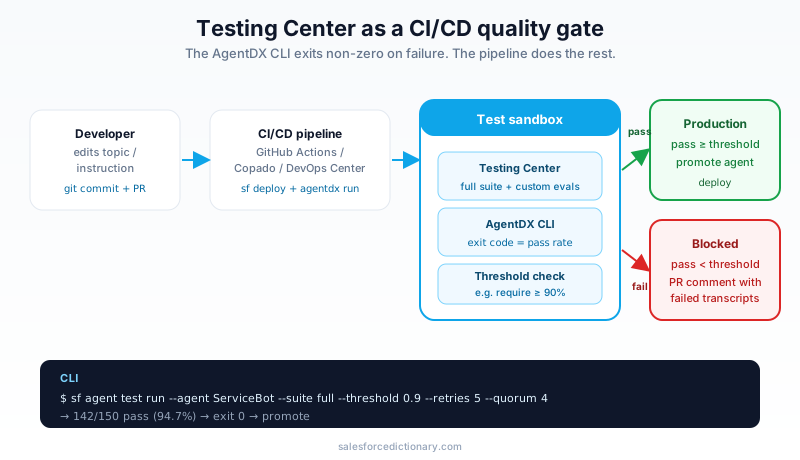
The pattern goes like this. A developer changes an instruction in Agent Builder, commits the metadata to source control, and opens a pull request. The pipeline picks up the change, deploys it to a test sandbox, runs the Testing Center suite, and reports the pass rate back on the pull request. If the rate is below the threshold the team set (most teams start at 90 percent and tighten over time), the merge is blocked. If it passes, the deployment continues to the next stage.
This is the quality-gate model Salesforce details in Supercharge DevOps with Built-In Testing and Quality Gates. The same gate model already used for Apex tests now applies to agent tests. You stop shipping agent changes that regress the suite.
A subtle but important detail. Because the agent is non-deterministic, a single test can flake. The CLI supports a retry count and a quorum threshold so you can require, for example, that a test passes 4 out of 5 runs before it counts as a pass. Without that, you will have flaky builds and the team will start ignoring the gate. With it, the gate stays meaningful.
Best practices and the mistakes you will probably make
A few patterns the teams who do this well have in common.
Write the eval before you write the agent. This is the agent equivalent of test-driven development. Decide what good looks like in concrete terms, then build the agent until the tests pass. Teams that build the agent first and the tests second tend to write tests that mirror the agent's existing behavior, which catches nothing.
Test the negative cases. What happens when the user asks something off-topic. What happens when the user is abusive. What happens when the user asks about a feature you do not have. Every off-rails case the agent should refuse or hand off is a test case you should write explicitly.
Use the Einstein Trust Layer audit logs to mine real cases. Once the agent is in production, the Trust Layer captures every prompt and response. Pull the failures, the long conversations, and the cases that ended in handoff. Turn the interesting ones into test cases. Your suite grows organically from real usage.
Re-run the full suite on every model update. Salesforce updates the model behind Atlas periodically. A test suite that passed last month can drop a few points after a model swap. That is normal, but it is not optional to ignore. Re-run before every release window.
Do not skip persona variety. Teams that only test with the "neutral customer" persona will ship agents that fall apart in front of the frustrated one. The persona library exists because the failures look different across personas. The Trailhead module Build Trust in Your Agents with Testing Center walks through this with concrete examples.
The most common mistake I see: teams ship the agent, watch it fail in production, and then write the test cases retroactively. That gives you regression coverage going forward but it does nothing for the customers who already saw the bug. Testing Center earns its keep when you front-load the discipline.
What to do this week
Three concrete steps, in order.
- Open Testing Center in your sandbox and run the default suite against an agent you already have. The tool ships with sensible defaults. Run them once. Look at the pass rate. Read the failed transcripts. That gets you fluent with the UI in about thirty minutes.
- Write ten hand-crafted test cases for the most important topic on that agent. Five happy-path phrasings, three edge cases, two negative cases. Upload as CSV. Run. Iterate on the agent until they all pass.
- Wire the CLI into your existing CI/CD pipeline as a non-blocking check. Let it report results on every pull request for two weeks without blocking merges. Once the team trusts the numbers, flip it to blocking with a 90 percent pass threshold.
Once those three steps are in place, the rest of the surface (synthetic users, AI-generated batches, custom Apex evaluations, multi-persona runs) becomes incremental work. You add one piece at a time, each one slotting into the same suite the pipeline already runs.
The 2026 version of shipping a serious Agentforce agent includes a Testing Center suite that gates the release. Start with one agent and one topic. Build from there.
About the Author
Dipojjal Chakrabarti is a B2C Solution Architect with 29 Salesforce certifications and over 13 years in the Salesforce ecosystem. He writes and edits salesforcedictionary.com, published by KineticBit Inc., to help admins, developers, architects, and cert/interview candidates sharpen their fundamentals. More about Dipojjal.
Share this article
Sources
Related dictionary terms
Practise it
Five questions on Agentforce Specialist
Exam-style questions with an explanation after each one. No account needed, and your answers build a weak-topic map once you have one.
Keep reading

Agentforce 360 Platform: The Architect's Complete 2026 Guide
Agentforce 360 is the platform under every Salesforce agentic SKU. This 2026 architect's guide covers Atlas Reasoning, Trust Layer, Agent Builder, Prompt Builder, Vibes, Voice, and platform decisions.

Salesforce DevOps Tools Compared: DevOps Center vs Gearset vs Copado vs AutoRabit (2026)
DevOps Center, Gearset, Copado, and AutoRabit all ship Salesforce metadata. They're not interchangeable. Feature matrix, pricing, decision tree, and the migration paths between them.

What Is Agentforce 360? The Complete 2026 Guide for Salesforce Admins, Developers & Architects
Agentforce 360 is Salesforce's 2025 rebrand of its agentic-AI platform - built on the Atlas Reasoning Engine, Einstein Trust Layer, and Data 360. Here's the complete admin + dev + architect guide.
Comments
No comments yet. Start the conversation.
Sign in to join the discussion. Your account works across every page.