
Build Custom Agentforce Actions
How to build Apex invocable actions, Flow actions, and External Service actions for Agentforce agents, with testing, Trust Layer, and governor limit guidance for 2026

You ship your first Agentforce agent. It greets customers, answers questions about your return policy, and summarizes a case when you ask it to. Then a customer types, "Where is my order? It said delivered but I have nothing." The agent apologizes, offers reassurance, and does absolutely nothing. It cannot read the shipping carrier's tracking API. It cannot issue a refund. It cannot escalate. It talks. That is all it can do.
That gap, between an agent that converses and an agent that acts, is what custom actions close. Agentforce crossed $1.2B ARR in Q1 FY27, and most of that growth is teams trying to get past exactly this wall. So let's get you past it.
What an Agentforce action actually is
An agent does not run code. It picks tools. When a user sends a message, the agent runtime reasons about intent, looks at the tools available inside the relevant topic, and decides which one to call and with what inputs. An action is how you hand the agent a tool.
There are three kinds you can build:
- Apex invocable methods for real logic, HTTP callouts, and anything that needs fine control.
- Autolaunched Flows for record operations and simple data work without code.
- External Service operations for calling a third-party REST API straight from an OpenAPI spec.
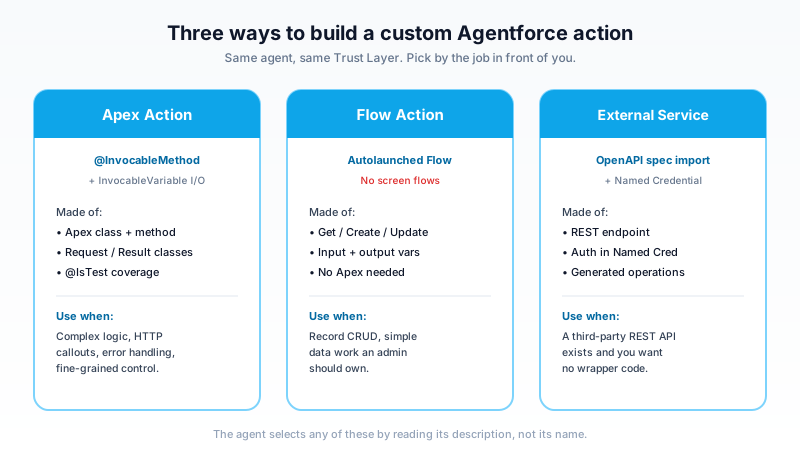
The part developers underestimate: the agent chooses an action by reading its description, not its name or signature. The description is the contract the language model sees. Write "Looks up live shipping status for an order by order number" and the runtime can match a tracking question to it. Write "shipUtil2" and the action sits there, never called. Treat every action description as the API surface, because to the model, it is the API.
Building an Apex invocable action
Apex is the workhorse. You expose a method to Agentforce with the @InvocableMethod annotation, the same annotation that has powered Flow-callable Apex for years. Inputs and outputs are passed as List parameters, even when the agent calls the action once, so the method signature always works in bulk.
Here is a shipping lookup action.
public with sharing class ShipmentLookupAction {

    public class Request {
        @InvocableVariable(required=true
            label='Order Number'
            description='The customer order number to look up, for example SO-10293.')
        public String orderNumber;
    }

    public class Result {
        @InvocableVariable(label='Status'
            description='Human-readable shipping status to relay to the customer.')
        public String status;

        @InvocableVariable(label='Estimated Delivery')
        public String estimatedDelivery;
    }

    @InvocableMethod(
        label='Get Shipping Status'
        description='Looks up live shipping status and estimated delivery date for an order by its order number. Use when a customer asks where their order is or when it will arrive.')
    public static List<Result> getStatus(List<Request> requests) {
        List<Result> results = new List<Result>();
        for (Request req : requests) {
            Result r = new Result();
            if (String.isBlank(req.orderNumber)) {
                r.status = 'No order number was provided.';
                results.add(r);
                continue;
            }
            r.status = CarrierService.fetchStatus(req.orderNumber);
            r.estimatedDelivery = CarrierService.fetchEta(req.orderNumber);
            results.add(r);
        }
        return results;
    }
}
A few things are doing heavy lifting here.
The description is everything. Notice it says when to call the action, not only what it does. "Use when a customer asks where their order is" gives the runtime a trigger condition. Vague descriptions are the number one reason an action is ignored or fired at the wrong time.
The InvocableVariable inner classes define the inputs and outputs. Each variable has its own label and description, and the model reads those too. The required=true flag tells the runtime it must collect an order number before calling.
Null handling is not optional. The agent fills in inputs from a messy conversation. It will sometimes pass a blank string. The String.isBlank check above keeps the method from throwing inside the agent turn, which would surface as an ugly failure to the customer.
Governor limits still apply
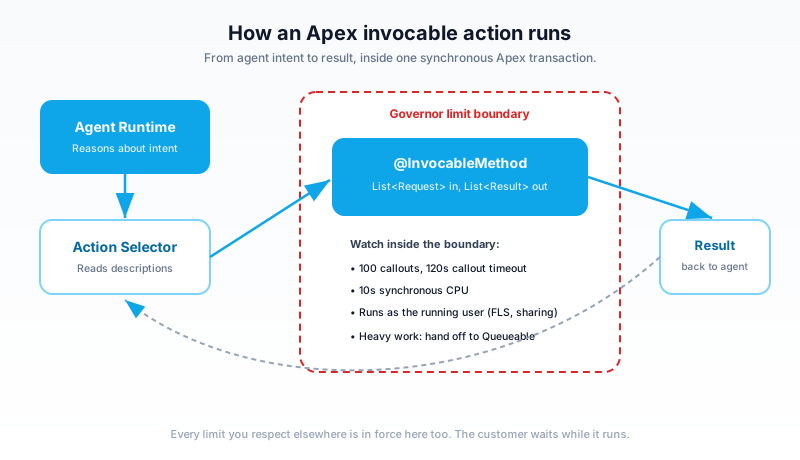
The action runs in a normal synchronous Apex transaction. Every limit you already respect is in force. Two bite hardest in agent actions:
- Callout limits. You get 100 callouts per transaction and a cumulative timeout of 120 seconds. The carrier API above is one callout. Fine. A loop that calls an API per order in a 200-record list is not.
- CPU time. You have 10 seconds of synchronous CPU. An agent action that does heavy processing will hit it, and the customer watches the agent stall while it does.
If the work is genuinely heavy, do not try to finish it inside the action. Kick off a Queueable and return a "We are working on it" message. The agent can follow up in the conversation.
Testing and mocking the callout
Agent actions are still Apex, so they need test coverage to deploy, and you want the test anyway. Mock the HTTP callout with HttpCalloutMock so the test does not depend on a live carrier.
@IsTest
private class ShipmentLookupActionTest {

    private class CarrierMock implements HttpCalloutMock {
        public HttpResponse respond(HttpRequest req) {
            HttpResponse res = new HttpResponse();
            res.setStatusCode(200);
            res.setBody('{"status":"In transit","eta":"2026-06-09"}');
            return res;
        }
    }

    @IsTest
    static void returnsStatusForValidOrder() {
        Test.setMock(HttpCalloutMock.class, new CarrierMock());
        ShipmentLookupAction.Request req = new ShipmentLookupAction.Request();
        req.orderNumber = 'SO-10293';

        Test.startTest();
        List<ShipmentLookupAction.Result> out =
            ShipmentLookupAction.getStatus(new List<ShipmentLookupAction.Request>{ req });
        Test.stopTest();

        System.assertEquals(1, out.size());
        System.assertEquals('In transit', out[0].status);
    }

    @IsTest
    static void handlesBlankOrderNumber() {
        ShipmentLookupAction.Request req = new ShipmentLookupAction.Request();
        req.orderNumber = '';
        List<ShipmentLookupAction.Result> out =
            ShipmentLookupAction.getStatus(new List<ShipmentLookupAction.Request>{ req });
        System.assertEquals('No order number was provided.', out[0].status);
    }
}
Write the blank-input test on purpose. It is the case the agent will trigger most often in production.
Building a Flow action
Not every action needs Apex. An autolaunched Flow can be an Agentforce action, and for record operations it is faster to build and easier for an admin to maintain.
The rule that trips people up: screen flows are not supported. An agent runtime has no screen to render. Use an autolaunched flow. Then mark the input and output variables as Available for input and Available for output in the variable settings. Those flagged variables become the action's inputs and outputs, and each one gets a description that the model reads, same as Apex.
So when do you pick Flow over Apex?
- Use Flow for create, update, and lookup operations on records, simple field math, and routing logic an admin should own. Get a record, set some fields, create a task, return an Id.
- Use Apex when you need an HTTP callout, real branching logic, custom error handling, or tight control over what comes back. Flow's HTTP callout action exists, but for anything beyond a trivial call, Apex gives you mocking, exception handling, and version control that Flow does not match.
A good split in practice: Flow handles the CRUD, Apex handles the integrations.
External Services actions
Sometimes the thing you need is a REST API that already exists, and you would rather not write or maintain Apex to wrap it. That is what External Services is for.
The pattern has two pieces. First, a Named Credential holds the endpoint URL and the authentication, so no secret ever lives in your metadata or code. Second, an External Service registers the API by importing its OpenAPI specification. Salesforce reads the spec, generates the operations, and each operation becomes invocable, including by Agentforce.
Because the operations come from the OpenAPI spec, the quality of that spec matters. The operation summaries and parameter descriptions in the spec become the text the agent reads to decide when to call them. A well-documented spec gives you good actions for free. A spec with empty descriptions gives you actions the agent cannot reason about, and you will end up editing them by hand.
When the agent calls an External Service operation, the request and response still pass through the Einstein Trust Layer, the same as any other action. So you get masking and audit logging on third-party calls without writing a line of it.
The Trust Layer sits on every call
Every action call, Apex, Flow, or External Service, runs through the Einstein Trust Layer. This is not optional and not something you bolt on. It is in the path.
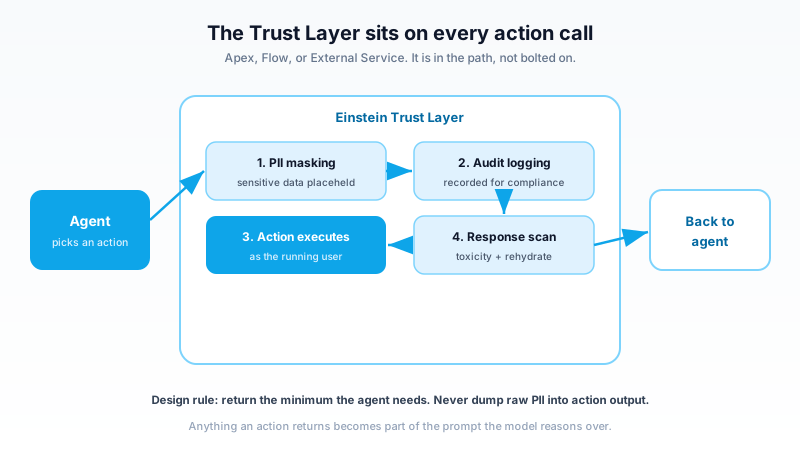
What it does on each call:
- PII masking replaces sensitive data with placeholders before content reaches the model, then rehydrates it on the way back to the user.
- Audit logging records the interaction for compliance review.
- Toxicity and response scanning checks generated content before it returns.
This has a direct consequence for how you design action outputs. Anything your action returns to the model becomes part of the prompt. So do not dump raw customer PII into an output meant to be reasoned over. Return the minimum the agent needs to answer. If the agent needs to confirm an identity, return "verified" rather than the full record.
One more thing that catches people: the action runs as the running user. Same field-level security, same sharing rules, same object permissions. If the running user cannot see a field, the action cannot return it, and the agent will behave as if the data does not exist. Test your actions as the actual agent user, not as a System Administrator, or you will ship something that works for you and fails for everyone else.
Common mistakes that waste a day
A short list of what goes wrong, from most to least common.
Vague action descriptions. "Handles orders" tells the model nothing. The runtime cannot decide when to call it against three other order actions. Be specific about the trigger and the inputs. This is the single biggest cause of actions that never fire.
Synchronous callouts after DML. If your action does a DML write and then a callout in the same transaction, you get an uncommitted-work error. Order matters: do callouts before DML, or move the callout to an async path.
Returning too much data. A big payload eats the context window, slows the response, and gives the model more to hallinate over. Return what the agent needs to answer the question and nothing more.
Forgetting null inputs. The agent extracts inputs from conversation. It will pass blanks, partial values, and the occasional nonsense. Guard every required input or the action throws mid-turn.
What to build next
Build the shipping lookup action from this post in a scratch org. Write both tests, the happy path and the blank-input path. Then wire it into a topic, open the Agentforce builder's conversation preview, and ask, in plain English, "where is my order SO-10293." Watch the runtime pick your action and fill the input. Seeing that selection happen, driven entirely by your description text, is the moment custom actions click.
Once that works, swap the mock for a real Named Credential and a live endpoint, and you have a production-shaped action. From there, every business capability your org has is one action away from your agent.
About the Author
Dipojjal Chakrabarti is a B2C Solution Architect with 29 Salesforce certifications and over 13 years in the Salesforce ecosystem. He writes and edits salesforcedictionary.com, published by KineticBit Inc., to help admins, developers, architects, and cert/interview candidates sharpen their fundamentals. More about Dipojjal.
Share this article
Sources
Related dictionary terms
Practise it
Five questions on Agentforce Specialist
Exam-style questions with an explanation after each one. No account needed, and your answers build a weak-topic map once you have one.
Keep reading

Salesforce Einstein Trust Layer: The Complete 2026 Guide to Secure AI
Your security team asks where the customer data goes when Agentforce processes it. Here is the full answer: how the Einstein Trust Layer's prompt journey, data masking, zero-data retention, and toxicity detection actually work.

Salesforce Flow vs Apex in 2026: A Decision Matrix for Admins, Developers & Consultants
Flow vs Apex is not a religious war anymore. Here is the 2026 decision matrix. Capability gaps, governor limits, the 70/30 rule, and 12 worked scenarios with the right answer for each.

Salesforce Named Credentials and External Credentials: The Complete 2026 Guide
Legacy Named Credentials are retiring. The new split between Named Credentials and External Credentials is how Salesforce expects every integration to authenticate in 2026. Here is what changed and how to migrate.

What Is Agentforce 360? The Complete 2026 Guide for Salesforce Admins, Developers & Architects
Agentforce 360 is Salesforce's 2025 rebrand of its agentic-AI platform - built on the Atlas Reasoning Engine, Einstein Trust Layer, and Data 360. Here's the complete admin + dev + architect guide.
Comments
No comments yet. Start the conversation.
Sign in to join the discussion. Your account works across every page.