
Apex Integration Tests in Winter '27: Real Callouts, Committed Data, and No Rollback
How @IntegrationTest, @BeforeClass and @TearDown work, what commitTestOnly() actually does, and the constraints that decide whether you can use any of it.

Your callout mock returns a perfectly formed JSON payload. Every field populated, every type exactly what the integration spec promised. The test passes. It has passed for eleven months.
Then the vendor ships a minor version, starts returning null where it used to return an empty string, and your parser throws a NullPointerException at 2am on the last day of the quarter. The test suite is still green. It was green the entire time.
The mock was never testing the vendor. It was testing your own idea of the vendor, written down once and then never checked against reality again. Every Salesforce developer has known this for a decade and shrugged, because the platform gave you no alternative. Apex tests could not make real callouts. Full stop.
Winter '27 changes that, partially, and with a set of strings attached that decide whether the feature is useful to you or a curiosity you read about and move on from. This is what actually shipped.
What Winter '27 added
Three new annotations and one static method.
@IntegrationTest marks a class, and each method inside it, as an integration test. A class carrying this annotation can hold integration test methods and @TearDown methods, nothing else. You cannot put @IntegrationTest and @IsTest on the same class. They are two separate test kinds with two separate execution models, and Salesforce keeps them physically apart.
@BeforeClass sets up data shared across every method in the class. This is the closest Apex has come to a real fixture. @TestSetup in a unit test class runs once and then gets rolled back and replayed per method. @BeforeClass runs once, commits, and the same records are still sitting there for method three.
@TearDown runs after the class finishes, pass or fail, and its transaction auto-commits. This is where you delete everything you created, because nothing else is going to.
IntegrationTest.commitTestOnly() commits the work you have done so far, mid-method, and resets the uncommitted-work checkpoint. That last part is the one that matters, and I will come back to it.
Put together, the shape looks like this:
@IntegrationTest
public class OrderSyncIntegrationTest {

    @BeforeClass
    public static void setup() {
        insert as user new Account(Name = 'IT_OrderSync_Acct');
    }

    @IntegrationTest
    public static void testOrderReachesTheVendor() {
        // work happens here, against real committed data
    }

    @TearDown
    public static void cleanup() {
        delete as user [SELECT Id FROM Account WHERE Name = 'IT_OrderSync_Acct'];
    }
}
If you have written JUnit or pytest, this is familiar furniture. If you have only written Apex, notice what is missing: there is no assumption that the platform tidies up after you.
The two rules it breaks
Read the standard Apex testing guidance and two rules come up in every version of it. Integration tests break both, on purpose.
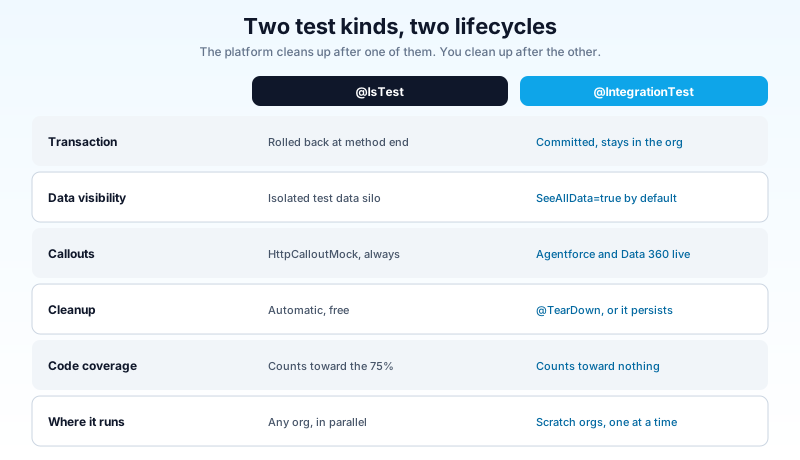
Rule one: test data is rolled back automatically. A @IsTest method runs inside a transaction that Salesforce discards when the method ends. You can insert ten thousand records and the org is untouched a millisecond later. That guarantee is why Apex testing feels safe.
Integration tests give it up. Data you insert is committed. It is visible to other threads, other users, reports, and anything else looking at the org. When the class finishes, those records still exist unless your @TearDown removed them.
Rule two: never use SeeAllData=true. This is the most repeated piece of Apex test advice in the ecosystem, and it is correct, because a test that queries "the first Account in the org" passes in your sandbox and fails wherever the data differs. I have written that advice myself in the Apex test class best practices guide.
Integration tests run with SeeAllData=true by default. Not as an option you can switch off. As the operating mode.
Both of these sound alarming until you see the reason. A real Agentforce agent runs on a different thread than your test. Data 360 queries hit a separate service. Neither of them can see data sitting uncommitted inside your test transaction, because from their perspective that data does not exist yet. If you want to test against a real service, the data has to be real first. The rollback and the data silo were never safety features here. They were the thing blocking the test.
commitTestOnly() and the checkpoint
Here is the part that trips people up on day one.
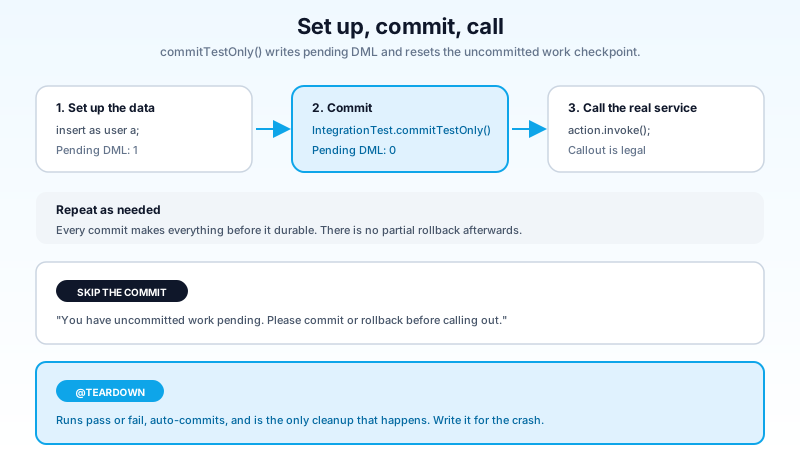
Apex has always refused to let you make a callout after uncommitted DML. The runtime tracks a checkpoint: if you have pending DML and you try to call out, you get "You have uncommitted work pending. Please commit or rollback before calling out." That rule exists because Salesforce will not hold a database transaction open across a network round trip it cannot bound.
Integration tests do not repeal that rule. They give you a way to satisfy it. IntegrationTest.commitTestOnly() writes your pending DML to the database and resets the checkpoint, so the next callout is legal.
Which means the sequence in almost every integration test you write is the same three beats:
@IntegrationTest
public static void testAgentSummarizesTheAccount() {
    Account a = new Account(Name = 'IT_AgentDemo', AnnualRevenue = 1000000);
    insert as user a;

    IntegrationTest.commitTestOnly();   // without this, the invoke below fails

    Invocable.Action action = Invocable.Action.createCustomAction(
        'generateAiAgentResponse', 'Demo_Action'
    );
    action.setInvocationParameter('userMessage', 'Summarize my Account ' + a.Id);
    List<Invocable.Action.Result> results = action.invoke();

    String response = (String) results[0].getOutputParameters().get('agentResponse');
    Assert.isNotNull(response, 'Agent returned nothing');
    Assert.isTrue(response.contains('IT_AgentDemo'), 'Agent did not see the account');
}
Set up. Commit. Call.
You can repeat that cycle as many times as the method needs. Insert an Account, commit, update it, commit again, insert a child Contact, commit a third time. Each commitTestOnly() makes everything before it durable and visible.
The obvious follow-on question: what happens if the method throws between commit two and commit three? The answer is that commits one and two stand. There is no partial rollback and no compensating logic. Your @TearDown is the only cleanup that runs, so it has to be written for the failure case, not the happy path. More on that shortly.
What you can actually call
This is where you need to read carefully, because the summaries and the reference docs do not say quite the same thing.
Release-note coverage of Winter '27 describes integration tests as letting Apex call real HTTP endpoints, external services included. The Apex Developer Guide page that documents the feature is titled, and scoped to, Agentforce and Data 360 services. That page states plainly that ordinary HTTP callouts to external endpoints still require an HttpCalloutMock implementation, and that the exemption covers agent invocation and Data 360 queries.
Take the narrower reading as your planning assumption. Two concrete capabilities are documented and unambiguous:
Invoking a real Agentforce agent and asserting on what comes back. Not asserting that your Apex built the right prompt string. Asserting that the agent, running its real reasoning path against real committed records, produced a response containing what it should contain. That is a different class of test, and until now there was no way to write it.
Querying Data Model Objects directly, without a SoqlStubProvider standing in for the result set. If you have wired Apex to Data 360, you know the callout hiding inside that SOQL and how little a stubbed response tells you about it.
For your vendor REST API, write the ten-line scratch org test before you plan a migration around it. Developer preview features move, and the docs and the release notes will converge on one answer eventually. Do not rewrite a mocking layer on the strength of a summary paragraph.
The constraints that decide this for you
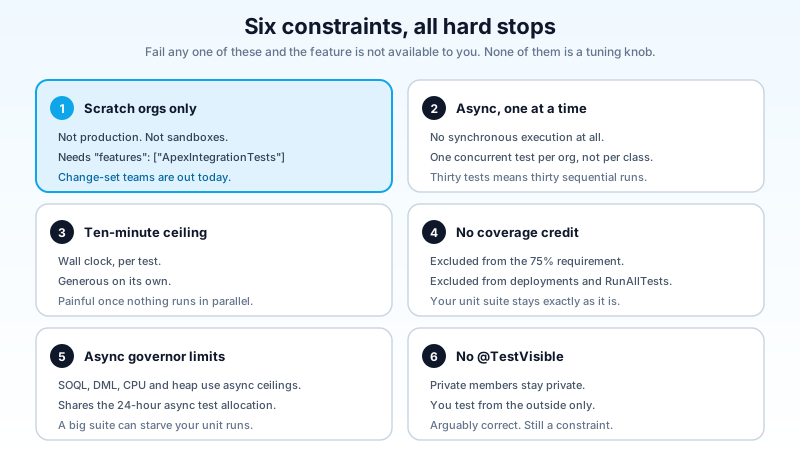
Before you plan any of this into a sprint, walk the gate. Every item below is a hard stop, not a tuning knob.
Scratch orgs only. Not production, not sandboxes. You enable it in your Salesforce DX scratch org definition file:
{
  "orgName": "YourCompany",
  "edition": "Developer",
  "features": ["ApexIntegrationTests"]
}
If your team's development model is change sets out of a developer sandbox, this feature is not available to you at all right now. That is not a small footnote. It rules out a meaningful share of Salesforce orgs on day one.
Asynchronous only, one at a time. Integration tests cannot run synchronously, and only one can run per org at a time. Not one per class. One per org. A suite of thirty integration tests is thirty sequential runs, and there is no parallelism to buy your way out of it.
Ten-minute ceiling. Each test gets ten minutes of wall clock instead of the usual synchronous limits. Generous per test, and also the reason the one-at-a-time rule stings: a slow suite is slow in a way you cannot fix with more workers.
No code coverage credit. Integration tests do not count toward the 75% deployment requirement. They are excluded from metadata deployments and from RunAllTests. You still need your unit tests, all of them, at the same coverage as before. This is additive work.
Asynchronous governor limits apply. SOQL, DML, CPU, and heap follow the async ceilings, including the heap increase Winter '27 shipped alongside this. They also draw on the same 24-hour async test run allocation shared with unit tests and flow tests. A large integration suite can starve your ordinary test runs.
No @TestVisible. Private members stay private. Integration tests exercise your code from the outside, which is arguably correct, and is also a real constraint if your design leaned on @TestVisible for reach.
Teardown is the part that bites
Every other Apex test you have written cleans up for free. This one does not, and the failure mode is quiet.
A @TearDown that deletes by a name filter looks fine until the third run, when a method failed halfway and left a Contact whose parent Account the teardown already tried to delete. Now you have a foreign key error inside teardown, teardown fails, and the next run starts against a scratch org carrying junk from the last one. Because integration tests see all data, that junk is visible to every query you write. Your assertions start failing for reasons that have nothing to do with your code.
Three habits that keep this from happening:
Prefix everything and filter on the prefix. Every record your test creates gets a name starting with something like IT_. Your teardown deletes on that prefix and nothing else. It never touches a record it did not create, and it catches records from a previous crashed run.
Delete children before parents. Contacts before Accounts, order items before orders. Obvious when you write it down, easy to forget when the teardown grows a fourth object.
Write teardown for the crash, not the success. Assume the method died at an arbitrary point. Query for what might exist rather than deleting a list you built during the test. A teardown holding an in-memory list of Ids is a teardown that misses everything created after the exception.
@TearDown
public static void cleanup() {
    delete as user [SELECT Id FROM Contact WHERE LastName LIKE 'IT\\_%' ESCAPE '\\'];
    delete as user [SELECT Id FROM Account WHERE Name LIKE 'IT\\_%' ESCAPE '\\'];
}
Note as user on the DML and WITH USER_MODE on the queries in the earlier examples. Integration tests run against committed data in a shared org context. Running them in user mode keeps them honest about the permissions the calling code actually has, which is the whole reason you are testing against something real.
Where this belongs in your suite
Integration tests are slow, serialized, uncovered, and confined to scratch orgs. That is not a criticism. It is a description of the trade, and the trade only pays for a specific kind of test.
The split I would hold to:
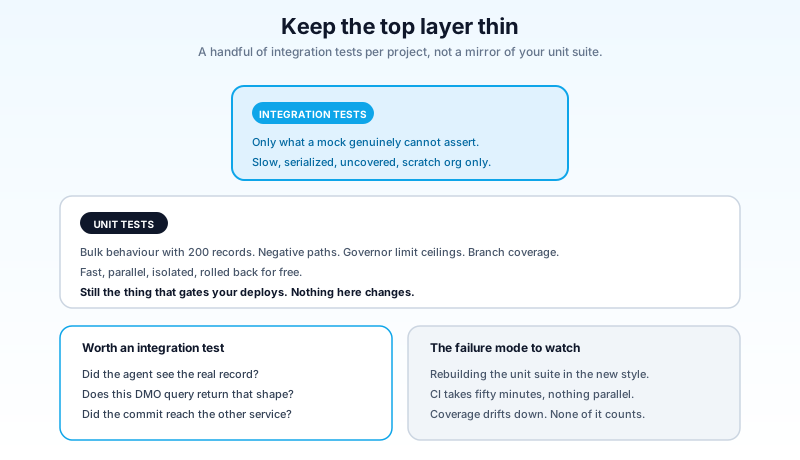
Unit tests stay where they are and stay the bulk of everything. Bulk behavior with 200 records, negative paths, governor limit ceilings, branch coverage, the whole test class discipline. Fast, parallel, isolated, and the thing that gates your deploys. Nothing here changes.
Integration tests get reserved for the assertions a mock genuinely cannot make. Does the agent, given this data, return an answer containing this fact? Does this DMO query return rows with this shape? Does the committed record actually trigger the downstream service? A handful of these per project, not a mirror of your unit suite.
The failure mode to watch for is the team that discovers integration tests, finds them more satisfying to write because they feel like they prove something, and quietly rebuilds half the unit suite in the new style. Six months later CI takes fifty minutes, nothing runs in parallel, and coverage has drifted down because none of it counts.
The honest assessment
This is a good feature shipped in a narrow form.
The design is right. Salesforce did not bolt a "real callout" flag onto @IsTest and let people discover the consequences in production. They made a separate test kind, gave it separate annotations, kept it out of deployments and coverage math, and confined it to scratch orgs where the blast radius is a disposable org. Someone thought about how this would be misused and built the guardrails first.
The scoping is the disappointment. The headline that Apex tests can finally call real endpoints is doing more work than the documentation supports. The exemption, as documented, is Agentforce and Data 360. Those are Salesforce's own services, and it is not hard to read the feature as scratching Salesforce's own itch: agents are difficult to test, and the ecosystem has been saying so loudly since Agentforce shipped. Useful. Just not the general-purpose integration testing the summaries suggest.
Developer preview also means the shape can change before general availability, which for a Winter '27 feature means you are looking at Spring '27 at the earliest for anything you would bet a release process on.
Do this next
Spin up a scratch org with "features": ["ApexIntegrationTests"] in the definition file and write exactly one test: insert an Account, call IntegrationTest.commitTestOnly(), invoke an agent action against it, assert the response mentions the account, and delete it in @TearDown. Then deliberately break the teardown and run it twice, so you see what a dirty scratch org does to a SeeAllData=true test before it happens to you on something that matters. That is an afternoon, and it tells you more about whether this fits your team than any release note will.
About the Author
Dipojjal Chakrabarti is a B2C Solution Architect with 29 Salesforce certifications and over 13 years in the Salesforce ecosystem. He writes and edits salesforcedictionary.com, published by KineticBit Inc., to help admins, developers, architects, and cert/interview candidates sharpen their fundamentals. More about Dipojjal.
Share this article
Sources
Related dictionary terms
Practise it
Five questions on Platform Developer I
Exam-style questions with an explanation after each one. No account needed, and your answers build a weak-topic map once you have one.
Keep reading

The Apex Heap Limit Went Up in Winter '27: What It Fixes and What It Doesn't
Your batch job died at 3am on a heap error and you cut the scope size to 50 to make it stop. Winter '27 raises sync heap to 10 MB and async to 25 MB. Here is what that actually changes in your code.

Querying Data 360 from Apex: The Callout Hiding Inside Your SOQL
Your class returns exactly 201 rows in production and nobody notices for a month. Data 360 queries from Apex behave like callouts, skip field-level security, and cannot be tested with real records. Here is the pattern that holds.

Salesforce Apex Test Classes: Best Practices, Test Factories, and Real-World Patterns (2026)
Write Apex tests that actually catch bugs. Test factories, bulk patterns with 200 records, callout mocks, negative testing, and why coverage percentage lies to you.
Comments
No comments yet. Start the conversation.
Sign in to join the discussion. Your account works across every page.