Salesforce Dictionary - Free Salesforce GlossarySalesforce Dictionary
DictionaryPPartner Portal
SalesBeginner

Partner Portal

Partner Portal is the legacy Salesforce feature for giving external partner organizations (resellers, distributors, channel partners) controlled access to a customer's Salesforce data: leads they should follow up on, opportunities they share, cases they file on behalf of end customers.

§ 01

Definition

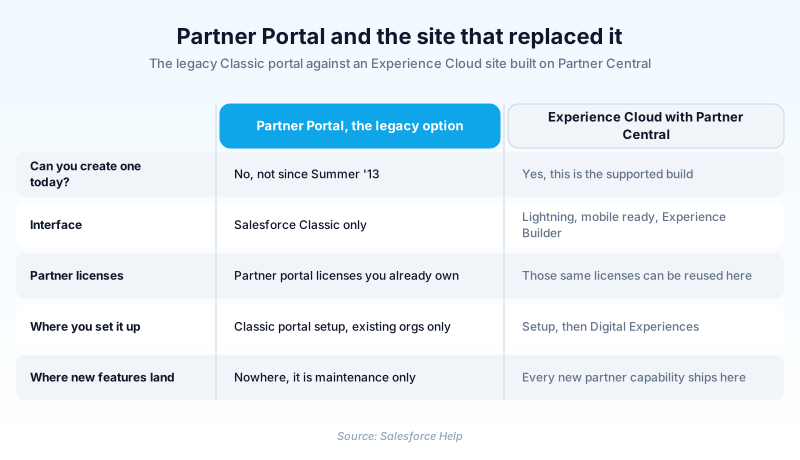
Partner Portal is the legacy Salesforce feature for giving external partner organizations (resellers, distributors, channel partners) controlled access to a customer's Salesforce data: leads they should follow up on, opportunities they share, cases they file on behalf of end customers. The original Partner Portal was a Salesforce Classic feature replaced in 2017 by Experience Cloud (formerly Community Cloud), which subsumed both Partner Portal and Customer Portal under a unified platform with Lightning Experience UI and richer customization.

Partner Portal is mostly a historical term now. New deployments use Experience Cloud with a Partner template that delivers the same partner-facing capabilities through a modern UI. Existing Partner Portal deployments in legacy orgs continue to work but receive no new feature investment. The Salesforce documentation still references Partner Portal in places for backwards compatibility, but the recommended path for any new partner-facing site is Experience Cloud. The underlying licensing model (Partner Community licenses) carries over from the Partner Portal era and remains the foundation of partner identity and access in modern orgs.

§ 02

How Partner Portal evolved into Experience Cloud partner sites

Partner Portal in Salesforce Classic

The original Partner Portal was a Classic-era feature that exposed a customizable web portal for partner users. Setup, Customize, Partners. The admin configured the portal logo, pages, tabs, and user access. Partner users logged in with Partner User accounts and saw a limited view of Salesforce data tied to their Account. The portal supported Lead routing, deal registration, joint selling workflows, and case-style support for end customer issues escalated through the partner. The Classic Partner Portal predates Lightning Experience by several years.

Why Salesforce replaced Partner Portal with Experience Cloud

The Classic Partner Portal had limited UI flexibility (Visualforce templates, basic branding), separate license types from broader Communities, and an aging codebase. Salesforce built Experience Cloud (originally Community Cloud) as a unified platform for any external-facing site: customers, partners, employees, support communities. The new platform uses Lightning Experience UI, supports drag-and-drop site building, integrates with Lightning Web Components for custom UI, and consolidates the partner and customer portal models. Existing Partner Portal customers were migrated or remain on the legacy path with no upgrade.

Partner Community licenses and the access model

The licensing model from Partner Portal carries over to modern Experience Cloud partner sites. Partner Community licenses give external users access to Leads, Opportunities, Accounts, Contacts, Cases, and custom objects with configurable sharing. Each license is per-user and meaningfully cheaper than full Salesforce licenses. The license type matters: Partner Community licenses cannot run Apex triggers as themselves, cannot run scheduled batch jobs, and have other constraints designed for external user populations.

Lead routing and deal registration

The most common partner-facing workflow is lead routing and deal registration. A vendor's Salesforce org distributes new leads to partner organizations based on territory, industry, or skill match. Partners log in, see assigned leads, work them, and register deals they want to bring to the vendor. Deal registration creates a structured Opportunity tied to the partner Account with explicit credit for the partner. The workflow has been built in both Classic Partner Portal and modern Experience Cloud Partner sites; the underlying data model is the same.

Joint selling and shared opportunities

Beyond lead routing, partner sites support joint selling: vendor reps and partner reps collaborate on the same opportunity through configurable sharing. The vendor controls the opportunity ownership; the partner sees the opportunity through Partner Community license sharing and contributes activities, attachments, and comments. Visibility is configurable per opportunity field, so the partner can see Stage and Close Date but not vendor-internal Notes or Pricing. The model balances collaboration against information control.

Migration from Partner Portal to Experience Cloud

Customers still on the legacy Partner Portal should migrate to Experience Cloud. The migration involves building a new Experience Cloud Partner site, mapping the existing Visualforce pages to Lightning page builders, exporting partner user accounts to the new site, and decommissioning the Classic Partner Portal. The work spans 2 to 6 months for a typical enterprise deployment. The benefits (modern UI, drag-and-drop customization, Lightning Web Component integration) usually justify the cost, especially for partner-heavy businesses.

Partner Relationship Management (PRM) and the broader stack

Partner Portal and its Experience Cloud successor are the technology layer for Partner Relationship Management (PRM). PRM as a discipline includes onboarding, training, deal registration, joint marketing, MDF (market development fund) management, and incentive payouts. Salesforce sells specific PRM products (Sales Cloud PRM, partner enablement add-ons) that layer onto Experience Cloud. For organizations with hundreds or thousands of channel partners, the PRM investment is significant; for organizations with a few key partners, basic Experience Cloud partner site capability may be sufficient.

§ 03

Setting up a partner-facing site in Salesforce

For new partner-facing deployments, use Experience Cloud with a Partner template. For existing legacy Partner Portal deployments, plan a migration to Experience Cloud.

  1. Confirm Partner Community licensing

    The license type is the foundation of partner identity. Confirm with the Salesforce account team that the org has Partner Community licenses available.

  2. Build an Experience Cloud Partner site

    Setup, Digital Experiences, All Sites, New. Pick a Partner template (Customer Service, Partner Central, others). The template seeds pages and a base configuration.

  3. Configure branding and pages

    Experience Builder lets you customize the site through drag-and-drop. Add Lightning components, configure page layouts, brand the colors and logo.

  4. Set up partner Account and User records

    Create Account records for each partner organization. Enable Partner Account on the Account. Create User records with Partner Community licenses for the individual partner users.

  5. Configure sharing rules and data access

    Decide which Leads, Opportunities, and Cases partners should see. Build sharing rules tying the partner Account to the relevant records.

  6. Set up Lead routing and deal registration

    Configure Lead Assignment Rules to route new leads to partner queues. Build a Deal Registration custom workflow that partners can submit through the site.

  7. Launch the site to partner users

    Activate the site, send login invitations to partner users, monitor adoption through site analytics and Login History reports.

  8. Migrate legacy Partner Portal deployments

    For existing Classic Partner Portal, build the Experience Cloud equivalent in parallel, migrate users, decommission the legacy portal.

Key options
Experience Cloud Partner templateremember

The Salesforce-provided starting point for partner-facing sites. Includes pages, navigation, and base configuration.

Partner Community licenseremember

The license type for external partner users, with constraints on Apex and batch operations.

Partner Account enablementremember

Account-level flag that designates an Account as a partner organization, enabling partner user creation.

Lead routingremember

Assignment Rules and Flow logic that distribute new leads to partner queues.

Deal Registrationremember

Workflow where partners submit deals for vendor approval, creating tracked Opportunities with explicit partner credit.

Classic Partner Portal (legacy)remember

The deprecated Classic-era partner portal, superseded by Experience Cloud in 2017.

Gotchas
  • Partner Portal is a legacy term. New deployments use Experience Cloud with a Partner template. The Classic Partner Portal does not run in Lightning Experience.
  • Partner Community licenses have constraints. Apex triggers running as partner users behave differently from internal-user contexts. Test partner-facing automation carefully.
  • Sharing rules for partner access need to be deliberate. Over-sharing leaks competitive information; under-sharing creates "I cannot see my deal" complaints.
  • Deal registration workflows are often custom. The platform provides the building blocks (Opportunity, Approval Process, Flow) but the specific workflow is org-configurable.
  • Migration from Classic Partner Portal to Experience Cloud takes months for enterprise deployments. Plan it as a coordinated project, not a quick technical migration.
§

Trust & references

Sources

Cross-checked against the following references.

Official documentation

Straight from the source - Salesforce's reference material on Partner Portal.

Was this entry helpful?
Help us write better definitions. Quick reactions or detailed edit suggestions.

About the Author

Dipojjal Chakrabarti is a B2C Solution Architect with 29 Salesforce certifications and over 13 years in the Salesforce ecosystem. He runs salesforcedictionary.com to help admins, developers, architects, and cert/interview candidates sharpen their fundamentals. More about Dipojjal.

§

Test your knowledge

Q1. What was Partner Portal?

Q2. What replaces Partner Portal?

Q3. Should new partner sites use Partner Portal?

§

Discussion

Loading…

Loading discussion…