
Installed Product
An Installed Product is a Salesforce Industries object that records a product or service a customer has acquired and that is now active, installed, or in service at a specific location.
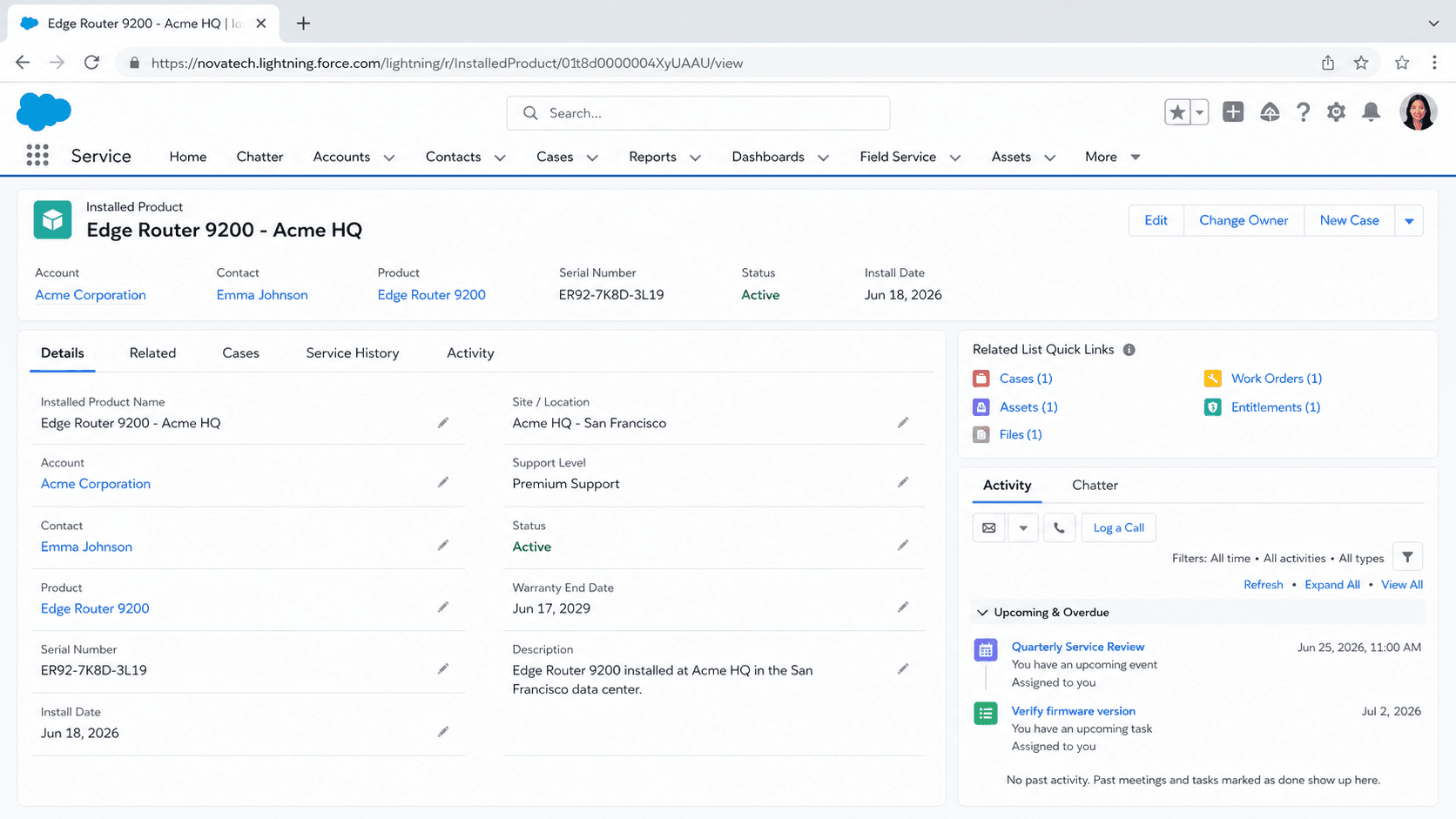
Definition
An Installed Product is a Salesforce Industries object that records a product or service a customer has acquired and that is now active, installed, or in service at a specific location. It connects the catalog product the customer bought to the account that owns it and to the place where it lives, such as a subscriber home, a meter, or a business site. The object is part of the Industries Common Data Model used by Communications Cloud, Media Cloud, and Energy and Utilities Cloud, where it tracks the modems, set-top boxes, service plans, and metered services a customer holds.
Installed Product answers a simple operational question: what does this customer have right now, and where. It is usually created when an order is fulfilled, so it represents the live state of a subscription after activation. Industries teams use it for billing context, service troubleshooting, upgrades, and disconnects. It is close in spirit to the platform Asset object, and the two are often compared, but Installed Product carries the location and service framing that telco and utility processes depend on.
How Installed Product fits the Industries data model
What the object represents
An Installed Product record is the customer-side instance of something from the catalog. The catalog defines a product offering in the abstract. The Installed Product is the concrete copy that a named account holds at a named location after a sale closes. A broadband plan in the catalog becomes hundreds of thousands of Installed Product records once subscribers sign up, one per household that bought it. Each record typically links to the Account that owns it, the Product or product offering it came from, and the place or service point where it operates. It also carries lifecycle data such as the activation date, current status, and any identifiers like a serial number or service number. Status matters because the same record moves through states over its life: pending, active, suspended, and disconnected. Reporting on these states tells a telco how many lines are live versus churned. Because the record sits at the account and location level, it gives service agents an exact answer when a customer calls about a specific line or device rather than a generic catalog entry.
Created by order fulfillment
In most Industries implementations, Installed Product records are not keyed in by hand. They are generated when an order reaches fulfillment. A customer places an order for a new fiber plan, the order decomposes into the work needed to provision it, and once provisioning completes the platform writes an Installed Product to record that the plan is now live for that account at that address. This order-to-asset flow is what makes the object trustworthy as a source of current state. Because creation is tied to fulfillment, the Installed Product reflects what was actually activated, not just what was quoted or ordered. Later changes follow the same path. An upgrade order modifies the existing Installed Product or supersedes it with a new one. A disconnect order flips the status to disconnected and stops billing. Teams that build on this object lean on the order management layer to keep it accurate, rather than editing records directly. When you see Installed Product data drift, the cause is almost always an order process that did not write back correctly, so that is the first place to look.
Installed Product versus the Asset object
This is the comparison that trips people up, so it is worth being precise. The platform Asset object also represents something a customer has purchased and owns. Asset is the long-standing core object, it links to Account, Contact, and Product2, and it supports parent and root asset hierarchies for multi-part equipment. Service Cloud and Field Service both use Asset as the record of installed equipment at a customer site. Installed Product is the Industries object. It grew out of telco and utility needs, where the unit of interest is a service tied to a place and a subscription, not only a piece of hardware someone bought. The two objects overlap heavily in purpose, and some Industries orgs map between them or use Asset alongside Installed Product. The practical guidance is to confirm which object your specific cloud uses before you model anything. Field Service work is built around Asset. Communications and Energy and Utilities processes are built around Installed Product. Picking the wrong one means rebuilding automations and reports later, which is expensive once data has accumulated.
Telco and utility use cases
In Communications Cloud, Installed Product records are the running inventory of what each subscriber has. A residential customer might hold three Installed Products: an internet plan, a streaming add-on, and the leased router in the closet. When that customer calls support, the agent opens the account and sees those three records with their statuses. A billing dispute, a speed upgrade, or a device swap all start from the relevant Installed Product. Energy and Utilities Cloud uses the object in a similar way for metered services and equipment tied to a premise. A utility tracks the service a customer has at a given meter or service point, and the Installed Product anchors that relationship. The shared pattern across both industries is the link between a customer, a product, and a physical place. That link is what lets these businesses answer location-specific questions: which services are active at this address, what needs a truck roll, and what should appear on the next bill. Reports built on Installed Product become the operational picture of the active customer base.
Hierarchies and bundles
Industries products are rarely flat. A subscriber buys a bundle, and that bundle contains several component services and devices. Installed Product supports this through parent and child relationships, so the fulfilled bundle is represented as a tree rather than one row. The parent record stands for the bundle the customer agreed to, and the child records stand for the individual services and pieces of equipment inside it. This structure matters when something changes. Suspending a whole bundle means acting on the parent and cascading to its children. Swapping a single device means touching one child record while the rest of the bundle stays untouched. Modeling the hierarchy correctly keeps these operations clean and keeps reporting honest, because you can roll counts up to the bundle level or drill down to a specific component. If you flatten everything into standalone records, you lose the ability to reason about the bundle as a unit, and partial changes become error prone. Designing the parent and child layout to mirror your product catalog is one of the more important decisions in an Industries build.
Reporting and the customer view
The reason teams invest in clean Installed Product data is the view it produces. Join Installed Product to Account, to the product it came from, and to the order that created it, and you get a precise account profile: every active service the customer holds, when each went live, and where each operates. Care and retention teams work from this picture every day. It also drives proactive work. A list of customers whose Installed Products are nearing the end of a contract term is a renewal queue. A set of records on aging equipment is an upgrade campaign. A spike in suspended status in one region is an early signal of a service or billing problem worth investigating. Because the object reflects the live, fulfilled state rather than historical orders, these reports describe reality rather than intent. That is the difference between a dashboard people trust and one they second-guess. Pair Installed Product reporting with billing and case data, and an Industries org gets a single operational answer to what each customer has and how it is performing.
How to create an Installed Product record
Most Installed Product records are created automatically by order fulfillment, which is the recommended path. You can also create one directly in an Industries org for data correction, migration, or a one-off, as long as the object is part of your cloud's data model.
- Confirm the object is enabled
Check that your org uses the Industries Common Data Model and that Installed Product is part of your cloud (Communications, Media, or Energy and Utilities). If your processes run on Field Service instead, use the Asset object rather than Installed Product.
- Open the record creation flow
From the Installed Products tab or related list on an Account, choose New. In most implementations you will reach this through an order or provisioning flow rather than a raw New button, so prefer the order path when one exists.
- Set the account, product, and location
Link the record to the owning Account, the catalog Product or product offering it represents, and the place or service point where it operates. These three links are what make the record useful for service and billing.
- Set status and lifecycle dates
Set the status to match reality, usually Active for a live service, and fill the activation date. If the record is part of a bundle, set its parent so the hierarchy is correct.
- Save and verify against the order
Save, then confirm the record matches the source order. Mismatches between Installed Product and the order that created it are the usual source of reporting errors.
The customer that owns the installed product. This is the anchor for the customer view and for billing context.
The catalog item the installed product is an instance of, linking the live service back to what was sold.
The lifecycle state, such as Active, Suspended, or Disconnected, which drives billing and operational reports.
The place where the product operates, which lets the business answer location-specific service questions.
- Do not key in Installed Products by hand when an order process exists. Manual records drift from the order data that fulfillment is supposed to write.
- Confirm whether your cloud uses Installed Product or Asset before modeling. Field Service is built on Asset, while Communications and Energy and Utilities are built on Installed Product.
- Set the parent link for bundle components. A flat set of records loses the ability to suspend or report on a bundle as one unit.
- Match status to the real service state. A record left Active after a disconnect keeps billing context wrong and pollutes churn reporting.
Prefer this walkthrough as its own page? How to Installed Product in Salesforce, step by step
Trust & references
Cross-checked against the following references.
Straight from the source - Salesforce's reference material on Installed Product.
Hands-on resources to go deeper on Installed Product.
About the Author
Dipojjal Chakrabarti is a B2C Solution Architect with 29 Salesforce certifications and over 13 years in the Salesforce ecosystem. He writes and edits salesforcedictionary.com, published by KineticBit Inc., to help admins, developers, architects, and cert/interview candidates sharpen their fundamentals. More about Dipojjal.
Test your knowledge
+5 pts / dayQ1. What does an Installed Product record capture that the older Asset object historically conflated?
Q2. How does an Installed Product model a complex unit like an HVAC system with sub-components?
Q3. In Field Service, what does referencing an Installed Product on a Service Appointment give the dispatched technician?
Discussion
Loading discussion…