
Asset
An Asset in Salesforce represents a specific instance of a product that a customer owns.
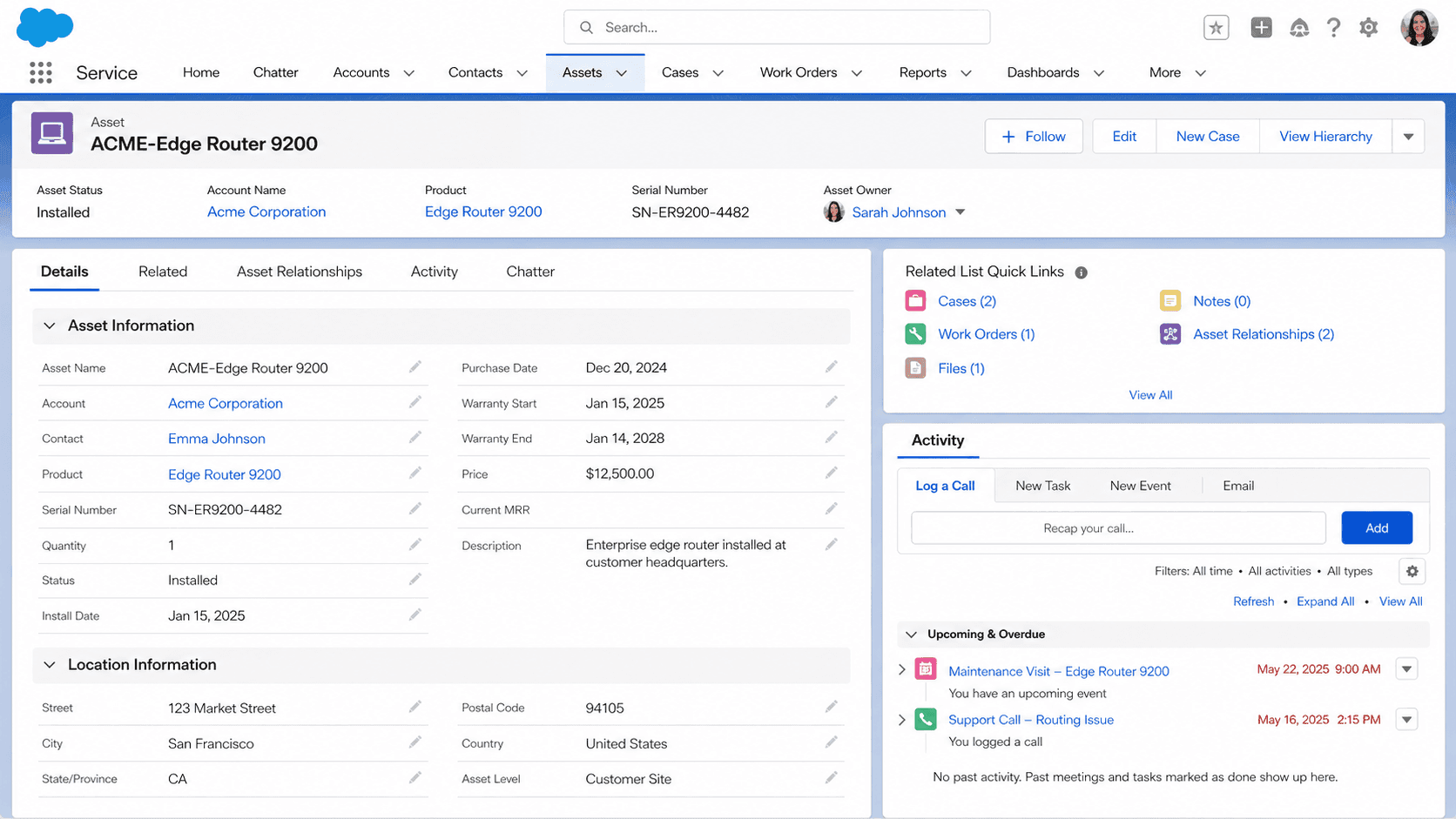
Definition
An Asset in Salesforce represents a specific instance of a product that a customer owns. Where Product describes the catalog item your company sells, Asset describes the actual unit installed at a specific customer site, tied to that customer's Account or Contact, with a serial number, install date, status, and history. A single Product can have thousands of Asset records across the customer base; each Asset is one customer's copy of that thing.
Asset is the object that connects sales motion to service motion. The deal closes on an Opportunity, the order gets fulfilled through an Order or Contract, and the Asset record is what remains on the customer Account as a tangible thing the support team can reference for warranty, troubleshooting, and renewal. In a Field Service org, every truck-roll keys off an Asset. In a B2B software org, Assets often represent subscription instances or named-user licenses. In a manufacturing org, Assets represent physical equipment with serial numbers and installation locations. The shape of the data is consistent; the operational meaning shifts by industry.
How Assets bridge sales motion and service motion
Asset vs Order
Assets and Orders are not the same thing, and the difference catches teams off guard. An Order represents the transactional commitment to deliver something; an Asset represents the resulting customer-owned thing. Most healthy Salesforce orgs create Assets automatically when Orders are fulfilled, either through a Flow that fires on Order Status change or through an integration with the fulfillment system. The Order tells you what the customer agreed to buy; the Asset tells you what they actually own and use. Returns and cancellations are where the split shows up clearly: a cancelled Order leaves behind the audit trail of the commitment, while a returned Product moves the Asset to Inactive or Retired status (or deletes it entirely, depending on org policy).
Asset Hierarchy
Asset Hierarchy is the parent-child relationship that lets you model complex installations as connected Asset records. The ParentAssetId field on Asset creates the tree, and Setup > Assets > Asset Hierarchy enables the relationship-aware UI. A telecom installation might have a parent Asset for the cabinet, child Assets for the modules in it, and grandchild Assets for the cards in each module. An industrial-equipment org might have an assembly-line parent Asset with twenty child Assets for individual stations. The hierarchy lets reports like "all components installed at this customer site" or "find every customer site running version 4 of this module" actually work. Without enabling Asset Hierarchy, you can store the relationships but the UI does not render them as a tree.
Asset Relationship
Asset Relationship is the many-to-many bridge that handles connections beyond strict parent-child. A network switch (Asset A) connects to ten servers (Assets B through K) in a customer's data center. The relationship is not parent-child; it is peer-to-peer. AssetRelationship records, accessed through Setup > Assets > Asset Relationship, let you model these connections explicitly. Most orgs that need them realize they need them after their support engineers complain that the parent-child hierarchy does not capture how things actually connect. Plan this at schema-design time if your products have cross-connections.
Entitlements on Assets
Entitlements attach to Assets to drive SLA logic on Cases. An Entitlement defines what support a customer gets (response time, resolution time, hours of coverage); when an Entitlement attaches to an Asset, every Case raised against that Asset inherits the Entitlement automatically. Asset-level Entitlements override Account-level Entitlements when both exist, which is the right default behavior for service orgs that sell different support tiers per product. The configuration lives in Setup > Service > Entitlement Management; the data ties through the EntitlementContact and Entitlement objects. If your service org bills support tiers by product, Asset-level Entitlements are usually how you wire it up.
Asset lifecycle
Asset Lifecycle Management is the term for tracking an Asset through its operational life: Active (in use), Inactive (deployed but not in service), Retired (decommissioned), Returned (sent back). The Status field carries the lifecycle state, and most orgs add custom fields for Install Date, Decommission Date, and Replacement Asset reference. Field Service uses Asset Status to decide whether work orders can be scheduled against the Asset; service contracts often gate renewal eligibility on Status. Build the lifecycle states explicitly at object setup, because retrofitting them onto an Asset table with a decade of records usually requires a data-migration project to resolve "Active" records that should have been Retired three years ago.
Field Service and Assets
Salesforce Field Service treats Assets as the unit of work for every dispatched technician. A Work Order in Field Service almost always references an Asset, which in turn references an Account, a Contact (the site contact), and often a Location record. Service Appointments scheduled against an Asset flow into the dispatcher console and onto field technicians' mobile devices. The Asset record carries Installation Date, Serial Number, Maintenance Plan references, and any custom fields the field organization uses to plan routes and parts. If your service motion is field-heavy, Asset is the most important object in the org behind Account, and the data quality you maintain on Assets directly limits how efficiently dispatch can route work and how accurately preventive maintenance triggers fire.
Asset reporting
Asset reporting tends to underperform what teams expect because the standard report types do not always join the way teams need. The Assets with Cases report type is straightforward. The Assets and Asset Relationships report type is harder to use because of the many-to-many shape. Custom report types that join Asset with Order, Account, and Contract are usually necessary for installed-base reporting. Build them up front, because building them ad hoc during an executive review is a project, not a query.
How to create an Asset
Creating an Asset is most often automated, triggered by Order fulfillment or by an integration with a fulfillment or provisioning system. The manual create flow still matters for one-off Assets (free trials, NFR licenses, replacements) and for testing automation paths after changes.
- Open the Account or Contact
Most healthy orgs create Assets from the customer record they belong to, either Account or Contact, through the Assets related list. Starting from the customer record auto-populates AccountId or ContactId.
- Click New Asset
The New button on the Assets related list opens the create form. If your profile lacks Create on Asset, the button is hidden; service-cloud and field-service permission sets typically grant it.
- Pick a record type if prompted
Many orgs use record types to separate Hardware, Software, Subscription, and other Asset categories, each with its own page layout and required fields. Pick the one that matches the product.
- Fill the name and Product reference
Asset Name is required. Most orgs also require Product2Id (the Product the Asset is an instance of), which drives reporting, entitlements, and Field Service work-order routing.
- Set Status, Install Date, and Serial Number
Status drives lifecycle reporting. Install Date drives warranty and renewal calculations. SerialNumber is required for any Asset that needs to be uniquely identified in the field.
- Connect to parent or related Assets if applicable
For complex installations, set ParentAssetId or create AssetRelationship records as part of the same workflow. The hierarchy needs to be set at create time, not as an afterthought.
- Save
Click Save. If your org runs Field Service, automation may fire here to associate the Asset with a service territory and dispatch queue.
Required. The display name that shows up in reports and related lists.
- Asset and Order are different objects. An Order describes the transactional commitment; an Asset describes the customer-owned thing that results from fulfillment. Build the Order-to-Asset creation flow explicitly; do not assume they sync automatically.
- Asset Hierarchy must be enabled in Setup before the UI renders the parent-child tree. Without enablement, you can store the relationships but the tree view does not appear.
- Asset-level Entitlements override Account-level Entitlements on Case SLA calculations. If your support tiers vary by product, configure Asset-level explicitly.
- Status changes to Inactive or Retired do not automatically cancel scheduled Service Appointments. Build a Flow or trigger to clean up future work orders when an Asset is retired.
Prefer this walkthrough as its own page? How to Asset in Salesforce, step by step
Trust & references
Cross-checked against the following references.
- Assets (opens in new tab)Salesforce Help
- Asset Hierarchy (opens in new tab)Salesforce Help
Straight from the source - Salesforce's reference material on Asset.
- Asset (Object Reference) (opens in new tab)Salesforce Developers
About the Author
Dipojjal Chakrabarti is a B2C Solution Architect with 29 Salesforce certifications and over 13 years in the Salesforce ecosystem. He writes and edits salesforcedictionary.com, published by KineticBit Inc., to help admins, developers, architects, and cert/interview candidates sharpen their fundamentals. More about Dipojjal.
Test your knowledge
+5 pts / dayQ1. What does an Asset record represent relative to a Product2 record?
Q2. On a returned product, what typically happens to its Asset record while the Order is kept?
Q3. In a Field Service org, why is the Asset object so central to dispatch?
Discussion
Loading discussion…