
What Is a Salesforce Administrator (and How to Become One in 2026)
What admins actually do day to day, the 2026 cert blueprint with Agentforce, a 6 to 8 week study plan, and the Power User vs Admin distinction recruiters check.

A friend at work just got promoted to "Salesforce Admin." You congratulate her, ask what she actually does now, and the answer is six bullet points that all sound vague. Your manager casually said in standup last week that someone on the team will own the new Salesforce rollout, and your name was in the room. The recruiter who messaged you on LinkedIn mentioned the average admin earns six figures in 2026. Now you are reading every "what is a Salesforce Admin" post on the internet and most of them are list-of-tools content that does not explain what the job is on a Tuesday morning.
This post is the one that explains it. Real day-to-day work, the 2026 certification blueprint (which changed in December 2025), the 6 to 8 week study plan that gets most people to a first Admin cert, and the Power User vs Salesforce Admin distinction that the recruiter will quietly check before the second interview.
What a Salesforce Admin actually does
A Salesforce Administrator owns the Salesforce platform on behalf of a business team. That sentence is doing a lot of work, so unpack it.
"Owns the platform" means the admin is the person who decides how Salesforce is configured for the business: which fields exist on the Account object, who can edit a closed Opportunity, what happens when a Lead is converted, which automation fires when a record changes. The admin has accountability for the org's setup, the data inside it, and the user experience for every person who logs in.
"On behalf of a business team" means the admin is not the customer. The admin works in service of sales, service, marketing, ops, or finance, depending on which department owns the Salesforce budget. The admin translates what those teams need into what the platform can do, and back. If the head of sales says "I cannot tell how many deals are stuck because the rep forgot to update the stage," the admin's job is to build the report, fix the field, write the validation rule, or design the Flow that prevents the gap.
The work breaks into roughly five categories. The percentages below are averaged across 2026 admin job postings and survey data for an admin sitting in a 200 to 2,000-user org.
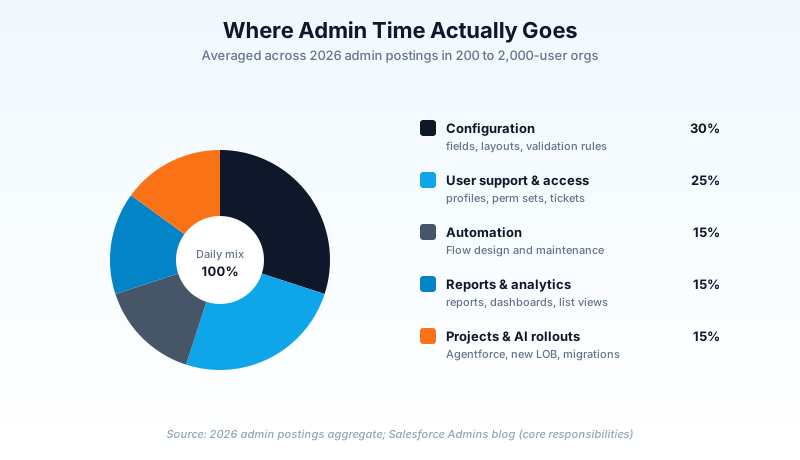
Configuration (30%). Adding a custom field, building a new page layout, creating a Validation Rule, tweaking a record type. This is the bread and butter. A senior admin might spend less time here because their org is mature; a junior admin doing a Greenfield deployment might spend half their week on it.
User support and access (25%). Adding new users, deactivating departing ones, troubleshooting "I cannot see this record" or "the page is missing the field my manager just told me about." This is also where Profile and Permission Set Group management lives. Half the senior admin tickets that come in are access bugs, and the admin who knows the difference between a profile and a permission set group fixes them in five minutes instead of two hours.
Automation (15%). Designing and maintaining Flow automation. In 2026, this is the part of the job that has grown the fastest. Flow ownership used to sit with developers; now most production Flows are designed by admins. Apex still exists, but for declarative work the admin is the owner.
Reports and analytics (15%). Building reports, dashboards, list views. The admin is usually the org's "data person" for non-trivial Salesforce queries. Power users build their own list views, but anything cross-object or scheduled lands on the admin's desk.
Projects and AI rollouts (15%). Quarterly initiatives. A new line of business is being added, a Sales Cloud to Service Cloud migration, an Agentforce pilot, a sandbox refresh strategy. This is the part of the job that decides whether the admin advances toward Senior Admin or stays in maintenance mode forever.
Read the percentages and ask yourself which bucket sounds most like the work you already enjoy. The 25% user support tier loves people who like puzzles and have patience. The 15% automation tier rewards people who can think in steps. The 15% project tier is where future architects spend their time. There is no wrong cell; there are wrong matches.
The 2026 Admin role has three things it did not have in 2022
Three changes in the last 36 months reshaped what employers expect from a new admin.
Flow design ownership. The Process Builder deprecation completed in 2024. The Workflow Rule deprecation completes in 2025. Both old tools were "fine" for an admin to know but were not load-bearing skills. In 2026, Flow design is the load-bearing skill. A new admin who cannot build a record-triggered Flow cannot do the job. A new admin who can build a screen Flow with fault paths and a subflow is suddenly worth $15,000 more than the floor.
Agentforce action governance. Agentforce shipped to GA in 2024 and into mainstream production rollouts in 2025. By 2026, most large Salesforce orgs are running at least one Agentforce agent in production. Admins are not building the LLM, but they are governing it: deciding which actions an agent can take, scoping the data the agent reads, monitoring for hallucinations, and rolling back agents that misbehave. The admin who can do this is the admin who gets the senior title.
Basic Apex literacy. "Read Apex" is now expected at the senior tier, even though "write Apex" stays in developer territory. A senior admin should be able to open a trigger, identify the object it fires on, and decide whether the bug is in the trigger or the Flow that calls it. A 20-hour skill that pays back within months.
If the scope sounds bigger than what you remember from 2018, it is. The 2018 admin was a power user with a Setup tab. The 2026 admin is the first line of automation, governance, and AI rollout.
Power User vs Salesforce Admin: the distinction recruiters check
This is the question that screens out roughly a third of admin candidates without anyone telling them. The candidate calls themselves an admin because they spent two years building reports and adding fields in their previous company's Salesforce. The recruiter asks one or two probing questions and discovers the candidate is actually a power user, not an admin. The conversation ends.
Here is the distinction in one paragraph. A Power User has elevated permissions in Salesforce (Setup access, the ability to build list views, sometimes the ability to add a custom field) and uses those permissions to make their own work easier. They do not own the platform. A Salesforce Admin owns the platform end to end: they are accountable for security, deployment, user lifecycle, sandbox management, integration health, release readiness, and at least one production org's stability. The platform is their primary deliverable, not a side benefit.
The screening questions a recruiter uses to tell them apart:
- "How do you decide whether something belongs in a profile or a permission set?" (Admin knows; power user guesses.)
- "Walk me through your sandbox refresh strategy." (Admin has one; power user has not thought about it.)
- "What is your release process?" (Admin uses change sets or a DevOps tool; power user pushes directly to production.)
- "When was the last time you deactivated a user, and what did you do with their open records?" (Admin has a record-reassignment runbook; power user has not.)
If you are a power user reading this post and the screening questions look unfamiliar, you have a clear roadmap. The 6 to 8 week study plan below closes the gap. The certs lock it in. The first real "I own this org" project in your next role makes you an admin in fact, not in title.
The admin career ladder
You do not need to plan four years ahead at week one, but it helps to see where the path goes.
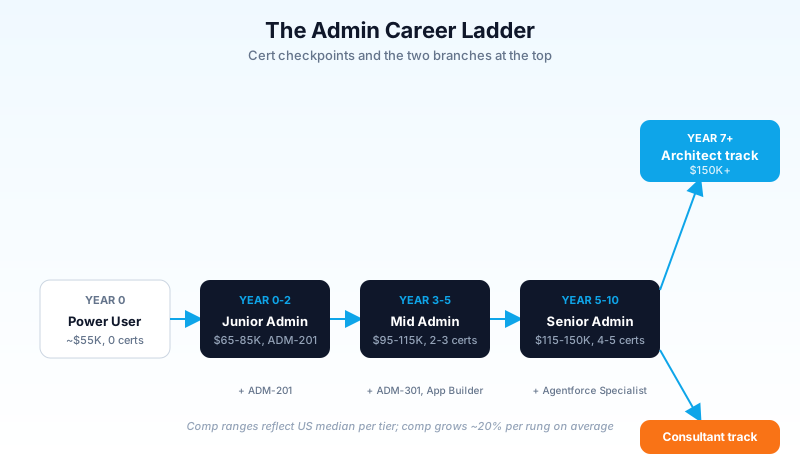
The four-rung ladder, with cert and skill checkpoints:
- Power User to Junior Admin (~ year 0): Earn the Salesforce Certified Administrator (ADM-201) credential. Land your first paid Admin role.
- Junior to Mid Admin (~ year 2): Earn Advanced Administrator (ADM-301) and Platform App Builder. Lead one production deployment end to end.
- Mid to Senior Admin (~ year 5): Earn Agentforce Specialist plus one Consultant cert (Sales Cloud or Service Cloud). Manage a sandbox strategy and a release process.
- Senior Admin to Architect (~ year 7+): Earn Application Architect (Sharing & Visibility, Data Architecture, App Builder, Platform Developer I). Take the architect-track salary jump.
- Senior Admin to Consultant (~ year 6+): Cross-train into a consultant role at a Salesforce SI partner or Big 4. Same comp range, faster cert velocity.
You do not have to follow this exact path. Plenty of admins skip Mid-Senior by going into consulting at year three. The point is that the path exists, comp grows roughly 20% per rung, and both Architect and Consultant branches pay $150K-plus.
The 2026 Admin cert blueprint (effective December 2025)
The Admin cert (ADM-201) is your gateway. The blueprint was refreshed in December 2025 to reflect the Agentforce era. Here is the current weighting:
- Data and Analytics: 17%. The largest section. Reports, dashboards, data import, Data Loader basics, list views, data quality.
- Configuration and Object Manager: 15%. Custom fields, page layouts, record types, Object Manager, validation rules.
- Process Automation: 15%. Flow, approval processes, the deprecation pattern for old automation tools.
- Security and Access: 14%. Profiles, permission sets, Permission Set Groups, roles, sharing rules.
- User Setup: 9%. New user creation, deactivation, license management, login history.
- Standard and Custom Objects: 8%. Standard object behavior, custom object design, relationship types.
- Agentforce: 8%. A new section as of December 2025. Action design, prompt templates, agent governance.
- Sales Productivity, Service Productivity, Mobile, AppExchange: smaller sections.
The Agentforce section is the headline change. As of December 2025, the cert tests whether you can scope an agent, design a Flow action for it, and govern access. The questions are not deep AI questions; they are admin-governance questions about an AI feature. This is good news because admins are already used to governing things. It is bad news because most older study guides do not cover it. Use Trailhead modules dated 2025 or later for the Agentforce section.
The 4-week intensive study plan (or 8-week realistic plan)
You want to know whether the cert is reachable. Yes, it is reachable. The honest math is 80 hours of focused work, spread over 4 weeks at 20 hours per week (intensive, for someone between jobs or on PTO) or 8 weeks at 10 hours per week (realistic, for someone working full time).
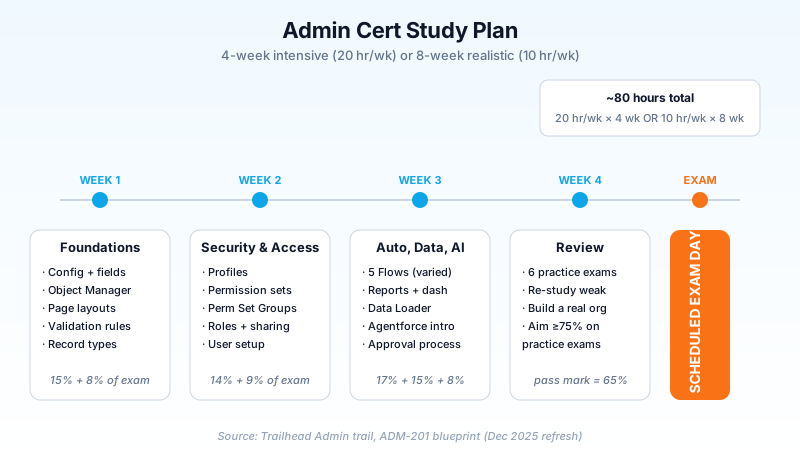
Week-by-week, intensive version:
Week 1: Foundations (Configuration + Object Manager + Standard Objects). Set up a Developer Edition org (free at developer.salesforce.com). Work through the "Admin Beginner" Trailhead trail. Build five custom fields, three page layouts, two validation rules, one record type. Read the Object Manager top to bottom for Account, Contact, Opportunity, Lead, Case.
Week 2: Security, Access, and User Setup. Build profiles, permission sets, permission set groups. Create three roles in a role hierarchy. Set up a sharing rule. Create and deactivate users. Read the difference between OWD, role hierarchy, sharing rules, and manual sharing until you can teach it.
Week 3: Automation, Data, and Analytics. Build five Flows (one record-triggered, one screen, one scheduled, one platform event triggered, one subflow). Build five reports and one dashboard. Run a Data Import Wizard import and a Data Loader insert. Skim the Agentforce module on Trailhead.
Week 4: Review and practice exams. Take three full-length practice exams. Score yourself. Re-study the weakest two sections. Take three more practice exams. Aim for 75% or higher on practice exams (the real exam pass is 65%, but practice exams are usually 10% harder). Schedule the real exam for the Friday of week 4.
If you are doing the 8-week version, double each block and add a Trailhead super-badge or two in the gaps. The intensive version is faster but more brittle; the realistic version is slower but sticks longer.
The single mistake that fails most candidates: studying without building. Reading about Flow does not teach you Flow. Reading about Permission Sets does not teach you Permission Sets. The org you build in week 1 is the most important tool you have. Use it every day.
The 2026 admin toolkit
Beyond Setup itself, here are the tools every admin should know on day one of a new job, sorted by what you own, touch, and avoid.
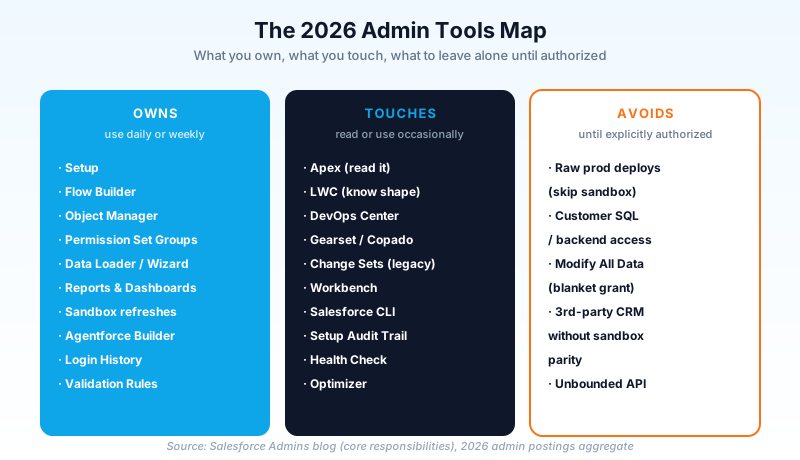
You own (use daily or weekly):
- Setup, Object Manager, Flow Builder, Permission Set Group manager
- Data Loader (for bulk loads over 50,000 records; Data Import Wizard for smaller)
- Sandbox refresh schedules
- The Agentforce Builder and Action Library
- Reports & Dashboards
- The Login History page (more important than people think)
You touch (read or use occasionally):
- Apex (read it, do not necessarily write it)
- LWC (know what one looks like, the developer owns it)
- DevOps Center or Gearset or Copado (your release tool)
- Workbench (for ad-hoc API queries)
- Change Sets (legacy but still in many orgs)
You avoid (until you have explicit reason and authorization):
- Raw production deploys without a sandbox path
- Customer SQL or backend access (Salesforce is the source of truth)
- Third-party CRM integrations that bypass sandbox parity
- The "Modify All Data" permission, except in deliberate, time-boxed admin sessions
Knowing what is in each column saves you from the two most common junior admin mistakes: doing too little because you are scared to touch anything, and doing too much because nobody told you what was off-limits.
How to get the first Admin job
This is the question that does not have a clean answer because the market shifted in 2026 (see the Salesforce Admin Salary Guide for 2026 for the market detail). The honest path:
- Earn the Admin cert. Without it, the resume filter drops you. With it, you are in the pile.
- Build a portfolio org. A Developer Edition org with five custom objects, three Flows, two integrations to free APIs, and a dashboard. Screenshot every screen. Write up one paragraph per artifact explaining what business problem it solves. This is your interview demo.
- Get a hands-on win at your current job. If you are a power user, take ownership of one Salesforce thing at your current role. Build the Flow nobody asked you to build, fix the report that has been broken for six months. Document what you did. This is the bridge story for your first admin interview.
- Aim for "Junior Admin," "Salesforce Analyst," or "Sales Operations + Salesforce Admin" titles for the first role. The pure "Salesforce Administrator" title at a tech company is the hardest to land cold. The hybrid roles in mid-size companies are the open door.
- Prepare for the interview. The 50 admin interview questions for 2026 covers the exact patterns that come up most. Practice answering them out loud, not just in your head.
The 2026 market is harder than 2022, but it is far from closed. Bootcamp grads with no work history still land roles in 6 months. Career-switchers with adjacent operations or analyst backgrounds land in 3 to 4 months. Power users with internal experience often land in 60 days. The ones who do not land are the ones who study without building and apply without portfolios.
What to do this week
Five concrete actions for someone who finished reading this and is ready to start:
- Open trailhead.salesforce.com, sign up if you have not, and start the "Prepare for Your Salesforce Administrator Credential" trail.
- Sign up for a free Developer Edition org at developer.salesforce.com. This is your sandbox for the next 8 weeks.
- Build one record-triggered Flow that updates the Account when an Opportunity closes won. The 20-minute version of this is on Trailhead. Build it twice without the guide.
- Read the Power User vs Admin distinction above and write down which side you are on today, honestly. If you are still on the Power User side, your next 8 weeks have a clear objective.
- Schedule the Admin cert exam for 8 weeks from today. You can move it if you need to. Putting the date on the calendar moves the work from "someday" to "this is happening."
The 2026 admin role is the best entry point into the Salesforce ecosystem the platform has ever offered. The pay band starts at $65K, the certifications are reachable, the path to $150K is well-mapped (see the admin-to-CTA career path post for the full arc), and the work itself is genuinely interesting most days. The hard part is starting. Open the Trailhead trail today and the rest takes care of itself.
About the Author
Dipojjal Chakrabarti is a B2C Solution Architect with 29 Salesforce certifications and over 13 years in the Salesforce ecosystem. He writes and edits salesforcedictionary.com, published by KineticBit Inc., to help admins, developers, architects, and cert/interview candidates sharpen their fundamentals. More about Dipojjal.
Share this article
Sources
- Trailhead: Prepare for Your Salesforce Administrator Credential
- Trailhead: Salesforce Admin Role - Skills, Responsibilities & More
- Salesforce Admins Blog: 6 Salesforce Features Every New Admin Should Learn First
- Salesforce Admins Blog: How Admins Drive Innovation With Core Responsibilities in the Agentforce Era
- Salesforce Ben: Salesforce Administrator Certification Guide and Tips
Related dictionary terms
Practise it
Five questions on Administrator
Exam-style questions with an explanation after each one. No account needed, and your answers build a weak-topic map once you have one.
Keep reading

50 Salesforce Admin Interview Questions & Answers (2026 Edition)
50 real Salesforce admin interview questions across security, automation, data model, reports, and Agentforce - with short answers, longer 'what to actually say' framing, and behavioral patterns.

Salesforce Admin Salary Guide 2026: What US Admins Actually Earn by Tier, Cert, and Metro
You are a year into a Salesforce Admin role, the cert wall above you is full of acronyms, and you do not know what your next raise should look like. Here is the 2026 US pay map.

The Salesforce Career Path in 2026: From Admin to CTA (with Salaries & Timelines)
The complete Salesforce career roadmap from Admin to CTA - realistic timelines (5–10 years), 2026 salary bands by region, and the difference between cert collecting and getting promoted.
Comments
No comments yet. Start the conversation.
Sign in to join the discussion. Your account works across every page.