
The Salesforce Shared Responsibility Model: Where Salesforce's Job Ends and Yours Begins
Salesforce secures the platform. You secure everything you configured on top of it. Here is exactly where that line sits, the four places orgs walk across it, and how agents redrew it.
In late June 2026, Salesforce disabled Klue's integration after attackers used a stale credential inside Klue's own environment to take OAuth tokens and pull CRM data out of roughly 200 customer orgs. Salesforce's statement contained one sentence that keeps showing up in these disclosures: the issue did not come from a vulnerability in the Salesforce platform.
That sentence was accurate. It was also, for about 200 security teams, completely useless.
This is the shared responsibility model doing what it does. Salesforce holds up its end, the platform is not breached, and data still leaves the org through a door the customer opened and never checked. Salesforce Ben's 2026 admin survey put a number on how well the field understands this: 53.8% of admins said they were unfamiliar with the Shared Responsibility Model. Half the people who own the configuration side of the line do not know the line exists, which is one of the sharper findings in the current state of the admin role.
So let's draw it.
Three layers, one line
Salesforce describes its security surface in three groups, and the grouping is more useful than it first looks because it maps cleanly onto who pays for what and who gets blamed for what.
Foundationals. The infrastructure, the tenancy isolation, the encryption in transit, the physical data centers, the availability of the service. Salesforce builds it, runs it, patches it, and audits it. You cannot configure it, and you cannot break it.
Configurables. Everything already included in your license that only works if somebody turns it on and sets it correctly. Authentication and SSO, profiles, permission sets, field-level security, sharing settings, session policies, IP restrictions, connected app policies. Salesforce ships the control. You own the setting.
Enhanceables. Paid add-ons for orgs whose risk profile needs more: Salesforce Shield, Security Center, Event Monitoring, Backup. Salesforce sells the capability. You decide whether your data justifies the line item, and you still own the configuration once you buy it.
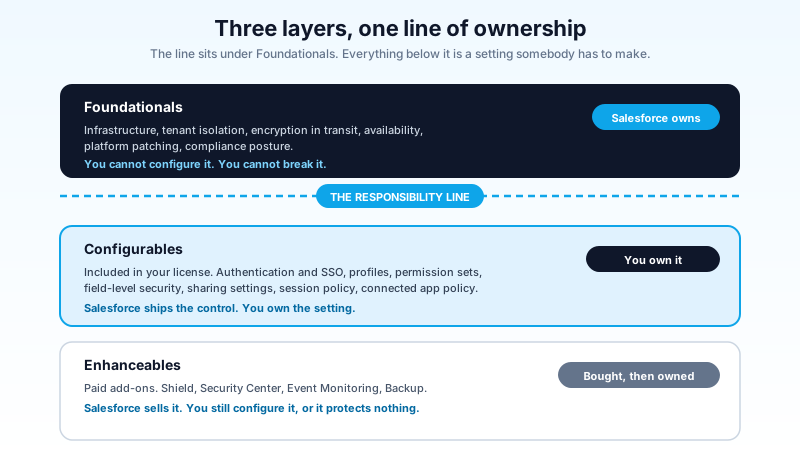
The line sits between the first group and the second. Everything above it is Salesforce's. Everything below it is yours, including the parts you never touched, never reviewed, and assumed were fine because nothing has gone wrong yet.
None of this is unique to Salesforce. Every major cloud provider publishes a version of the same split, and the reasoning is identical: the provider cannot secure decisions it does not make. Salesforce publishes its version through the compliance portal as a formal document rather than a marketing page, which tells you what it is for. When something goes wrong, that document is the reference both sides use to work out who was supposed to have done what. Reading it after an incident is legal work. Reading it now is administration.
What Salesforce actually owns
Salesforce's half is real and it is large. The platform runs multi-tenant isolation so one customer's query cannot reach another customer's rows. It maintains the trust and compliance posture that lets regulated industries buy at all. It ships security fixes without asking you to schedule a patch window. It runs the release process that has, three times a year for two decades, avoided the kind of breach that ends a SaaS company.
For AI specifically, Salesforce owns the Einstein Trust Layer: zero data retention with the model providers, prompt injection detection, toxicity scoring, and the masking that keeps sensitive fields out of what gets sent to an external model. Salesforce Help is explicit about this split: Salesforce secures the core platform and infrastructure, provides the Trust Layer, detects broad threats like toxicity and prompt injection, and provides audit logging capabilities.
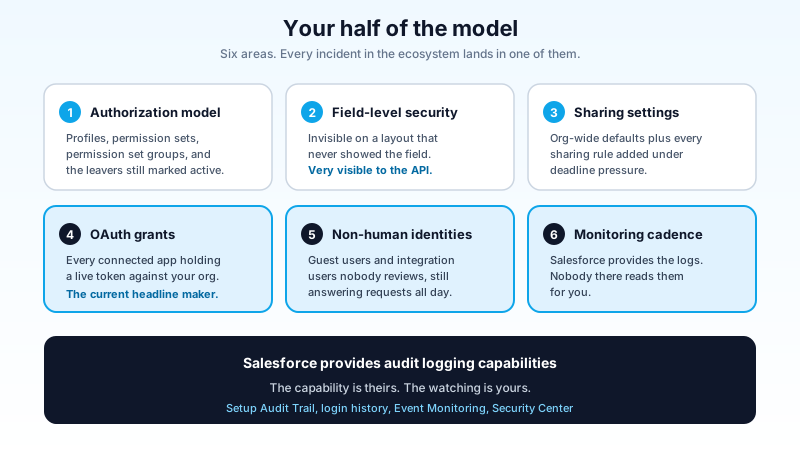
Read that last item again. Salesforce provides audit logging capabilities. It does not read your logs. Nobody at Salesforce is watching your org for the pattern that says an integration user is pulling 400,000 Contact records at 3am on a Sunday. The capability is theirs. The watching is yours.
That pattern repeats through the whole model, and once you see it, most of the confusion goes away. Salesforce builds the lock. You decide whether to turn the key, who gets a copy, and whether anyone checks the door at night.
What you actually own
Your half is longer and it is the half that generates incidents.
You own the authorization model: which profile, which permission set, which permission set group, and whether the sixteen people who left last year still have active users. You own field-level security, which is where most over-exposure hides because it is invisible on a page layout that never displayed the field but very visible to the API. You own sharing settings and every sharing rule anyone added under deadline pressure. You own MFA enforcement and session policy.
You own every connected app with an OAuth grant against your org, which is the one that keeps producing headlines. You own the guest user on every Experience Cloud site you have ever launched, including the one marketing spun up for a campaign in 2023 that nobody decommissioned. You own the integration users with API Only profiles and permissions somebody granted "temporarily" during a data migration.
And you own the monitoring. Setup Audit Trail, login history, and, if you bought it, Event Monitoring and Security Center. Owning them means somebody looks at them on a schedule, not that they exist in your org.
The four places orgs walk across the line
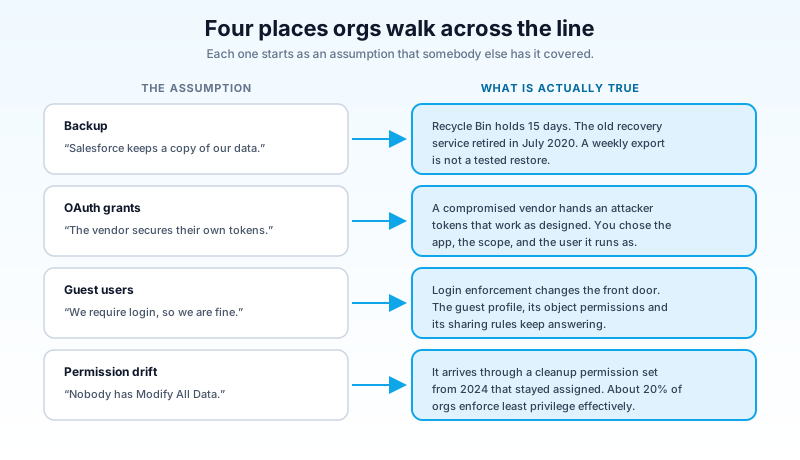
In practice, misunderstanding the model shows up in the same four places. Each one is an assumption that somebody else has it covered.
1. Backup and restore
The most expensive assumption in the ecosystem is that Salesforce keeps a copy of your data for you. Salesforce retired the old Data Recovery Service on July 31, 2020, and the version people remember cost $10,000 per request, took six to eight weeks, and did not guarantee complete recovery. The Recycle Bin holds deleted records for 15 days. Sandbox refreshes are not backups. Weekly data export is a CSV dump with no relationship integrity on restore.
Salesforce Backup exists as a paid product, and third-party tools exist for good reasons. What does not exist is a scenario where a bad deployment wipes 80,000 records on a Thursday and Salesforce restores them for you on Friday because you are a customer. Data loss caused by your configuration, your integration, or your admin is your problem to recover from, and the recovery plan needs to be tested before you need it. If you have never run a restore drill, you do not have a backup. You have a bill.
2. Third-party OAuth grants
The Klue incident is the current example, and it will not be the last. The mechanism is always the same: a vendor you trust gets compromised, the attacker takes the OAuth tokens that vendor holds for its customers, and those tokens work against your org exactly as designed because you authorized them.
Nothing in that chain is a Salesforce vulnerability. Every link is a customer configuration: which app got authorized, what scope it got, whether the grant was scoped to a dedicated integration user or to a System Administrator, whether anyone revoked it when the pilot ended. Reporting on the June 2026 incident noted that most organizations lack full visibility into the third-party vendors connected through OAuth apps, which is the actual finding. If you cannot list your grants, you cannot revoke them under pressure.
Open Setup, go to Connected Apps OAuth Usage, and count the rows you cannot explain. That number is your exposure. The connected app audit walkthrough has the full process, including how to tell a dormant grant from a live one.
3. Guest users
Every Experience Cloud site creates a user you never made and cannot delete, and that user answers unauthenticated requests with whatever your object permissions and sharing rules allow. Requiring login on the site changes the front door and not the data layer. The August 2026 City-Forum campaign, where a single rented server collected records from public Salesforce and ServiceNow portals for 17 months, involved no exploit at all. The attacker read what was configured to be readable.
That one is worth a dedicated pass. The guest user audit covers the exposure map and the fix order.
4. Permission drift
Nobody grants Modify All Data on purpose. It arrives through a permission set built for a one-week data cleanup in 2024 that stayed assigned, or a profile cloned from a profile cloned from a profile that had it. The same survey that found half of admins unfamiliar with the shared responsibility model also found that only about 20% say least privilege is enforced effectively in their org.
Drift is a customer-side failure by definition. There is no vendor to escalate it to.
Agentforce moved the line without changing the wording
The model reads the same for agents. What changed is how much damage a misconfiguration on your side can do per second.
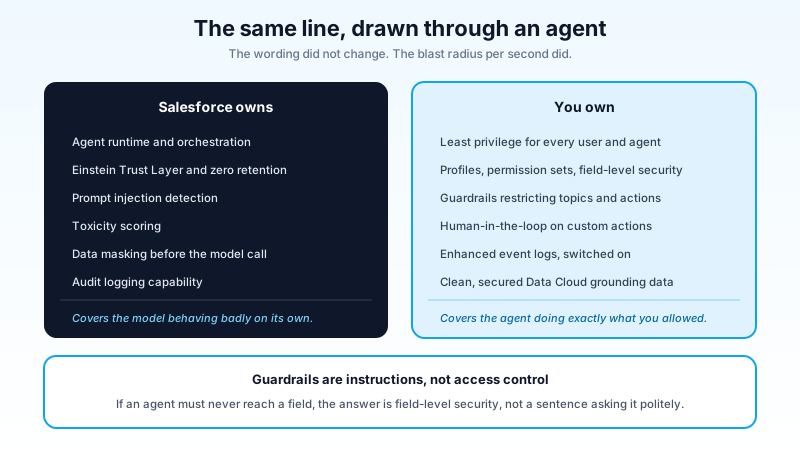
Salesforce owns the agent runtime, the Trust Layer, prompt injection and toxicity detection, and the audit logging capability. That covers the model behaving badly on its own. It does not cover the agent doing exactly what you configured with permissions you gave it.
Salesforce Help lists the customer side plainly: implement least privilege for all users, configure profiles, permission sets and FLS correctly, build agent guardrails that restrict topics and actions, monitor and audit agent and user activity, keep Data Cloud data clean and secure, enable enhanced event logs, and enable human-in-the-loop for custom actions.
Every one of those is a setting you make. And an agent changes the math on all of them in three ways.
The agent runs as a user. Whatever that user can read, the agent can read, and it can read it faster and more thoroughly than any human. An over-permissioned integration user was previously a risk that depended on someone writing a query. Now it is a risk that depends on someone asking a question.
Guardrails are natural language, not a permission check. Topic restrictions and instructions shape what an agent will attempt. They are not an access control layer, and treating them as one is the single most common Agentforce design error. If the agent should never be able to reach Social Security numbers, the answer is FLS, not a sentence in the instructions asking it politely.
Custom actions execute. A retrieval mistake returns wrong information. An action mistake writes, sends, refunds, or deletes. Human-in-the-loop on write actions is a customer-side control, it is off until you turn it on, and it is the difference between an embarrassing answer and a support ticket with a legal team attached.
An audit that fits in one week
You do not need a program for this. You need five sittings, and each one ends with a number you can write down.
Monday, 45 minutes: grants. Setup, Connected Apps OAuth Usage. Export the list. Mark every app nobody on the call can name. Revoke the ones tied to finished pilots and departed vendors. Write down how many you revoked.
Tuesday, 45 minutes: the dangerous permissions. Query which users have Modify All Data, View All Data, Manage Users, and Author Apex, across profiles and permission sets. Every name on that list should be defensible in one sentence. Names you cannot defend go on a removal list with a date.
Wednesday, 30 minutes: guest users. List your active Experience Cloud sites. For each one, open the guest user profile and check object permissions and sharing rules. Sites nobody owns get decommissioned, not hardened.
Thursday, 45 minutes: agents and integrations. For every agent and every integration user, ask one question: what is the largest object this identity can read, and does it need to? Then check whether human-in-the-loop is on for anything that writes.
Friday, 30 minutes: the cadence. Decide who reviews login history and Setup Audit Trail, how often, and where the result gets recorded. A monthly 20-minute review that actually happens beats a quarterly deep dive that gets skipped twice.
That is three and a half hours. It closes the four crossings above, and it produces the artifact auditors keep asking for: evidence that somebody looked.
When Enhanceables are worth the money
Shield and Security Center are not table stakes and pretending otherwise wastes budget. Buy them for specific reasons.
Buy Event Monitoring when you need to answer "who read this, and when" after the fact. Login history tells you someone logged in. Event Monitoring tells you what they exported. If your regulator or your customer contracts require that answer, the alternative is not having it.
Buy Shield Platform Encryption when a compliance regime names encryption at rest for specific fields, not because encryption sounds prudent. It carries real functional cost: encrypted fields lose some filtering, sorting, and formula behavior, and finding that out after a rollout is a bad afternoon.
Buy Security Center when you run more than a handful of orgs and cannot answer a configuration question across all of them in under an hour.
Buy Backup when you have concluded that a full restore drill matters more than the license cost. Then run the drill.
The trap in this layer is thinking a purchase moves the line. It does not. Every Enhanceable ships as a configurable, and an unconfigured Shield license protects nothing while showing up on the invoice.
Start with the list you cannot produce
Pick the one question you currently cannot answer in under five minutes: which third-party apps hold live OAuth grants against your production org. Open Setup, pull the list this week, and revoke everything nobody can name. That single pass covers the exact failure mode behind the last three OAuth incidents in this ecosystem, and it takes less time than the meeting you would schedule to discuss it.
The platform side of the model has held up for twenty years. Your side is a list of settings, and somebody has to read it.
About the Author
Dipojjal Chakrabarti is a B2C Solution Architect with 29 Salesforce certifications and over 13 years in the Salesforce ecosystem. He writes and edits salesforcedictionary.com, published by KineticBit Inc., to help admins, developers, architects, and cert/interview candidates sharpen their fundamentals. More about Dipojjal.
Share this article
Sources
- Agentforce Security and the Shared Responsibility Model (Salesforce Help)
- Security Perspective on the Shared Responsibility Model (Salesforce Compliance)
- Security as a Shared Responsibility Between Provider and Customer (Salesforce)
- OAuth Hacks Return: Salesforce Disables Third-Party App as CRM Data Exposed (Salesforce Ben)
- The State of the Salesforce Admin Role in 2026 (Salesforce Ben)
Related dictionary terms
Practise it
Five questions on Agentforce Specialist
Exam-style questions with an explanation after each one. No account needed, and your answers build a weak-topic map once you have one.
Keep reading
Salesforce Connected App OAuth Security: Find and Kill the Dormant Grants Before Someone Else Uses Them
Forgotten OAuth grants from Connected Apps you stopped using are one of the highest-value attack surfaces in Salesforce. Here is how to find them, revoke them, and stop them from coming back.
The Salesforce Guest User Audit: Finding What Your Experience Cloud Site Gives Away
Your public site answers unauthenticated requests with real records, and nothing in Salesforce is broken. Here is the guest user audit that finds the exposure, ranked by how much data each fix takes off the internet.

The Salesforce Admin Role in 2026: Satisfaction Is Up, and 60% Are Still Looking for the Exit
New 2026 survey data shows Salesforce admins are more satisfied than ever, and 60% still plan to leave the role within two years. Here's the real story.
Comments
No comments yet. Start the conversation.
Sign in to join the discussion. Your account works across every page.