
Salesforce Prompt Builder: The Complete 2026 Guide for Admins & Developers
How to build, ground, test, and deploy AI prompt templates across Service Cloud, Sales Cloud, and Agentforce — without a single line of code.

If you've been near a Salesforce org in the last eighteen months, you've heard the pitch: generative AI everywhere, agents in every workflow, summaries on every record. What's less obvious is the unglamorous piece of plumbing that makes any of that work. That piece is Prompt Builder: the declarative studio where every reusable AI prompt in your org is authored, grounded, tested, and deployed.
This guide walks through Prompt Builder end-to-end as it exists in 2026: the three template types, the anatomy of a well-built prompt, how it interacts with the Einstein Trust Layer, step-by-step builds for Case Summary and an Agentforce Agent Action, deployment patterns, the mistakes that bite teams in production, and what's landing in Spring '26 and Summer '26.
What Prompt Builder Is, and Why It Matters Now
Prompt Builder is a no-code authoring environment inside Setup that lets you create, version, and manage prompt templates, reusable instructions sent to a Large Language Model (LLM) along with grounded Salesforce data. Salesforce first announced it in late 2023 as a way to "supercharge every workflow with trusted AI prompts" (Salesforce Admins), and it became generally available with Spring '24.
In the original positioning, Prompt Builder was the way admins surfaced Einstein-generated text on a record page or in an email composer. That framing has changed. As of 2026, every Agentforce Agent Action that produces unstructured output (a summary, a recommendation, a draft, a classification) is, under the hood, a prompt template. Salesforce Ben puts it bluntly: Prompt Builder is now vital in an Agentforce world because it's the only governed path from "I have an idea for an AI feature" to "that AI feature is running in production on my real customer data."
That matters for three groups:
- Admins get a no-code way to wire generative AI into Lightning record pages, list views, and email composers without filing a ticket with engineering.
- Developers get a way to expose grounded LLM calls as callable units to Flow, Apex, Invocable Actions, and the Agentforce planner, with the prompt logic versioned as metadata.
- Architects get a single chokepoint where data masking, model routing, and audit live, instead of fifteen scattered GPT integrations stitched together by whoever was on-call in 2024.
If your org is running Agentforce or planning to, Prompt Builder is not optional. It's the authoring surface.
The Three Template Types
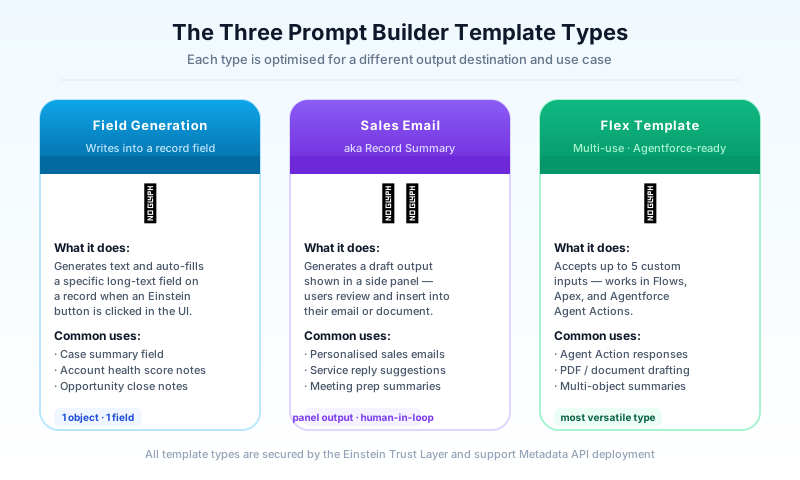
Prompt Builder ships with three template types. Picking the right one is the first decision you'll make on any new template, and it constrains everything downstream: what merge fields you can use, where the output renders, and how the template can be invoked.
Field Generation Templates
A Field Generation template produces a single field value. You bind it to a specific field on a specific object (a long text area, a rich text area, or a picklist), and the resulting text becomes the field's content. The classic use case is a Case_Summary__c long text area populated automatically when a case is escalated, or a Lead_Research_Notes__c field generated from web grounding plus the lead's company data.
Field Generation templates are the easiest entry point because the input context is fixed (the record the field lives on) and the output target is fixed (the field itself). They're invoked from the field's edit UI, from Flow, or from Apex via the ConnectApi.EinsteinLLM namespace.
Real-world examples:
- Service Cloud: Generate a one-paragraph case summary so a Tier-2 agent doesn't read forty case comments.
- Sales Cloud: Generate a 200-word account brief that pulls in recent opportunities, last contact date, and open cases.
- Financial Services Cloud: Generate a relationship summary on a Person Account combining household, policies, and recent service interactions.
Sales Email and Record Summary Templates
The Sales Email template type produces an outbound email body grounded in a recipient's record. The Record Summary template (sometimes surfaced as the engine behind the "Summarize" action on a record page) returns a structured summary directly into a Lightning component.
These templates feel similar to Field Generation but they don't write to a field: the output is ephemeral, rendered inline in the email composer or summary panel. The user reviews, edits, and sends. This is the right pattern when you want human-in-the-loop without storing a probabilistic value on the record.
The Salesforce Admins team's Spring '24 ultimate guide walks through Sales Email setup in detail, including how to ground on both the recipient Contact and a related Opportunity in the same template, useful for nurture sequences where you want the email to reference the deal stage, not just the contact's first name.
Flex Templates
Flex is the power-user template type. Unlike Field Generation or Sales Email, a Flex template isn't bound to a single object record. Instead, you define your own input variables, each typed (record, free text, primitive, or collection), and you control where the template is invoked from. Salesforce Ben's Flex template guide is the best practical walkthrough of the type.
Flex templates are what you use when:
- The prompt needs context from multiple unrelated records (a Case, the related Account, and a Knowledge article).
- The prompt is called by an Agentforce Agent Action and the agent needs to pass in a topic, a customer ID, and a language preference.
- The prompt is invoked from Flow with values computed at runtime.
- The output isn't tied to any record at all: it's just text returned to the caller.
In 2026, Flex is the dominant template type by volume. Every custom Agentforce action you build will, in practice, be a Flex template plus a thin Apex or Flow wrapper that handles side effects (DML, callouts, logging).
Anatomy of a Prompt Template
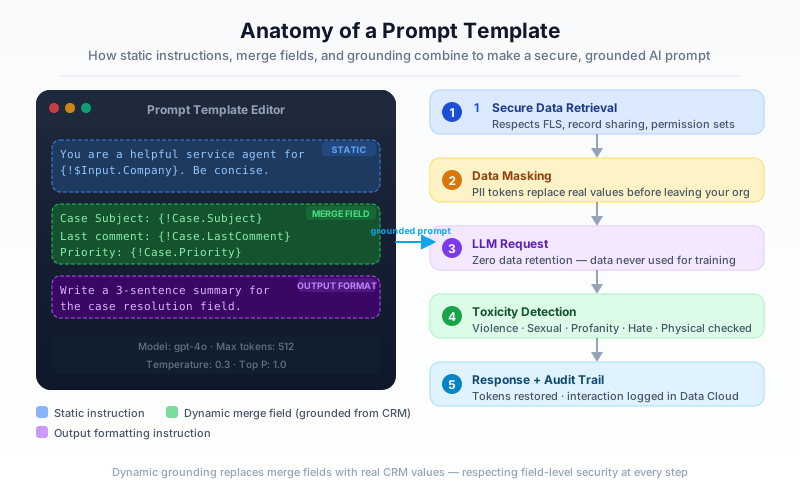
Open any template in Prompt Builder and you'll see four logical zones, even if the UI doesn't label them that way.
1. Static Instructions (the system prompt)
This is the prose you write directly in the resource editor. It's identical across every invocation: tone, role, length constraints, formatting rules, what to do if data is missing. Salesforce Help's prompt template best practices recommends being explicit: name the persona ("You are a senior support agent"), state the audience ("Write for a technical buyer"), and bound the output ("Reply in three sentences, no more than 80 words").
2. Merge Fields and Input Variables
Merge fields are how dynamic Salesforce data enters the prompt. In a Field Generation template, merge fields come from the bound record and its related lists. In a Flex template, they come from the input variables you defined.
The merge picker traverses the object graph, so on a Case template you can pull {!$Input:Case.Account.Industry} without writing SOQL. Behind the scenes, Salesforce executes a real query at runtime as the running user, which means field-level security and sharing rules apply. A user who can't see the field can't leak it into a prompt; the merge resolves to null.
3. Grounding
Grounding is the act of injecting authoritative data into the prompt so the LLM doesn't hallucinate. Prompt Builder supports several grounding sources:
- Record merge fields (the simplest form, just CRM data).
- Related lists: pull the last five cases on an account or the open opportunities in a household.
- SOQL queries: for cases where the merge picker isn't expressive enough.
- Flow: invoke a Flow that returns text or records, then merge the result.
- Apex: same idea, but from an
@InvocableMethodreturning aPromptTemplateOutput. - Data Cloud: retrieve from a Data Cloud Data Graph or run a Retrieval Augmented Generation (RAG) query against vector-indexed unstructured data.
- Knowledge: surface relevant articles via semantic search.
The Agentforce Developer Guide is the canonical reference for which grounding sources are available in which template type. Not every source works in every type: for example, Data Cloud retrievers are available in Flex and Field Generation but the integration patterns differ.
4. Output Formatting
The last zone is implicit but critical: how you tell the model to format its answer. If a Flex template is being called by an Agent Action that expects JSON, your static instructions must specify the JSON schema and include an example. If a Field Generation template writes to a rich text field, your instructions should say "Use HTML for bold and bullets, not Markdown." Skip this and you'll get inconsistent output across runs, which is the single most common reason prompts "stop working" after a model upgrade.
Tokens
Every prompt is bounded by a token budget, typically a few thousand input tokens depending on the model. Long related lists, large Knowledge articles, or unbounded SOQL results will silently truncate. Gearset's prompt engineering guide recommends previewing token counts in the resource editor and aggressively filtering grounding data before it reaches the model.
Prompt Builder and the Einstein Trust Layer
Every prompt invocation, regardless of template type, runs through the Einstein Trust Layer. This is what separates Prompt Builder from "just call OpenAI from Apex," and it's the reason security and compliance teams will tolerate AI in your org.
The Trust Layer applies five guarantees on every call:
- Secure data retrieval: Merge fields execute as the running user. Sharing rules, FLS, and record visibility are honored: a sales rep can't ground a prompt on accounts they can't see.
- Dynamic grounding: Salesforce assembles the final prompt server-side. Your template is a recipe; the prompt that hits the model is rebuilt fresh on every call from live data.
- Data masking: Configurable PII detection masks fields like names, phone numbers, and emails before they leave Salesforce's infrastructure, then unmasks them on the way back.
- Zero data retention: Salesforce's contracts with model providers (OpenAI, Anthropic, Google, and others routed through the Models API) prohibit them from logging prompts or using them for training.
- Audit trail: Every prompt invocation, masked input, raw output, and toxicity score is logged to Data Cloud, queryable for compliance and improvement.
The practical implication for builders: you don't need to bolt on your own security. A well-built prompt template inherits the org's permission model automatically. The mistake to avoid is bypassing the Trust Layer by calling an LLM directly from Apex with a hardcoded API key. Do that and you lose all five guarantees and most legal teams won't sign off on it.
Step-by-Step: Building a Field Generation Template for Case Summary
Let's walk through a concrete build. Goal: when a support manager opens a Case, a "Case Summary" field on the record page shows a three-bullet summary generated from the case description, comments, and the customer's prior cases.
Step 1: Create the field
In Object Manager on Case, add a long text area called AI_Case_Summary__c, 32,768 characters, place it on the Case page layout where you want the summary to appear, set it to read-only for end users.
Step 2: Open Prompt Builder
Setup > Einstein > Prompt Builder > New Prompt Template. Pick Field Generation. Name it Case Summary - Tier 2 Handoff. Set the object to Case and the field to AI_Case_Summary__c. Pick a model: for summarization, GPT-4o or Claude Sonnet via the Models API are reasonable defaults; the Trailhead Prompt Builder Basics module recommends benchmarking with the cheapest model first and upgrading only if quality demands it.
Step 3: Write the system instructions
You are a senior support engineer writing a handoff summary for a Tier-2
specialist who has never seen this case.

Summarize the case in exactly three bullets:
- The customer's reported problem in one sentence.
- The most recent action taken and by whom.
- The single most important next step or open question.

Use plain text. No emojis. No greetings. If a section has no information,
write "Unknown" rather than guessing.
Step 4: Add grounding
Insert merge fields for {!$Input:Case.Subject}, {!$Input:Case.Description}, and {!$Input:Case.Account.Name}. Add a related-list grounding for Case Comments (last 10, ordered by CreatedDate descending). Add a second related-list grounding for the Account's prior closed cases (last 5).
Step 5: Preview and test
Use the Preview pane on the right. Pick a real Case ID from a sandbox. Inspect the resolved prompt: verify the merge fields populated, the related lists rendered, no PII is leaking that shouldn't be. Run the prompt. Inspect the output. Iterate.
The Salesforce Admins blog post Prompt Like a Pro recommends testing with at least ten different records spanning best-case (lots of context) and worst-case (sparse data, single-comment cases). Edge cases find bugs that happy-path testing never will.
Step 6: Activate and wire to UI
Click Activate. Then in the Lightning App Builder, add the standard "Einstein Generative AI" component to the Case record page, point it at your template, and choose how the field gets populated: on demand via a button, automatically on record open, or invoked from a Flow trigger on Case escalation.
That's it. End-to-end build time once the field exists: about thirty minutes for a first draft, another hour or two of iteration to get the output reliable.
Step-by-Step: Building a Flex Template for an Agentforce Agent Action
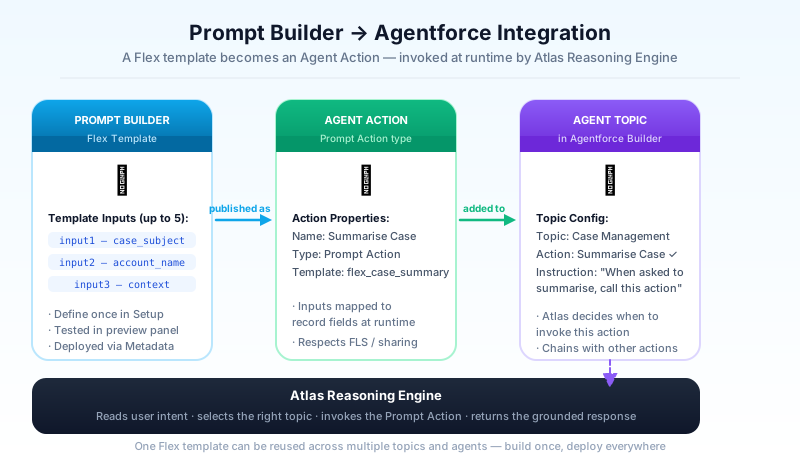
Flex is where it gets interesting. We'll build a template the Agentforce planner can call: given a customer ID and a product category, return a three-product recommendation grounded in the customer's purchase history and current promotions.
Step 1: Define the inputs
New Prompt Template > Flex. Name it Recommend Products By Category. Define two input variables:
Customerof type Account (record).Categoryof type Text.
Flex inputs are typed: when you reference a record-typed input in the resource editor, the merge picker walks its object graph the same way Field Generation does.
Step 2: Ground the prompt
Add grounding sources:
- The
Customerrecord's last 20 Orders, filtered to closed/won, with line items. - A Flow called
Get Active Promotions By Categorythat takesCategoryas input and returns a list of active promotions. Salesforce Ben's Flex template guide walks through this Flow-as-grounding pattern step by step. - A Data Cloud retriever pointed at a product catalog index, top 10 products by semantic similarity to
Category.
Step 3: Write the instructions and define output format
Because this template will be called by an agent, structure matters more than prose. Tell the model to return JSON, give it the schema, and give it an example.
You are a product recommendation engine for an Agentforce agent.

Given the customer's purchase history, active promotions, and the category
they're interested in, recommend exactly three products.

Return only valid JSON matching this schema:
{
  "recommendations": [
    {"productId": "...", "name": "...", "reason": "..."}
  ]
}

Prefer products the customer hasn't bought before. Prefer products covered
by an active promotion. Each "reason" must be under 25 words and must
reference either a past purchase or an active promotion, never both.
Step 4: Register as an Agent Action
In Agent Builder, create a new custom Agent Action of type "Prompt Template." Point it at Recommend Products By Category. Map the agent's planner inputs to your template's input variables: the planner provides Customer from session context, and Category from the user's utterance.
Add a clear action description. This is what the planner reads when deciding which action to invoke. Something like: "Use when a customer asks for product recommendations in a specific category."
Step 5: Test in the Agentforce conversation pane
Open the agent in Agent Builder, switch to the conversation tester, and ask: "What outdoor gear should I buy?" Watch the Atlas Reasoning Engine pick the action, see the resolved prompt in the inspector, verify the JSON response parses, and confirm the agent's reply renders the recommendations cleanly.
Deployment: Prompt Templates as Metadata
Prompt templates are first-class metadata. They have a Metadata API type (GenAiPromptTemplate and GenAiPromptTemplateVersion) and they ship through every standard deployment mechanism. Treat them like Flows, not like reports.
Change Sets work for simple promotions between connected orgs. Include the template, any custom merge field formulas, any Flows or Apex it grounds on, and the field metadata for Field Generation bindings.
Metadata API and SFDX is the right path for serious teams. The template definition serializes cleanly into source, which means it lives in version control next to its Flow and Apex dependencies. PRs are reviewable, a senior architect can sanity-check a prompt change the same way they review Apex.
DevOps Center handles prompt templates as of its 2025 release, including version comparison. When a template is updated, DevOps Center surfaces the diff at the field level (instructions changed, new merge field added) rather than as opaque XML.
A few deployment gotchas worth knowing:
- A template's active version is environment-specific. Activating in sandbox doesn't activate in production; you activate post-deploy.
- The model assignment is metadata, so if your sandbox is on GPT-4o-mini for cost reasons and prod is on Claude Sonnet, that mismatch ships with the template. Audit before deploy.
- Flow- and Apex-grounded templates won't deploy cleanly if their dependencies aren't already in the target org. Order matters.
Best Practices and Common Mistakes
After two years of teams shipping Prompt Builder to production, the same patterns separate the successful builds from the painful ones.
Do:
- Start narrow. One template, one use case, ten test records, before you scale to fifty templates.
- Constrain the output. Word counts, formats, schemas. Unconstrained prompts drift.
- Version with intent. Use template versions to A/B test instructions. Don't edit the active version in place.
- Log everything. The Trust Layer audit trail in Data Cloud is your debugging tool. Query it after every iteration.
- Test FLS. Run the preview as a user with restricted access. Confirm the prompt degrades gracefully when fields resolve to null.
Don't:
- Don't ground on unfiltered related lists. "Last 100 case comments" will blow your token budget on noisy accounts. Always order, limit, and filter.
- Don't put business logic in the prompt. If the rule is "premium customers get free shipping," that's a Flow decision, not a prompt instruction. LLMs are bad at deterministic logic.
- Don't skip Sandbox testing because "it's just text." A prompt template is production code. Treat it that way.
- Don't hardcode model names in instructions. Models change. Your instructions should describe behavior, not assume a specific model's quirks.
- Don't expose raw LLM output to customers without review. Field Generation and Sales Email default to human-in-the-loop for a reason. Honor that boundary in custom UIs too.
What's New in Spring '26 and Summer '26
The 2026 releases push Prompt Builder deeper into the Agentforce stack and broaden the surface area for non-CRM data.
Spring '26 delivered enhanced commerce-specific templates and tighter integration with Data Cloud retrievers, including the ability to chain a retrieval through a prompt and back into another retrieval, useful for agent workflows that need to disambiguate before grounding. The Salesforce blog's Agentforce Commerce Spring '26 announcement covers the commerce-template specifics, including out-of-the-box templates for product discovery, cart abandonment outreach, and post-purchase follow-up.
Other Spring '26 highlights:
- Multi-modal inputs in Flex templates: you can now pass image attachments as input variables, useful for grounding on a customer's uploaded screenshot in a support case.
- Template imports from a curated Salesforce-maintained library, accelerating common patterns like "summarize email thread" or "extract requirements from a meeting transcript."
- Improved testing harness: bulk-run a template across a CSV of test cases and diff the outputs against a baseline. This was previously a third-party DevOps capability; it's now native.
Summer '26 (in preview at the time of writing) extends prompt observability and adds prompt template orchestration: the ability to compose templates, so a high-level "draft customer email" template can call a "summarize recent support history" template and merge the result. This is Salesforce catching up to chain-of-thought patterns the industry has been doing in code for years, but doing it inside the Trust Layer.
Also in Summer '26: tighter Apex integration via a refined ConnectApi.EinsteinLLM method that returns structured outputs with type-safe deserialization, removing the need for the JSON.deserialize boilerplate that's been the standard pattern since 2024.
FAQ
Do I need a separate license for Prompt Builder?
Yes. Prompt Builder is part of the Einstein for Sales/Service/Platform SKUs and is included with Agentforce. The Salesforce Developers Prompt Builder docs list the exact entitlements.
Can I use my own LLM instead of Salesforce's default?
Yes, through the Models API and BYO LLM patterns. You can route any prompt template to OpenAI, Azure OpenAI, Anthropic via Bedrock, Google Gemini, or your own hosted model. The Trust Layer guarantees still apply.
What happens if a merge field is null at runtime?
The merge resolves to an empty string. Your static instructions should handle this, tell the model what to do when a field is missing rather than letting it improvise.
Can a Flex template be called from outside Salesforce?
Yes, via the Einstein platform REST API. You'll authenticate with a connected app, pass the input variables in the request body, and get the model output back. Same Trust Layer protections apply.
How do I roll back a prompt template change?
Activate a previous version. Every template keeps its version history, and activation is instant. There's no need to redeploy.
What's the difference between Prompt Builder and Einstein Copilot Builder?
Prompt Builder authors prompt templates; Agent Builder (formerly Copilot Builder) authors agents that orchestrate actions, some of which are prompt templates. They're complementary surfaces in the same Agentforce stack.
Is Prompt Builder available in Government Cloud or Hyperforce-restricted regions?
Availability has been expanding through 2025 and 2026. Check the current Salesforce trust and compliance documentation for your specific region and edition, the picture changed twice in 2025 alone.
Closing Thought
Prompt Builder isn't glamorous. It doesn't get the keynote slot at Dreamforce. But every Agentforce demo you've watched, every "summarize this case" button you've clicked, every AI-drafted email your sales team will send next quarter: they all route through a prompt template authored in this tool. Master it now and you'll be the person your org turns to when the AI roadmap meets reality. Ignore it and you'll be reverse-engineering someone else's prompts in production at 2 a.m. The choice, as always, is yours.
About the Author
Dipojjal Chakrabarti is a B2C Solution Architect with 29 Salesforce certifications and over 13 years in the Salesforce ecosystem. He writes and edits salesforcedictionary.com, published by KineticBit Inc., to help admins, developers, architects, and cert/interview candidates sharpen their fundamentals. More about Dipojjal.
Share this article
Sources
- The Ultimate Guide to Prompt Builder | Spring '24 — Salesforce Admins
- Prompt Builder Basics — Trailhead
- Best Practices for Building Prompt Templates — Salesforce Help
- Why Prompt Builder Is Vital in an Agentforce World — Salesforce Ben
- Your Guide to Building a Flex Template for Agentforce — Salesforce Ben
- Introducing Prompt Builder — Salesforce Admins
- Prompt Like a Pro — Salesforce Admins
- Mastering Salesforce Prompt Builder: Tips and Best Practices — Gearset
Related dictionary terms
Practise it
Five questions on Platform Developer I
Exam-style questions with an explanation after each one. No account needed, and your answers build a weak-topic map once you have one.
Keep reading

Agentforce Operations: The Complete 2026 Guide for Salesforce Admins, Developers & Architects
Agentforce Operations (GA April 2026) brings AI agents to back-office work - invoice auditing, supplier onboarding, compliance checks, and more. Built on Regrello and the Einstein Trust Layer.

Salesforce Flow vs Apex in 2026: A Decision Matrix for Admins, Developers & Consultants
Flow vs Apex is not a religious war anymore. Here is the 2026 decision matrix. Capability gaps, governor limits, the 70/30 rule, and 12 worked scenarios with the right answer for each.

Salesforce Multi-Agent Orchestration: The Complete 2026 Guide
In 2026, orgs run an average of 12 AI agents - half in isolated silos. Learn the primary-and-specialist architecture, Agent Fabric, and the A2A protocol that turn agent sprawl into coordinated enterprise AI.

What Is Agentforce 360? The Complete 2026 Guide for Salesforce Admins, Developers & Architects
Agentforce 360 is Salesforce's 2025 rebrand of its agentic-AI platform - built on the Atlas Reasoning Engine, Einstein Trust Layer, and Data 360. Here's the complete admin + dev + architect guide.
Comments
No comments yet. Start the conversation.
Sign in to join the discussion. Your account works across every page.