
Agentforce Operations: The Complete 2026 Guide for Salesforce Admins, Developers & Architects
Blueprints, intelligent agents, and adaptive management - how Salesforce is bringing agentic AI to the back office.

Salesforce just opened a second front in the agent wars
For the past two years, Salesforce has poured most of its AI energy into the front office - the parts of a business that touch customers. Agentforce helped service reps deflect cases, sales reps draft outreach, and marketers personalize journeys. By late 2025, with the rollout of the Agentforce 360 platform, the company had a coherent story for every customer-facing function.
The back office was a different story. Finance teams still chased approvals through email threads. Supply chain analysts still copy-pasted line items between portals. Compliance officers still maintained dozens of process documents in SharePoint that nobody actually read. Salesforce had no real answer for this messy, document-heavy, cross-functional work - until April 29, 2026, when it announced Agentforce Operations, a new product that brings the same agentic approach to the processes nobody sees but everyone depends on.
According to Salesforce's announcement, Agentforce Operations is generally available at launch and is positioned as the company's first product purpose-built for back-office orchestration. It is not a re-skinned version of Flow, it is not a wrapper around Apex, and it is not just another set of prompt templates bolted onto the existing Agentforce platform. It is a distinct product, with its own runtime, its own blueprint authoring surface, and a foundation that came from outside Salesforce entirely - namely, the October 2025 acquisition of Regrello.
This guide walks through what Agentforce Operations actually does, where it came from, how it fits alongside the front-office Agentforce 360 stack, and how admins, developers, and architects should start thinking about it now that it is in production.
What Agentforce Operations is - and what it is not
Agentforce Operations is a workflow-orchestration product built around three ideas: blueprints, intelligent agents, and adaptive management. You upload a process - as a Word doc, a Visio diagram, a PDF SOP, or even a slide deck - and the system turns it into a structured, executable blueprint. Specialized AI agents then handle the steps that used to require human chasing: pulling line items out of invoices, confirming a supplier's compliance certificate is current, hunting down the four approvers needed to release a purchase order. Managers can change the rules in plain English and the blueprint updates everywhere it is used.
As CIO.com reported, this is Salesforce's most explicit move beyond the CRM perimeter to date. The product targets work that historically lived in ERPs, email inboxes, shared drives, and people's heads.
It is worth being precise about what Agentforce Operations is not:
- It is not a replacement for your ERP. It sits on top of SAP, Oracle, NetSuite, Workday, and similar systems and coordinates work across them.
- It is not a generic RPA tool. It does not record screen clicks. Its agents call APIs, read documents, and reason about exceptions.
- It is not a new flavor of Flow. Flow remains the right tool for deterministic, in-CRM record automation. Operations handles cross-system, document-heavy, exception-prone processes that Flow was never designed for.
- It is not the same as front-office Agentforce. The customer-facing Agentforce 360 platform still owns service, sales, and marketing use cases. Operations is the behind-the-scenes counterpart.
The Regrello acquisition: why this product exists
You cannot understand Agentforce Operations without understanding Regrello. Salesforce completed the acquisition on October 1, 2025, and as CIO.com noted at the time, it was framed as a play to "boost automation in Agentforce." That undersold what was actually being bought.
Regrello was an AI-powered operating system for manufacturing and supply chains. Its founders - many of them ex-Palantir - had spent years building a platform that could ingest unstructured process artifacts (SOPs, regulatory filings, supplier contracts, BOMs) and convert them into runnable, observable workflows. The platform had three distinguishing characteristics:
- A document-first ingestion layer that treated PDFs, diagrams, and emails as primary inputs, not afterthoughts.
- A graph-based blueprint model rather than a linear flowchart, which made it possible to represent the messy, conditional, multi-party realities of manufacturing operations.
- An agent runtime designed for long-running, multi-day processes - not the seconds-to-minutes loops that most chat-style agents are built for.
Salesforce did not just bolt Regrello onto Agentforce. According to SiliconAngle's coverage of the launch, the engineering teams spent roughly seven months rebuilding Regrello's authoring and runtime layers on top of Hyperforce, wiring them into the Einstein Trust Layer, and exposing the resulting product through the Agentforce branding and admin experience. The Regrello DNA is still very visible - particularly in the blueprint model and the document-extraction pipeline - but the platform context is now unmistakably Salesforce.
This matters for two reasons. First, it explains why Operations feels different from anything else in the Salesforce portfolio: its core abstractions did not originate inside the CRM. Second, it sets a precedent. Salesforce is now willing to buy a product, rebrand it, and ship it as a first-class member of the Agentforce family within months. Expect more of this pattern.
Front office versus back office: where Operations fits
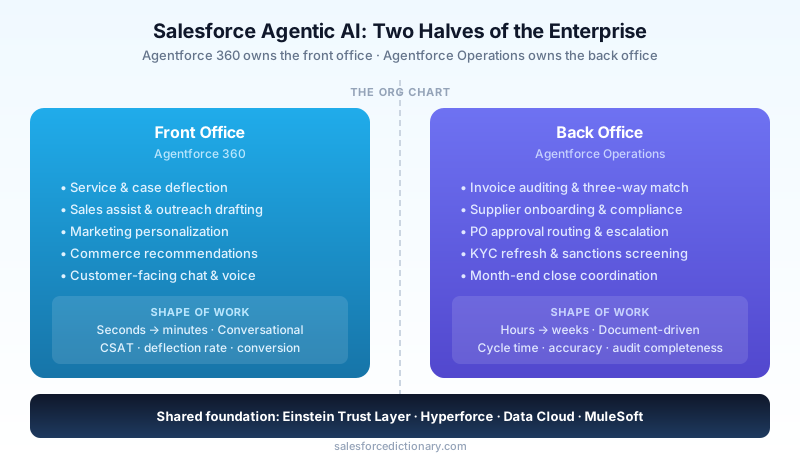
The cleanest way to think about Salesforce's portfolio in 2026 is to draw a line through the org chart. Above the line - sales, service, marketing, commerce - lives the front office, served by Agentforce 360 and the broader Headless 360 architecture for embedding agents in custom surfaces. Below the line - finance, supply chain, procurement, compliance, HR operations, legal ops - lives the back office, now served by Agentforce Operations.
The two halves share a foundation. They use the same Einstein Trust Layer for prompt redaction, the same Hyperforce infrastructure for residency and isolation, the same Data Cloud for grounding, and the same MuleSoft and event-bus layer for integration. What differs is the shape of the work:
| Dimension | Front office (Agentforce 360) | Back office (Agentforce Operations) |
|---|---|---|
| Trigger | Customer interaction (chat, email, call) | Document arrival, schedule, exception |
| Duration | Seconds to minutes | Hours to weeks |
| Data | Conversational, intent-driven | Structured documents, line items, approvals |
| Success metric | CSAT, deflection rate, conversion | Cycle time, accuracy, audit completeness |
| Failure mode | Wrong answer to a customer | Stalled approval, compliance miss |
A finance team running month-end close has more in common with a manufacturing scheduler than either has with a service rep. Salesforce finally has a product that acknowledges that.
The three core capabilities
Instant Blueprints
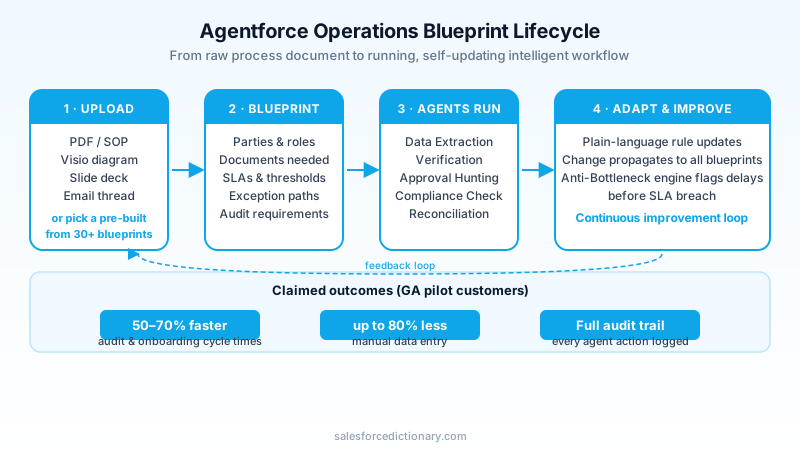
The first capability is the one most likely to make admins do a double-take. Instant Blueprints takes unstructured process documentation - a five-page SOP, a swimlane diagram, a regulator's compliance memo, a vendor onboarding checklist - and produces a structured, executable digital blueprint in minutes. You can also start from one of the 30+ pre-built blueprints that ship with the product, which cover scenarios like invoice auditing, supplier onboarding, PO rescheduling, certificate-of-origin verification, and KYC refresh.
A blueprint is more than a flowchart. It encodes the parties involved, the documents required at each step, the data fields that need to be extracted or verified, the SLAs, the exception paths, and the audit requirements. Because the underlying model is a graph rather than a linear sequence, branches, joins, and long-running waits are first-class - none of the awkward sub-flow gymnastics that traditional process tools require.
For admins who have spent years building processes in Flow, the mental shift is significant. In Flow you start with a trigger and build forward. In a blueprint you start with the process as documented and let the system propose the structure, which you then refine. It is closer to importing an OpenAPI spec than to building a screen flow from scratch.
Intelligent Operations
The second capability is the agent runtime itself, branded Intelligent Operations. This is where the specialized AI agents live - and "specialized" is the operative word. Rather than one general-purpose agent reasoning about every step, Agentforce Operations ships a roster of role-scoped agents:
- Data Extraction Agents that pull structured fields from invoices, bills of lading, certificates, and contracts, including handwritten annotations and stamped signatures.
- Verification Agents that cross-check extracted data against ERP records, supplier master data, and regulatory databases.
- Approval Hunter Agents that figure out who needs to sign off, route the request through the appropriate channel, and escalate when SLAs slip.
- Compliance Agents that compare process outputs against current regulatory text and flag anything that no longer aligns.
- Reconciliation Agents that match three-way and four-way documents (PO, receipt, invoice, payment) and surface only the genuine exceptions.
These agents are not chatbots. They run headlessly, often for hours or days, and they call out to the systems where the data actually lives. As TechTarget noted in its analysis, this orientation toward long-running, multi-system orchestration is what distinguishes Operations from the chat-and-action pattern that dominates most enterprise agent products today.
Salesforce's published performance claims are aggressive. Cycle times for auditing and onboarding processes drop 50 to 70 percent, and manual data entry tasks fall by up to 80 percent. These are pilot-customer numbers, so treat them with the usual caution, but the underlying logic is plausible: most of the time in these processes is spent waiting, chasing, and re-keying, not deciding.
Adaptive Management
The third capability is the one that finance and compliance leaders will care about most. Adaptive Management lets a manager describe a change in plain language - "Starting June 1, any supplier invoice over $50,000 from a non-EU vendor needs a secondary review from Trade Compliance" - and have the blueprint update across every process that references it.
Two components make this work. The first is a change-propagation engine that understands which blueprints reference which rules, so a single update reaches every affected process. The second is an Anti-Bottleneck engine that watches running processes and proactively flags delays - not after an SLA breach, but when the statistical pattern of a particular approver, queue, or document type starts trending toward one.
This is genuinely new. Most workflow tools tell you a process is late after it is already late. The Anti-Bottleneck engine is closer to a predictive maintenance system for paperwork: it notices that the average approval time for capex requests in the EMEA region has crept up 18 percent over the last three weeks and surfaces that pattern before any individual request misses its deadline.
The 30+ pre-built blueprints: who benefits most
The shipped blueprints cluster around four industry groups, though many are cross-industry by nature.
Finance and accounting. Invoice auditing, three-way match, T&E exception review, intercompany reconciliation, vendor master data hygiene, month-end close coordination. These are the highest-volume use cases and the ones with the clearest ROI math.
Manufacturing and supply chain. PO rescheduling, supplier onboarding, certificate-of-origin verification, bill-of-materials change management, quality non-conformance review, customs documentation. This is the Regrello heritage showing through; these blueprints are the most mature in the catalog.
Healthcare and life sciences. Prior authorization, clinical trial site onboarding, adverse event triage, credentialing renewals, claims adjudication exceptions. Salesforce flagged these as priority blueprints in the launch materials, in part because the document-heavy nature of healthcare ops maps cleanly onto the platform's strengths.
Regulated cross-industry. KYC refresh, sanctions screening, FCPA review, ESG attestation, SOX control evidence collection. These blueprints lean heavily on the compliance agents and on the audit-trail generation.
For admins evaluating the product, the right starting move is to compare the shipped blueprints against your team's current backlog of process improvement projects. If two or three line up, you have a credible pilot scope. If none do, you are probably better served by Flow, MuleSoft Composer, or a targeted front-office Agentforce deployment.
The trust and security stack
A back-office product has different trust requirements than a customer-facing one. A wrong answer to a customer is embarrassing; a wrong number on a regulatory filing is a finding. Salesforce has clearly thought about this.
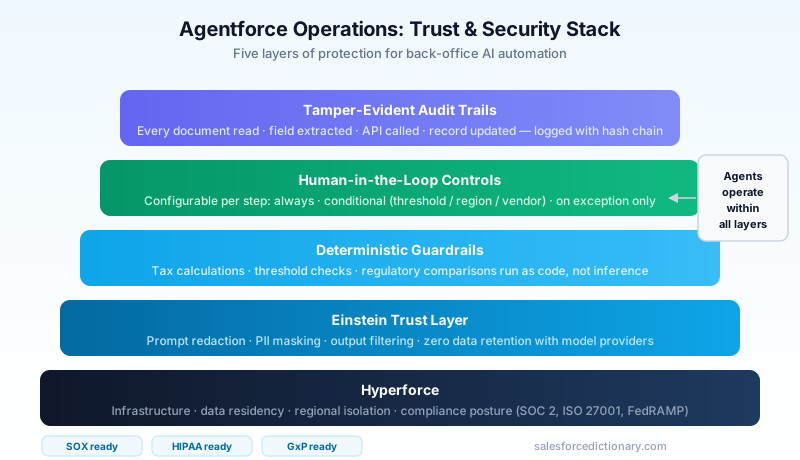
Every Agentforce Operations agent runs inside the Einstein Trust Layer, which means prompt redaction, output filtering, zero-retention contracts with model providers, and policy-based data masking are applied to every model call. The runtime sits on Hyperforce, giving customers the same residency, isolation, and compliance posture they get from the rest of the Salesforce platform.
On top of that foundation, Operations adds three back-office-specific guardrails:
-
Deterministic guardrails. Certain steps - tax calculations, threshold checks, regulatory comparisons - run on deterministic code rather than model inference. The agent decides when to invoke them but does not get to interpret their output. This is critical for any process that has to be auditable.
-
Human-in-the-loop controls. Every blueprint step can be configured to require human approval, either always, conditionally (over a threshold, in a region, for a vendor category), or on exception. The default for high-stakes steps is "human required," and admins have to explicitly relax that.
-
Full audit trails. Every action an agent takes - every document it read, every field it extracted, every API it called, every record it updated - is logged with a tamper-evident hash chain. The audit log is queryable, exportable, and retained per the customer's data governance policy. For SOX, HIPAA, and GxP scopes, this is non-negotiable, and Salesforce knows it.
Integration roadmap: what is live, what is coming
Operations launched with a defined integration roadmap, and the dates matter for planning.
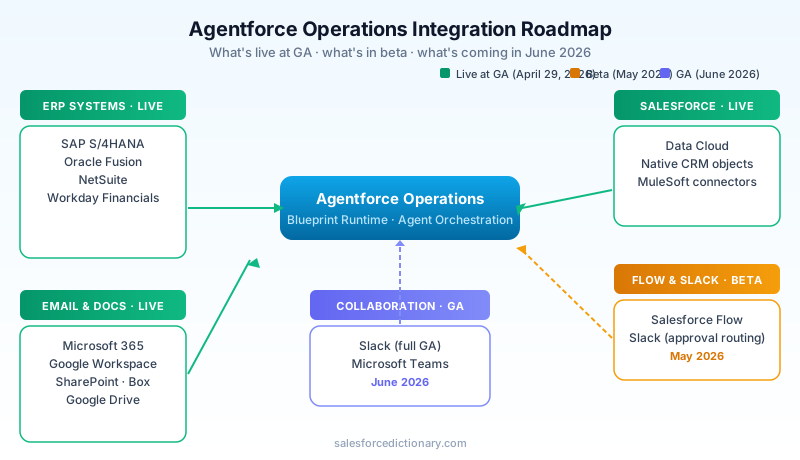
Live at GA (April 29, 2026). ERP connectors for SAP S/4HANA, Oracle Fusion, NetSuite, and Workday Financials. Email ingestion via Microsoft 365 and Google Workspace. Document storage connectors for SharePoint, Box, and Google Drive. Native Salesforce object access via Data Cloud.
May 2026 (beta). Salesforce Flow invocation - Operations blueprints can call Flows and Flows can invoke blueprints. Slack integration in beta, primarily for approval routing and exception escalation.
June 2026 (GA). Slack and Microsoft Teams collaboration channels go GA. This is the milestone most enterprises are waiting for, because Teams is where most back-office work actually happens. Once Teams is GA, an approval can be requested, granted, audited, and reconciled without anyone leaving their normal chat client.
The integration story is intentionally pragmatic. Salesforce is not asking customers to rip out their ERP or migrate to a new collaboration platform. It is meeting back-office workers where they already are.
How Operations differs from Flow, Apex, and existing automation
This is the question every admin and developer asks within the first ten minutes of the demo, and the answer matters for architecture decisions.
Flow is still the right tool for deterministic, record-driven automation inside the Salesforce data model. If your trigger is "Opportunity stage changes to Closed Won" and your action is "create a Renewal Task and send an email," Flow is faster to build, cheaper to run, and easier to maintain than a blueprint. Flow is also better when you need sub-second response times - blueprint runtime is optimized for processes measured in hours, not milliseconds.
Apex is the right tool when you need custom logic that has to run in the Salesforce transaction context, when you need fine-grained governor limit management, or when you are extending core CRM behavior. Operations agents can call Apex (via invocable methods exposed through the Salesforce connector), but they are not a replacement for it.
MuleSoft Composer and Anypoint remain the right tools for high-volume system-to-system integration where the logic is integration-shaped rather than process-shaped. A blueprint that needs to sync 50,000 records overnight should still delegate that sync to MuleSoft.
Agentforce Operations is the right tool when the process meets three conditions: it spans multiple systems, it involves unstructured artifacts (documents, emails, diagrams) as primary inputs, and it requires judgment that is too varied to encode as deterministic rules but too consequential to leave undocumented. Invoice exception handling fits. Closing a service case does not. Supplier onboarding fits. Sending a renewal reminder does not.
A useful mental model: Flow is for records, MuleSoft is for systems, Apex is for logic, front-office Agentforce is for conversations, and Operations is for processes - particularly the long, messy, multi-party ones.
How admins and developers should think about it
For admins, the first ninety days should be about literacy, not deployment. Spend time in the blueprint authoring environment. Upload one of your existing process documents and see what the system produces. Compare it to what you would have built in Flow. Notice where the blueprint surfaces structure you did not realize was implicit in your SOP, and notice where it gets confused. That calibration is more valuable than a rushed pilot.
When you do pilot, start with a process that has clear inputs (documents arriving on a schedule), clear outputs (a record updated, an approval granted, a payment released), a measurable cycle time, and a tolerant business owner. Invoice exception review is the canonical starting point for a reason.
For developers, the most important shift is that Operations is fundamentally a declarative product with extension points, not a code-first one. You will not write Apex for most of what Operations does. What you will do is:
- Build custom agent skills for steps that need bespoke logic, exposed as invocable services the blueprint can call.
- Configure Data Cloud grounding so agents have the right context for your business.
- Define deterministic guardrail functions for any step where math, threshold logic, or regulatory comparison needs to be exact.
- Wire up custom connectors for systems Salesforce has not shipped a native integration for, using the same connector framework MuleSoft exposes.
- Own the audit-log integration with your enterprise SIEM and your evidence-collection tooling.
For architects, the decision is where Operations sits in your reference architecture. The cleanest pattern is to treat Operations as the back-office orchestration tier, sitting above your systems of record (ERP, HRIS, supplier portals) and below your systems of engagement (Slack, Teams, email). Front-office Agentforce 360 occupies a parallel tier for customer-facing engagement. Both tiers ground on the same Data Cloud, are governed by the same Trust Layer, and surface the same audit posture. That symmetry is the strategic point of the product. Salesforce wants to own the agentic layer on both sides of the org chart.
A few architectural watch-outs:
- Do not let Operations become a second source of truth. It is an orchestrator, not a record. The ERP still owns the invoice; the HRIS still owns the employee record.
- Plan your model strategy explicitly. Operations uses model routing under the Trust Layer, but for sensitive domains (clinical, legal, defense) you will want to constrain which models can be invoked.
- Treat blueprints as code. Version them, review them, deploy them through environments. The product supports this, but only if you set up the discipline.
- Watch your audit log volume. Tamper-evident logs are not small. Budget storage and retention up front.
What this means for your org
Agentforce Operations is the most strategically significant product Salesforce has launched in 2026 - more so, arguably, than any of the front-office enhancements that got more launch-day press. It is the company's bid to extend agentic AI into the half of the enterprise it has historically not served, and it does so with a credible technical foundation (the Regrello acquisition was clearly money well spent), a defensible trust posture (the Einstein Trust Layer plus deterministic guardrails plus audit trails), and an integration roadmap that respects how back-office work actually gets done.
For most enterprise Salesforce customers, the honest answer right now is: do not rush a deployment, but do not ignore the product either. Spend the next quarter doing three things. First, identify the two or three back-office processes in your org with the highest cycle-time pain and document-heavy inputs - those are your candidate pilots. Second, get your blueprint literacy up; have at least one admin and one developer go through the authoring experience end-to-end on a non-production process. Third, get your governance posture in front of the conversation: who owns the audit logs, who approves new blueprints, how human-in-the-loop thresholds are set, how Operations interacts with your existing SOX, HIPAA, or GxP scopes.
The organizations that will get the most out of Agentforce Operations in 2026 and 2027 are the ones that treat it not as a new automation tool to deploy but as a new layer in their enterprise architecture to plan. The product is good enough to deserve that level of seriousness. The Regrello acquisition is paying off, the integration story is grounded in reality, and the back-office problem it is solving is one that almost every large enterprise has been quietly losing money to for years.
Salesforce has spent a decade telling customers it owns the front office. With Agentforce Operations, the pitch has changed. The company now wants to own the work that happens after the customer hangs up, too.
About the Author
Dipojjal Chakrabarti is a B2C Solution Architect with 29 Salesforce certifications and over 13 years in the Salesforce ecosystem. He writes and edits salesforcedictionary.com, published by KineticBit Inc., to help admins, developers, architects, and cert/interview candidates sharpen their fundamentals. More about Dipojjal.
Share this article
Sources
Related dictionary terms
Practise it
Five questions on Platform Developer I
Exam-style questions with an explanation after each one. No account needed, and your answers build a weak-topic map once you have one.
Keep reading

Salesforce Flow vs Apex in 2026: A Decision Matrix for Admins, Developers & Consultants
Flow vs Apex is not a religious war anymore. Here is the 2026 decision matrix. Capability gaps, governor limits, the 70/30 rule, and 12 worked scenarios with the right answer for each.

What Is Salesforce Headless 360? The Complete 2026 Guide for Developers, Admins & Architects
Salesforce Headless 360 exposes Salesforce capabilities as APIs, MCP tools, and CLI commands so work can happen in agents, Slack, voice, and custom apps without relying on the browser UI.

Salesforce Integration Patterns: REST vs SOAP vs Bulk vs Composite vs GraphQL (2026 Reference)
The complete 2026 reference for Salesforce APIs - REST, SOAP, Bulk 2.0, Composite, GraphQL, Pub/Sub, Streaming, Metadata, Tooling. When to use each, rate limits, OAuth flows, and patterns.

What Is Agentforce 360? The Complete 2026 Guide for Salesforce Admins, Developers & Architects
Agentforce 360 is Salesforce's 2025 rebrand of its agentic-AI platform - built on the Atlas Reasoning Engine, Einstein Trust Layer, and Data 360. Here's the complete admin + dev + architect guide.
Comments
No comments yet. Start the conversation.
Sign in to join the discussion. Your account works across every page.