
Salesforce External Services: Calling Any REST API From Flow Without Code (2026)
Import an OpenAPI spec, wire up a Named Credential, and call any external API from Flow or an Agentforce action. No Apex required. Here is how.

You open Flow Builder, realize you need to call a shipping-rate API every time an Order closes, and brace yourself for an afternoon of Apex callouts, JSON parsing, and a wrapper class you will have to unit test before it goes anywhere near production. Then someone on your team mentions External Services. Twenty minutes later you have a typed, invocable action sitting in the Flow palette that calls that API, and you wrote zero lines of code.
That is the pitch, and for once it mostly holds up. External Services has been around for a while, but in 2026 it matters more than it used to. [Agentforce agents](/terms/agentforce-agents) need to reach external systems, and External Services is the supported path to give a no-code action a real REST endpoint behind it. This guide walks through what it does, what it needs, and where it will bite you.
What External Services Actually Does
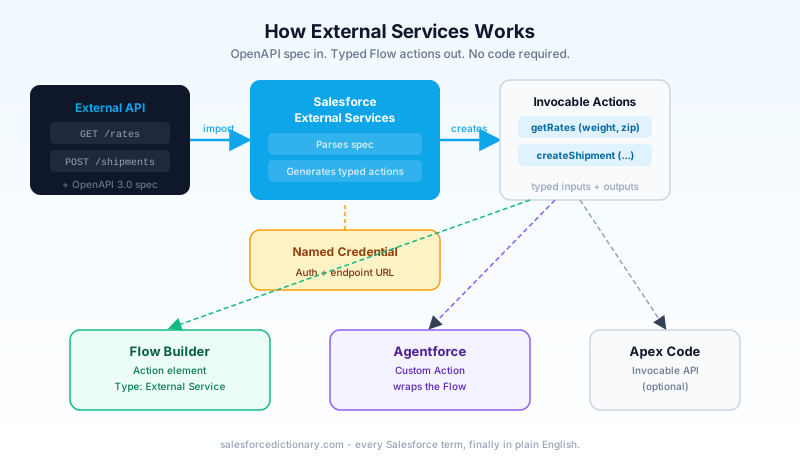
External Services takes an API description and turns each operation in it into a Flow action. You feed it an OpenAPI specification, the machine-readable contract that says "this API has a GET /rates endpoint, it takes these query parameters, and it returns this JSON shape." Salesforce reads that contract and generates one invocable action per operation you select.
The format matters. External Services accepts OpenAPI 2.0 (the old Swagger format) and OpenAPI 3.0. It does not accept SOAP, GraphQL, or a PDF of someone's API docs. If the API you want to call publishes a spec file, you are in business. If it does not, you will need to write one, which is annoying but doable.
Each generated action arrives with typed input and output parameters pulled straight from the spec's schema. A createShipment operation that expects a weight, a destination, and a service level shows up in Flow with three input fields, each with the correct data type. The response fields become outputs you can map to Flow variables and use downstream. These actions live in the Action element in Flow Builder right next to your Apex-defined actions and standard actions. Flow does not care that one is hand-written Apex and the other was generated from a JSON file. They behave the same.
The practical effect: an admin who has never touched a callout can call a REST API, pass it data from a record, and act on the response, all inside Flow.
What You Need Before You Start
Two things have to exist before you register anything, and skipping either one will stop you cold.
A Named Credential. This is how Salesforce authenticates to the external API and where the endpoint URL lives. You never paste a password or token into the External Service itself. The Named Credential handles that, and the modern setup splits it into two pieces: a Named Credential that points at the host, and an External Credential that holds the authentication scheme. External Credentials cover OAuth 2.0, Basic auth, API key headers, and more. If the API needs an OAuth client credentials flow, you configure that once in the External Credential and every action reuses it. If you have not set up Named Credentials before, do that first. It is the part most people underestimate.
A valid OpenAPI spec. It has to be real OpenAPI 2.0 or 3.0, and it has to be valid. Salesforce parses the whole thing during registration and rejects it if required fields are missing or the structure is malformed. You can host the spec at a URL or paste the raw JSON directly into the setup screen. Either works.
A few spec details trip people up. External Services does not handle every legal OpenAPI construct. Circular $ref chains, where schema A references B which references A, are not supported. There are limits on schema complexity and nesting depth. Streaming operations are out. If your spec is enormous and deeply nested, expect to trim it before Salesforce will accept it. The spec also has to describe a REST API. This bears repeating because people try to point it at SOAP services and get confused when nothing works.
Registering the Spec Step by Step
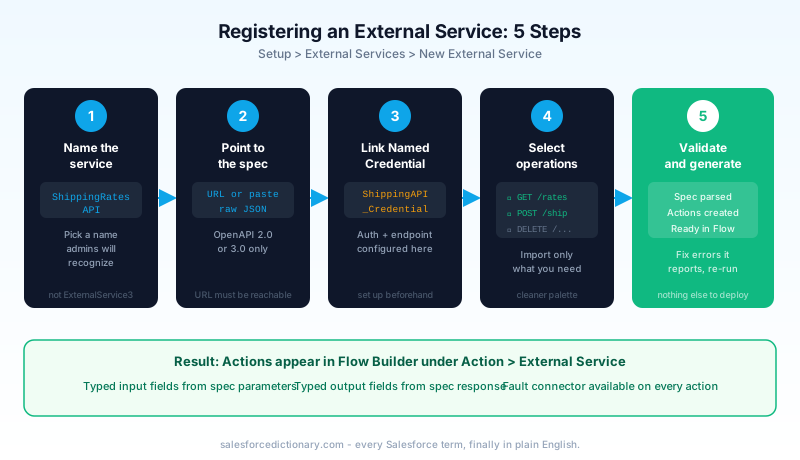
The whole flow lives under Setup > External Services > New External Service. The wizard is short.
Step 1: Name the service. This becomes the label you see in Flow, so pick something a future admin will recognize. ShippingRatesAPI beats ExternalService3.
Step 2: Point to the spec. Either give it the URL where your OpenAPI document is hosted or paste the raw spec into the text area. If you use a URL, that URL has to be reachable from Salesforce's servers at registration time. More on that gotcha later.
Step 3: Associate a Named Credential. Select the Named Credential you set up earlier. This tells Salesforce where to send the calls and how to authenticate them. The base URL from the Named Credential is what actually gets used at runtime, not necessarily the host in the spec.
Step 4: Choose which operations to include. You do not have to import everything. A spec might describe forty endpoints; if you only need three, select those three. Fewer actions means a cleaner palette and less clutter for whoever builds the Flow.
Step 5: Let Salesforce validate and generate. It parses the spec, checks the schemas, and creates an invocable action for each operation you picked. If validation fails, it tells you which part of the spec it choked on. Fix that and re-run.
When it finishes, the actions exist. Nothing else to deploy.
Using External Services Actions in Flow
Open Flow Builder and drop an Action element onto the canvas. In the action picker, change the Type filter to External Service. Your registered service appears, and under it, the operations you imported.
Pick the operation you want. The action expands to show its input parameters: query parameters, path parameters, and request body fields, all derived from the spec. You map each one from a Flow variable, a record field, or a literal value. If the getRates operation needs a weight and a zip, you wire those from your Order record or wherever the data lives.
The outputs work the same in reverse. The response schema becomes a set of output values. Assign them to Flow variables so the rest of your Flow can use them. A rate comes back, you store it, you write it to a field or show it on screen.
One thing you must not skip: add a fault connector to the action element. External calls fail. The API times out, the auth token expires, the remote service returns a 500. Without a fault path, a failure throws an unhandled error and your Flow dies in a way the end user sees as a generic, unhelpful message. Drag the fault connector to a screen or a logging step and handle the failure on purpose. This is the single most common omission, and you will notice it the first time the external API has a bad day.
For screen Flows, showing a friendly error message on the fault path is straightforward. For background Flows, create an Error Log record. Either way, capture $Flow.FaultMessage in the log or message so you have something to debug with later.
A note on testing
Flow Builder's debugger works with External Services actions. You can run the Flow in debug mode, supply test inputs, and see what the action returns, assuming the external API is reachable from your sandbox. If you want to test without actually calling the remote endpoint, set up a test Named Credential pointing at a mock server or a request capture tool. That way you control the response and can test error paths without the external API cooperating.
There is no official mock injection for External Services the way Apex has HttpCalloutMock. Your best option is a configurable Named Credential that points at a local or sandbox mock during testing and the real endpoint in production.
Connecting External Services to Agentforce
Here is where the 2026 relevance shows up. Agentforce agents act through actions, and an External Services-backed Flow becomes one of those actions.
The pattern is straightforward. You build a Flow that uses your External Service action, the same way described above. You expose that Flow as an autolaunched, invocable process. Then you register it as an Agentforce custom action, or wrap it through the agent's action library so the agent can call it. The Flow's input variables become the action's inputs, and the agent supplies them from the conversation.
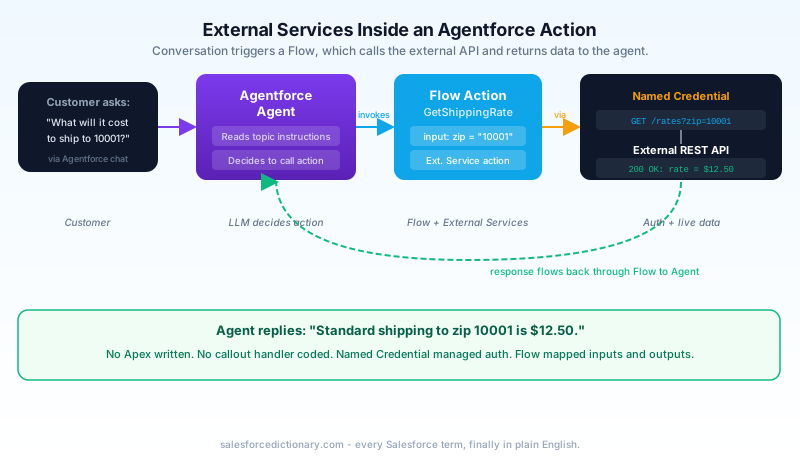
What makes this work is the topic instructions. Inside the agent's topic, you describe in plain language when this action should run. Something like: "When a customer asks about shipping costs, call the Get Shipping Rates action using their destination zip code." The large language model reads the conversation, matches intent against your instructions, and decides to invoke the action. You are not writing routing logic. You are describing behavior and letting the model dispatch.
So the full chain looks like this: a customer types a question, the agent recognizes it needs live data, it calls your Flow action, the Flow calls the external REST API through External Services and the Named Credential, the response flows back into the Flow, and the agent uses that data to answer. No Apex anywhere in that path.
This is the part worth getting right, because it is the reason External Services stopped being a niche feature and became something most Agentforce builds touch.
One practical note: the agent's response latency now includes the time your external API takes to respond. A slow API means a slow agent. If you are wiring an External Services action into an agent topic, test the round-trip time from the sandbox and make sure it is acceptable. Agents with multiple actions that each call external APIs can feel sluggish in a way that frustrates users even when everything is technically working.
Common Gotchas and Limitations
The demo is smooth. Production is where you learn the edges. These are the ones that cost real time.
Spec validation is strict. A spec that loads fine in Swagger Editor can still get rejected by Salesforce if a required field is missing or a schema is structured in a way the parser does not like. When registration fails, read the error closely. It usually names the offending operation or property.
Every required parameter must be populated. If the spec marks a request parameter as required and your Flow passes it a null, the action fails at runtime. Map all required inputs, and add decision logic earlier in the Flow if a value might be empty.
Callout limits still apply. External Services calls are HTTP callouts, and they count against the Salesforce limit of 100 callouts per transaction. A Flow that loops over a hundred records and calls the API once per iteration will hit the wall. Batch your data or rethink the design.
Async contexts have callout restrictions. Scheduled Flows and batch-triggered Flows have callout restrictions. If you need the API call in an async context, you have to structure it correctly, and the simple synchronous action may not behave as it does in a screen Flow.
The spec must be reachable during registration. Even though the Named Credential controls the runtime endpoint, Salesforce needs to fetch and parse the spec when you register it. If the spec lives behind a firewall Salesforce cannot reach, paste the raw JSON instead of using a URL.
Response schema drift breaks Flows silently. If the external API changes its response shape, your generated action does not magically update. The output mappings keep pointing at fields that may no longer exist, and the Flow can fail or return empty data without an obvious cause. When the API team ships a change, re-register the spec.
Prefer OpenAPI 3.0. Salesforce's 3.0 support is newer and handles more constructs cleanly than its older 2.0 support. If the API offers both, take the 3.0 version.
FAQ
Do I need to know JSON Schema to use External Services?
Not to consume it. If a clean spec already exists, you point External Services at it and never look at the schema internals. You only need to understand JSON Schema if you are writing or repairing the spec yourself, which happens when the API does not publish one or publishes a broken one.
Can I use External Services with APIs that need dynamic auth tokens?
Yes, that is what External Credentials are for. Configure an OAuth flow (client credentials or authorization code) in the External Credential, and Salesforce fetches and refreshes tokens for you. You do not handle the token in the Flow at all.
What happens when the external API returns an error?
The action fails, and the failure follows the fault path on the action element if you added one. If you did not, the Flow throws an unhandled error. Always wire a fault connector and decide what the user or agent sees when the call fails.
Can I call External Services actions from Apex?
The generated actions are invocable, so you can call them from Apex the way you call other invocable actions, through the Invocable API. Most teams call them from Flow, but the option exists if you need to trigger one from code.
Is there a size limit on the spec?
Yes. There are limits on overall spec size, schema complexity, and nesting depth. A large, deeply nested spec may need trimming before Salesforce accepts it. Importing only the operations you need also keeps things manageable.
Can I use External Services for Agentforce without a Named Credential?
No. The Named Credential is how the call authenticates and where the endpoint resolves. Even an unauthenticated public API needs a Named Credential to define the host Salesforce calls. There is no path that skips it.
What to Do Next
Pick one real API you already wish Flow could call: the shipping rate lookup, the address validator, the inventory check, whatever has been forcing you into Apex. Find its OpenAPI spec or write a minimal one covering the single operation you need. Set up the Named Credential and External Credential for it. Then register the service, drop the action into a test Flow, wire a fault connector, and run it against a sandbox record. Once that one call works end to end, every other integration follows the same pattern, and you will reach for External Services before you reach for Apex.
About the Author
Dipojjal Chakrabarti is a B2C Solution Architect with 29 Salesforce certifications and over 13 years in the Salesforce ecosystem. He writes and edits salesforcedictionary.com, published by KineticBit Inc., to help admins, developers, architects, and cert/interview candidates sharpen their fundamentals. More about Dipojjal.
Share this article
Sources
Related dictionary terms
Practise it
Five questions on Platform Developer I
Exam-style questions with an explanation after each one. No account needed, and your answers build a weak-topic map once you have one.
Keep reading

Building Custom Agentforce Actions: Apex, Flow, and Prompt Templates Explained
Standard Agentforce actions only go so far. Here's how to build custom Apex actions, Flow-based actions, and Prompt Template actions that give your agents real org-specific capabilities.

Salesforce Flow vs Apex in 2026: A Decision Matrix for Admins, Developers & Consultants
Flow vs Apex is not a religious war anymore. Here is the 2026 decision matrix. Capability gaps, governor limits, the 70/30 rule, and 12 worked scenarios with the right answer for each.

Salesforce Integration Patterns: REST vs SOAP vs Bulk vs Composite vs GraphQL (2026 Reference)
The complete 2026 reference for Salesforce APIs - REST, SOAP, Bulk 2.0, Composite, GraphQL, Pub/Sub, Streaming, Metadata, Tooling. When to use each, rate limits, OAuth flows, and patterns.

Salesforce Named Credentials and External Credentials: The Complete 2026 Guide
Legacy Named Credentials are retiring. The new split between Named Credentials and External Credentials is how Salesforce expects every integration to authenticate in 2026. Here is what changed and how to migrate.
Comments
No comments yet. Start the conversation.
Sign in to join the discussion. Your account works across every page.