
Building Custom Agentforce Actions: Apex, Flow, and Prompt Templates Explained
How to extend your Agentforce agents with custom Apex actions, Flow-based actions, and Prompt Template actions

A customer asks your service agent, "Do you have the blue jacket in size medium?" Your agent confidently creates a case, sends a confirmation email, and searches the knowledge base. What it cannot do is check the actual warehouse system that holds your stock counts. That gap, between what an agent says and what it can do, is exactly where custom actions live.
Agentforce ships with a useful set of standard actions: create a record, draft an email, query Knowledge, summarize a record. They cover the obvious cases. They do not cover the business logic that only exists in your org, the third-party inventory API behind your firewall, or the carefully tuned response you built in Prompt Builder. For those, you build custom actions.
There are three ways to do it. Apex, Flow, and Prompt Templates. Each one fits a different kind of problem, and picking the wrong one is the most common reason a custom action feels slow, flaky, or expensive. Here is how all three work and how to choose between them.
What a custom action actually is
Before writing any code, you need to understand how an agent decides to call your action at all. Agentforce does not run a script. It reasons.
An agent is built from topics. A topic is a grouping of related jobs, like "Order Management" or "Returns." Each topic carries a set of actions it is allowed to use, plus instructions that tell the model when that topic is relevant. When a user sends a message, the planner reads the conversation, picks the most relevant topic, then looks at the actions inside it and decides which one to invoke and with what inputs.
The model never sees your Apex code. It sees metadata. Specifically, it reads the action's label, its description, and the descriptions of each input and output. That text is the entire contract. If your description says "Checks live inventory for a product in the warehouse system," the planner can match a stock question to it. If your description says "invMethod1," the planner has nothing to work with and your action sits unused.
This is the single most important mental shift for developers. You are used to method names being for humans and signatures being for the compiler. Here, the natural-language description is the API. Write it for the model. Salesforce's Agentforce Developer Guide is explicit that clear, specific descriptions are what make action selection reliable.
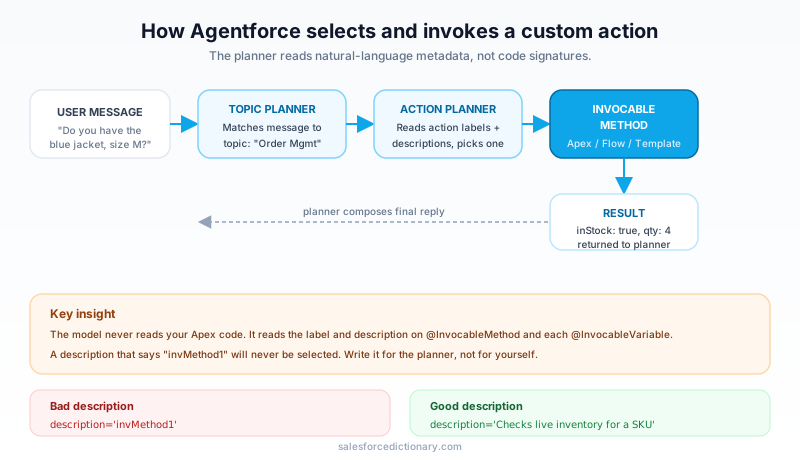
Once the planner picks an action and fills in its inputs, the action executes inside your org under normal platform rules. Governor limits apply. Sharing and field-level security apply. The output comes back to the planner, which decides what to say next or whether to chain into another action. So a custom action is two things at once: a normal piece of Salesforce automation, and a natural-language interface to that automation.
Apex-based custom actions
Apex is the most flexible option and the one developers reach for first. You expose an Apex method to Agentforce by marking it with the @InvocableMethod annotation. The same annotation has powered Flow-callable Apex for years, which means a lot of existing invocable methods can become agent actions with no rewrite. The full rules live in the @InvocableMethod documentation.
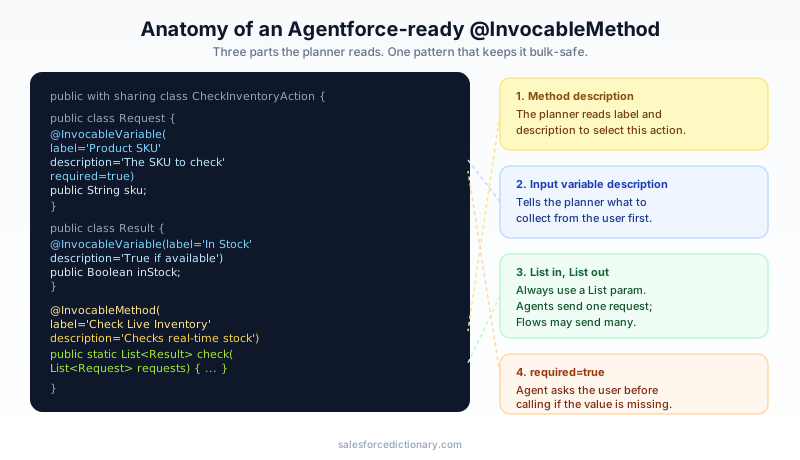
Here is the shape of a well-formed action.
public with sharing class CheckInventoryAction {

  public class Request {
    @InvocableVariable(label='Product SKU'
      description='The SKU code of the product to check' required=true)
    public String sku;

    @InvocableVariable(label='Size'
      description='Requested size, e.g. S, M, L' required=false)
    public String size;
  }

  public class Result {
    @InvocableVariable(label='In Stock'
      description='True if the requested quantity is available')
    public Boolean inStock;

    @InvocableVariable(label='Available Quantity'
      description='Units currently available in the warehouse')
    public Integer availableQty;
  }

  @InvocableMethod(label='Check Live Inventory'
    description='Checks real-time stock for a product SKU and size in the warehouse system')
  public static List<Result> check(List<Request> requests) {
    List<Result> results = new List<Result>();
    for (Request req : requests) {
      Result r = new Result();
      // call your warehouse service, set r.inStock and r.availableQty
      results.add(r);
    }
    return results;
  }
}
A few details carry real weight here.
The method takes a List and returns a List. This is not optional. The platform bulkifies invocable calls, so your method receives a list of requests and must return a list of results in the same order. For an agent conversation you will usually get one request at a time, but write the loop anyway. It costs you nothing and keeps the method usable from Flow and bulk contexts.
Every input and output should be its own variable with a description. Use a wrapper class with @InvocableVariable fields. Each label and description feeds the planner the same way the method description does. The required flag tells the planner which inputs it must collect from the user before calling. If sku is required and the user never mentioned a SKU, the agent will ask for it rather than guessing.
Keep the surface small and the output structured. Return typed fields, not a giant JSON blob the model has to parse. The planner reasons better over inStock: true, availableQty: 4 than over a paragraph of prose.
Governor limits and callouts
Your action runs inside the same transaction limits as any Apex. The catch with agents is that an action calling a third-party service needs a callout, and callouts inside an invocable method must be handled carefully. For a synchronous action, the callout runs in the request and counts against your callout limits and timeout. Keep external calls fast. If a warehouse API regularly takes eight seconds, the whole conversation stalls and the user assumes the agent is broken.
When the work is genuinely slow or you need to make DML before a callout, the usual platform answer is asynchronous processing. But an agent expects a result it can talk about now. Async patterns that return later do not fit a live turn well. The honest guidance: if you cannot get an answer back in a couple of seconds, rethink whether that work belongs in a real-time action at all.
Testing Apex actions
Treat these like any other Apex. Write a test class that builds a Request, calls the static method, and asserts on the Result. Mock callouts with HttpCalloutMock so tests do not depend on a live external system. Your test verifies the logic. It does not verify that the planner picks the action, which is a separate concern you validate in the Agentforce Testing Center with sample utterances. Code coverage rules still apply before you can deploy to production, so do not skip the test class thinking the agent layer covers you. It does not.
Flow-based custom actions
Not every action needs Apex. An autolaunched flow can be exposed as an agent action directly, no code required. Salesforce documents the pattern under using a flow in an invocable action. You build the flow, mark its input and output variables as available for input and output, give those variables clear API names and descriptions, and the flow shows up in the action library.
Flow is the right call when the work is declarative: look up related records, run an approval, update fields, branch on business rules an admin owns. If a Salesforce admin can build and maintain the logic without you, building it in Flow keeps it in their hands and out of your deployment pipeline.
The same description discipline applies. A flow variable named recordId with no description tells the planner nothing. Give it a label and a sentence. The planner reads flow metadata the same way it reads Apex metadata.
Flow pitfalls that bite
Flow looks easier than Apex, and for simple cases it is. The trouble starts when people forget that the platform rules underneath are identical.
Bulkification. A Get Records or an update inside a loop will hit limits the same way it would in Apex. The agent context usually sends one record, which hides the problem in testing, then the flow gets reused somewhere bulk and falls over. Build it bulk-safe from the start.
Callouts in the wrong context. Flow can make HTTP callouts, but the ordering rules around DML and callouts are strict. A flow that updates a record and then makes a callout in the same transaction throws the same "you have uncommitted work pending" error you would hit in Apex. If you need both, you usually need an asynchronous path, and as with Apex, async fits a live agent turn poorly.
Silent failures. A flow fault that is not handled can surface to the agent as an unhelpful generic error. Add fault paths and return a meaningful output the agent can relay, like "I couldn't reach the scheduling system, please try again shortly."
As a rule: reach for Flow when the logic is declarative and admin-owned, and reach for Apex when you need callouts with real error handling, complex data shaping, or performance you can tune.
Prompt Template actions
The third type is different in kind. Apex and Flow do something. A Prompt Template says something, in a controlled way.
In Prompt Builder you author a reusable prompt with merge fields that pull in record data. A "Draft Account Summary" template might take an Account and produce a tidy paragraph grounded in that account's open opportunities, recent cases, and renewal date. You can wire that template into an agent as an action. When the planner calls it, the template runs through the Einstein Trust Layer, grounds itself in the record context you specified, and returns generated text.
This matters because of grounding. A raw model answer about your customer is a guess. A Prompt Template answer is built from real fields you chose, so it stays accurate and on-policy. The Trust Layer adds masking and toxicity checks on top, which you want any time generated text reaches a customer.
Use a Prompt Template action when the job is to produce language from structured data: summaries, personalized recommendations, drafted replies, explanations of a record's state. Use Apex or Flow instead when the job is to change data or fetch a fact. A Prompt Template should not be your way to "ask the model" for inventory counts. It has no live data unless you ground it, and grounding pulls from Salesforce records, not your warehouse API. Get the fact with an Apex action, then, if you want it phrased nicely, feed it to a template.
Choosing the right type
Most of the wasted effort in agent projects comes from forcing one tool to do another's job. Here is the short decision framework.
- Does the action need to call an external system, do complex data work, or handle errors precisely? Use Apex.
- Is the logic declarative, record-based, and something an admin should own? Use Flow.
- Is the goal to generate human language grounded in record data? Use a Prompt Template.
- Does a standard action already do it? Use the standard action. Do not rebuild "create a case" in Apex.
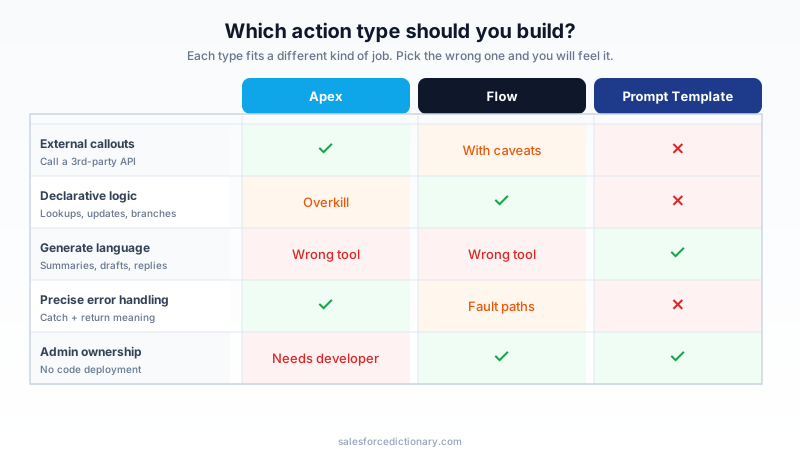
These combine. A returns agent might use a Flow action to validate eligibility, an Apex action to issue the refund through a payment API, and a Prompt Template action to draft the confirmation message. One topic, three action types, each doing the part it does best. The Trailhead module on building agent actions walks through wiring several types into a single agent if you want hands-on practice.
Deploying and versioning
A custom action is metadata, so it deploys like metadata. For anything beyond a quick experiment, package your actions in an unlocked package. That gives you a clean dependency boundary, repeatable installs across sandboxes and production, and a version history you can roll back.
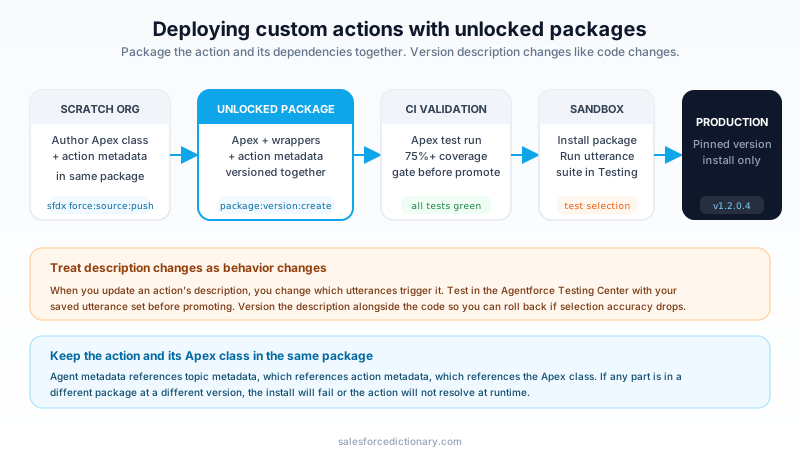
Watch the dependency chain. An agent references topics, topics reference actions, and an Apex action references its class and any wrapper classes. If you package the agent metadata without the underlying Apex or Flow, the install breaks. Keep an action and the code it depends on in the same package, or pin the dependency version explicitly so a consumer org gets a compatible set.
Version pinning deserves real attention. When you change an action's description, you are changing how the planner selects it. A description tweak that reads fine to you can shift which utterances trigger the action, sometimes for the worse. Treat description changes as behavior changes. Test them in the Testing Center with your saved utterance set before promoting, and version them so you can revert if selection accuracy drops.
One more habit worth keeping: never let production be the place you discover an action does not fire. Run your utterance suite in a sandbox after every deploy. Action code can be green while action selection is broken, and only the conversation-level tests catch that.
Where to start
Pick one real gap your current agent cannot fill, the most common question it punts on, and build exactly one custom action for it. Make it Apex if it touches an external system, Flow if it is declarative, a Prompt Template if it is about phrasing. Write the label and description for the planner, not for yourself. Then add three or four sample utterances to the Testing Center and confirm the agent actually reaches for it. Ship that one, learn from it, and the next ten get easier.
About the Author
Dipojjal Chakrabarti is a B2C Solution Architect with 29 Salesforce certifications and over 13 years in the Salesforce ecosystem. He writes and edits salesforcedictionary.com, published by KineticBit Inc., to help admins, developers, architects, and cert/interview candidates sharpen their fundamentals. More about Dipojjal.
Share this article
Sources
Related dictionary terms
Practise it
Five questions on Platform Developer I
Exam-style questions with an explanation after each one. No account needed, and your answers build a weak-topic map once you have one.
Keep reading

Agentforce Testing Center: The Complete Guide to Testing Your AI Agents in 2026
Testing Center is the Agentforce tool for validating AI agents before they ship. Synthetic test users, conversation-level checks, custom evaluations, and DevOps quality gates. Here's how to use all of it.

The Apex Trigger Framework: Best Practices for Bulk-Safe, Scalable Triggers (2026)
The complete 2026 trigger framework guide. Logic-less triggers, bulk safety, recursion control, framework comparison (Kevin O'Hara vs interface vs virtual), and CRUD/FLS enforcement.

Salesforce Flow vs Apex in 2026: A Decision Matrix for Admins, Developers & Consultants
Flow vs Apex is not a religious war anymore. Here is the 2026 decision matrix. Capability gaps, governor limits, the 70/30 rule, and 12 worked scenarios with the right answer for each.

Salesforce Prompt Builder: The Complete 2026 Guide for Admins & Developers
Prompt Builder is the no-code studio that connects your Salesforce data to any LLM — and in 2026, it's the foundation of every Agentforce Agent Action. Here's the complete guide for admins and developers.
Comments
No comments yet. Start the conversation.
Sign in to join the discussion. Your account works across every page.