
Salesforce Backup and Restore: Why Your Backup Is Not a Restore Plan
The Recycle Bin ends at 15 days, a weekly export cannot put anything back, and a restored record often comes back wearing a new ID. Here is what recovery actually costs.
A data load runs at 9:40 on Monday morning. It updates 61,000 Contacts, and on 12,000 of them it blanks a field, because the CSV had an empty column and somebody reused a field mapping saved last quarter. Nobody notices until Thursday, when a campaign goes to the wrong segment and a sales director asks why half her accounts lost their industry.
You have backups. What you are about to discover is that having backups and being able to restore are two different projects, and only one of them was ever on your checklist.
Salesforce's native protections are real. They are also smaller than most teams assume, and the gap between what they cover and what a Thursday morning needs is where recovery plans quietly fail.
Part of that gap is a misreading of who owns what. Salesforce runs the infrastructure, replicates it across sites, and publishes its uptime, which protects you from Salesforce having a bad day. None of that protects you from your own org having one. A user with delete permission, an integration with a bug, an admin with a spreadsheet, and a deployment that overwrote a picklist all sit on your side of the line. Trust.salesforce.com will show green through every one of them, because from the platform's point of view nothing went wrong: the writes you asked for were performed exactly as requested.
The 15-day clock you are already running
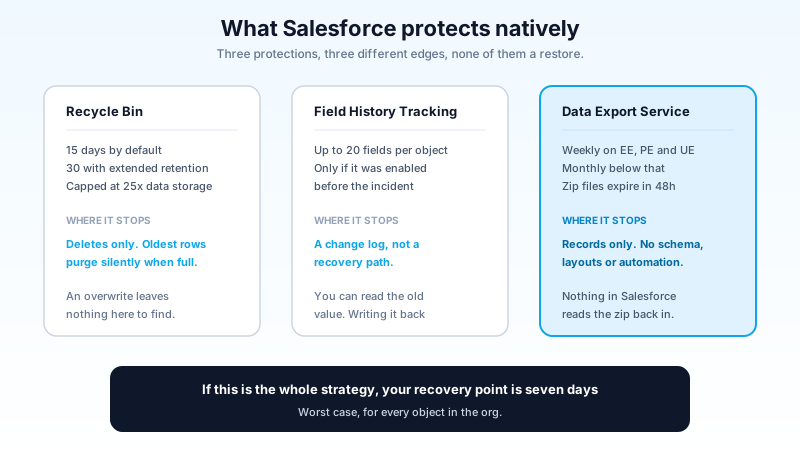
The Recycle Bin holds deleted records for 15 days. After that they are gone from the ordinary interface for good. You can stretch that to 30 days by enabling Extended Recycle Bin Retention, a setting most orgs have never opened.
Two limits matter more than the number of days.
The bin has a capacity ceiling of 25 times your org's data storage allocation. When it fills, Salesforce purges the oldest records to make room, without an alert and without asking. So 15 days is a ceiling, not a promise. In an org running nightly integrations that delete and reinsert, or a deduplication job that clears a few hundred thousand rows, the real window can be a couple of days and nobody finds out until they go looking for something that should still be there.
The second limit is bigger: the Recycle Bin only knows about deletes. Monday's incident was an update. An overwrite leaves nothing behind to restore. Field History Tracking gives you a read log on up to 20 fields per object, if somebody enabled it on the right field before the incident, and it is a log, not a recovery path. You can see what the value used to be. Putting it back is a separate piece of work you write yourself.
An export is a copy, not a restore
The other native option is the Data Export service. Enterprise, Performance, and Unlimited editions can run it weekly. Professional and below get monthly. Manual runs are gated to once every six days on the weekly schedule and once every 28 days on the monthly one.
The output is a set of zip files full of CSVs, chunked at 512MB, that Salesforce deletes 48 hours after the notification email (weekends do not count against the clock). Winter '26 added a sequential download rule in Setup: one file at a time, with a 60 second wait between them, and an HTTP 429 if you rush it. That applies to manual downloads in the UI only, not to API-based tooling, which matters if you script the pull.
Read the cadence carefully, because if this is your only backup then your recovery point objective is seven days. Not "about a week." Seven days, worst case, for every object in the org.
Then read the format. The export gives you records. It does not give you your schema, your automation, your picklist values, your page layouts, or your validation rules. Restore a six-month-old export into an org whose fields have moved since, and it fails a column at a time. And there is no button anywhere in Salesforce that accepts one of those zip files and puts the org back the way it was. The export is evidence. It is not recovery.
That gap is the whole reason a backup product exists, and it is the reason so many orgs buy one and still cannot answer the only question that matters on Thursday: how long until the data is right again.
Restoring is a write operation
Here is the sentence worth carrying out of this article. A restore is a data load, and it is subject to everything a data load is subject to.
Start with identifiers, because they decide how much cleanup follows a technically successful restore.
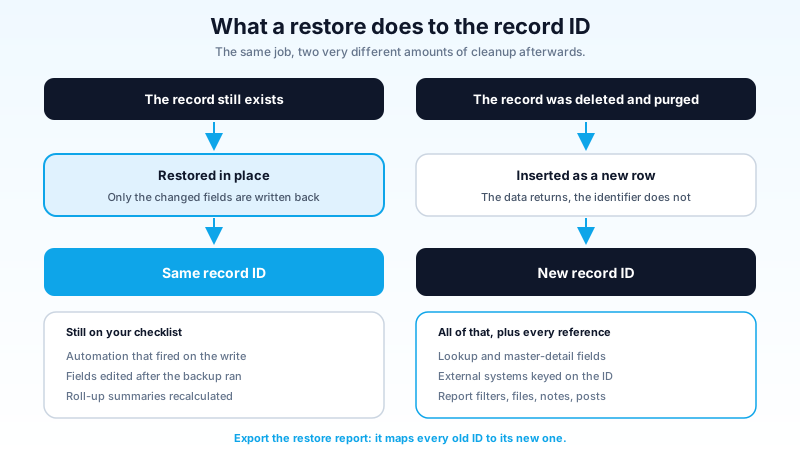
When a record still exists and you restore an earlier version of it, Salesforce Backup updates it in place. The record ID survives and only the changed fields are written. That is the good case, and it is the case that Monday's blanked-field incident falls into.
When a record has been deleted and purged, restoring it creates a new record with a new ID. The data comes back. The identifier does not.
What that breaks, in roughly the order you find out:
Every lookup relationship and master-detail relationship that pointed at the old ID now points at nothing. Any external system keyed on the 18 character ID (the data warehouse, the marketing platform, the billing system, the reporting extract somebody built in 2019) is now holding references to records that no longer exist. Saved report filters, dashboard sources, and list views that name specific IDs go quiet rather than loud. Files, notes, and posts attached to the old record stay attached to the old record.
Salesforce Backup can export a restore report that maps each original ID to its new ID and lists per record errors. That file is the most valuable artifact the whole exercise produces, and almost nobody plans for it in advance. Decide now who receives it, which downstream systems need a remap, and what the remap script looks like. Doing that thinking during an incident is how a four hour recovery becomes a two week reconciliation.
Parents before children, and other lessons from 2am
Order of operations is the next thing that bites.
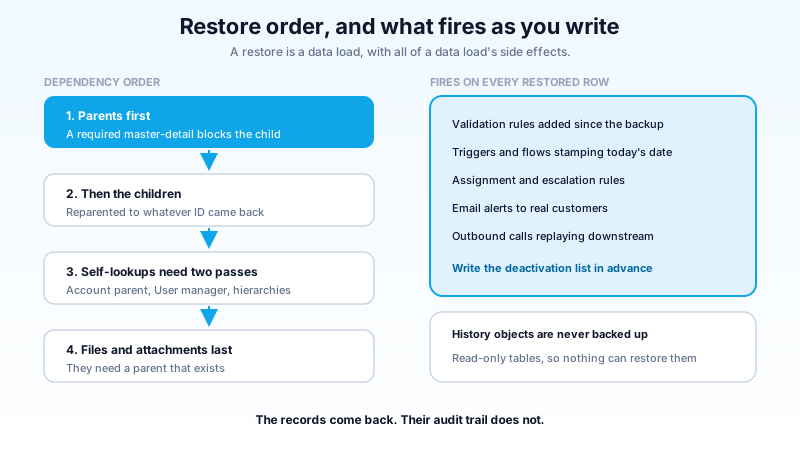
A child record with a required master-detail parent cannot be restored until the parent exists. So a large restore is a dependency walk, not a bulk insert, and the tool has to know the graph. Self referencing hierarchies (Account parent, User manager, anything with a lookup to its own object) need two passes: create the rows first, then set the references once the targets exist.
History objects are not backed up at all, and the reason is structural rather than an oversight. History tables are read only, so a restore job has nothing to write to. Your records come back. Their audit trail does not, and the gap in it is permanent.
Then there is automation, which is where restores turn from slow into dangerous.
Every trigger, record-triggered flow, validation rule, roll-up summary, assignment rule, escalation rule, email alert, and outbound integration fires on restored records, because from the platform's point of view these are ordinary DML operations performed by whichever user runs the job. In practice that means four things happen at once:
Validation rules reject rows that were perfectly valid when the data was created, because a required field was added in the meantime. Triggers and flows recalculate derived fields and stamp today's date onto records that are three weeks old. Email alerts go out to real customers about a case that closed last month. Outbound integrations replay 40,000 updates into a downstream system that has no idea a recovery is happening, which is how one incident becomes two.
The fix is unglamorous and has to exist before you need it: a written deactivation list. Which automation gets switched off, in what order, by whom, with a named owner for switching it back on and a way to verify that it was. Add the restore user's permissions to that list, because running a restore as an integration user with a light permission set fails halfway through and leaves you reconciling a partial write.
One more item belongs on that list, and it is the one teams skip because it does not feel like data. Your metadata needs its own backup and its own restore path. A record referencing a custom field that no longer exists cannot be restored into the org, so schema drift between the backup date and the recovery date silently shrinks what is recoverable. If your version control holds the metadata and your backup product holds the records, confirm that somebody has actually tried putting the two together. The pairing tends to work in theory and fail on the first required field that was added after the snapshot.
What Salesforce sells you now
The native paid product has been through a few names. The managed package once called Backup and Restore is now Salesforce Backup, with the functionality unchanged by the rename.
The bigger change came in April 2026 with Backup & Recover Next, which folds in the recovery engine Salesforce acquired with Own and rebuilds it on the Headless 360 platform. The specifics worth knowing:
Backups run daily across standard objects, custom objects, files, attachments, and sandboxes. The restore workflow lets you compare one backup against another to isolate exactly what changed, which is the difference between restoring a field on 12,000 Contacts and restoring 61,000 Contacts wholesale. Backup permissions and restore permissions are separate, with audit logging on both, so the person who can read the archive is not automatically the person who can overwrite production with it. The pipeline sits inside the Salesforce trust boundary rather than in a third-party stack, and it does not consume your API governor limits. Salesforce puts the throughput at conservatively 200% faster than the previous generation, and it is the first Salesforce-native backup to carry FedRAMP High, which matters if you are in public sector. It launched in select regions with broader availability landing across subsequent releases, so confirm yours before you build a plan around it.
This is a genuinely better product than what came before, and it is fair to say so. It is also worth being clear about what buying it does and does not do. It gives you the tool the plan needs. It does not give you the plan. ID remapping, automation sequencing, schema drift, and the decision-making that happens in the first hour are still yours, and they are most of your recovery time.
The third-party market is still worth shopping, particularly if you need cross-cloud coverage or specific data residency. Gearset, Odaseva, Flosum, AutoRABIT, GRAX, and Veeam all serve this space. Judge any of them on five questions: does it back up metadata alongside data, can it rebuild relationships rather than just reinsert rows, can it seed a sandbox from a backup, where does the data physically sit, and how long does a five million record restore take in a test you ran yourself rather than in the number on the datasheet.
Two numbers, written down
Recovery point objective is how much data you can afford to lose, measured in time. Recovery time objective is how long you can afford to be wrong before it stops being an inconvenience.
Most orgs, measured honestly, have an RPO of seven days and an RTO of "nobody knows." The second one is the finding. An unmeasured RTO is not a small number, it is an unknown number, and unknown numbers get discovered on the worst possible day.
Set both per object rather than per org. Opportunity, Case, and anything a regulator asks about probably need a 24 hour RPO. A reference object that changes twice a year does not, and pretending otherwise is how teams end up quoting the most expensive tier across the whole org and then buying nothing because the number scared everyone.
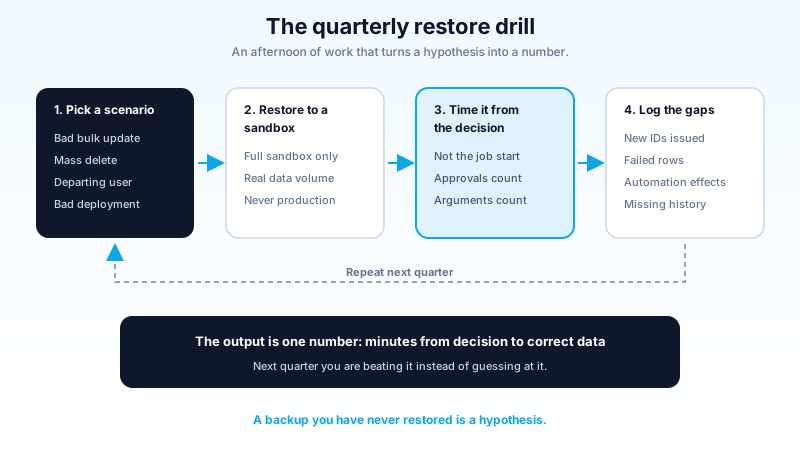
Run the drill, once a quarter
A backup you have never restored is a hypothesis. The drill is what turns it into a number, and it takes an afternoon.
Pick a scenario from the four that actually happen: a bad bulk update, a mass delete from a broken integration, deletions by a user on their way out the door, or a deployment that overwrote data along with metadata. Restore into a sandbox rather than production. A Full sandbox is the only type that carries production data volume, so it is the only place where your timings mean anything (the sandbox types breakdown covers what each tier actually copies).
Time the recovery from the moment someone decides to restore, not from the moment the job starts. The decision, the approvals, and the argument about which backup to use are usually most of the elapsed time, and they are the part a product datasheet will never tell you about.
Then count what came back wrong. New IDs, failed rows, automation side effects, missing history, downstream systems out of sync. Write the number and the gaps somewhere your successor will find them. Next quarter you are beating a number instead of guessing at one.
One thing that shortens every future drill: less data. If a restore takes three hours because the object holds 40 million rows, part of your recovery problem is a retention problem. Check storage usage in Setup, and move what you can into Big Objects or an archive tier. The archiving playbook covers which paths actually free space and which ones only move it around.
And if the loss came from outside rather than from a bad load, recovery is only the second question. The first is what was reachable, and for how long. The guest user audit is where that one starts.
What to do today
Open Setup, go to Data Export, and write down the date of your most recent completed export. The distance between that date and today, in days, is your real recovery point objective for every object in the org. Send that number to whoever signed the business continuity plan, and find out which of you was working from the wrong assumption.
About the Author
Dipojjal Chakrabarti is a B2C Solution Architect with 29 Salesforce certifications and over 13 years in the Salesforce ecosystem. He writes and edits salesforcedictionary.com, published by KineticBit Inc., to help admins, developers, architects, and cert/interview candidates sharpen their fundamentals. More about Dipojjal.
Share this article
Sources
- Restore Records with Salesforce Backup (Salesforce Help)
- Enable Extended Recycle Bin Retention (Salesforce Help)
- Introducing the Future of Salesforce Data Protection: Backup & Recover Next (Salesforce)
- Enterprise Backup and Recovery Software (Salesforce)
- Ultimate Guide to Salesforce Backup Solutions (Salesforce Ben)
Related dictionary terms
Practise it
Five questions on Salesforce certifications
Exam-style questions with an explanation after each one. No account needed, and your answers build a weak-topic map once you have one.
Keep reading

Salesforce Data Archiving in 2026: What Actually Frees Storage and What Just Moves the Problem
Setup says 94% data storage and somebody suggests buying more. Here is where the space actually went, the four archiving paths ranked by cost and pain, and the Big Object index rule you cannot undo.

The Salesforce Guest User Audit: Finding What Your Experience Cloud Site Gives Away
Your public site answers unauthenticated requests with real records, and nothing in Salesforce is broken. Here is the guest user audit that finds the exposure, ranked by how much data each fix takes off the internet.
Salesforce Sandbox Types Explained: Developer, Developer Pro, Partial Copy & Full
Four sandbox types, four use cases. Here is the 2026 reference: storage, refresh, cost, license. Plus the templates, masking, and refresh strategies that keep environments healthy.
Comments
No comments yet. Start the conversation.
Sign in to join the discussion. Your account works across every page.