
Campaign
A Campaign in Salesforce is a marketing program record: an email send, a webinar, a trade show, a paid ad flight, a content syndication push, or any other outreach effort that produces Leads and influences Opportunities.
Definition
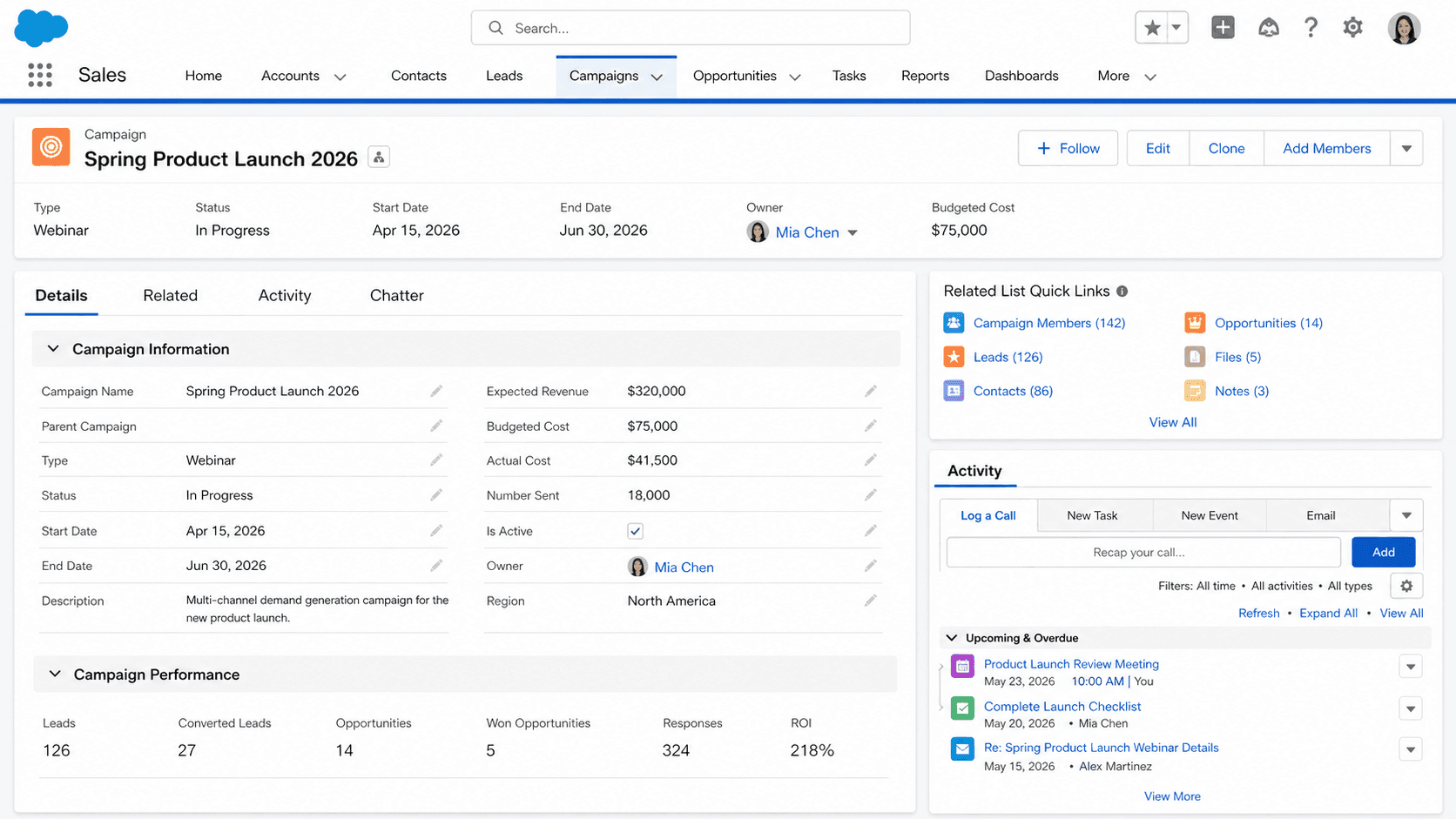
A Campaign in Salesforce is a marketing program record: an email send, a webinar, a trade show, a paid ad flight, a content syndication push, or any other outreach effort that produces Leads and influences Opportunities. Campaigns hold the metadata for the program (Name, Type, Status, Start and End Date, Budgeted Cost, Actual Cost, Expected Response, Expected Revenue) and they hold a roster of CampaignMember records that ties every Lead and Contact who participated back to the program.
Campaigns matter because they are how marketing makes its case for budget. Without Campaign records, the question "did the trade show we spent forty thousand dollars on produce any pipeline" has no answer in Salesforce. With Campaign records and a working Campaign Influence model, the same question turns into a report. The Campaign object is one of the more underused parts of Sales Cloud in B2B orgs, partly because marketing teams use dedicated tools like Pardot or Marketing Cloud and assume those tools cover the attribution job. They do not. Pardot and Marketing Cloud track engagement; native Salesforce Campaigns track attribution to revenue.
How Campaigns drive marketing attribution in Salesforce
CampaignMember
CampaignMember is the bridge between a Campaign and the Leads or Contacts who participated. Each CampaignMember row carries a Status (Sent, Responded, Registered, Attended, No Show, plus whatever custom statuses your org adds), a HasResponded flag derived from Status, and a FirstRespondedDate set the moment the member's status moves to a responded value. CampaignMember Status sets are per-Campaign-type, which means a webinar Campaign and a trade-show Campaign can have completely different status taxonomies even though they both use CampaignMember. Configure the status sets up front through Setup > Campaign Member Statuses or through the Campaign record itself, because rebuilding them after the campaign has launched usually loses the historical state of members already marked.
Campaign Influence
Campaign Influence is the multi-touch attribution model that turns Campaign membership into deal credit on Opportunities. The classic Salesforce Campaign behavior is single-touch: a Contact has a Primary Campaign Source, and any Opportunity that Contact converts into inherits that single Campaign in the CampaignId field. Single-touch attribution undercounts the campaigns that actually moved the deal, especially in long enterprise cycles with five or more touches per buyer. Campaign Influence (Customizable Campaign Influence in Lightning) lets you configure multi-touch models: even-weight, first-touch, last-touch, or fully custom with weights per touch. The configuration requires admin setup; the default Customizable Campaign Influence model assigns one hundred percent credit to the most-recent campaign, which is also single-touch in practice. Configure the model your marketing team actually uses, or accept that attribution reports are fiction.
Campaign Hierarchy
Campaign Hierarchy lets you nest campaigns under a parent Campaign to roll up metrics across a coordinated program. Setup > Campaigns > Settings allows up to five levels of parent-child nesting, and the ParentId field on Campaign creates the relationship. Campaign Hierarchy rollups (NumberOfLeads, NumberOfContacts, AmountAllOpportunities, AmountWonOpportunities) automatically aggregate across the hierarchy, which is how an org gets a "Q1 Demand Gen Program" parent campaign that rolls up the metrics of eight individual email, webinar, and event children. Most orgs underuse this; once teams discover it, the question becomes how to retroactively organize a year of orphan campaigns into hierarchies without breaking historical reporting.
The Active flag
Active flag controls whether a Campaign appears in lookup fields, picklists, and reports. Inactive campaigns (IsActive=false) stay in the org as historical records but stop showing up in the Campaign Source picklist on Lead, in the Primary Campaign Source field on Opportunity, and in Campaign Member statuses for new members. The most common Campaign hygiene problem in long-running Salesforce orgs is a Campaign picker with three hundred entries because nobody marks finished campaigns inactive. Build a monthly Campaign-cleanup job that flips IsActive based on end date, or train marketing to do it as part of the campaign close-out process.
Web-to-Lead and Campaign attribution
Web-to-Lead integration with Campaign is one of the cleaner native attribution paths. The Web-to-Lead form HTML supports a hidden Campaign_ID field that ties the inbound Lead to a specific Campaign at creation, which means the Lead has a Campaign attribution before any salesperson touches it. Pair this with UTM-parameter capture (UTM_Source, UTM_Medium, UTM_Campaign written to custom Lead fields) and you have a complete capture trail from the marketing tactic to the Lead record. Without the Campaign_ID hidden field, you are reliant on either Marketing Cloud sync or manual attribution, both of which produce noisier data.
Marketing-tool sync (Pardot, MCAE, Marketing Cloud)
Marketing-tool integration with Campaign is its own design decision. Pardot, Marketing Cloud, and Marketing Cloud Account Engagement (the rebranded Pardot) all sync campaign membership back to Salesforce Campaigns differently. The Pardot Connector creates Salesforce Campaigns from Pardot's own Campaign object; Marketing Cloud sends membership through Marketing Cloud Connect; MCAE uses a different sync layer entirely. The unifying truth: marketing-tool campaigns and Salesforce Campaigns are not the same object, and marketing-tool-side activity does not automatically update the Salesforce side. Build an explicit sync process or accept that one half of attribution data is missing. The split also creates a recurring debate about which system is the system of record; most enterprise orgs settle on Salesforce Campaign as the reporting layer and the marketing tool as the execution layer.
Campaign reporting
Reporting on Campaigns uses three primary report types: Campaigns with Leads, Campaigns with Contacts, and Campaigns with Opportunities. The first two count members; the third counts deals. Campaigns with Influenced Opportunities is the Customizable Campaign Influence report type, which surfaces multi-touch attribution. Most "Campaign ROI" dashboards build off these report types, calculating Cost Per Lead, Cost Per Opportunity, and Marketing-Sourced Pipeline by dividing campaign cost fields by member or opportunity counts. The dashboards are only as good as the cost fields, which is why marketing operations spends so much time policing whether Actual Cost gets updated after the campaign runs.
How to create a Campaign
Creating a Campaign is the first step in tracking any marketing program in Salesforce. Most orgs create Campaigns ahead of the program launching, populate them with target Leads or Contacts, then track responses as members engage.
- Open the Campaigns tab
From the App Launcher, search Campaigns and open the list view. Most marketing orgs filter the default view to My Active Campaigns or All Active Campaigns rather than the global list.
- Click New
The New button sits at the top of the list view. If your profile lacks Create on Campaign, the button is hidden; marketing-user permission sets typically grant this.
- Pick a record type if prompted
Many marketing orgs use record types to separate Email, Event, Webinar, Trade Show, Content Syndication, and Paid Advertising, each with its own page layout and required fields. Pick the one that matches the program.
- Fill the name, type, and dates
Use a consistent naming convention. "2026-Q1-Email-ProductLaunch" reads cleanly across reports. Type drives downstream segmentation. Start and End Dates drive Campaign Influence windows.
- Set Budgeted Cost and Expected metrics
Budgeted Cost is the planned spend; Expected Response is the rate marketing forecasts; Expected Revenue is the projected pipeline. These drive ROI calculations before the campaign runs, so populate them before sending out invitations.
- Configure Member Statuses
Edit the Campaign Member Status set on the Campaign before adding members. Add the statuses your campaign actually uses (Sent, Bounced, Responded, Registered, Attended). Default statuses rarely fit any specific tactic.
- Save and add members
Click Save. Add members through the Add Members button (single, list, or report-driven). Track responses as the campaign runs.
Required. Marketing-attribution reports group on Campaign Name; consistent naming is the single biggest input to clean reports.
Required by most orgs (not platform-required). Drives report segmentation and Member Status defaults.
- Campaign Member Status sets are per-Campaign-type, configured on the Campaign record. Setting up a status set after members have been added means rebuilding historical state by hand.
- Campaign Influence requires admin setup. Default Customizable Campaign Influence assigns one hundred percent credit to the most-recent campaign; without explicit configuration, multi-touch attribution is single-touch in disguise.
- Inactive campaigns stay in lookup pickers if IsActive is not toggled off. Build a monthly hygiene job that marks completed campaigns inactive based on End Date.
- ROI fields (Actual Cost, NumberOfLeads, AmountWonOpportunities) only auto-populate from member and opportunity activity. Forgetting to update Actual Cost after the campaign runs distorts every CPL and CPA calculation downstream.
Prefer this walkthrough as its own page? How to Campaign in Salesforce, step by step
Trust & references
Cross-checked against the following references.
- Campaigns (opens in new tab)Salesforce Help
- Customizable Campaign Influence (opens in new tab)Salesforce Help
Straight from the source - Salesforce's reference material on Campaign.
- Campaigns (opens in new tab)Salesforce Help
- Campaign (Object Reference) (opens in new tab)Salesforce Developers
About the Author
Dipojjal Chakrabarti is a B2C Solution Architect with 29 Salesforce certifications and over 13 years in the Salesforce ecosystem. He writes and edits salesforcedictionary.com, published by KineticBit Inc., to help admins, developers, architects, and cert/interview candidates sharpen their fundamentals. More about Dipojjal.
Test your knowledge
+5 pts / dayQ1. What does Campaign Influence add over the classic single-touch Campaign behavior?
Q2. What does marking a Campaign inactive (IsActive = false) do?
Q3. Which report type surfaces multi-touch attribution for Campaigns?
Discussion
Loading discussion…