
Heroku AppLink in 2026: Agentforce Actions That Apex Was Never Going to Run
How AppLink publishes a Heroku app as an agent action, the three user modes that decide what your agent can read, and whether to bet on a platform in maintenance mode.
The agent works right up until someone asks it for the document. It answers the question, pulls the right records, picks the right action, and then hits the step that has to render a 40-page policy PDF. Heap size limit. The customer gets an apology message and you get a stack trace.
You already know the fix everyone suggests: chunk it, move it to Queueable, cache more aggressively. You have done all three. The problem is not the implementation. Apex is a good language for orchestrating CRM logic and a poor one for computation, and no amount of tuning changes the fact that you are running a rendering engine inside a multi-tenant execution context that gives you 12 MB of heap and 60 seconds of CPU.
Heroku AppLink is the officially documented way out of that box. It also comes with a question about the platform underneath it that nobody selling you on it wants to open. Both halves of that are in this article.
What AppLink actually does
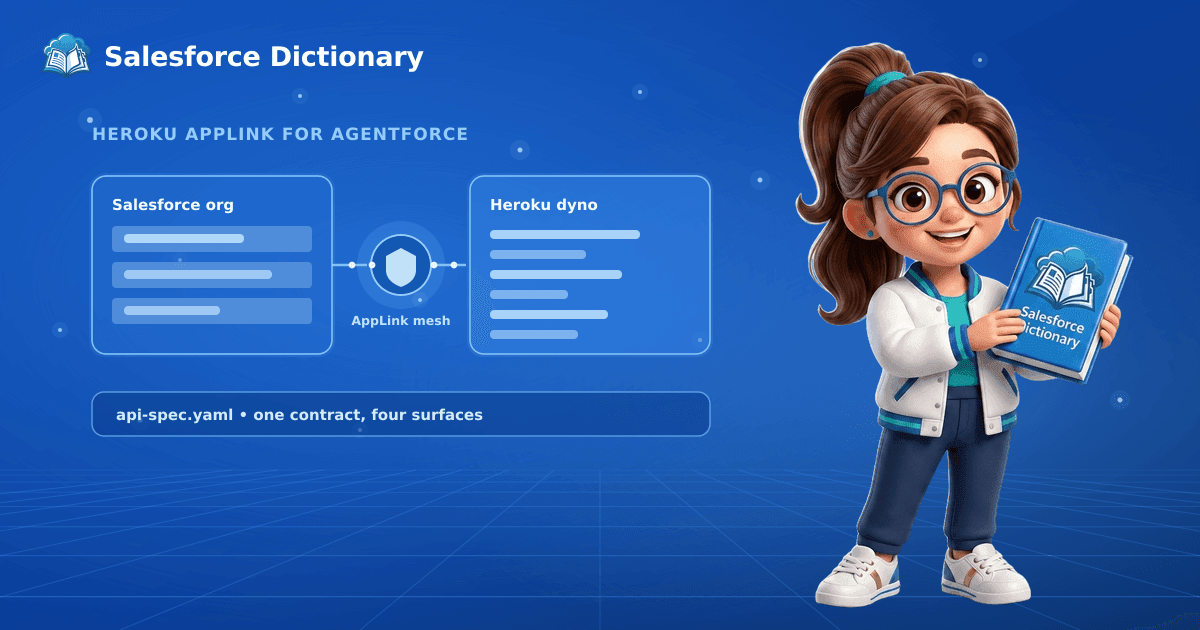
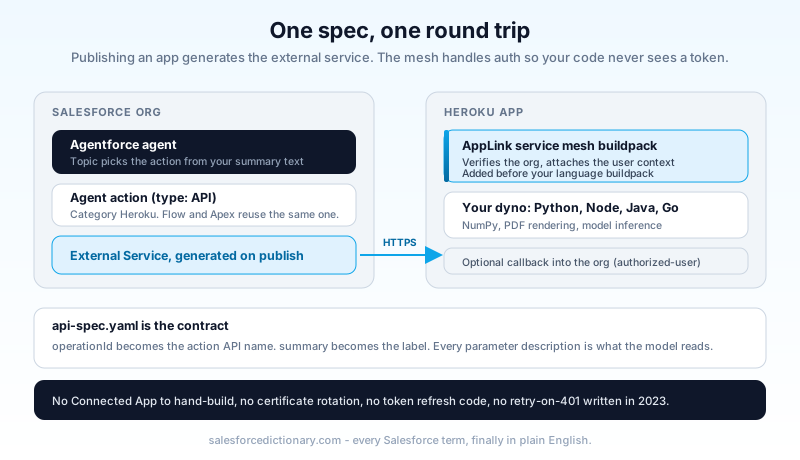
AppLink is a Heroku add-on that publishes your Heroku app into a Salesforce org as an External Service. One OpenAPI spec, four consumption surfaces: an agent action in the Agentforce Builder asset library, an invocable action in Flow, a generated Apex class, and a data action target in Data Cloud.
Five pieces do the work.
The add-on (heroku-applink) provisions on your Heroku app and holds the connection state. The service mesh buildpack sits in front of your dyno as a proxy: it validates the inbound request, verifies it really came from the connected org, and attaches the Salesforce user context before your code sees it. A connection is the trusted link between one Heroku app and one Salesforce org. An authorization stores a specific user's token for the cases where Heroku starts the conversation instead of Salesforce. The api-spec.yaml describes your endpoints in OpenAPI 3.0 and is the contract everything else is generated from.
What that removes is the part teams consistently underestimate. No Connected App to hand-configure, no certificate rotation, no Named Credential plumbing, no token refresh code, no retry-on-401 logic that somebody wrote in 2023 and nobody has touched since. The publish command creates the external client app and the permission set for you, and the admin can see both in Setup, which matters the first time security asks what this thing is allowed to touch.
Wiring one up
The setup is genuinely short. Assume a Python service that builds amortization schedules using NumPy, which is exactly the kind of thing Apex should never be asked to do.
heroku plugins:install @heroku-cli/plugin-applink
heroku addons:create heroku-applink -a pricing-engine
heroku buildpacks:add heroku/heroku-applink-service-mesh
heroku buildpacks:add heroku/python
git push heroku main
heroku salesforce:connect production-org -a pricing-engine
Order matters on the buildpacks. The service mesh has to run in front of your language buildpack, so add it first.
Then publish:
heroku salesforce:publish api-spec.yaml \
  --client-name PricingEngine \
  --connection-name production-org \
  --authorization-external-client-app-name PricingEngineApp \
  --authorization-permission-set-name PricingEnginePermissions
The spec is where your agent's behavior actually lives:
openapi: 3.0.0
info:
  title: Pricing Engine
  version: 1.0.0
paths:
  /amortization:
    post:
      operationId: BuildAmortizationSchedule
      summary: Build a full amortization schedule for a quote
      requestBody:
        content:
          application/json:
            schema:
              type: object
              properties:
                principal:
                  type: number
                  description: Loan principal in the quote currency
                termMonths:
                  type: integer
                  description: Term length in whole months
Three mappings decide whether the agent uses this correctly. operationId becomes the action's API name. summary becomes the label an admin sees in the builder. Every parameter description becomes the instruction the model reads when it decides what to collect from the user.
Write those descriptions as prose aimed at someone who has never seen your API, because that prose is the only thing standing between a well-behaved agent and one that calls your pricing endpoint with a customer's phone number in the principal field. This is the single most common cause of a "the agent picked the wrong action" ticket, and it is fixed in the YAML, not in the agent.
After publishing, two permission grants are needed before anyone can invoke it: the generated permission set (PricingEnginePermissions above) and the Manage Heroku AppLink system setting on a permission set of its own. Miss the second and the action shows up in Setup, looks correctly configured, and fails at runtime with a message that does not mention permissions.
Then create the action itself in Setup under Agentforce Assets, with Reference Action Type set to API and Reference Action Category set to Heroku, and add it to a topic. The custom Agentforce actions guide covers the topic and instruction side of that in more depth.
The three user modes, and the one teams get wrong
This is the security decision, and it is made in the spec rather than in Salesforce, which is exactly why it gets made carelessly.
user mode runs with the context of the person who triggered the action. Field-level security applies. Sharing rules apply. If the rep cannot see the record, neither can your Heroku app. This is the default and it is correct for anything a human initiated.
user-plus mode starts from the same user context, then layers on a session-based permission set you declare in the OpenAPI spec. The elevation lasts for the call and disappears afterward. The real use case is narrow and worth naming: a service rep needs to run a discount calculation that reads a DiscountFloor__c field they are not allowed to see, and the answer is a number, not the field. They get the number without getting permanent access to the field.
authorized-user mode ignores the caller entirely and runs as a dedicated user whose token you stored with heroku applink:authorizations:create. It is the only mode available when Heroku initiates the call, so scheduled jobs, worker dynos, and multi-org sync all live here.
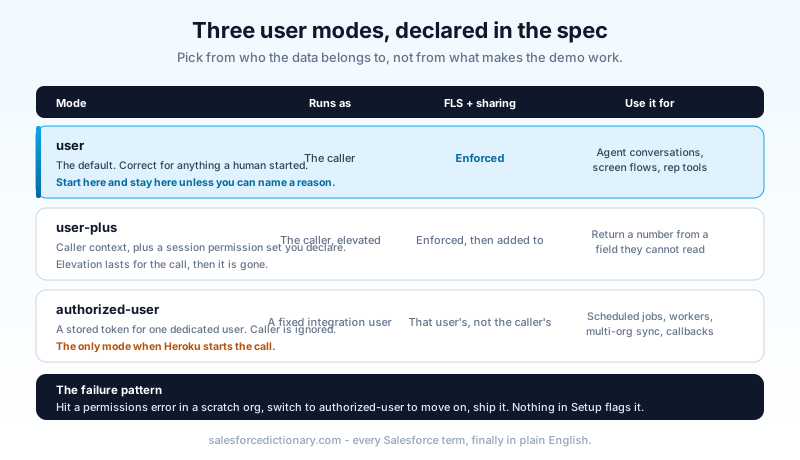
The failure pattern is predictable. A developer builds in a scratch org, hits a permissions error in user mode on day two, switches to authorized-user because it makes the demo work, and never switches back. Six months later there is an agent action running as an integration user with a permissive profile, invoked from a conversation with anyone who can open the chat. Nothing in Salesforce flags this. The action looks the same in Setup either way.
Pick the mode from who the data belongs to, and write the reason in the spec as a comment. If the answer is "the person talking to the agent", it is user. If someone argues for authorized-user on an agent action, ask them which customer's data the agent should be able to read when the wrong customer is on the line.
The limits that shape the architecture
Four numbers do most of the design work here, and one of them causes an outage the first week if you miss it.
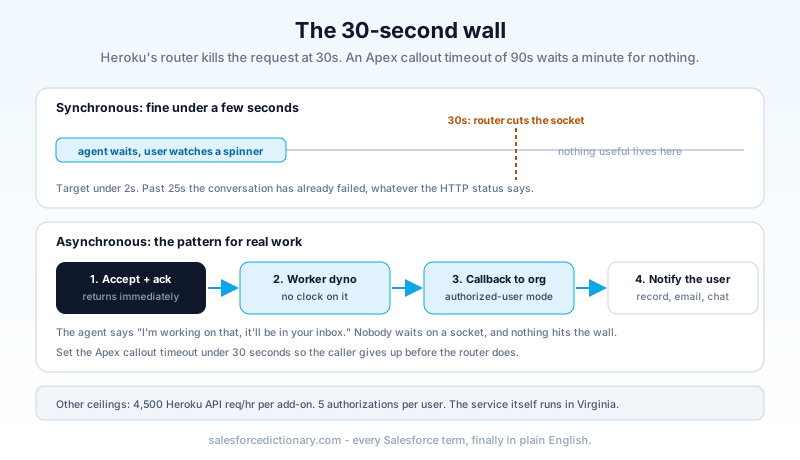
Heroku's router enforces a hard 30-second timeout on HTTP requests. Apex callout timeouts are configurable from 10 to 120 seconds, so an Apex class set to 90 seconds will sit and wait for a response the router killed an entire minute earlier. Set your Apex timeout below 30. Better, design so nothing gets close: an agent conversation where the user waits 25 seconds for a reply has already failed, whatever the HTTP status says.
For work that genuinely takes longer, the supported pattern is to accept the request, return an acknowledgement immediately, do the work on a worker dyno, and call back into Salesforce with the result using an authorization in authorized-user mode. The agent gets "I'm working on that, it'll be in your inbox", the user gets a real answer, and nothing waits on a socket.
4,500 Heroku API requests per hour, per add-on. That is generous for agent traffic and tight if you point a bulk process at it. Share one add-on across several apps and they share the ceiling.
Five distinct authorizations per Salesforce user. The sixth revokes the oldest one. In a large org with many AppLink apps, users start silently losing access to the app they used least recently, which surfaces as an intermittent failure nobody can reproduce.
Publish payload caps: 10 metadata files, 3 MB of uncompressed YAML, 10 MB of JSON, 20 MB total. A generated spec for a large API hits these, and the answer is to publish the operations Salesforce actually needs rather than your whole surface area. Your agent does not need 200 endpoints.
Two more that are easy to forget. The AppLink service itself runs in Virginia, so a dyno in Dublin adds a transatlantic round trip to every call before your code runs. And once your app calls back into the org, you are spending that org's API allocation like any other integration, so use the Bulk API for anything with volume. Our governor limits cheat sheet has the allocation numbers.
When this is the wrong tool
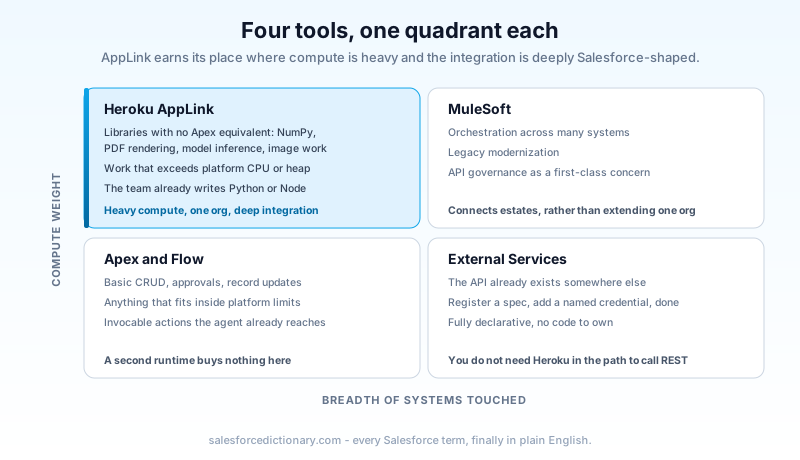
AppLink earns its place in one quadrant: high computational complexity plus deep Salesforce integration. Outside that quadrant something cheaper is usually correct, and Salesforce's own guidance says so.
Use Apex or Flow for basic CRUD, standard approvals, and record updates. If the logic fits comfortably inside platform limits, adding a second runtime and a second deployment pipeline buys you nothing but a second thing to be on call for.
Use External Services with a Named Credential when you are calling an API that already exists somewhere else and the complexity is low. You do not need Heroku in the path to call a REST endpoint from Flow. External Services on its own handles that, and it is fully declarative.
Use MuleSoft for enterprise orchestration across many systems, legacy modernization, and anything that needs API governance as a first-class concern. AppLink extends Salesforce with your code; MuleSoft connects estates.
Use AppLink when you need a library that has no Apex equivalent (scientific computing, machine learning inference, PDF and image processing), when the work exceeds platform CPU or heap, when you need sub-second response times under load that Apex cannot promise, or when the team's real skill is Python or Node and rewriting it in Apex would be a translation project with no business value.
Where the debugging happens now
The first production incident on an AppLink action is usually not a code problem. It is an org-chart problem, and it shows up the moment something fails.
The Salesforce debug log ends at the callout. It records that an external service was invoked and what came back. Everything after that (the request the mesh validated, the user context it attached, the exception your Python threw on row 4,000) lives in heroku logs, on a platform your Salesforce admin has no account on. Meanwhile the person who noticed the failure is a service manager watching an agent apologise to a customer.
Decide who holds the Heroku account before you publish, not during the incident. Two practical habits make this survivable. Log the Salesforce request identifier your app receives on every request, so a conversation in Agentforce can be traced to a line in the dyno log without guessing from timestamps. And return real error bodies rather than a bare 500, because the agent will read whatever you send back and paraphrase it to the customer. "Unable to price a term over 480 months" is a sentence an agent can handle gracefully. A stack trace is not.
Environments need the same deliberate treatment. A connection points at one org, and mixing sandbox and production orgs on the same Heroku app is a documented way to confuse yourself: use https://test.salesforce.com for sandboxes and scratch orgs, https://login.salesforce.com for production, and give each environment its own app. Publishing is part of your deployment, not a one-off setup step, so the publish command belongs in the pipeline next to the metadata deploy. Change the spec, republish, and the external service and its generated actions update in the target org.
The part nobody puts in the pitch deck
On February 6, 2026, Nitin T Bhat, Heroku's Chief Product Officer, published "An Update on Heroku". Heroku moved to a sustaining engineering model: stability, security, reliability, and support continue, new feature development does not. Enterprise Account contracts are no longer sold to new customers, though existing ones can renew. Credit-card customers see no change to pricing, billing, or service.
So the situation is this. AppLink is Heroku's documented, generally available path for running custom Agentforce compute, and the platform it runs on stopped receiving new investment six months ago. Both statements are true at once, and any advice that skips one of them is selling something.
What it means in practice:
What shipped is what you get. Plan against today's capabilities and today's limits. The 30-second timeout is not going to become 60.
New enterprise buyers are blocked. If you are not already on a Heroku Enterprise agreement, that door is shut. Credit-card accounts still work, which is fine for a team and awkward for a bank's procurement process.
Existing production apps are supported. Sustaining engineering is not a shutdown notice, and treating it as one is its own mistake. Plenty of infrastructure runs for years in exactly this posture.
The sane response is architectural rather than emotional. Keep the business logic in an ordinary container with no Heroku-specific code beyond the service mesh buildpack. Keep the OpenAPI spec as the real contract. Do that, and moving to another host behind External Services and a Named Credential is a redeploy and a permission set change, not a rewrite. That portability costs you nothing today and it is the entire hedge.
I would still build a new agent action on AppLink this quarter if the workload genuinely needs off-platform compute, because the alternative is hand-rolling the auth layer AppLink gives you for free and I have watched teams lose three weeks to that. I would not migrate a working Apex integration onto it just to modernize.
Start with the endpoint you already have
Find the one piece of logic in your org that is currently a compromise: the batch job that exists because a synchronous version blew the heap limit, the report someone exports to Excel because the calculation cannot run in Apex, the integration that calls out to a service you already run. That is your candidate. Wrap it in an OpenAPI spec, publish it to a sandbox with user mode, and time the round trip. If it comes back under two seconds, you have your first real agent action and a number to take to whoever asks whether this is worth it.
About the Author
Dipojjal Chakrabarti is a B2C Solution Architect with 29 Salesforce certifications and over 13 years in the Salesforce ecosystem. He writes and edits salesforcedictionary.com, published by KineticBit Inc., to help admins, developers, architects, and cert/interview candidates sharpen their fundamentals. More about Dipojjal.
Share this article
Sources
Related dictionary terms
Practise it
Five questions on Platform Developer I
Exam-style questions with an explanation after each one. No account needed, and your answers build a weak-topic map once you have one.
Keep reading

Build Custom Agentforce Actions
Agentforce agents can call three types of custom actions: Apex invocable methods, autolaunched Flows, and External Service operations. Here is how to build each one correctly, what the Trust Layer enforces, and where governor limits bite.

Salesforce External Services: Calling Any REST API From Flow Without Code (2026)
External Services turns an OpenAPI spec into Flow-ready invocable actions. Here is how to register a spec, handle authentication, call the API from Flow, and wire it into an Agentforce action.

Salesforce Governor Limits Explained: The 2026 Cheat Sheet (with Examples)
The canonical 2026 cheat sheet: SOQL/DML/CPU/heap limits, sync vs async, the most-hit limits in production, and 10 patterns to keep your org out of the red.
Comments
No comments yet. Start the conversation.
Sign in to join the discussion. Your account works across every page.