
Agentforce Triggered Agents Explained: How Salesforce's Event-Driven AI Agents Work
What fires a triggered agent, how the Atlas Reasoning Engine decides what happens next, and where it beats or loses to a plain record-triggered flow.

You come into the office and an enterprise opportunity that has been stuck at Negotiation for eleven days has already been reassigned. A risk summary is attached, drafted from the last three email threads and a competitor field your Data Cloud pipeline populated overnight. Nobody wrote a flow for "stalled at Negotiation for ten-plus days." Nobody clicked a button. Something decided that was worth acting on, at 6:42 AM, and it acted.
That something is a triggered agent, the feature pulling most of the attention out of Salesforce's Summer '26 release. It is a genuinely different animal from the automation admins have been building for the last decade, and the difference is not cosmetic. It changes who is responsible when the wrong thing happens.
What a triggered agent actually is
Every Agentforce agent you have met so far waits for you. You open a chat window, type a question, and the Agentforce Service Agent or Help Agent responds. A human starts the conversation.
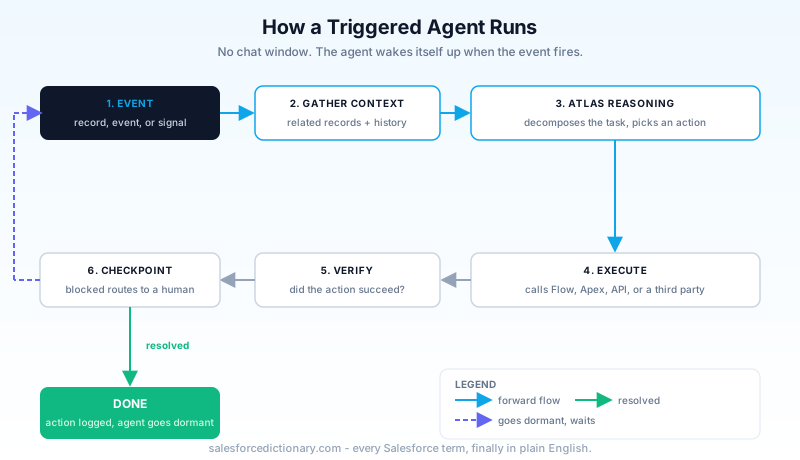
A triggered agent skips that step. It sits dormant, subscribed to a business event, and wakes itself up when that event fires. No chat window. No prompt. The first the reasoning engine even mentions to you is a completed action, or, if it is designed well, a request to check its work.
Think of the distinction this way: a chat agent is a colleague you call over to your desk. A triggered agent is the colleague who notices your monitor flashing red from across the room and walks over on their own.
The four things that can wake one up
A triggered agent needs an event to attach to. In Summer '26, that event comes from one of four sources:
- A record change. A field update, a new record, a deletion, anything a record-triggered flow already listens for.
- A Platform Event. A custom or standard Platform Event message published from Salesforce or an external system.
- A Change Data Capture signal. Change Data Capture publishing a change stream off a monitored object.
- A Data Cloud signal. A calculated insight crossing a threshold, or a record entering or leaving a Data 360 segment.
That fourth one is the source that did not exist for classic automation. A workflow rule or a record-triggered flow can only see the object in front of it. A Data Cloud-triggered agent can react to a pattern computed across every system you have unified into Data 360: a customer's support ticket volume spiking against their subscription tier, a churn score crossing 70, a web session showing cart abandonment three times in a week. None of that lives on a single Salesforce record, which is exactly why it was out of reach for a record-triggered flow.
Admins do not need a separate console to wire this up. Flow Builder ships a "Create Agent" element you can drop straight onto a canvas, so a trigger you already understand, an entry condition on a record-triggered flow, can hand off to an agent mid-path instead of only ever calling deterministic elements.
How the reasoning layer decides what happens next
Detecting the event is the easy part. Salesforce has been publishing Platform Events and CDC change streams for years. What is new is what happens between detection and action.
Once an event fires, an orchestration layer gathers context: related records, customer history, dependent fields, whatever the agent's grounding sources point to. That payload gets handed to the Atlas Reasoning Engine, the same reasoning runtime behind conversational Agentforce agents. Atlas breaks the situation into smaller tasks, decides an order of operations, and picks from whatever actions the agent has been scoped to: a Flow, an Apex invocable, a REST callout, a third-party API.
This is the part that separates a triggered agent from a fancy trigger. A record-triggered flow with five decision elements still runs the same five decisions every time, in the same order, for every record that meets the entry criteria. A triggered agent reasons about the specific record in front of it and can take a different path for two records that technically meet the same entry condition, because the reasoning step is evaluating context, not just checking a boolean.
After it acts, the agent is supposed to verify the outcome. Did the email send. Did the case actually get reassigned. Did the API call return success. If a business rule blocks it, or the verification step fails, a properly configured agent redirects, retries a different path, or drops the record into a human queue instead of failing silently. That escalation path is not automatic. You have to build it, and I have seen teams skip it because the demo never shows what happens when the agent gets stuck.
Triggered agents vs. the automation you already have
You are not choosing between "old, boring automation" and "new, smart automation." You are choosing the right tool for a specific kind of decision, and getting this choice wrong is the single most common mistake teams make in their first quarter with triggered agents.
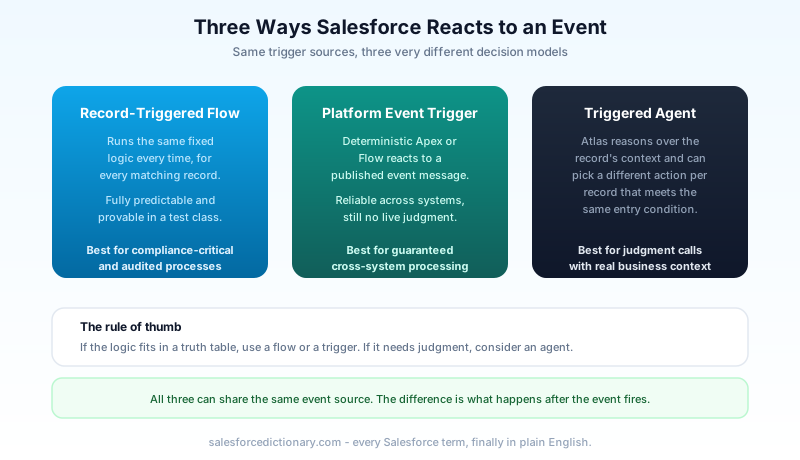
A record-triggered flow, or a Platform Event subscriber written in Apex, executes the exact logic it was assigned. Given the same inputs, you get the same outputs, every time, and you can prove that in a test class. That predictability is a feature, not a limitation, and it is exactly why compliance-sensitive processes, approval routing, financial postings, anything with an audit requirement, belong on deterministic automation and not on a reasoning agent.
A triggered agent trades some of that predictability for judgment. It is a better fit when the "correct" action genuinely depends on context that would take forty branching decision elements to encode by hand: does this stalled deal need a senior AE, a discount offer, or nothing at all, depending on the account's history, the competitor mentioned in the last email, and the rep's current pipeline load. A flow can check three of those fields. It cannot read the email and decide what "mentioned a competitor" means in context. An agent can attempt that, imperfectly, and get better as its instructions and grounding improve.
If you can write the business rule as a truth table, use a flow. If the business rule is "use your judgment, here is what good judgment looks like," that is the shape of problem a triggered agent is built for.
Setting one up without breaking anything
The mechanics are more approachable than the concept suggests:
- Turn on Data 360. Even if the trigger source is a plain record change, several of the richer context sources an agent grounds on live in Data Cloud.
- Enable Agentforce in Setup, under the Agentforce Agents section, if it is not already on for your org.
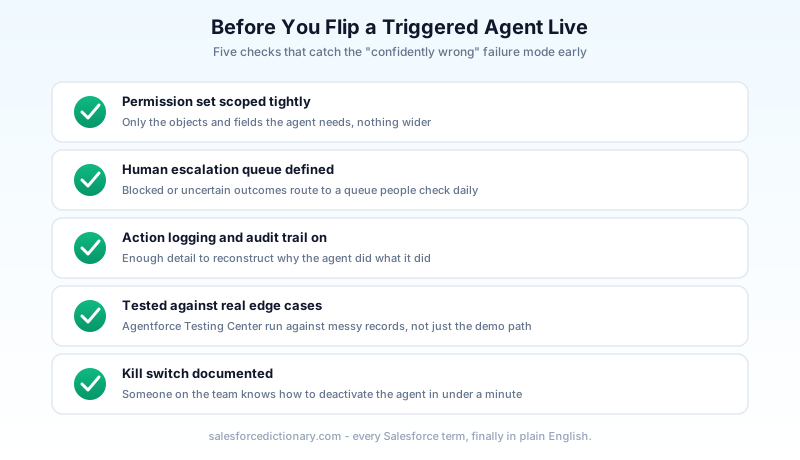
- Build the agent in Agent Builder, scoping its topics and actions tightly. Give it fewer capabilities than you think it needs at first. You can widen scope later; you cannot easily undo an action an over-permissioned agent already took.
- Wire the trigger, either as a native triggered-agent event subscription or through the "Create Agent" element inside a record-triggered flow you already have.
- Test it in Agentforce Testing Center before it touches production data. Testing Center runs the agent against scenario libraries instead of your live org, which is the only sane way to catch a bad decision before a real customer does.
That fifth step is not optional, and it is the one teams skip when a deadline is close. An agent that reasons differently per record also fails differently per record, which means a handful of manual spot-checks will not catch what a structured test suite will. Build your scenario library from real edge cases, the stalled deal with no contact activity at all, the case from a customer already mid-churn, not just the clean happy-path record you used in the demo.
Permission scoping deserves its own line item, not a bullet inside step three. Give the agent's running user a permission set built for exactly the objects and fields it needs, nothing wider. An agent that can technically edit every field on Opportunity because it inherited a broad profile will eventually touch a field it had no business touching, and you will not find out until someone asks why a Close Date moved.
The failure mode nobody puts in the demo
Here is the honest part. A triggered agent does not fail like a flow fails. A flow with bad logic throws an error, or it silently does the wrong thing in a way you can trace by reading five decision elements. A triggered agent with bad grounding data does the wrong thing confidently, in natural language, often before a human even knows the event fired.
The most common cause is not a reasoning bug. It is dirty data. An agent reading a stale "Renewal Risk" field that nobody has updated in six months will reassign accounts based on a number that stopped meaning anything a long time ago. The agent is doing exactly what it was built to do. The input was wrong. This is why the setup steps above put permission scoping and a human escalation queue before "go live," not after.
A working escalation path matters more here than in traditional automation, because a flow failure usually stops the process. An agent that hits an edge case it cannot resolve keeps going unless you explicitly built a stop. Route uncertain outcomes to a queue a human checks daily, log every action the agent takes with enough detail to reconstruct its reasoning, and treat the Einstein Trust Layer's audit trail as something you actually read, not a checkbox you enabled once.
Three patterns worth stealing
Reading about the architecture only gets you so far. These are the three patterns showing up most often in early Summer '26 deployments, and each one maps cleanly to one of the four event sources above.
Sales: the stalled-deal agent. Trigger source is a record change (days since last stage update crossing a threshold) combined with a Data Cloud signal (a calculated insight tracking email response rate on the opportunity's contact role). Instead of a flow that just emails the owner "this deal is stale," the agent reads the account's history, checks whether a competitor was mentioned in recent activity, and drafts a specific recommendation: escalate to a senior AE, offer a time-boxed discount, or leave it alone because the account is mid-procurement and slow is normal for them.
Service: the escalation triage agent. Trigger source is a Platform Event published when a case's sentiment score drops or its SLA countdown crosses a threshold. Rather than a static assignment rule, the agent weighs case history, the customer's support tier, and whether similar cases from that account resolved cleanly last time, then decides whether this one needs a senior agent, a callback, or just a faster queue.
Marketing and Data Cloud: the segment-entry agent. Trigger source is a Data 360 segment membership change, a customer entering a "high churn risk" segment computed from usage data no single Salesforce record holds on its own. The agent checks whether that customer already has an open case or a pending renewal before deciding whether outreach is even appropriate right now, something a static journey in a marketing tool cannot easily do because it does not have that CRM context at decision time.
Notice what all three have in common: none of them fully automate the outcome. Each one narrows a judgment call down to a recommendation or a routed action, with a person still positioned to catch it before anything customer-facing happens. That is not a limitation of the technology. It is the correct shape for a first deployment.
Where to start this quarter
Do not pick your highest-stakes process for your first triggered agent. Pick something with real value and a soft landing if it gets something wrong: a case-escalation agent that drafts a summary and pings a Slack channel, not one that auto-closes cases. A stalled-deal agent that flags and recommends, not one that reassigns without a review window. Let it run for a month with logging on, read what it actually decided against what you expected, and only then widen its authority to act without a human glancing at the output first.
That review cycle is the real setup cost of a triggered agent, more than the Flow Builder configuration. Budget time for it before you flip the first one live, and pull the action log after week one whether or not anything looks broken.
About the Author
Dipojjal Chakrabarti is a B2C Solution Architect with 29 Salesforce certifications and over 13 years in the Salesforce ecosystem. He writes and edits salesforcedictionary.com, published by KineticBit Inc., to help admins, developers, architects, and cert/interview candidates sharpen their fundamentals. More about Dipojjal.
Share this article
Sources
Related dictionary terms
Practise it
Five questions on Agentforce Specialist
Exam-style questions with an explanation after each one. No account needed, and your answers build a weak-topic map once you have one.
Keep reading

Agentforce Testing Center: The Complete Guide to Testing Your AI Agents in 2026
Testing Center is the Agentforce tool for validating AI agents before they ship. Synthetic test users, conversation-level checks, custom evaluations, and DevOps quality gates. Here's how to use all of it.

The Complete 2026 Guide to Record-Triggered Flows in Salesforce
Record-triggered flows are the Salesforce automation default in 2026. This is the complete tutorial: before-save, after-save, scheduled paths, gotchas, and 5 worked examples.

Platform Events vs Change Data Capture vs Streaming API: The 2026 Event-Driven Salesforce Guide
Platform Events, Change Data Capture, and Streaming API all stream events out of Salesforce. They solve different problems. Decision matrix, replay strategy, limits, and 2026 best practices.

Salesforce Atlas Reasoning Engine: How Agentforce Agents Actually Make Decisions
Atlas is the reasoning engine behind Agentforce. Here is how it picks actions, loops through a problem, grounds on your data, and where its decisions go wrong.

Salesforce Multi-Agent Orchestration: The Complete 2026 Guide
In 2026, orgs run an average of 12 AI agents - half in isolated silos. Learn the primary-and-specialist architecture, Agent Fabric, and the A2A protocol that turn agent sprawl into coordinated enterprise AI.
Comments
No comments yet. Start the conversation.
Sign in to join the discussion. Your account works across every page.