
Chat Window
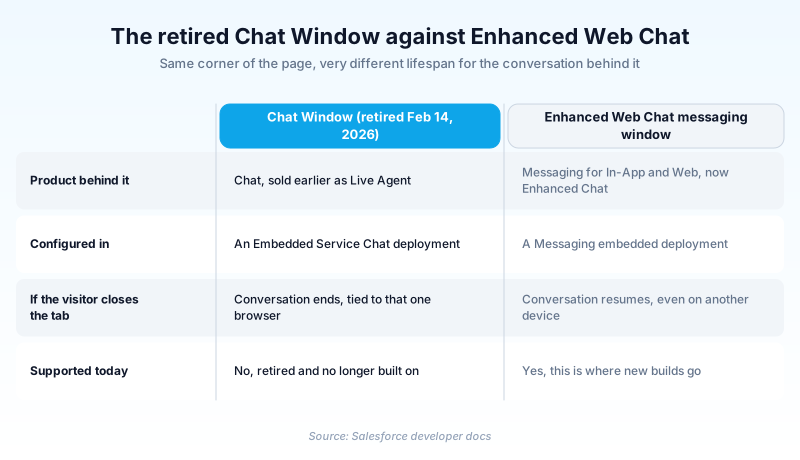
A Chat Window is the retired customer-facing panel of Salesforce Chat, the web chat channel sold earlier as Live Agent.
Definition
A Chat Window is the retired customer-facing panel of Salesforce Chat, the web chat channel sold earlier as Live Agent. It opened when a website visitor clicked an embedded chat button. Inside sat the running transcript, the typing box, and the agent's branding.
Salesforce retired the legacy chat product on February 14, 2026. The embedded Chat Window retired with it. The replacement is Messaging for In-App and Web, now published as Enhanced Chat: Enhanced Web Chat for websites, Enhanced In-App Chat for mobile.
The old developer guides are still online for Summer '26, which is why the term keeps turning up in inherited projects.
In plain English
“Picture a shop counter that only stayed open while you stood in front of it. Step away and the whole conversation was gone. Salesforce closed that counter in February 2026 and replaced it with one that remembers what you said.”
Worked example
A regional insurer ran a Chat Window on its claims page from an Embedded Service deployment. A visitor clicked the button and filled a three-field pre-chat form: First Name, Email, and Reason for Contact set to Claim status. The panel opened with the company logo while Omni-Channel found an agent. The transcript landed on a Live Chat Transcript record tied to the matched Contact. In March 2026 the team rebuilt the page on Enhanced Web Chat. The button moved to a Messaging deployment and the pre-chat fields carried across.
How the Chat Window was built and why it went away
It was generated, not hand-coded
Admins never edited the panel directly. They configured an Embedded Service deployment in Setup, and that deployment produced the JavaScript snippet the site dropped onto its pages. The snippet drew the window. Chat images, button display, status text and routing order were all deployment parameters. Two sites sharing one deployment looked identical unless a developer layered CSS on top.
Pre-chat, chat, post-chat
The developer guide split customization into three stages, and the split shows where things broke. Pre-chat gathered visitor information and set context for the agent. Its findOrCreate API mapped those answers onto a Contact or Case. It could also save them to the transcript and show the agent the record on arrival. The chat stage was the live transcript. Post-chat wrapped up the interaction and could auto-open a survey.
Session-bound by design, which is what finished it
The window held exactly one browser session. Close the tab or switch to a phone and the conversation was over. That was fine when chat meant a desktop visitor with fifteen spare minutes. It stopped being fine once people expected to reply an hour later from another device. Salesforce stopped shipping features for the channel well before the retirement date.
What to do if you inherited one
Nothing supported runs on the old channel now. Rebuild the surface as an Enhanced Web Chat deployment, map the pre-chat fields across, and point routing at the same Omni-Channel queues. Keep the old Live Chat Transcript records for reporting, and do not spend a sprint restyling a retired window.
Trust & references
Cross-checked against the following references.
Straight from the source - Salesforce's reference material on Chat Window.
Hands-on resources to go deeper on Chat Window.
About the Author
Dipojjal Chakrabarti is a B2C Solution Architect with 29 Salesforce certifications and over 13 years in the Salesforce ecosystem. He writes and edits salesforcedictionary.com, published by KineticBit Inc., to help admins, developers, architects, and cert/interview candidates sharpen their fundamentals. More about Dipojjal.
Test your knowledge
+5 pts / dayQ1. When did Salesforce retire the legacy Chat product that the Chat Window belonged to?
Q2. Where did an admin change the Chat Window's branding, button and status text?
Q3. What does Salesforce currently call the web channel that replaced the legacy Chat Window?
Discussion
Loading discussion…