
Salesforce Atlas Reasoning Engine: How Agentforce Agents Actually Make Decisions
A technical breakdown of the ReAct loop, action selection, grounding, and what it means for developers building Agentforce solutions in 2026.

You ask your Agentforce agent to find the top 10 at-risk accounts and draft renewal emails. It thinks for four seconds and returns three emails, all addressed to the same account, none of which mention renewal. You open the debug logs and see it called your account-scoring action once, ignored the result, called a generic email-draft action, and stopped. No error. No exception. Just a confident wrong answer.
This is the part of Agentforce nobody warns you about. The agent did not crash. It made a decision, several decisions actually, and you have no obvious thread to pull. The runtime that made those decisions is the Atlas Reasoning Engine, and if you are building agents in 2026, understanding how it thinks is the difference between an agent you trust in production and a demo that falls apart on the second prompt.
Atlas is not a raw LLM call
Start with the most common misconception. People assume Agentforce is a prompt wrapped around a large language model. You type something, it gets stuffed into a prompt, the model answers. If that were true, agents would hallucinate constantly and never reliably touch your CRM data.
Atlas is the orchestration layer that sits between the user and the model. Salesforce built it inside Salesforce AI Research, and its job is to turn a vague human request into a sequence of grounded, governed steps. The model is one component Atlas calls. It is not the whole system.
The official framing is that Atlas does "System 2" reasoning: slow, deliberate, multi-step thinking instead of the fast, intuitive single-shot answer you get from a bare model. In practice that means Atlas does not answer your question directly. It plans how to answer it, executes part of the plan, checks what came back, and decides what to do next. Salesforce reports this approach roughly doubled response relevance and improved accuracy by about a third in customer service testing, which tracks with what you would expect from adding a planning and reflection layer on top of a model.
Three primitives sit underneath everything Atlas does:
- State: the agent's short-term and long-term memory. Conversation history, retrieved records, what it has already tried.
- Flow: the logical structure that decides the next step. Not Salesforce Flow the product, though Atlas can call those. This is the decision framework itself.
- Side effects: the actual changes the agent makes in the world. Updating a record, sending an email, opening a case.
Keep those three in mind, because every failure you will debug is a problem with one of them.
The reasoning loop
The core of Atlas is a loop that will look familiar to anyone who has read about the ReAct pattern (reason, act, observe). Atlas runs a version of it on every turn.
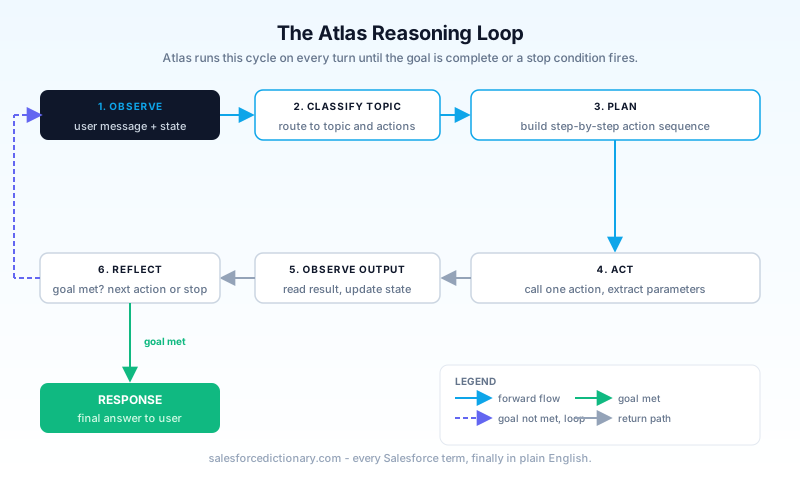
Here is what actually happens when a user sends a message.
Observe. Atlas reads the incoming message plus current state: the conversation so far, the active topic, and any data already grounded into context.
Classify the topic. Before doing anything else, Atlas decides which topic the request belongs to. A topic is a bounded set of instructions and actions you defined at design time. Think of it as routing: "this is a billing question," "this is a renewal question." The available actions narrow to whatever lives inside that topic. This step matters more than developers expect, and we will come back to it.
Plan. A specialized reasoning model translates the goal into a step-wise plan. Find the at-risk accounts, then for each one draft an email, then return all of them. The plan is not fixed. It is a working hypothesis Atlas will revise.
Act. Atlas selects one action and calls it with concrete parameters it extracted or inferred from the conversation.
Observe again. The action returns. Atlas reads the output, updates state, and asks the real question of every agent runtime: am I done, or do I need another step?
Reflect and repeat or stop. If the goal is met, Atlas generates the final response. If not, it loops. This reflection step is where Atlas can retry a failed action, pick a different one, or abandon a dead end. It is also where, when configured badly, your agent spins in circles.
The loop continues until Atlas judges the goal complete or hits a stop condition. The whole thing is wrapped in event-driven guardrails, and in multi-agent setups a concierge orchestrator coordinates several specialized agents, each running its own loop and contributing its own piece of the answer.
How Atlas picks which action to call
This is the question developers care about most, because action selection is where agents most visibly go wrong.
Atlas does not read your action's name. It does not read your method signature. It reads the description. When Atlas needs to act, it looks at every action available in the current topic and matches the user's intent against the natural-language description of each one. The description is the contract. To the reasoning model, the description is the API.
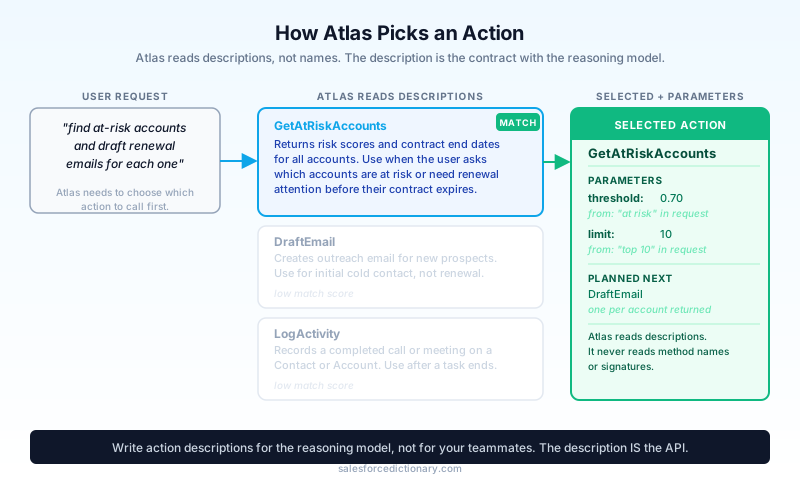
Two actions get matched here. First, which action. Atlas compares intent ("draft a renewal email") against descriptions and picks the closest fit. Second, the inputs. Atlas extracts parameter values from the conversation, from grounded data, or from earlier action outputs, and fills them in. If your action needs an account ID and the conversation only mentioned a company name, Atlas has to bridge that gap, usually by calling a lookup action first. If no lookup exists, it guesses or asks. Guessing is where bad parameters come from.
Then there is the decision to stop. After each action, Atlas evaluates whether the user's goal is satisfied. Stopping too early gives you incomplete answers. Stopping too late gives you an agent that calls five actions to answer a one-action question. Both behaviors trace back to how clearly you described the work and how tightly you scoped the topic.
A concrete rule follows from all this: write action descriptions for the model, not for your teammates. "Returns the renewal-risk score and contract end date for a given account ID; use when a user asks which accounts are at risk or about renewal timing" gives Atlas everything it needs to match and to fill parameters. "Account scoring helper" gives it nothing, and the action will sit unused while the agent improvises.
Grounding through the Einstein Trust Layer
An agent that reasons but cannot see your data is useless, and an agent that ships your customers' personal data off to a third-party model is a compliance incident. Atlas resolves both through grounding, mediated by the Einstein Trust Layer.
Grounding is how Salesforce records get injected into the reasoning context. When Atlas needs data, it retrieves the relevant records, structured CRM data, Data Cloud objects, knowledge articles, and places them into the prompt context so the model reasons over real values instead of inventing them. This is retrieval-augmented generation applied to your org.
The Trust Layer wraps that retrieval. Before any grounded content reaches the model, sensitive fields run through dynamic masking, so a credit card number or an email address can be replaced with a placeholder token. The model reasons over masked data; when the response comes back, the real values are re-inserted before the user sees them. Salesforce also enforces zero data retention with model providers, so prompts and responses are not stored or used for training outside your org. Toxicity scoring and an audit trail round it out.
The practical upshot for a developer: you do not hand-build the data plumbing for safe grounding. You configure what the agent can retrieve, and Atlas plus the Trust Layer handle masking, retrieval, and the round trip. Your job is to make sure the right data is reachable and the wrong data is not.
How your configuration shapes Atlas
Atlas's behavior is not fixed. You shape it through three levers, and most agent quality problems are misconfiguration of one of them.
The agent definition. Every agent is described by role, the data it can access, the actions it can take, its guardrails, and its channel. The role and instructions become part of the context that frames every reasoning step. Vague instructions produce vague reasoning.
Topics. A topic bundles a scope, a set of instructions, and a set of actions. Topic classification is the first real decision Atlas makes, and it gates everything downstream. If your topics overlap, Atlas routes ambiguously and may pull the wrong action set. If a single topic carries forty actions, the selection step has too many candidates and accuracy drops. Tight, well-separated topics with a handful of well-described actions each are the single biggest lever on decision quality.
Instructions. Inside a topic, instructions tell Atlas how to behave: when to ask a clarifying question, when to escalate, what order to prefer. These are not code. They are guidance the reasoning model weighs. Write them as clear, testable rules ("always confirm the account before sending any email") rather than aspirations.
Why agents make bad decisions
Once you see the loop, the common failure patterns stop being mysterious.
Hallucinated actions. The agent claims it did something it cannot do, or invents a parameter. This is usually a description problem. The model matched a description that promised more than the action delivers, or it could not find the data for a parameter and filled the gap with a plausible guess. Fix: sharpen descriptions and add explicit lookup actions so Atlas never has to invent IDs.
Unnecessary looping. The agent calls action after action without converging. The reflection step keeps deciding the goal is not met. This often comes from a topic that is too broad, an instruction set that does not define "done," or actions whose outputs do not clearly answer the question. Fix: scope the topic, state the completion condition in instructions, and make sure action outputs are legible.
Incomplete answers. The agent stops early. It satisfied a narrow reading of the request and quit. Fix: make the instruction explicit about the full deliverable, and confirm the action that should run last actually exists and is described as the terminal step.
Wrong topic. The whole conversation goes sideways because Atlas classified the request into the wrong topic at step two, and from there only the wrong actions were even visible. Fix: reduce topic overlap and add distinguishing language to topic scopes.
Notice that almost none of these are model problems. They are design problems that surface as model behavior.
Practical optimizations that move the needle
Here is what I do when an agent is making bad decisions, in rough order of payoff.
- Rewrite action descriptions as intent-to-trigger mappings. State what the action returns and when the agent should pick it. Include the trigger phrases a user would actually say.
- Split overstuffed topics. If a topic has more than roughly eight actions, ask whether it is really two topics. Fewer candidates per selection step means cleaner choices.
- Add lookup actions for every ID a downstream action needs. Never make Atlas guess a key.
- Write completion conditions into instructions. Tell the agent what "done" looks like so the reflection step has a target.
- Test the reasoning, not just the output. Use Agentforce Testing Center to run utterances at scale and inspect the plan, the action calls, and the parameters, not only the final text. Salesforce's own evaluation framework grades planning accuracy, action inputs and outputs, topic classification, and planner state. Borrow that lens: when an answer is wrong, find which step in the loop went wrong before you touch anything.
That last point is the mindset shift. Debugging an agent is debugging a decision trace, not reading an error log.
What changed in 2026
Atlas has moved fast across the recent releases. The reasoning engine grew stronger multi-step planning, so agents handle longer chains of dependent actions without losing the thread, the at-risk-accounts-then-emails kind of task that used to break. Topic classification got more reliable, which directly reduces the wrong-topic failures above. Multi-agent orchestration matured: the concierge orchestrator now coordinates specialized agents more cleanly, letting you decompose a hard problem across agents that each reason in their own scope. And the testing and observability tooling improved, giving you more visibility into the planner state and the action trace, which is exactly the visibility you need to debug the black box.
The throughline is that Salesforce keeps pushing the deliberate, inspectable part of the loop. The model matters, but the planning, grounding, and reflection around it are where Agentforce earns enterprise trust.
Your next step
Open one agent you have already built. Pick its busiest topic. Read every action description in that topic out loud and ask: if all I knew about this action was this sentence, would I know when to call it and what to pass it? Rewrite the ones that fail that test, then run the topic through Testing Center and watch the action trace, not the answer. You will find at least one description that was quietly costing you decisions. Fix that, and you have improved the agent's reasoning without touching a line of model configuration.
About the Author
Dipojjal Chakrabarti is a B2C Solution Architect with 29 Salesforce certifications and over 13 years in the Salesforce ecosystem. He writes and edits salesforcedictionary.com, published by KineticBit Inc., to help admins, developers, architects, and cert/interview candidates sharpen their fundamentals. More about Dipojjal.
Share this article
Sources
Related dictionary terms
 Our appAdWake up sharp. Not just awake.The alarm that rings through Silent and DND — free on iOS & Android.Get WakeSharp →
Keep reading

Build Custom Agentforce Actions
Agentforce agents can call three types of custom actions: Apex invocable methods, autolaunched Flows, and External Service operations. Here is how to build each one correctly, what the Trust Layer enforces, and where governor limits bite.

Salesforce Agent Fabric: The Complete 2026 Guide
Agent Fabric is Salesforce's answer to multi-vendor agent sprawl: a control plane that wraps every LLM call, authenticates every agent identity, and enforces governance at the seams where regulated actions fire. Here is the complete guide.

Salesforce Einstein Trust Layer: The Complete 2026 Guide to Secure AI
Your security team asks where the customer data goes when Agentforce processes it. Here is the full answer: how the Einstein Trust Layer's prompt journey, data masking, zero-data retention, and toxicity detection actually work.

Salesforce Multi-Agent Orchestration: The Complete 2026 Guide
In 2026, orgs run an average of 12 AI agents - half in isolated silos. Learn the primary-and-specialist architecture, Agent Fabric, and the A2A protocol that turn agent sprawl into coordinated enterprise AI.


Comments
No comments yet. Start the conversation.
Sign in to join the discussion. Your account works across every page.