
Enterprise Edition
Enterprise Edition is the Salesforce edition that most mid-size and large customers buy, and it is the lowest tier that includes the full customization platform: custom Apex, full API access, and sandboxes.
Definition
Enterprise Edition is the Salesforce edition that most mid-size and large customers buy, and it is the lowest tier that includes the full customization platform: custom Apex, full API access, and sandboxes. Your edition is a licensing tier rather than a setting, so it decides which features exist in your org before an admin configures anything.
On the current ladder it sits above the Pro Suite and below Unlimited Edition. The suites below it cover core CRM with capped customization. Unlimited above it raises the same allocations rather than adding a different platform, so that step is about headroom and support, not new capability.
Enterprise Edition is also the assumption behind most Salesforce documentation, AppExchange listings and certification questions. When an article says a feature is available in Enterprise, Unlimited and Developer Editions, Enterprise is the paid tier being described.
In plain English
“Salesforce comes in a few sizes, a bit like phone plans. Enterprise is the size most companies pick. It is the first one where your own developers can build custom things and connect other software, instead of only using what came in the box. Bigger sizes give you more of the same, not something different.”
Worked example
A 400-seat medical device distributor runs Enterprise Edition with 400 Salesforce licenses. Their nightly ERP sync works inside a ceiling of 500,000 API calls per rolling 24 hours, which is what 400 licenses produce on this edition. The same edition gives them 25 Developer sandboxes and one Partial Copy sandbox, which is where that integration gets tested before it touches production. When the product team asks for a 512th custom field on Asset, they are already past what the edition allows. Retire fields, or upgrade. None of those numbers change by flipping a setting in Setup. They are what the edition bought.
Where Enterprise Edition draws its lines, and the numbers behind them
The edition is fixed before an admin opens Setup
Your org's edition is a provisioning attribute, not a configuration option. You can read it in Setup: type Company in Quick Find, open Company Information, and look at the Organization Edition field. That field is display only. Moving between editions is a contract change handled through your Salesforce account executive, and it re-provisions the allocations behind the org rather than flipping a switch. Every "Available in" box at the top of a Salesforce Help article is checking that one field. It is why two admins can follow identical documentation and only one of them finds the feature.
Custom Apex and full API access are the dividing line
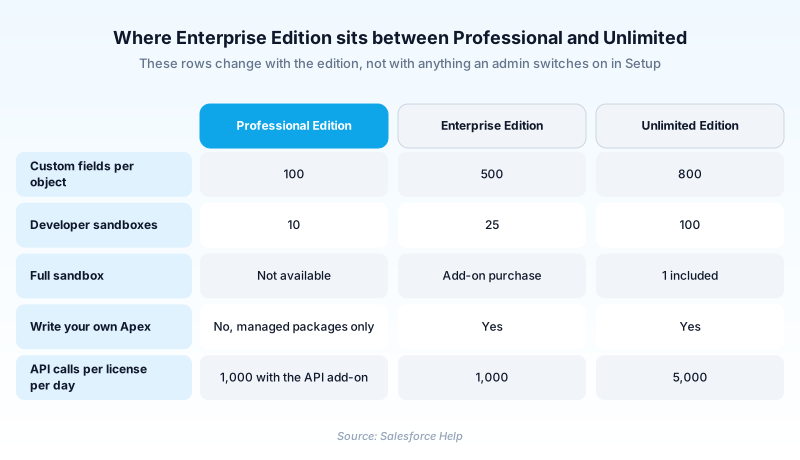
The Apex Developer Guide names the editions that include Apex: Enterprise, Unlimited, Developer, Performance and Database.com. Two of those, Performance and Database.com, are retired, so anyone buying today chooses from the first three. Professional Edition is absent from the list either way. A Professional org can still run Apex that arrives inside a certified managed package from AppExchange, but nobody in that org writes a trigger of their own. API access splits along the same seam. Salesforce publishes the Enterprise allocation as 100,000 calls for the org plus 1,000 for every standard Salesforce license, counted over a rolling 24 hours. Professional orgs get that formula only after buying the API add-on. Those two capabilities account for most upgrades out of the suites.
The sandbox allocation is the difference people notice last
Enterprise Edition includes 25 Developer sandboxes and one Partial Copy sandbox. Professional gets 10 Developer sandboxes and neither copy type. Unlimited gets 100 Developer sandboxes and a Full sandbox. Full sandboxes are the only type Salesforce supports for performance testing, load testing and staging, and Enterprise does not ship one. Buying the Full sandbox add-on also bundles 15 extra Developer sandboxes, so the add-on carries more than its headline suggests. Teams that need production-scale data for user acceptance testing usually buy it rather than upgrade the whole org.
Per-object field limits are where Enterprise orgs actually run out
Enterprise allows 500 custom fields on an object, plus another 400 installed from an AppExchange certified managed package. In practice the ceiling gets hit on Account, Contact, Opportunity and Case, because those absorb every department's request. Reaching 480 fields on Opportunity deserves a design review before it becomes a purchasing conversation. Field count drags page layout maintenance, report building and deployment size along with it. The tier above sells headroom, not a cure for the field sprawl that got you there.
Performance Edition is not the upgrade path any more
A lot of older advice tells Enterprise customers to step up to Performance Edition for storage and Premier Support. Salesforce Help now lists Performance under editions that are no longer sold, alongside Contact Manager, Group, Personal and Database.com. Existing Performance orgs keep working, and the name still appears in allocation tables beside Unlimited, which is why it refuses to die in slide decks. The lineup a new customer picks from runs Free Suite, Starter Suite, Pro Suite, Enterprise and Unlimited, with a bundled tier above Unlimited. From Enterprise today, the step up is Unlimited.
Enterprise buys a platform, not a product bundle
The edition sets your platform allocations. It does not pay for the clouds sitting on top of them. Service Cloud capability, Data 360 (formerly Data Cloud), Agentforce, revenue tooling and the Industries clouds are separate licensing decisions. External users on Experience Cloud are their own line entirely. Premier Support is bundled at Unlimited, not at Enterprise. Procurement conversations that treat "we are on Enterprise" as covering everything tend to come apart the first time somebody asks for an agent or a customer portal.
When Enterprise is the wrong answer
Two shapes of company overpay here. One is small, under roughly ten users, with no integration ambitions and no developer; the suites exist for exactly that profile, and Enterprise sells it capability nobody will touch. The other runs heavy data volumes, several parallel release streams and expectations of round-the-clock support. That org can spend more on Enterprise add-ons than Unlimited would have cost. Price the Full sandbox add-on, the extra API capacity and the support contract together before assuming Enterprise is the cheaper seat. Sometimes it is. Sometimes the add-ons quietly close the gap.
How organizations use Enterprise Edition
Runs a nightly ERP integration inside the Enterprise API allocation and stages every release through the 25 Developer sandboxes the edition includes.
Moved up from a suite the quarter it needed its own Apex triggers and somewhere real to test them, which is the capability line Enterprise sits on.
Keeps Enterprise for internal staff and licenses an Industries cloud plus Experience Cloud external users on top, because the edition covers the platform and not the product bundles.
Trust & references
Cross-checked against the following references.
- API Request Limits and Allocations (opens in new tab)Salesforce
- Custom Fields Allowed Per Object (opens in new tab)Salesforce
- Sandbox Licenses and Storage Limits by Type (opens in new tab)Salesforce
- Salesforce Editions That Are No Longer Sold (opens in new tab)Salesforce
- What Is Apex? (opens in new tab)Salesforce
Straight from the source - Salesforce's reference material on Enterprise Edition.
Hands-on resources to go deeper on Enterprise Edition.
About the Author
Dipojjal Chakrabarti is a B2C Solution Architect with 29 Salesforce certifications and over 13 years in the Salesforce ecosystem. He writes and edits salesforcedictionary.com, published by KineticBit Inc., to help admins, developers, architects, and cert/interview candidates sharpen their fundamentals. More about Dipojjal.
Test your knowledge
+5 pts / dayQ1. An org shows Enterprise Edition in Company Information and has 300 Salesforce licenses. What is its API call allocation per rolling 24 hours before any add-ons?
Q2. A Professional Edition customer wants their admin to write Apex triggers. What has to change?
Q3. A 2018 architecture document tells an Enterprise Edition customer to upgrade to Performance Edition for more storage. Why is that advice out of date?
Discussion
Loading discussion…