
Agentforce Marketing: The Complete 2026 Guide (Formerly Marketing Cloud)
The Marketing Cloud rebrand, conversational email, real-time segmentation, brand settings, business units, and the marketer's workflow when the agent drafts every asset.

You write a brief on Friday for a Tuesday send. You email it to creative. You email it to data. You email it to legal. The brief gets misread by data, the segment turns out wrong, creative writes copy against the wrong segment, legal flags a claim that was always going to fail review, and your Tuesday send slips to Thursday. Marketing cycles in 2024 looked like that for most teams. In 2026, the cycle looks different because the brief, the segment, the creative, and the legal scan all happen inside one Agentforce conversation, and the marketer reviews the draft instead of orchestrating five handoffs.
That is the Agentforce Marketing story. Marketing Cloud, as a SKU, is now Agentforce Marketing. It is a rebrand plus a genuine architectural shift toward conversational, agent-driven workflows. The marketer is still in the loop. The agent does the typing.
This post walks through what the rebrand actually changed, the new conversational features (conversational email, real-time segmentation, brand settings, business units), how the marketer's workflow shifts when the agent drafts every asset, and the rollout pattern that lands in real campaigns instead of stalled pilots.
What the Marketing Cloud to Agentforce Marketing rebrand actually changed
The headline product on salesforce.com/marketing is now "Agentforce Marketing". Marketing Cloud Engagement, Marketing Cloud Account Engagement (formerly Pardot), Marketing Cloud Personalization, Marketing Cloud Intelligence, and Marketing Cloud Next all picked up Agentforce-branded variations. The internal SKU codes still reference Marketing Cloud. The licenses you bought still work. The objects underneath are the same.
What did not change:
- Journey Builder. Same canvas, same activity nodes, same entry/exit rules.
- Email Studio for Marketing Cloud Engagement customers. Same data extensions, same content blocks, same automation studio.
- The Account Engagement (formerly Pardot) Lightning app. Same engagement studio, same scoring rules, same prospect lifecycle.
- Marketing Cloud Personalization (formerly Interaction Studio). Same sitemap, same web personalization rules.
- The Subscriber list management, the data extension schema, the segmentation queries.
What did change:
- Two-way conversational email. The agent can now hold an actual conversation with a customer inside an email thread, not just send static templates. Inbound replies trigger agent responses inline.
- Real-time segmentation. Segments can be built and refreshed in real time inside an Agentforce conversation, no overnight batch processing required.
- Brand Settings. A single setup screen captures your tone of voice, style guides, banned phrases, and visual identity. Every asset the agent generates inherits those settings.
- Business Units expanded. Orgs can now partition data and marketing assets into up to 50 business units, each with isolated views for campaigns, audiences, and reporting.
- Paid Media Optimization, Unified Analytics, Clean Rooms, and Multi-Touch Attribution shipped as integrated features rather than separate Datorama bolt-ons.
- Marketing Cloud Next, the architecturally rebuilt foundation, became the deployment target for new customers in 2026.
The rebrand is more substantive than the Sales Cloud or Service Cloud rename because Marketing Cloud was already a confused stack of acquired products (ExactTarget, Pardot, Interaction Studio, Datorama, Krux). The Agentforce rebrand is partly cover for finally unifying those products into one platform. Whether the unification is complete in 2026 depends on which SKU you bought.
The conversational email shift
This is the change that changes the most about a marketer's day.
Old Marketing Cloud email: you build a template, you schedule the send, you watch the open and click reports. If a customer replies to the email, the reply lands in a shared inbox or bounces. The customer-to-brand conversation, when it happens at all, happens in a separate channel.
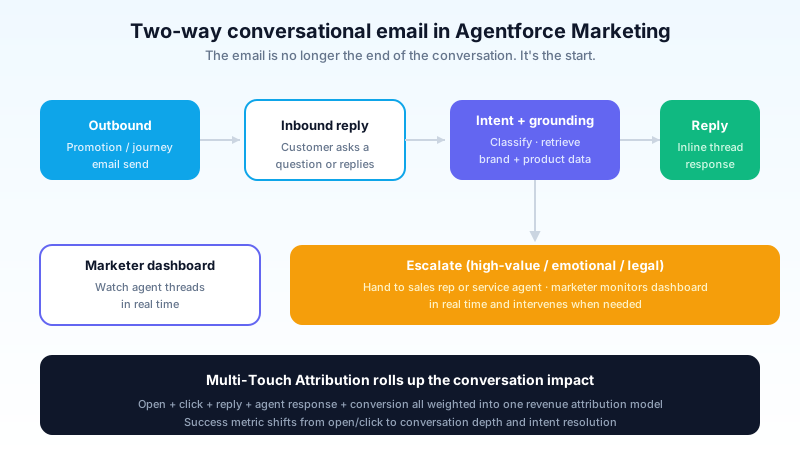
New Agentforce Marketing email: you build the template, you schedule the send, and when customers reply, the agent reads the reply, classifies the intent, and either responds inline (with grounding in product info, FAQs, and the customer's account state) or escalates to a human marketer or service rep. The marketer sees a real-time dashboard of agent conversations, can intervene mid-thread, and reviews the responses the agent sent without intervention.
The mechanism is the same Trust Layer architecture that runs Service Agent and SDR. Inbound message arrives, intent classifier runs, content retrieval against your brand voice + product info + customer context, draft response, Trust Layer scan, send.
The use cases that work today: reply to a promotional email with a question about the promo. Reply to an order-confirmation email asking when the shipment will arrive. Reply to a re-engagement campaign asking what changed about the product. These are scoped, factual, and groundable in product data. The agent handles them inline.
The use cases that still need a human: high-value B2B replies where the response is a sales conversation, not a customer service one. Anything emotional (complaints, escalations, churn risk). Anything legal. Route those to the service or sales agent path instead.
The marketer's job shifts from "did the email perform" to "did the conversations the email started perform". The success metric shifts from open and click to conversation depth, intent resolution, and conversion within the threaded conversation.
Real-time segmentation
The other big shift is segmentation. In old Marketing Cloud, segments were SQL queries against data extensions, refreshed nightly or hourly at best. By the time a segment was ready, the underlying customer state had already changed.
Agentforce Marketing segmentation runs against Data Cloud. When you tell the agent "build me a segment of customers who viewed the pricing page in the last hour and have an open opportunity in Sales over fifty thousand dollars", the agent generates the segment definition, the segment refreshes in real time as customer behavior updates, and the journey activates without the overnight batch wait.
The implication for marketers: campaign cadence shifts from weekly broadcast sends to triggered, real-time activations. A segment that was a one-time export becomes a living audience that adds and drops members as customer state changes. Journey Builder activities can now activate within seconds of the trigger, not the next morning.
This is genuinely new. Marketing Cloud customers complained about batch segmentation for years. The Spring '26 release is the first time the platform does what marketers always wanted it to do: respond to customer behavior in the time horizon the customer is still acting.
The catch is that real-time segmentation only works if your Data Cloud is connected to the live signal sources. Web behavior, mobile app events, in-store POS, support chat transcripts. Orgs that connected Data Cloud last year as a data warehouse copy get the benefit. Orgs that have not connected real-time sources get nightly batches with extra steps.
Brand Settings: the agent's voice
Marketers who tried generative AI for content creation in 2024 had the same complaint: the AI writes generically. It does not sound like your brand. The Spring '26 Brand Settings feature is Salesforce's response.
Brand Settings is a single setup screen that captures:
- Tone of voice. Formal vs casual, direct vs warm, playful vs serious. The agent uses these as input to every draft.
- Style guide. Banned phrases (your competitor's product names, deprecated product features, marketing claims legal has flagged). Preferred phrases. Reading-level target.
- Visual identity. Logo, colors, font choices, image style references. The agent uses these when generating visual assets for emails, landing pages, or social posts.
- Mandatory disclosures. Legal disclaimers, footer requirements, compliance statements that must appear in every asset of a given type.
Once configured, every asset the agent generates inherits those settings. The agent drafts an SMS, the SMS sounds like you. The agent drafts an email, the email looks like yours. The agent drafts a landing page hero, the imagery matches your brand.
This is the feature that closes the gap between "AI-generated draft" and "asset I would send". Marketers who configured Brand Settings well report 70 to 80 percent of agent-generated assets ship without copy edits. Marketers who skipped it report the agent output sounds like every other vendor's AI output. Configure Brand Settings before you ship a single agent-generated campaign.
Business Units and Marketing Cloud Next
For enterprise marketing teams, the business unit expansion in 2026 is the change that makes the platform usable at scale.
Old Marketing Cloud: business unit support existed but was clunky. Asset sharing across business units was manual. Data access was hard to audit. Large orgs ended up with parallel Marketing Cloud tenants, one per regional team, which then had no shared analytics view.
New Agentforce Marketing: up to 50 business units per org. Each business unit gets:
- Its own data space (isolated subscriber data, data extensions, journeys, automations)
- Its own brand settings (per-region or per-product tone of voice, locale-specific compliance)
- Its own campaign and audience reporting
- Cross-business-unit asset sharing under a controlled framework
The org-wide analytics view sits on top of the business units, so the marketing leadership team can roll up performance across all units without giving every regional admin access to every region's data.
Marketing Cloud Next is the rebuilt architectural foundation that backs the business unit improvements. Existing Marketing Cloud Engagement customers stay on the existing stack with Agentforce features layered on. New customers and major migrations land on Marketing Cloud Next, which has the multi-tenant business unit model built in from the start. Salesforce has been clear that Marketing Cloud Next is the long-term target. Migrating existing orgs onto it is a 6 to 18 month project depending on complexity.
The marketer's workflow when the agent does the drafting
The day-to-day for a marketer running Agentforce Marketing looks different from the Marketing Cloud day.
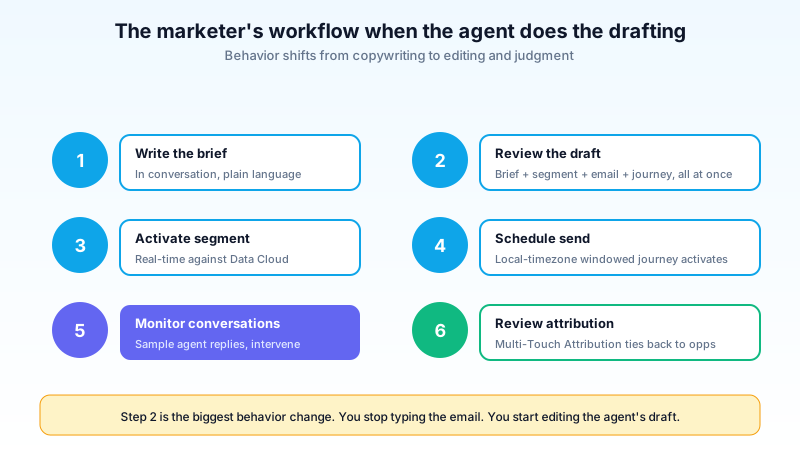
Step 1: write the brief in conversation. Instead of a Word doc or a Jira ticket, you describe the campaign to Agentforce in plain language. "I want to re-engage customers who churned in Q4 with a 30-day reactivation offer. Target audience is the lapsed paid tier, exclude anyone we already won back, send between 10 AM and 2 PM in their local timezone."
Step 2: review the draft. The agent produces a brief document, a segment definition, an email draft, a landing-page mockup, and a journey configuration. All in one response. You read it. You edit the parts that are off. You confirm.
Step 3: activate the segment. The segment runs against Data Cloud in real time. You watch the count come back. You adjust filters if the segment is too narrow or too broad.
Step 4: schedule the send. The journey activates. The first emails go out within the timezone window you specified.
Step 5: monitor conversations. If the campaign uses two-way conversational email, you watch the inbound reply dashboard. You sample the agent's responses. You intervene when needed.
Step 6: review attribution. Multi-Touch Attribution rolls up the cross-channel impact of the campaign on revenue, with the new analytics surface tying it back to opportunities in Agentforce Sales.
The biggest behavior change is step 2. You stop typing the email yourself. You start reviewing the agent's draft. The skill that matters most shifts from copywriting to editing and judgment.
Paid media, attribution, and the analytics rollup
The 2024 version of Marketing Cloud had Datorama as a separate analytics product, Audience Studio as a separate paid-media product, and a Customer Data Platform that never quite fit either. In 2026, those three are folded into Agentforce Marketing as integrated features under the Unified Analytics umbrella.
Paid Media Optimization. Connects to Google Ads, Meta, LinkedIn, and the major DSPs. Pulls spend and performance data into the same analytics layer as your owned-channel data (email, mobile, web). The agent suggests budget reallocations based on cross-channel performance, not the per-channel siloed view that paid media teams optimized against in the past.
Multi-Touch Attribution. Shipped in February 2026 as a integrated module. Attributes revenue across the customer journey using a data-driven model that weights touchpoints by influence, not just first-touch or last-touch. The model is grounded in your specific customer journeys rather than a generic industry default, which makes the output usable for budget decisions instead of just board-deck filler.
Clean Rooms. For B2C orgs sharing audience data with retail partners or media networks under privacy constraints. Allows joint audience overlap analysis without exchanging raw PII. The use cases are narrow but the legal-compliance bar is genuinely high, and the integration with the rest of Agentforce Marketing means the resulting clean-room segments can be activated in journeys without a separate export step.
Unified Analytics. The roll-up surface. Marketing leaders see cross-channel performance, attribution-weighted revenue, and segment behavior in one dashboard. The dashboard is configurable per business unit, so regional teams see their own data and the org-wide team sees the rollup.
For a marketing team that has been duct-taping Marketing Cloud, Google Analytics, a separate paid-media platform, and a custom Tableau dashboard together, this is the first credible single-pane view Salesforce has shipped.
How the three Marketing SKUs sit relative to each other
This is the question that confuses new admins more than anything else, because Marketing Cloud has been three different products under one brand for a decade.
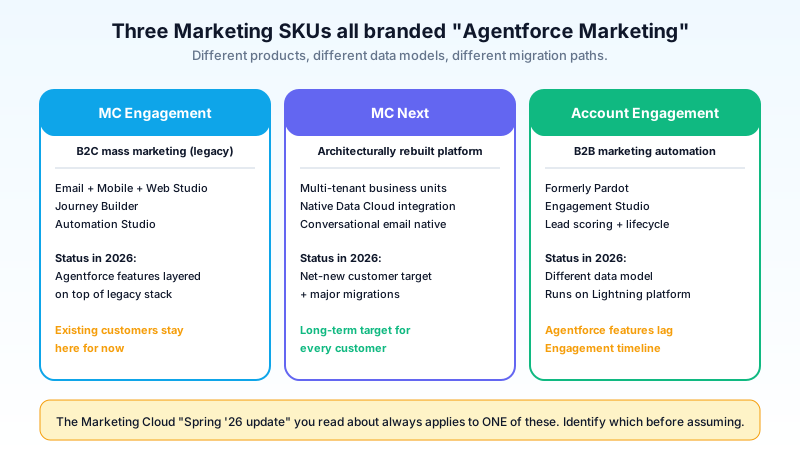
Marketing Cloud Engagement (formerly Marketing Cloud Email/Mobile/Web Studio). The B2C-focused mass-marketing platform. Email Studio, Mobile Studio, Journey Builder, Automation Studio. The "Marketing Cloud" most people meant historically. Agentforce features are being layered on top of this stack. Existing customers stay here and get the agent layer added.
Marketing Cloud Next. The architecturally rebuilt platform. Multi-tenant business unit model built in from day one, native Data Cloud integration, conversational email as a first-class feature. The deployment target for net-new customers and large migrations. Long-term, this is what every customer ends up on. Short-term, it is a 6 to 18 month project to migrate off Engagement.
Marketing Cloud Account Engagement (formerly Pardot). B2B marketing automation. Engagement Studio, lead scoring, prospect lifecycle. Different product, different data model, runs on the Salesforce Lightning platform instead of the legacy Marketing Cloud infrastructure. Agentforce features are coming here too, but the timeline lags Engagement.
The pricing tiers differ across all three. The features differ. The administrative model differs. When you read "Marketing Cloud Spring '26 update", the first question is always: which one? The marketing-team confusion is the single largest source of wasted Salesforce conversations in B2B orgs that bought Account Engagement years ago and now wonder why the Marketing Cloud Next features do not apply.
For a deeper comparison of which SKU fits which use case, see Marketing Cloud Engagement vs Account Engagement (Pardot).
The pieces of Agentforce Marketing that are bad
Calling out what is worse, with specifics:
The Marketing Cloud Engagement vs Marketing Cloud Next confusion is real. Existing customers are on Marketing Cloud Engagement (the old Marketing Cloud Email/Mobile/Web stack). New customers are on Marketing Cloud Next. The feature gaps between the two are real, the migration is non-trivial, and the documentation often does not specify which platform a feature applies to. Read every help article carefully to confirm which platform it covers.
Two-way conversational email is genuinely new. It exists, customers are using it, but the failure modes are not all documented. Customers who reply with sarcasm, mixed signals, or complex multi-question replies sometimes get agent responses that miss the mark. Watch the agent conversations for the first three months before scaling.
Data Cloud is now required, not optional. Real-time segmentation, conversational email, and most of the new Agentforce features depend on Data Cloud being connected to live signal sources. If your org has not invested in Data Cloud, the Agentforce Marketing features will run in a degraded mode. Plan for Data Cloud as a prerequisite, not an add-on.
Consumption pricing surprises here too. Conversational email burns Flex Credits per turn. Real-time segmentation burns credits on every refresh. The pricing meter is genuinely hard to predict for a high-volume B2C marketer. Agentforce 1 at the predictable tier is the answer for enterprise marketers who plan to run agents at scale.
These are the rough edges. The platform is still a meaningful step forward from the 2024 Marketing Cloud stack. The rough edges are what to plan around.
What to do next
If you run an existing Marketing Cloud Engagement org, the next move is small. Open Setup, find Brand Settings, and fill in the tone-of-voice, style guide, and banned-phrases fields. That alone changes the quality of every agent-generated asset in your org. Thirty minutes of work, immediate quality improvement on every subsequent agent draft.
If you are evaluating Agentforce Marketing for a new deployment, the next move is the Data Cloud audit. Whatever you spend on Agentforce Marketing licenses, you need a Data Cloud foundation underneath it for the real-time features to work. Confirm your Data Cloud connections to web behavior, mobile events, and CRM signals before you sign the Agentforce contract.
Open one journey in your existing org. Pick the simplest one. Add an Agentforce conversational email node. Send it to a small test segment. Watch what the agent does with three or four inbound replies. That is one journey, one segment, one afternoon. The opening move is that small.
About the Author
Dipojjal Chakrabarti is a B2C Solution Architect with 29 Salesforce certifications and over 13 years in the Salesforce ecosystem. He writes and edits salesforcedictionary.com, published by KineticBit Inc., to help admins, developers, architects, and cert/interview candidates sharpen their fundamentals. More about Dipojjal.
Share this article
Sources
Related dictionary terms
Practise it
Five questions on Agentforce Specialist
Exam-style questions with an explanation after each one. No account needed, and your answers build a weak-topic map once you have one.
Keep reading

Agentforce Sales: The Complete 2026 Guide (Formerly Sales Cloud)
Sales Cloud got a new name and five new agents. This 2026 guide cuts through the marketing: what changed, the SDR and Sales Coach agents, the pricing tiers, and the 30-day rollout that actually works.

Marketing Cloud Engagement vs Account Engagement (Pardot): The 2026 Decision Guide
Marketing Cloud Engagement and Account Engagement (Pardot) sound similar but solve different problems. Decision matrix by audience, channel, scale, pricing, and 2026 Agentforce integration.

What Is Agentforce 360? The Complete 2026 Guide for Salesforce Admins, Developers & Architects
Agentforce 360 is Salesforce's 2025 rebrand of its agentic-AI platform - built on the Atlas Reasoning Engine, Einstein Trust Layer, and Data 360. Here's the complete admin + dev + architect guide.
Comments
No comments yet. Start the conversation.
Sign in to join the discussion. Your account works across every page.